Article
Sep 24, 2026
How We Use Claude Code to Build Recruitment Workflows That Run on Their Own
How we build recruitment workflows in Claude Code that source, match, and reach out on their own, with a human on every decision that matters.

Most recruitment tools automate a single step. They schedule an interview, parse a CV, or fire a sequence, and the recruiter still stitches the steps together by hand. The work we do with Claude Code is different in kind, because it lets us build a workflow that carries a task from start to finish, reads the situation at each step, decides what to do next, and only comes back to a person for the calls that genuinely need judgment. This piece explains how we approach that, and what it takes to build recruitment workflows that run on their own.
The reason this is possible now is the shift from assistive tools to agentic ones. An assistive tool suggests something and waits for a human to trigger the next step, while an agent is given a goal and then plans and runs the steps itself, adapting as it goes. Understanding that difference is the starting point, because it is what turns a set of disconnected automations into a workflow that actually operates without supervision.
What Claude Code brings to a recruitment workflow
Claude Code is an agentic tool that works directly on your files and systems rather than inside a closed platform. It reads the data you point it at, writes and runs the code a task needs, and connects to your other tools through the Model Context Protocol, so it can pull from an ATS, a spreadsheet, Google Drive, or Slack. It runs locally, and it asks for permission before it changes a file or runs a command, which is exactly the property you want when the workflow touches candidate and client data.
Two features make it suited to workflows rather than one-off tasks. The first is that a routine can be packaged as a reusable skill, so the same process runs the same way every time and any member of the team can trigger it, which is what Claude skills are built for. The second is that it connects to live data through MCP integrations, so the workflow reads from the systems where your candidates and roles already live instead of a static export. Together these let us build something that monitors, decides, and acts on a schedule rather than waiting to be run.

The shape of a self-running recruitment workflow
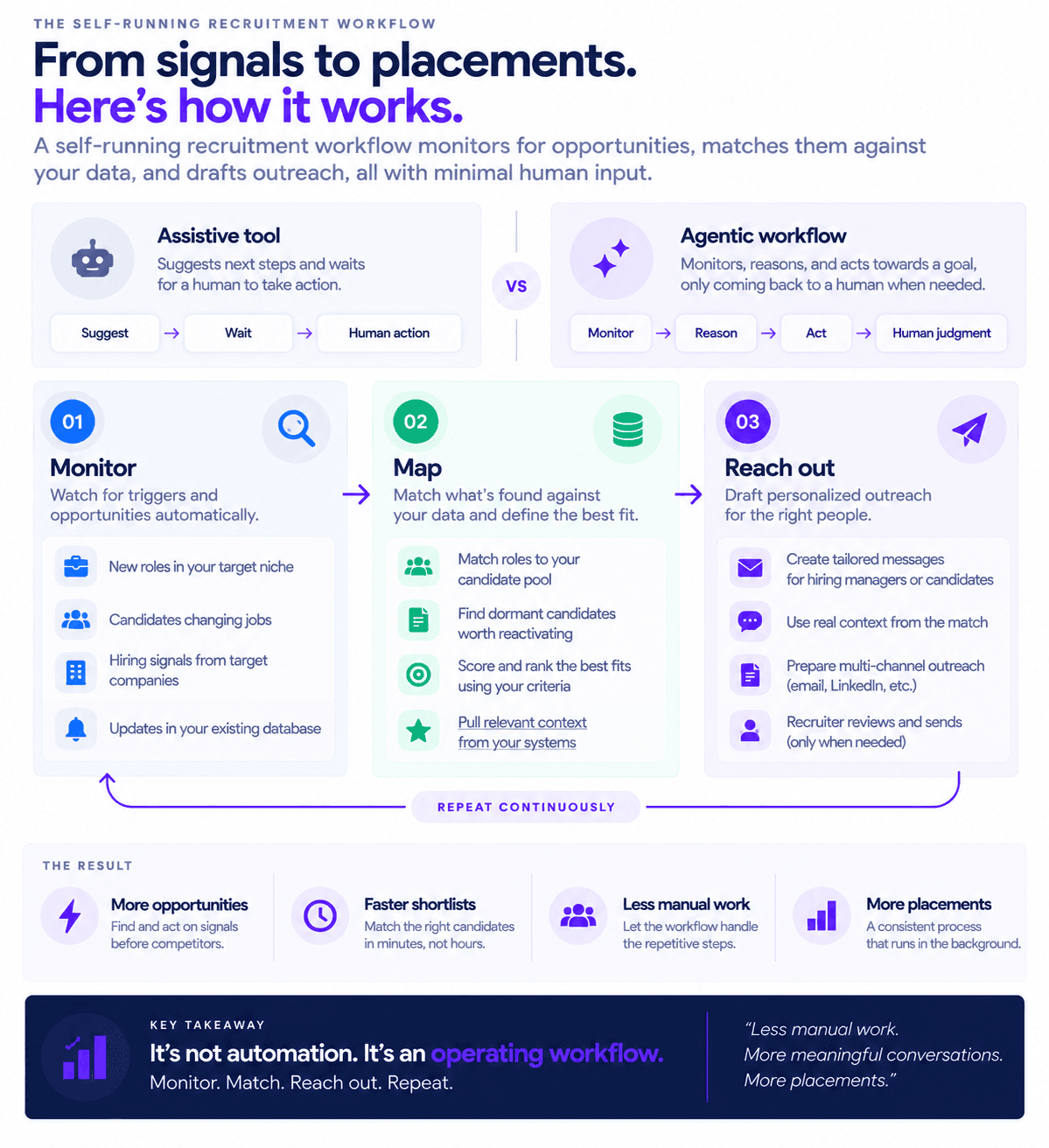
The workflows we build tend to follow the same three-part shape, whether they are pointed at candidates or clients. The workflow monitors for something worth acting on, maps what it finds against what we already have, and then reaches out. Each part is a place where an agent can do the reasoning that a fixed rule cannot.
Monitoring means watching continuously for triggers, such as a new role appearing in a target niche, a candidate in the database changing jobs, or a hiring signal at a company we want to work with. This is the same discipline behind spotting new roles before competitors, run automatically rather than by a recruiter refreshing a search. Mapping means matching what the monitor finds against our own data, so a new role gets checked against the candidate pool for a fit, or a job change surfaces the dormant records worth reactivating. Reaching out means drafting the outreach, whether to a hiring manager or a candidate, personalized to what the monitor and the mapping found, ready for a recruiter to review and send.
How we build one, step by step
We start narrow, because a workflow that tries to do everything is hard to build and harder to trust. The first version does one job well, such as monitoring a niche for new roles and returning a qualified, matched opening, and we expand only once that works.
The build begins by writing the process down in a skill, describing the steps, the order, and the rules the workflow should follow, the same way we would brief a new recruiter. Anything long or reusable, such as the ideal client profile, the qualification criteria, or the message templates, goes into reference files the workflow reads when it needs them. We connect the live data sources through MCP so the workflow reads real roles and real candidates, and we keep the underlying records clean, since enriching and tidying the data is what makes the matching reliable. For the steps that are purely mechanical, we add small scripts so those parts run identically every time, and the same build pattern we use to find B2B leads with Claude Code applies directly to sourcing candidates and roles. The result is packaged so it can run on a schedule and be triggered by anyone on the team, which is how a workflow becomes something that operates on its own rather than a script someone has to remember to run.
Where the human stays in control
A workflow running on its own does not mean a workflow making the decisions that matter. We keep a person on every consequential judgment, which means a recruiter reviews the shortlist before anyone is submitted, approves the outreach before it sends, and makes the call on who to put forward to a client. The workflow does the monitoring, the mapping, and the drafting, and it hands the judgment back.
This is deliberate for two reasons. The first is quality, since candidate assessment, client relationships, and the read on whether someone is right for a role are exactly the parts that need human judgment, and automating them would produce worse outcomes. The second is that Claude Code asks permission before it acts, so the control is built into how it works rather than bolted on. Keeping the human gate is also increasingly a compliance requirement where automated decisions affect candidates, so building it in from the start is simply how a responsible workflow is designed. The point of the automation is to remove the manual research and admin around the decisions, not the decisions themselves, which is what gives recruiters their time back for the work that actually closes placements.
Connecting the workflows into a system
Individual workflows are useful, and they compound when connected. A monitoring workflow that spots a new role can trigger a matching workflow that produces a shortlist, which feeds an outreach workflow that drafts a message leading with a specific candidate. Run together, the sourcing side and the client side stop being separate efforts and start feeding each other, which is the core idea behind automating candidate sourcing and client outreach as one connected motion.
Packaging your business development process this way is also how a consistent approach becomes a shared asset rather than something that lives in one person's head, which is what building a Claude skill for recruitment business development achieves. The outreach these workflows produce follows the same principles that work in any good recruitment cold email, reaching the right hiring manager with something relevant. Measuring what the workflows return, in reclaimed hours and additional placements, is how we know they are worth running, which ties directly to measuring the ROI of AI.
Do you need to be a developer to build these workflows?
You interact with Claude Code in plain language, and it writes and runs whatever code a task needs, so you do not need to write code yourself. Some comfort with files and a technical person to handle the initial setup and the data connections helps, and once a workflow is packaged as a skill, running it is straightforward for anyone on the team. The bulk of the work is describing your process clearly, since a workflow is only as good as the instructions and the reference material behind it.
Is it safe to run automated recruitment workflows on candidate data?
It is well suited to sensitive data because Claude Code runs locally and works on the systems you already control, rather than requiring you to upload your database into an external platform, and it asks permission before it acts. You still carry the normal responsibilities of handling personal data, including a lawful basis and candidate transparency, and keeping a human review step on consequential decisions is both good practice and increasingly a legal requirement. Designed with those gates in place, an automated workflow can be both efficient and compliant.
What recruitment workflows should you automate first?
Start with the workflow that is repetitive, high-volume, and low-judgment, which for most agencies means monitoring for new roles or job changes and matching them against your existing data. That returns time quickly and builds confidence before you extend to outreach and more connected workflows. Automating in this order, keeping each workflow narrow and reliable before adding the next, produces the most value soonest and keeps a human comfortably in control throughout.
Bringing it together
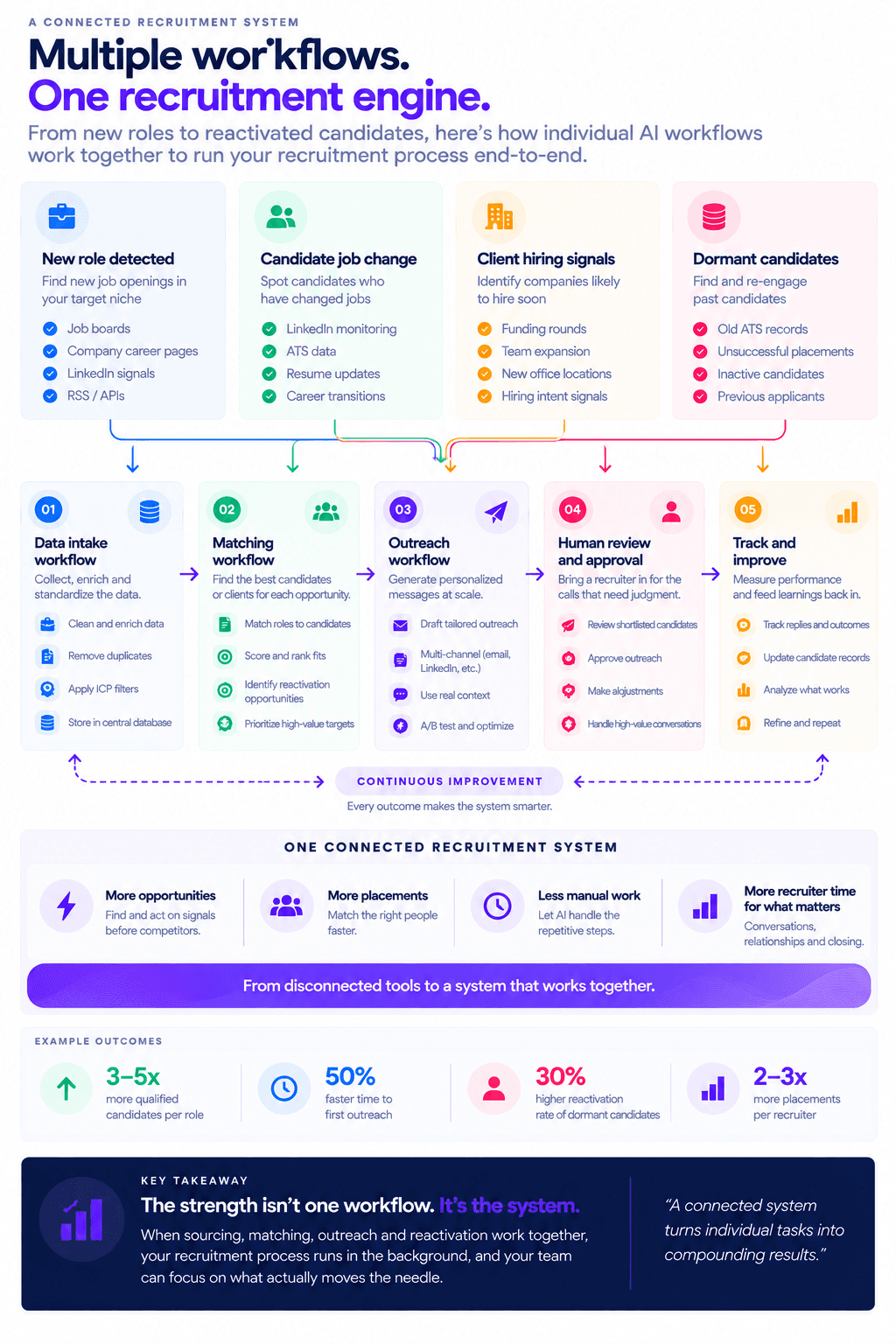
Building recruitment workflows that run on their own comes down to using an agentic tool to carry a task through monitoring, mapping, and outreach, while keeping a person on every decision that matters. We build them narrow first, write the process into a reusable skill, connect live data through MCP, keep the records clean, and package the whole thing to run on a schedule. The human stays on the shortlist, the outreach approval, and the client call, while the workflow removes the research and admin around them. Connected together, these workflows turn a recruiter's week from manual coordination into judgment and closing.
If you want help building recruitment workflows that run on their own, book a call with the Novoslo team and we will show you exactly how it works.