Article
Jun 24, 2026
Best Claude MCPs for Lead Generation
The best Claude MCPs for lead generation in 2026. Apollo, Smartlead, Explorium, and Firecrawl, plus how to wire them into one outbound pipeline.

Lead generation used to mean sitting inside a prospecting database and stacking filters one at a time. Founders of financial services companies in the UK, fifty to two hundred employees, hiring for sales, and so on, until a list finally appeared. Then you exported it, ran it through an enrichment tool, qualified each row against your ICP, and wrote copy. For a lot of SDRs that was the whole day, every day.
The reason Claude can now do most of that work comes down to one thing: MCP servers. They connect Claude directly to the tools you already pay for, so it reads your live account data and takes real actions instead of describing what you could do. This guide covers the best Claude MCPs for lead generation in 2026, what each one is actually good at, and how they fit together into a single outbound pipeline rather than a pile of disconnected logins.
What an MCP actually does for lead generation
MCP stands for Model Context Protocol. It is an open standard that lets Claude talk to outside systems through a consistent interface, so you do not have to learn APIs, webhooks, or any code to connect your stack. Think of it as a clean way to plug platforms like Apollo, Smartlead, or a web scraper into Claude.
The practical difference is access to live data. Without an MCP, Claude only knows what it learned about cold email during training. With one connected, it reads your actual campaigns, your real lead lists, and your current deliverability numbers, and it can act on them. As Smartlead puts it, this is the difference between having a dashboard and having an analyst who reads the dashboard for you. When you give Claude an MCP, you are handing it a set of tools it can call, each one a specific lookup or action like searching for contacts, enriching a record, or pausing a sequence. You ask in plain English, and Claude decides which tools to call and in what order.
If you want the full picture of how this connects to a working setup, our guide on how to set up Claude Code for your GTM team walks through folder structure, configuration, and MCP connections step by step.
The best Claude MCPs for lead generation
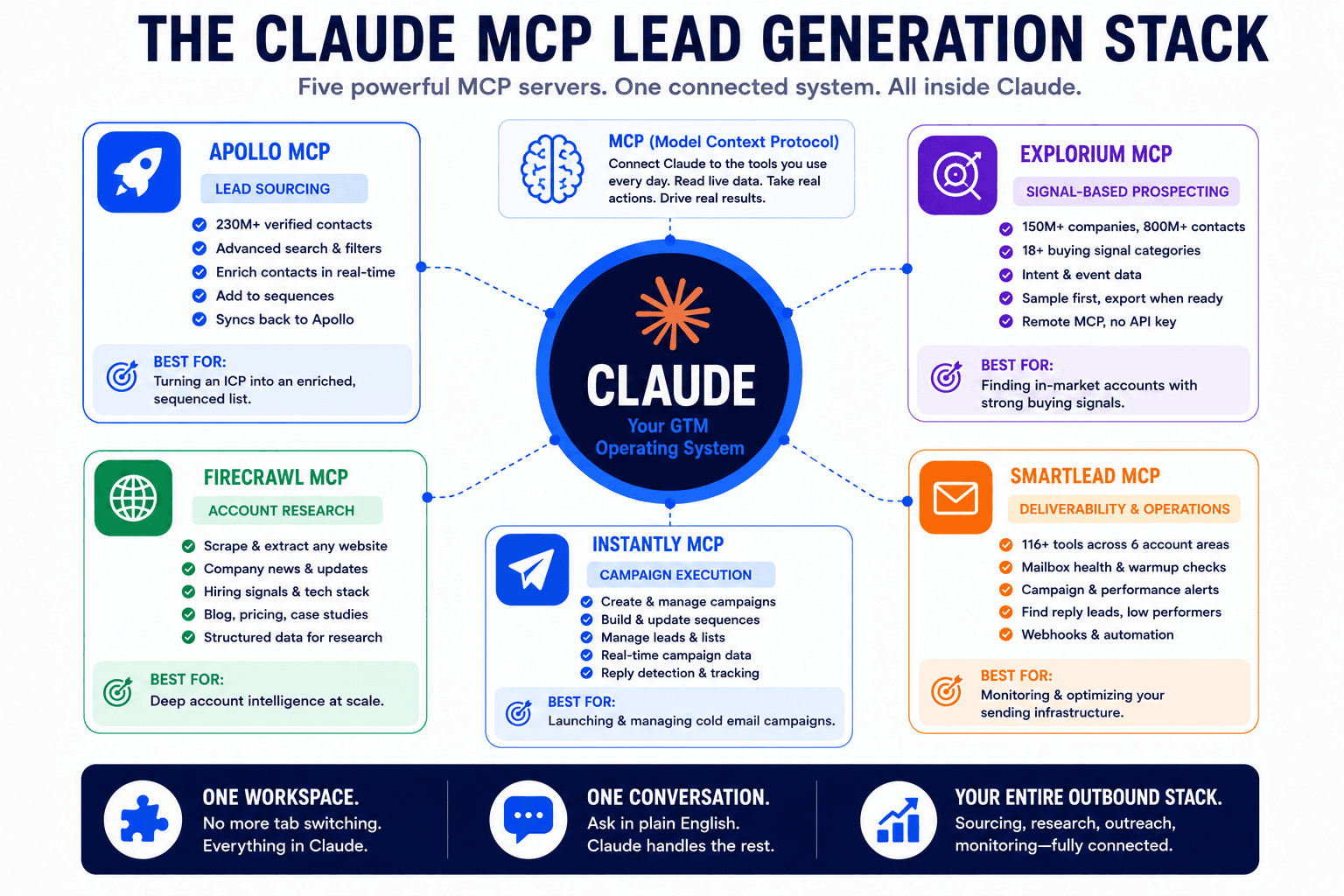
There is no single best MCP. The right choice depends on the job, sourcing, enrichment, research, or sending, so here are the servers worth connecting, organized by what they do well.
Apollo MCP
Apollo went live as a native connector inside Claude in late February 2026. It runs on Apollo's own infrastructure, authenticates through OAuth, and needs no API key. Once connected, you can describe your ICP in plain language and Claude searches Apollo's database of more than 230 million verified B2B contacts, enriches the results, creates or updates contacts, and adds prospects to sequences, all inside one conversation.
What makes Apollo useful here is that it keeps Apollo as your system of record. Actions you take through Claude are written back to your account, so contacts, enrichments, and sequence activity stay where your team already works. For power users, Apollo also ships a Claude Code and Cowork plugin that chains search, enrichment, and sequence creation into guided workflows you trigger with a single command. If you are weighing Apollo against other data tools, our breakdown of Apollo vs Clay covers where each one fits.
Best for: turning an ICP into an enriched, sequenced list without leaving Claude.
Smartlead MCP
Smartlead's MCP server ships with 116 or more tools covering six areas of your account: campaign management, lead lifecycle, email account health, deliverability diagnostics, analytics, and webhook automation. Setup takes about five minutes with an API key, and once connected Claude can read your live sending data.
This is the server to reach for when the question is operational rather than list building. You can ask Claude to check the health of every connected mailbox and flag warmup issues, surface campaigns with reply rates below one percent over the last seven days, or find leads who replied but are still marked active in a sequence. Those are the silent problems that quietly drain pipeline, and an MCP that reads your real account catches them before a rep notices. If you are choosing a sequencer in the first place, our comparison of Smartlead vs Instantly vs PlusVibe lays out the tradeoffs.
Best for: running and monitoring your sending infrastructure conversationally.
Explorium Vibe Prospecting MCP
Vibe Prospecting is Explorium's remote MCP server. There is nothing to run locally and no API key to manage. You connect over a single URL and sign in through your browser. Behind it sits a database of more than 150 million companies and 800 million contacts pulled from over 50 sources, plus 18 categories of buying signals.
The workflow is built for safe, large list building. You describe an ICP in plain English, Claude returns a sample of five to ten rows first, and the full dataset is only processed when you explicitly ask to export, which keeps exploration fast and credit friendly. Because it carries intent and event data, it is strong when you want to source accounts that are showing signs of being in market rather than a flat list. If buying signals are new to your team, start with our explainer on what are buying signals and the practical guide to what is intent data. For the sourcing motion itself, see how GTM teams use Claude Code for prospecting.
Best for: building large, signal-based prospect lists from a plain-English ICP.
Firecrawl MCP
Firecrawl solves a different problem. Most lead research means reading prospect websites, and feeding raw HTML to a model is expensive because the page is mostly navigation, ads, and cookie banners. Firecrawl's official MCP server takes any URL and returns clean markdown or structured JSON, which cuts token use by up to 80 percent compared to raw HTML.
In practice this turns a prospect's site into usable account context on demand. You can ask Claude to find a set of leads in a specific business and city and pull their name, website, and a couple of relevant facts from each site, then hand it back as a clean document. It is also the practical answer for prospects who do not live in corporate databases, the local services businesses that are on a map but never on LinkedIn.
Best for: account research and scraping niche or local businesses that databases miss.
Instantly MCP
If Instantly is already your sequencer, its MCP is the natural fit. It is lighter than Smartlead, exposing roughly 38 tools, and covers campaign creation, lead loading, and sequence management. You can have Claude analyze a lead list, score contacts by decision maker level, segment them into campaigns, draft copy under your rules, and create the campaign, then stop for you to verify before anything sends.
Best for: teams standardized on Instantly who want campaign creation and sequencing in chat.
How the MCPs fit into one outbound pipeline
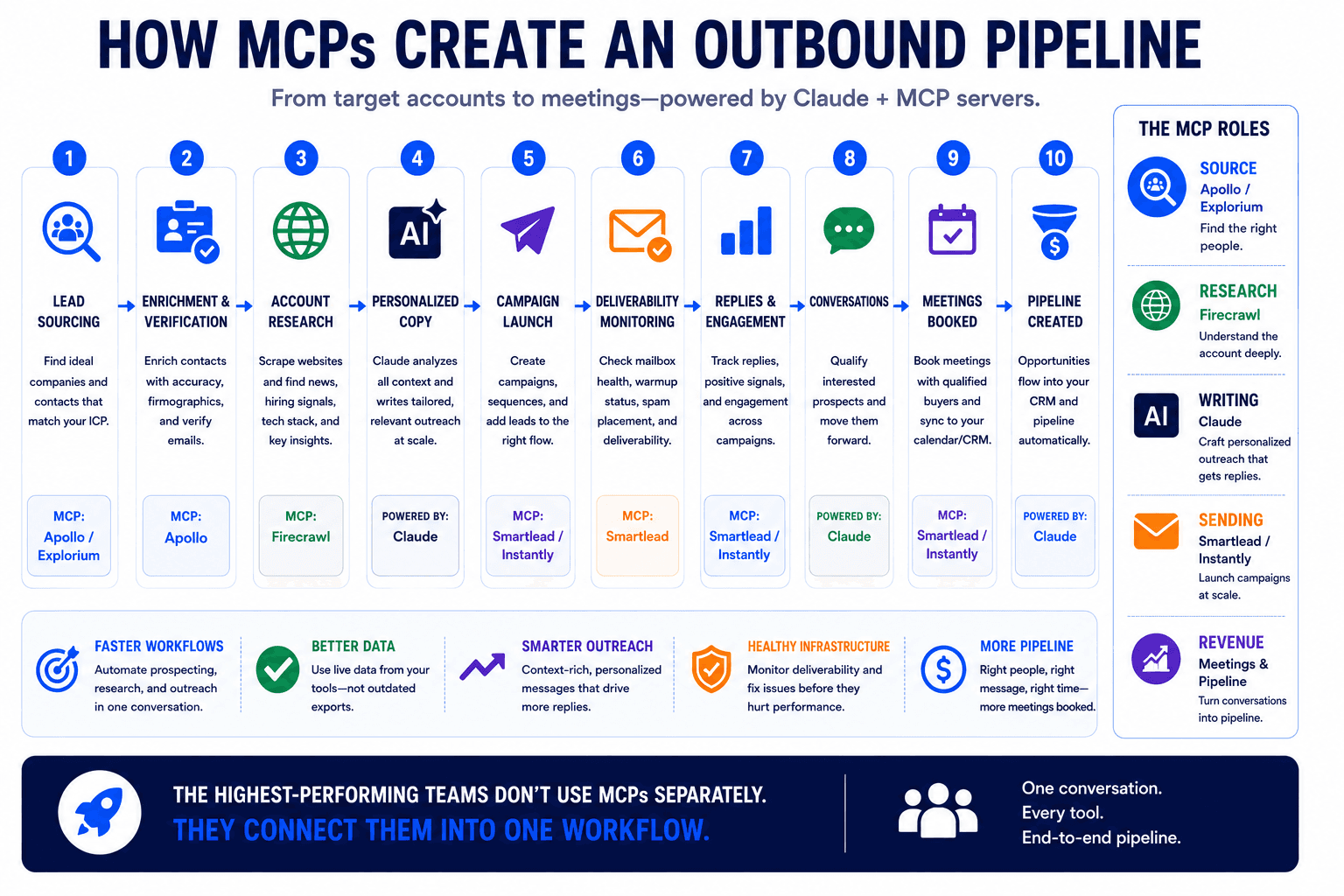
Connected one at a time, these servers are useful. Connected together, they become a pipeline that runs end to end. The chain looks like this.
You start with sourcing through Explorium or Apollo, describing the ICP and letting Claude return a qualified list. From there you enrich and verify, filling in emails and checking they are deliverable before anything goes out. Our guides on how to enrich your lead list using Claude Code and the best email verification tools for cold email cover that step in detail. Then Firecrawl pulls account context from each prospect's site so the copy has something specific to say. Claude writes the sequences against your rules, and Smartlead or Instantly deploys and monitors them. For the full stack underneath all of this, see the best cold email stack for B2B companies and our walkthrough on how to build a cold email system using Claude.
The part most teams skip is reuse. Once a run works, you can have Claude turn the whole sequence into a reusable Skill, so the next list does not require rebuilding the workflow from scratch. If that idea is new, our guide on what Claude Skills are and how to use them explains how to encode a process once and reuse it.
This is also where the payoff shows up. One enterprise client doubled its sales efficiency by using AI-driven insights to engage leads at the right time with data-backed decisions, which is the kind of result a connected pipeline produces when sourcing, timing, and outreach stop living in separate tools.
How many MCPs should you actually connect?
More servers is not better. Most MCPs expose somewhere between five and fifteen tools each, and clients like Cursor have a soft ceiling around 40 active tools. Past that point the agent starts losing access to tools or picking the wrong one, because every tool description sits in the context window and the selection task gets noisier with each option added.
The working rule is three to six well-chosen servers, with the rest behind a per-project enable flag. Claude Code helps here through Tool Search, which lazy-loads tool definitions on demand instead of dumping every schema into context up front, so you can connect more servers without drowning the model. Still, the mental model that matters is not which servers exist but which handful should be on for the job in front of you. Our GTM engineer's guide to Claude Code goes deeper on managing skills, subagents, and MCP connections as one system.
Common questions about Claude MCPs for lead generation
Do I need to know how to code to use these?
No. Most of these servers are built for non-technical operators. Apollo and Explorium connect through OAuth in the connectors menu with no API key at all. Smartlead and Instantly need you to paste an API key into a config, which takes about five minutes, and after that everything runs through plain-English prompts. The whole point of MCP is to remove the API and webhook work that used to require a developer.
Are MCPs safe to give account access to?
They are as safe as the permissions you set, so the access is worth configuring deliberately. Servers like Apollo use OAuth, which means your access inside Claude mirrors your account exactly and follows your existing plan limits. Most clients let you set each action to ask for approval or run automatically, and Claude Code adds scope levels so a server can be limited to a single project rather than every workspace. For anything that consumes credits or sends on your behalf, keep approval on until you trust the workflow, then loosen it.
Will an MCP replace tools like Clay or Apollo?
No, and that is the wrong way to think about it. An MCP is an execution layer, not a database. Apollo's MCP still runs on Apollo's data, and Explorium's still runs on Explorium's. What changes is where the work happens. Instead of switching between tabs and copying data between tools, you run the motion from one conversation while each platform stays your system of record. The data sources you rely on do not go away; they just become reachable from inside Claude.
Which MCP should I start with?
Start with the job you do most. If list building is the bottleneck, connect Apollo or Explorium first. If your lists are fine but sends are underperforming, start with Smartlead so Claude can read your deliverability data. If your research is what eats time, Firecrawl pays for itself quickly. You do not need all of them on day one, and you should not turn them all on at once.
Wrapping up
A few things hold across every setup here. Choose MCP servers by the job they do, not by how many you can install, because a focused three to six will outperform a crowded stack. The real value is the connected pipeline, sourcing through sending in one place, rather than any single server on its own. And once a workflow earns its keep, standardize it into a Skill so you are not rebuilding it every week.

If you would rather have this pipeline built and running for you instead of assembling it yourself, book a call with our team and we will map it to how your outbound actually works.