Article
Sep 3, 2026
How to Find Hiring Managers for Open Jobs
A practical guide to finding the hiring manager behind any job posting: read the listing, use LinkedIn, get a verified email, and do it at scale.

When a company posts a role, the person who actually owns that hire is almost never named on the listing. The posting routes applications into an applicant tracking system, and the manager who will make the decision rarely sees any of it directly. Reaching that person yourself is the highest leverage move available, whether you are pitching candidates, selling a service, or applying for the job.
The good news is that the hiring manager is nearly always discoverable, usually within 20 to 30 minutes of research per role, and much faster once you have a system. This guide covers how to find hiring managers for open jobs in a practical, repeatable way: who they are, how to identify them from the posting and from LinkedIn, how to get a verified email, and how to run the whole process at scale so you are reaching hundreds of them rather than a handful.

Who the hiring manager actually is
Three different people tend to touch a hiring process, and mixing them up wastes outreach. The recruiter, whether internal or agency, screens candidates for baseline fit and manages the pipeline. HR administers the process, the offer, and compliance. The hiring manager is the person the role reports to, the one who owns the problem the new hire is meant to solve and who makes the final call. For most outreach, the hiring manager is the person who decides and therefore the person worth reaching.
Companies leave the manager off the posting on purpose, since they do not want their managers buried under direct messages. That gap is exactly why finding them works. A single corporate posting can attract hundreds of resumes, and most applications never reach a human at all before the system filters them out. A short, relevant message that lands in the hiring manager's inbox skips that queue entirely.

Start with the job posting itself
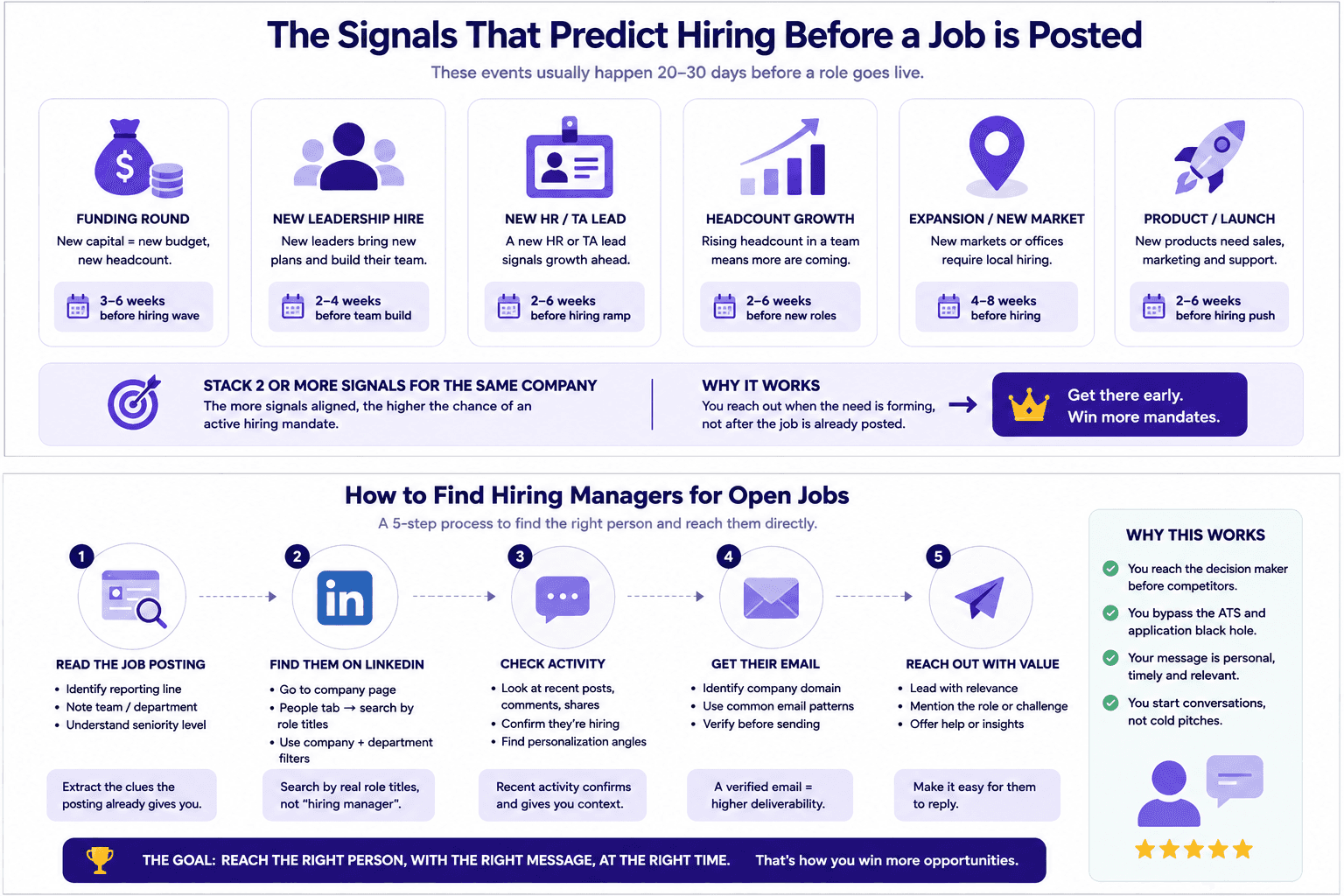
Before opening any tool, read the listing closely, because it leaks more than companies realize. The reporting line is the most valuable clue. A description that says the role reports to the Head of Growth has effectively handed you the hiring manager's title, which becomes your search query. The team name does similar work by narrowing a company of thousands down to a handful of relevant people, so a mention of the Cortex platform team tells you which corner of the org to look in.
The responsibilities and seniority described in the posting also tell you how far up the chain the manager sits. A senior role usually reports to a director or a VP, while a junior one reports to a team lead or manager. Reading the posting first means every later step starts from a real title and team rather than a guess.
Find the hiring manager on LinkedIn
LinkedIn is the most consistent place to turn a title into a specific person. Three techniques cover most cases.
Check the "Meet the hiring team" box
Many LinkedIn job posts include a section showing the people connected to the role. This often surfaces the recruiter working the req, and sometimes the hiring manager directly. It is the fastest confirmation available when it is present, so it is worth checking before you do any manual searching.
Search the People tab by title, not by "hiring manager"
When the posting does not name anyone, go to the company page and open the People tab. Searching the phrase "hiring manager" is a common mistake, since almost nobody carries that in their title. Search the actual role titles from the department hierarchy instead, such as Engineering Manager, Director of Engineering, or VP of Engineering for a software role, combined with the company filter. This turns a broad search into a targeted one and shows you the chain of command inside the team you care about. LinkedIn's verified recruiter and verified company badges are a quick way to confirm a profile is genuine before you rely on it.
Use the activity tab to confirm and personalize
Once you have a likely name, check their recent activity. Hiring managers frequently share or comment on the roles they are trying to fill, which both confirms you have the right person and gives you specific material for a relevant message. Referencing something they actually posted is far stronger than a generic opener, and it costs a minute to find.
Get their verified email
A LinkedIn profile is useful, and a verified email is what lets you reach them on your own terms. Most companies follow a predictable email pattern, and once you know one address at the company you can usually infer the rest. Common B2B formats include firstname.lastname@company.com, firstnamelastname@company.com, and flastname@company.com.
Build the likely address from the manager's name and the company domain, then verify it before you send. This step is not optional, because a bounced email wastes your one first impression and repeated bounces damage the sender reputation that all of your future outreach depends on. Running each address through one of the best email verification tools removes that risk, and keeping the underlying records clean is where enriching your contact data earns its place. An email finder can shortcut the pattern guessing, and the same verification rule applies to whatever it returns.
Do it at scale, from job posting to verified contact
Everything above works for a single role, and it takes 20 to 30 minutes each time with guesswork at every stage: the right title, the right person, the right email pattern. That is fine for the occasional target, and it collapses the moment you need to reach fifty hiring managers a week. Manual email finding does not scale, which is the real constraint for any recruitment agency or outbound team.
The fix is a repeatable workflow that runs the same steps automatically. It starts by monitoring the job boards and career pages in your niche so fresh roles surface as they appear, then identifies the likely hiring manager for each role from the title and team, finds and verifies the email, and routes the contact into outreach. Building this is mostly a matter of connecting the right prospecting tools into one flow, and it is the core of a working signal based outbound engine. Setting up the find step as AI driven sourcing means the system does the monitoring and matching around the clock instead of relying on someone to refresh a search a few times a day.
Prioritization matters as much as volume here. Layering in buying signals such as recent funding, a new leader, or roles that have sat open for weeks tells you which hiring managers to reach first, since those are the people under the most pressure to fill a seat. A recruitment agency running this well reaches hundreds of relevant hiring managers a week without adding a single hour of manual research.
What to send once you've found them
Finding the manager is half the work, and the message is the other half. Keep it short, specific to the role, and built around one clear ask. The mistake that sinks most outreach is opening with your own pitch, which is one of the cold email mistakes that kill reply rates. Lead instead with the reader and with value, most powerfully a candidate, since telling a manager you have someone with the exact skill set available right now is a message they will read to the end.
The first line carries most of the weight, so make it clearly about their specific role rather than a template, which is the whole point of a strong personalized opening line. For the full message structure and follow up cadence, our guide to recruitment agency cold email covers it in depth, and none of it works if the email lands in spam, so a sound cold email infrastructure setup sits underneath the whole effort.
What is the difference between a hiring manager and a recruiter?
The recruiter runs the search and screens candidates for baseline fit, while the hiring manager owns the role and makes the final decision about who gets hired. The recruiter's job is to manage the pipeline and shortlist, and the hiring manager's job is to solve a problem on their team with the right person. For outreach, this distinction decides your message. A recruiter cares about process and candidate quality, and the hiring manager cares about outcomes and speed, so a message that speaks to the manager's actual problem tends to land better when they are the one you can reach.
Is it okay to email a hiring manager directly?
Yes, within reason. A short, specific note about a role they are actively trying to fill is welcome far more often than people expect, because you are saving them the work of finding the right person for a seat they need filled. This holds as long as you are using professional contact information that is already public, such as a company directory or a professional profile, rather than private personal data. Reaching one relevant person about one relevant role is a different thing from blasting an entire company, and it is the version that both works and stays on the right side of etiquette and data rules.
How long does it take to find the hiring manager for a job posting?
Doing it manually, plan for 20 to 30 minutes per role once you account for identifying the title, finding the right person, guessing the email pattern, and verifying it. That is reasonable for a small number of high value targets. If you need to reach hiring managers across dozens or hundreds of open roles, manual research becomes the bottleneck, and a repeatable workflow that monitors roles and returns verified contacts brings the effective time per role down to seconds while you focus on the outreach itself.
Bringing it together
Finding hiring managers for open jobs comes down to a short sequence done consistently. Read the posting for the reporting line and team so you know the title to look for, use LinkedIn to turn that title into a specific verified person, confirm a working email before you send, and lead your message with value rather than a pitch. For a single important role, the manual version is quick enough. For a recruitment agency or outbound team working many roles at once, the advantage comes from turning that sequence into a system that reaches the right hiring managers first, before the posting is crowded with everyone else, which is a core part of how agencies win more clients in a competitive market.
If you want to see this built for your desk, we can walk you through a system that monitors roles in your niche, identifies and verifies the right hiring managers, and reaches them with personalized outreach at scale. Book a call with the Novoslo team and we will show you exactly how it works.