Article
Sep 10, 2026
How to Build a Claude Skill for Recruitment Agency Business Development
A detailed guide to building a Claude Skill that runs your recruitment BD process: what to put in it, how to build it, and how to keep it reliable.

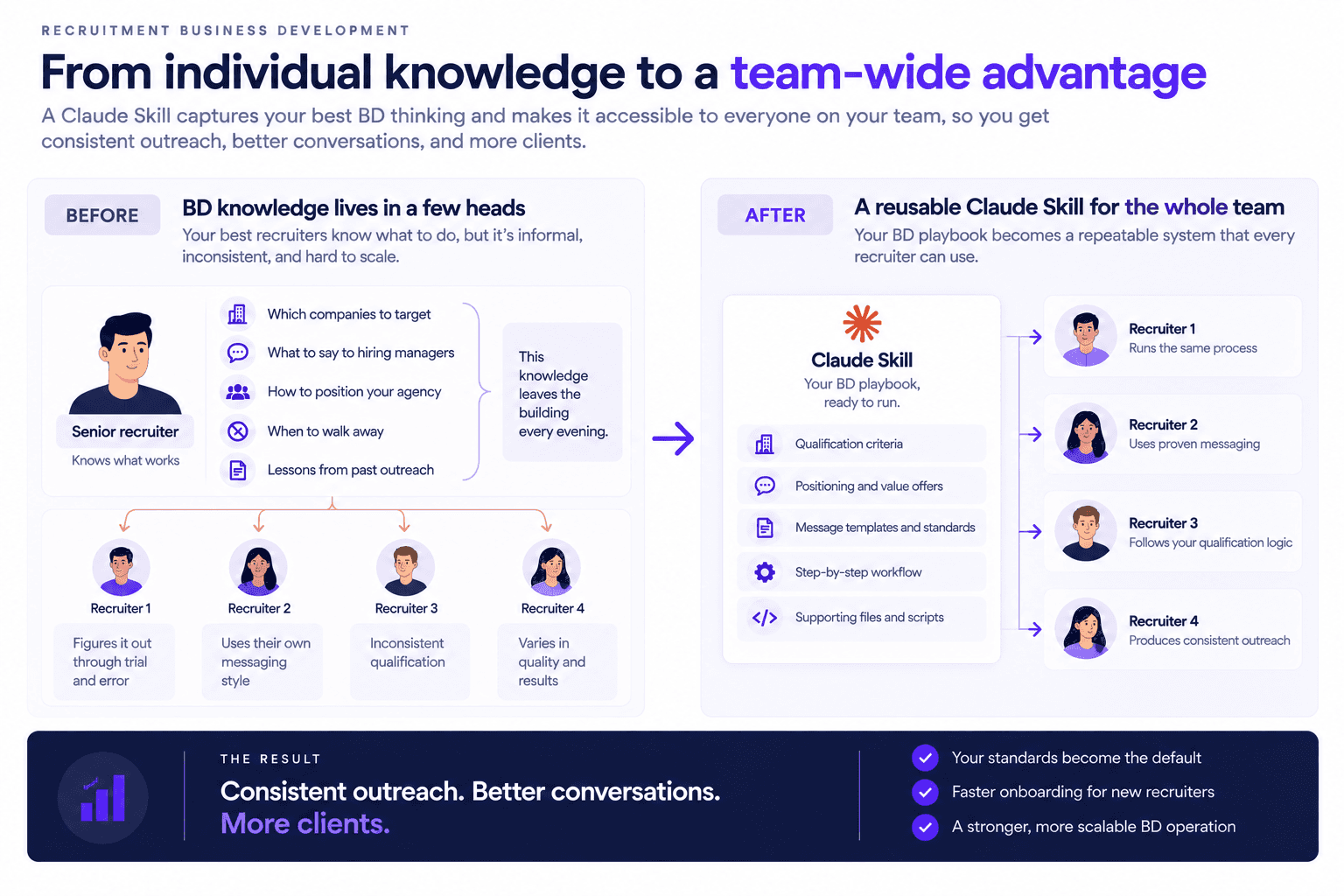
Most recruitment agencies run business development on knowledge that lives in a few people's heads. The senior recruiter knows which companies are worth chasing, what to say to a hiring manager, and when to walk away from a bad-fit account, and that judgment leaves the building every evening. New recruiters rebuild it slowly through trial and error, and the quality of your outreach, and ultimately how many new clients you win, depends on who happens to be doing it that day.
A Claude Skill solves this by turning your BD playbook into something Claude runs the same way every time. Instead of writing a fresh prompt for each task, you package your qualification criteria, your message standards, and your workflow into a reusable asset that any recruiter on your team can trigger. This guide covers what a Claude Skill is, what a recruitment BD skill should contain, and how to build one step by step so your best BD thinking becomes repeatable.
What a Claude Skill is
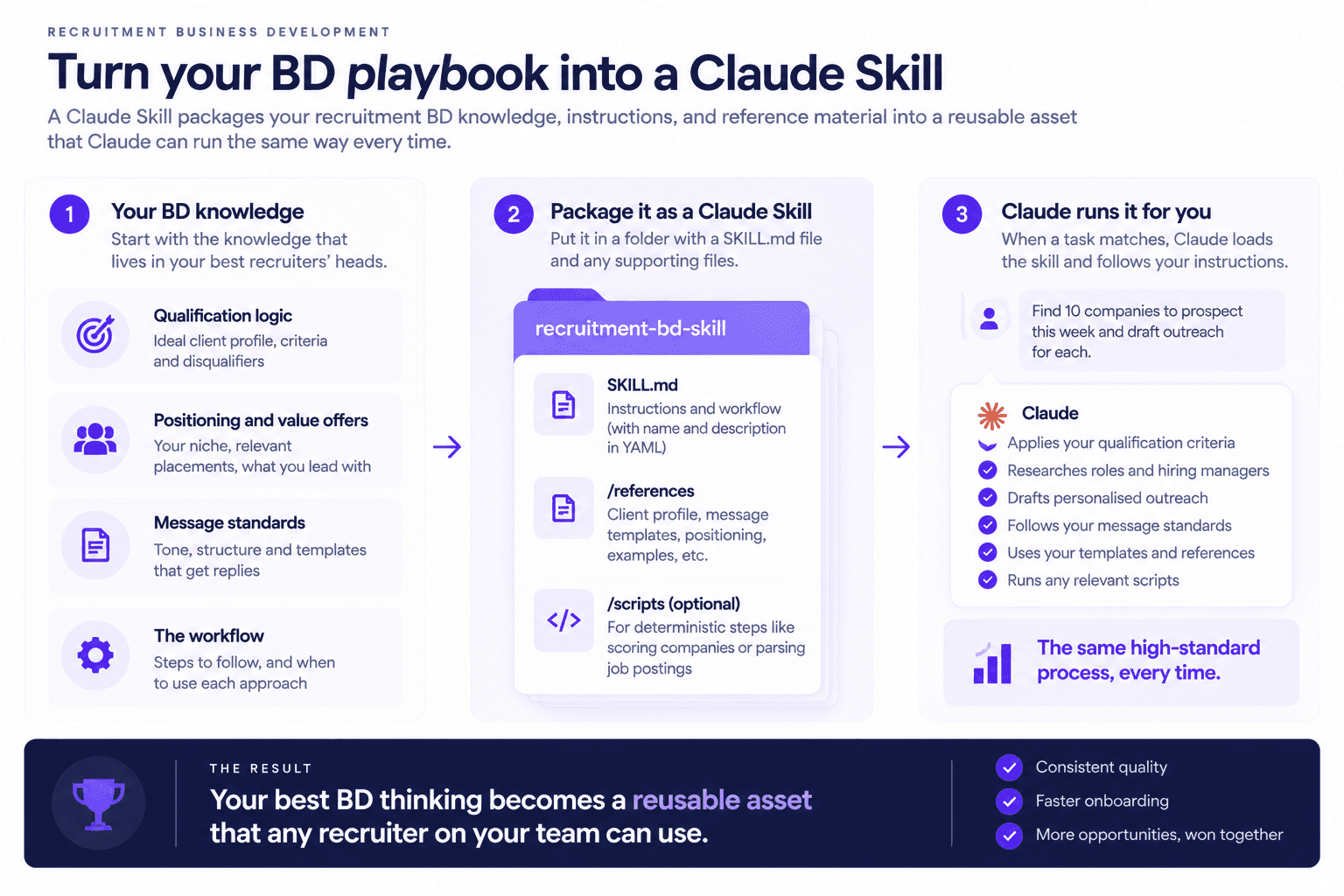
A Claude Skill is a folder containing a single SKILL.md file, plus any supporting files you want to include. The SKILL.md holds a short piece of YAML frontmatter with a name and a description, followed by Markdown instructions that tell Claude how to perform the task. The description is the part that matters most for triggering, because Claude reads it to decide when the skill applies and loads the full instructions only when a task matches. Anything longer, such as your ideal client profile or a set of message templates, can live in separate reference files that load only when the specific task needs them, which keeps the whole thing efficient.
Skills work across Claude's products, so the same skill can run in the Claude apps your team uses day to day, in Claude Code where it lives as a folder in your filesystem, and through the Claude API for anything you automate. The difference between a skill and a one-off prompt is consistency and reuse. A good prompt helps once, while a skill applies the same standards on every run, can be shared across the team, and improves as you refine it. That reusability is what makes it worth the setup effort for a task you do every week.
Why recruitment BD is a good fit for a skill
Business development looks like relationship work, and underneath it follows a repeatable sequence. You decide whether a company is worth pursuing, find the roles they are hiring for, identify the person who owns the requisition, and craft a message that gives that person a reason to reply. Each of those steps has rules that your best recruiters already apply, and the reason results vary is that the rules are informal and inconsistently followed rather than written down.
Encoding that sequence in a skill makes your standards the default. The qualification criteria that a senior recruiter applies by instinct become explicit, the message structure that gets replies becomes the one everyone uses, and the disqualifiers that keep people off dead-end accounts get enforced automatically. The judgment that used to walk out the door every evening becomes an asset the whole team draws on, which is the same logic behind building a wider AI operating system for your business.

What to put in a recruitment BD skill
A useful skill contains more than instructions, because the quality of its output depends on the reference material you give it. The core is the workflow itself, written in the SKILL.md as the steps Claude should follow and the order to follow them in. Around that, a recruitment BD skill benefits from several supporting pieces.
The first is your qualification logic, meaning the ideal client profile and the criteria that decide whether a company is worth prospecting, including the disqualifiers that should take a company off the list. The second is your positioning, meaning the niche you win in, the placements you can point to, and the specific value offers you lead with, such as matched candidates or salary benchmarks. The third is your voice and message standards, so that anything the skill drafts follows the structure that actually earns replies rather than a generic template. Documenting how your cold outreach should read and that it should lead with value rather than a meeting request belongs here. Finally, for any step that is deterministic, such as scoring a company against your criteria or parsing a job posting, a small script can handle it reliably, and because a skill runs a script and reads only its output, that step stays both consistent and efficient.
How to build it, step by step
The build is more straightforward than it sounds, and starting narrow is the single most important decision. Rather than trying to encode your entire BD operation at once, define the one job the skill does first, for example qualifying a company and drafting a first-touch message, and get that working before you expand.
Begin by writing the SKILL.md. Give it a clear name and, more importantly, a precise description that states exactly when it should be used, since that description is what makes Claude reach for the skill at the right moment. Follow it with step-by-step instructions written the way you would brief a new recruiter, specific about what to check, what to produce, and what to avoid. Next, move anything long or reusable into separate reference files, so your ideal client profile, your message templates, and your voice guide sit alongside the SKILL.md and load only when a task calls for them. Where a step is purely mechanical, add a script to handle it, which keeps that part of the process identical on every run.
Once the structure is in place, test it on real companies from your pipeline and read the output critically, then tighten the description and the instructions wherever the result missed. The description usually needs the most iteration, because triggering reliability depends on it. When the skill performs well, install it where your team works, either in the Claude apps or as a folder in your Claude Code setup, and share it so everyone runs the same process. If you would rather not write the first version from scratch, the Skill Creator is a meta-skill that interviews you about the workflow and generates a structured skill for you to refine, and the same build pattern is covered for a narrower use case in our guide to building a skill for cold email personalization.
A worked example: a "qualify and open" skill
To make this concrete, consider a single skill that handles the top of your BD funnel. You give it a company name, and it runs your process end to end. It starts by checking the company against your ideal client profile and disqualifiers, so a business that cannot afford your fee or has a large internal recruiting team is filtered out before any effort goes into it. For a company that passes, it reads the open roles worth pursuing and identifies the likely hiring manager behind the relevant one.
From there it moves into the part that actually wins replies. It checks the role against your candidate pool, which is where candidate matching produces a shortlist you can name, and then drafts a first-touch message that leads with a matched candidate and asks a low-friction question rather than requesting a meeting. What comes back is a qualified company, the right contact, and a ready-to-send message that follows your standards, produced in the time it used to take to research a single account by hand. A recruiter reviews and sends it, keeping judgment on the final call while the repeatable work is already done.
Making it reliable
A skill that gets ignored or produces weak output almost always has the same two problems, and both are fixable. The first is a vague description, which leaves Claude unsure when to use the skill, so write the description to name the exact situation it applies to. The second is instructions that are too general, which produce generic output, so be as specific as you would be when training a person, including examples of good and bad results where it helps.
Beyond that, a few habits keep a skill useful over time. Keep a human reviewing what it produces rather than sending anything automatically, since BD output still benefits from judgment and a final check protects your reputation. Start with one narrow job and expand only once it works, because a focused skill is easier to get right than one that tries to do everything. And treat the skill as a living document, updating it as your niche, your value offers, and your process evolve, so it keeps reflecting how you actually win business. Handled this way, the skill becomes part of the broader system behind generating recruitment leads with AI rather than a one-time experiment, and it composes naturally with other skills such as one focused purely on cold email.
Do I need to be a developer to build a Claude Skill?
No. A skill is written in plain language, since the SKILL.md is just a description of the task and step-by-step instructions in Markdown. Some comfort with files helps for organizing the reference material, and the Skill Creator can generate the initial structure for you if you would rather not start from a blank file. The one area where technical help is useful is adding scripts for deterministic steps, though many recruitment BD skills work well without any scripts at all. The bulk of the work is writing down what you already know about how your agency qualifies and reaches prospects.
What is the difference between a Claude Skill, a Claude Project, and a prompt?
A prompt is a single instruction you write each time, so it is flexible but inconsistent and not shareable. A Claude Project groups related chats, files, and context together for ongoing work, which is useful for a body of related tasks. A skill packages a specific repeatable procedure into a folder that Claude loads automatically when a task matches its description, which makes it the right tool when you want the same process followed the same way every time. For recruitment BD, where consistency across recruiters is the whole point, a skill is usually the better fit than relying on prompts.
Where do recruitment agencies run a Claude Skill?
Wherever your team already works with Claude. The same skill can run in the Claude apps for everyday use, in Claude Code where it lives as a folder in your project and needs no upload, and through the Claude API for anything you automate at scale. A common pattern is to build and refine the skill in the app where it is easy to test, then deploy the same folder into an automated workflow once it is reliable. Because the skill is a portable folder, moving it between these places does not require rebuilding it.
Bringing it together
Building a Claude Skill for recruitment agency business development comes down to writing your BD process where it can be reused. Capture your qualification criteria, your positioning, and your message standards in a SKILL.md with clear instructions and supporting reference files, start with one narrow job such as qualifying a company and opening the conversation, and refine the description until the skill triggers and performs reliably. The result is that your best BD thinking stops depending on who is at their desk and becomes something every recruiter runs consistently.
If you want help building this for your agency, we can design a skill around your qualification criteria, your niche, and your outreach standards, and connect it to the wider system that finds roles, identifies hiring managers, and matches candidates. Book a call with the Novoslo team and we will show you exactly how it works.