Article
Sep 7, 2026
How Recruitment Agencies Can Use Claude Code to Match Candidates to Open Jobs
A practical guide to using Claude Code to match your candidate pool to open roles: how to set it up, what it outputs, and how to keep judgment human.

Recruiters spend a large part of the week doing the same task over and over: reading CVs and working out which candidates fit which open roles. Most of that first pass is repeatable pattern matching against a set of requirements, which is exactly the kind of work that does not need a person doing it by hand. Claude Code can run that first pass over your own candidate data and hand back a ranked, reasoned shortlist, leaving your recruiters to spend their time on the judgment calls that actually need them.
This guide is a practical look at how recruitment agencies can use Claude Code to match candidates to open jobs. It covers what Claude Code is, how to set it up for matching, what the output looks like in practice, and how to keep quality and fairness under human control. The aim is a working setup you can hand to your team, not a demo.
Why candidate matching is the right job to automate
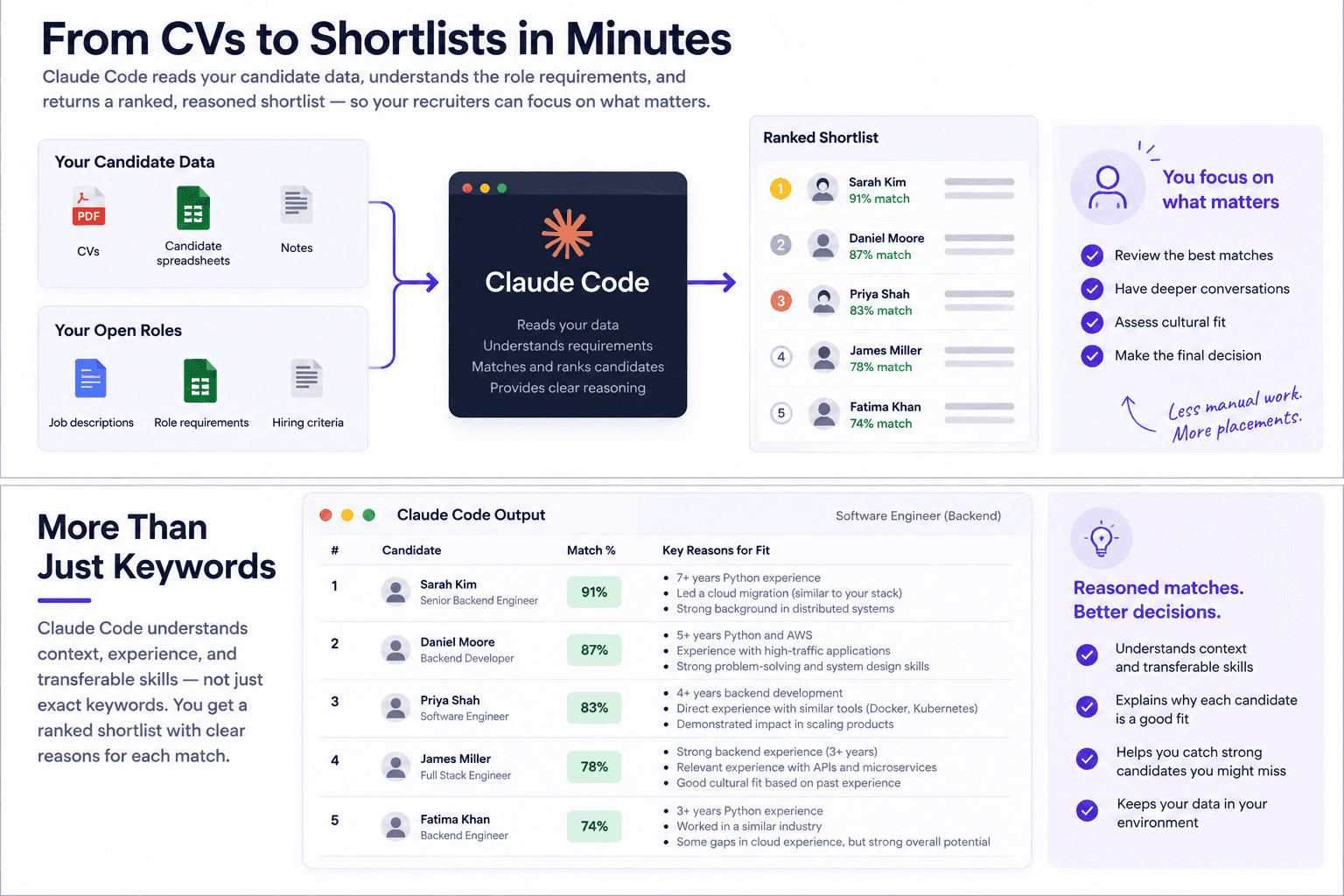
Screening is the most time consuming step in most desks, and it scales badly. A single role can attract a large stack of applications and inbound candidates, and reading each one against the brief eats hours that could go into client conversations and closing. Speed matters here beyond the recruiter's own time, because agencies that take three or four weeks to produce a shortlist routinely lose strong candidates to competitors who move faster.
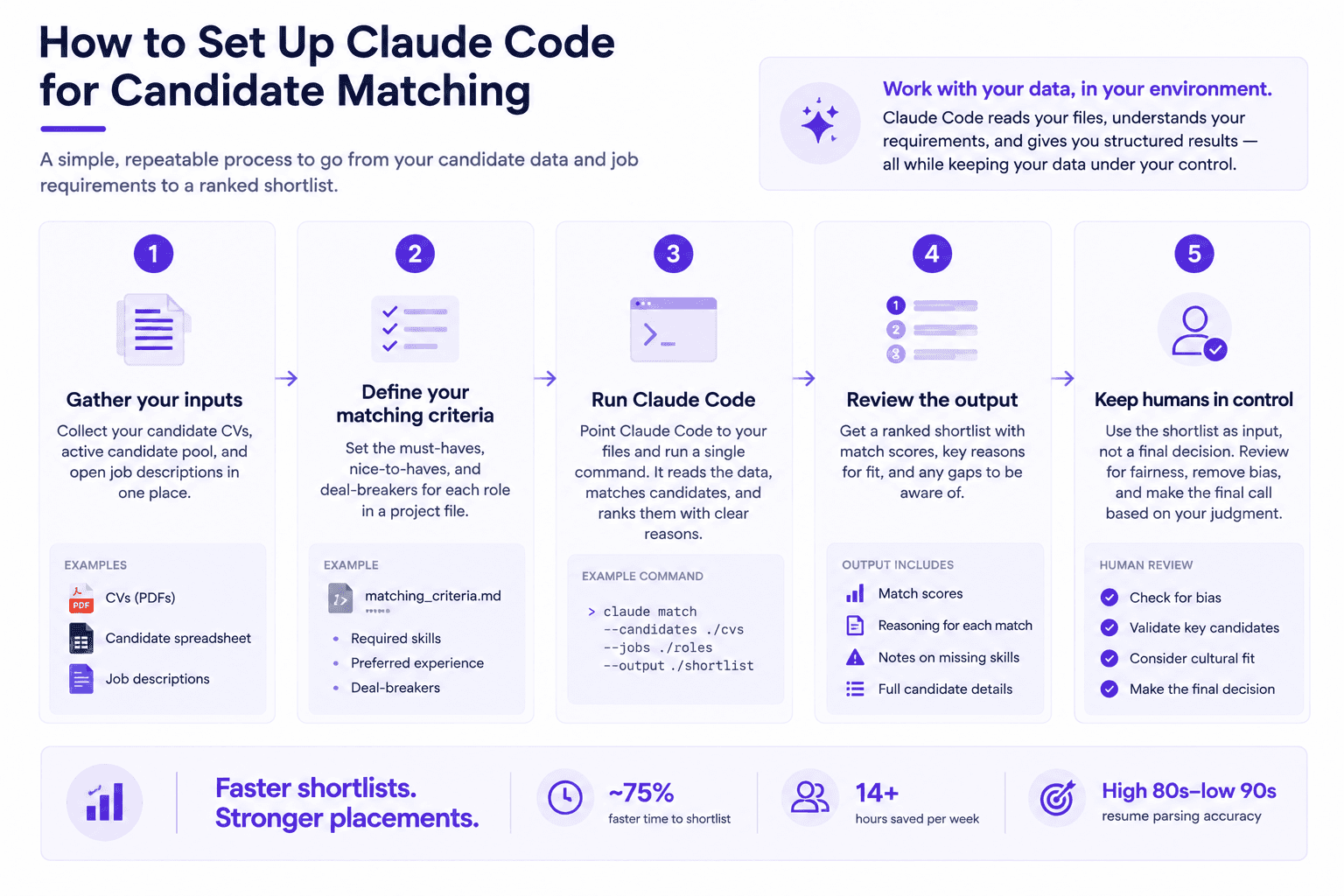
The results from automating this step are well documented across the industry. AI screening and shortlisting has been shown to cut time to shortlist by around 75% for high volume roles and to reduce initial review time by roughly 71% while maintaining or improving match accuracy, with resume parsing accuracy sitting in the high 80s to low 90s. Broader analysis puts the amount of screening work AI can take off a recruiter's plate at 14 or more hours a week. The first pass through a stack of CVs is repeatable and rules based, which makes it a strong fit for automation, while final selection and cultural read stay with a person.
What Claude Code is, and why it fits this task
Claude Code is Anthropic's agentic tool that runs in your terminal, IDE, desktop app, or browser. It reads the files you point it at, writes and runs code, and connects to your other systems through the Model Context Protocol, which lets it pull from services like Google Drive, Slack, or an applicant tracking system. It runs locally, talks directly to the model, and asks for permission before it changes a file or runs a command. Two properties make it a good fit for candidate matching specifically.
It works on your data, in your environment
Most AI matching products require you to load your candidate database into their platform. Claude Code works the other way around by operating directly on the files and systems you already have, so your CVs, your candidate spreadsheet, and your notes stay in your environment rather than being uploaded into a third party tool. For an agency handling personal data under GDPR or similar rules, keeping that data in place and under your control is a meaningful difference. This is the same pattern agencies already use to enrich lead and contact data with Claude Code, applied to candidates and roles.

It reasons about fit rather than keyword matching
A traditional ATS filter matches on keywords, so it passes a candidate who happened to list the right terms and rejects a strong one who described the same experience differently. Claude Code reads a CV the way a recruiter does, understanding that someone who led a team of eight through a platform migration has the seniority a role calls for even if their CV never uses the exact phrase in the job description. That difference between reasoning and literal matching is the core of how AI differs from simple automation, and it is why an agentic tool produces better shortlists than a rules based filter. It also matters when choosing an agent over a static tool for the job.
Setting it up to match candidates to open jobs
The setup follows a straightforward sequence, and once it is in place a recruiter runs it with a single command.
Start by gathering your inputs in one place: a folder of candidate CVs, a spreadsheet of your active candidate pool, and the open job descriptions you are working. Claude Code can read PDFs, documents, and spreadsheets directly, so the pool does not need reformatting first.
Next, write down your matching criteria in a project file so the tool applies your standards rather than a generic notion of fit. This is where you specify the must-haves, the nice-to-haves, and the deal-breakers for each type of role, along with how you weight experience against skills, seniority, location, salary expectation, and availability. A CLAUDE.md file in the project sits at the root and is read at the start of every session, which makes it the natural home for these rules. The more specific you are about what a good match means on your desk, the more useful the output.
From there, ask Claude Code to parse each candidate against a given role, score the fit, and return a ranked shortlist with the reasoning for each placement. For agencies that want live data rather than static files, connecting your ATS, Google Drive, or Slack through MCP lets it pull candidates and roles directly from where they already live. Finally, save the whole routine as a reusable skill so it becomes a repeatable command any recruiter on the team can run without rebuilding the logic each time. Packaging work this way is what Claude skills are built for, and the same build pattern used to find B2B leads with Claude Code applies to matching candidates to roles.
What good output looks like
A useful matching run does not return a single number. For each open role it produces a ranked shortlist of candidates, and for every candidate it explains why they fit, where they fall short of the brief, and the questions a recruiter should ask to close the gaps. Instead of reading two hundred CVs, the recruiter reviews the top handful with the reasoning already laid out.
The visible reasoning is the part that matters most. A black-box score that says a candidate is an 82% match tells you nothing you can act on or defend, whereas an explanation that a candidate has the required industry experience and team lead history but is light on one specific tool gives the recruiter something concrete to verify and to raise with the client. That transparency also makes the output easier to audit, which becomes important the moment you are making decisions about real people.
Keep judgment and fairness in the loop
Automating the first pass is sensible, and handing over the final decision is not. The right division is that Claude Code surfaces the signal and ranks the field, and a recruiter makes the call on who actually goes forward. This is not only good practice but a legal reality in a growing number of places, since bias audit and disclosure rules such as New York City's Local Law 144 and the EU AI Act now apply obligations to automated hiring decisions.
The bias risk is real and worth designing against. AI systems trained on historical hiring data have reproduced the patterns in that data, including documented cases of screening that disadvantaged candidates by gender or by name. The practical guardrails are to define your criteria on skills and experience rather than proxies that can encode bias, to keep a human reviewing the shortlist rather than automatically rejecting anyone, and to keep the reasoning as an audit trail you can review. It is also worth remembering that most firms which struggle to get value from AI fail on process and change management rather than on the technology, so treating this as a workflow change and implementing it deliberately matters as much as the setup itself.
Where matching fits the wider agency workflow
Fast, accurate matching is most valuable as one link in a connected chain rather than a standalone trick. The front of that chain is finding the work, which means spotting the open roles worth pursuing before competitors do and identifying the hiring manager behind each one. Matching then turns that opportunity into something concrete, because the strongest possible opening for a recruitment cold email is a specific, well matched candidate you can name, rather than a general offer to help.
Run end to end, the sequence compounds: you find a role early, produce a shortlist in minutes instead of days, and reach the hiring manager first with a candidate who genuinely fits. That combination is a large part of how agencies win more clients in a tight market, and it sits inside the broader shift in how AI is changing recruitment lead generation.
Do I need to be a developer to use Claude Code for candidate matching?
You do not need to write code, since you interact with Claude Code in plain language and it writes and runs whatever code the task needs. Some comfort with files and the terminal helps for the initial setup, and many agencies have a technical person configure the project file and the data connections once. After that, the day-to-day use is a single command, and the desktop app makes running it approachable for any recruiter on the team. The learning curve sits mostly in the setup, not the ongoing use.
Is it safe to use Claude Code with candidate data?
It is well suited to sensitive data because it runs locally and works on the files and systems you already control, rather than requiring you to upload your candidate database into an external platform. It also asks for permission before it acts, so nothing runs without your say. You still carry the normal responsibilities of handling personal data, including a lawful basis for processing, appropriate retention, and candidate transparency, and you should confirm your specific setup meets the rules that apply to you. The point is that keeping the data in your environment makes those responsibilities easier to meet.
Can Claude Code replace our ATS or our recruiters?
No on both counts, and that is the right way to use it. Your ATS remains the system of record for candidates, applications, and compliance, while Claude Code sits alongside it to do the reasoning heavy matching work, ideally connected so it reads from the ATS directly. It does not replace recruiters either, since the judgment about who to put forward, how to read a client, and how to manage a placement stays human. What it replaces is the hours of manual first pass screening that were never the best use of a recruiter's time.
Bringing it together
Using Claude Code to match candidates to open jobs comes down to a clear setup and a clear boundary. Point it at your own candidate data and job descriptions, write down exactly what a good match looks like on your desk, and have it return a ranked shortlist with reasoning that a recruiter reviews rather than rubber-stamps. Keep the data in your environment, keep a person on the final decision and on fairness, and connect the matching step to the rest of your workflow so a fast shortlist becomes the thing you pitch. Done this way, matching stops being the bottleneck in your week and becomes one of the fastest parts of the job.
If you want help building this for your agency, we can walk you through a setup that connects your candidate data and open roles, runs matching as a repeatable workflow, and fits into the wider system that finds roles and reaches hiring managers. Book a call with the Novoslo team and we will show you exactly how it works.