Article
Jun 19, 2026
Best Email Verification Tools for Cold Email
Compare the best email verification tools for cold email in 2026: MillionVerifier, Bounceban, NeverBounce, Omniverifier, and Hunter.io.

Your offer can be sharp, your timing can be right, and your copy can sound human. None of it matters if the email address you are sending to does not exist. When that happens, you are not just missing one prospect. You are telling Gmail, Outlook, and Yahoo that you are sending to dead addresses, which is exactly the pattern they associate with spam.
That signal carries real weight in 2026. Inbox providers now treat a sustained bounce rate above 2% as a spam filtering trigger across your entire domain, and the global inbox placement rate already sits around 84%, meaning roughly one in six legitimate emails never reaches a primary inbox even when everything else is set up correctly. Verification is the cheapest insurance you can buy against making that worse.
This guide compares the best email verification tools for cold email: MillionVerifier, Bounceban, NeverBounce, Omniverifier, and Hunter.io. We will cover what each one does well, where it falls short, and the part most teams skip, which is how to handle catch-all addresses instead of throwing them away.
Why email verification decides whether your campaign survives
A bounce is an email that comes back undeliverable. There are two kinds, and only one of them really hurts you. A hard bounce is permanent: the address does not exist, the domain is invalid, or the mailbox is gone. A soft bounce is temporary, like a full mailbox or a server that is briefly down. When deliverability people talk about bounce rate, they almost always mean the hard bounce rate, because that is the number inbox providers watch.
The thresholds are tighter than they used to be. Under 2% is the safe zone, between 2% and 5% your Postmaster reputation starts degrading and you should stop and clean your list, and above 5% you are in real trouble. A single campaign sent to a dirty list can damage your sender reputation for weeks. That damage does not stay contained to one campaign either. It follows the domain, which means a bad send can quietly lower deliverability for every email you send afterward.
This is why verification is the highest-leverage dollar in your budget. Cleaning a 5,000-contact list costs somewhere between $15 and $40. The reputation it protects is worth far more, because rebuilding a burned domain takes weeks of warmup you cannot shortcut. If you want the full picture of how this fits together, our guide to cold email infrastructure setup walks through where verification sits alongside domains, DNS, and warmup.
What email verification actually checks
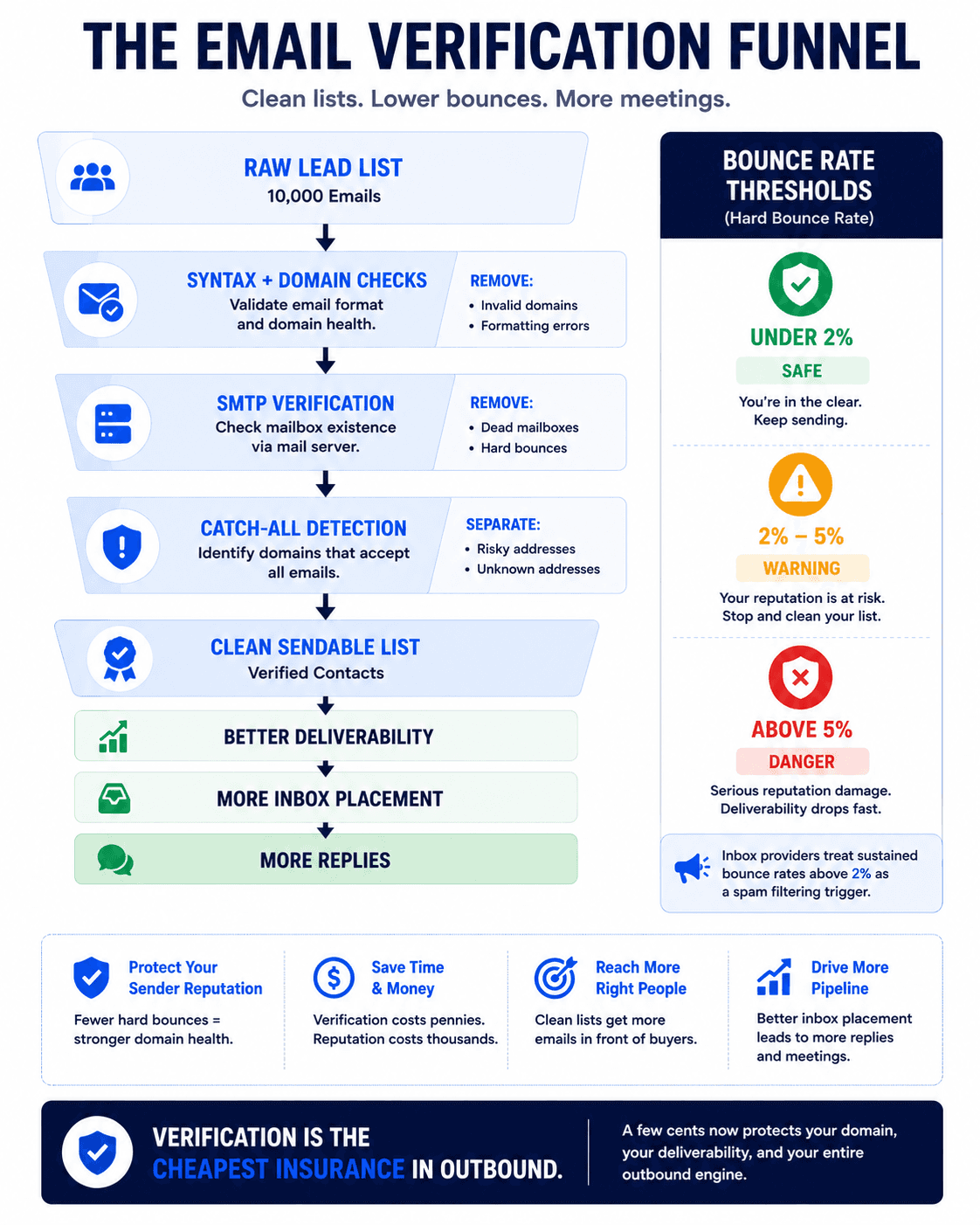
Most tools run the same core sequence. They check the syntax of the address, confirm the domain exists and has valid MX records, then open an SMTP connection to the mail server and ask whether the mailbox accepts mail, all without sending an actual email. On top of that they flag disposable addresses, role-based addresses like info@ or sales@, and known spam traps.
The hard part is catch-all domains. A catch-all (or accept-all) domain is configured to return a "yes, this exists" response for every address at that domain, real or not. So when a verifier runs its SMTP check, the server says the mailbox is fine even when it is not. Most tools cannot tell the difference, so they mark the whole category as "risky" and leave you to guess. This is also why you can run the same list through two different verifiers and get conflicting results: one calls an address valid, another calls it risky, and both are technically doing their job. Catch-alls are common at smaller businesses and older corporate domains, which makes them a big chunk of any B2B list. How a tool handles them is the single biggest accuracy differentiator, and it is the reason the workflow at the end of this guide matters as much as the tool you pick.
The 5 best email verification tools for cold email
There is no single best tool for every team. The right pick depends on your volume, your budget, and how much of your list is catch-all. Here is how the five compare.
MillionVerifier
MillionVerifier is the budget bulk option, and it earns that reputation. It runs the standard checks (syntax, DNS, MX, SMTP, disposable, catch-all detection) and sorts every address into Good, Risky, Bad, or Unknown. It claims 99%+ accuracy, though in practice that holds best on clean lists and slips a little on catch-all-heavy ones.
The pricing is what makes it stick. Credits are pay-as-you-go and never expire, running roughly $2 to $4 per thousand verifications with no monthly fee. For campaign-based prospecting where you build a list, verify, send, then wait a few weeks before the next batch, that model fits far better than a subscription you pay for whether you use it or not. You get 100 free credits to test it. The trade-off is a basic feature set: you get a clean yes/no/maybe per address and not much else, no inbox placement testing or engagement data. For most cold email teams, that is enough.
Bounceban
Bounceban is built around the one problem most tools punt on, which is catch-all and SEG-protected addresses. Instead of marking every catch-all as risky, it uses its own algorithms to work out which ones are actually deliverable, and it claims to reliably verify deliverability for 85% to 95% of catch-all, greylisted, or SEG-protected emails without sending a single email. SEG here means Secure Email Gateways like Mimecast, Proofpoint, and Barracuda, which normally make verification close to impossible.
That focus matters more than it sounds, because catch-alls are where reach gets lost. Single email checks are free and unlimited, bulk verification starts around $21, and it integrates cleanly with Clay and CRMs like HubSpot. If a meaningful share of your list is mid-market or enterprise B2B, those domains skew catch-all, and a specialist like Bounceban will recover leads a general-purpose tool would have told you to delete.
NeverBounce
NeverBounce is the high-volume workhorse. It is built for bulk processing speed and handles lists in the hundreds of thousands or millions, with both batch uploads and a real-time API. In independent 2026 benchmarks it scored very high on raw accuracy, and its results lean conservative, meaning it rejects more borderline addresses. For cold outbound, that conservatism is usually a feature: fewer false positives slipping through to bounce on you later.
Its real-time API is also useful beyond list cleaning. You can wire it into signup and lead capture forms so a bad address gets caught before it ever enters your database, which keeps the rot out at the source. Pricing runs around $0.003 to $0.008 per address depending on volume. The one caveat worth knowing: like every verifier, its headline accuracy number drops sharply on catch-all domains, so a high score on a clean list does not tell you how it performs on a catch-all-heavy one.
Omniverifier
Omniverifier is the speed-focused high-volume option, and it has built a following among agencies sending at scale. Users report verifying 50,000 emails in a few minutes and bounce rates under 1% on validated lists, with bulk discounts that make it workable for high senders where premium tools stop making financial sense. It claims around 99% accuracy and, importantly, offers catch-all verification at a price that does not punish you for using it.
It gives you free trial credits to start, and the workflow is straightforward: upload your CSV, let it run, and it returns your list split into valid, catch-all, and invalid. From there you export the valid emails and, if you want more reach, run the catch-alls through its catch-all verification to recover sendable addresses. The honest caveat is that some users report bugs and thin support, particularly on very large lists, so test on a sample before you commit a big batch of credits.
Hunter.io
Hunter.io is the one tool here that does more than verify. It finds emails too, which makes it the natural pick when you need to discover addresses before you validate them. The free tier gives you a small monthly allowance with no credit card, and verification is bundled into its plans rather than sold cheaply at scale.
That bundling shapes who it fits. For individuals and small teams doing targeted, lower-volume outreach, Hunter just works, and having find and verify in one place removes a step. For high-frequency outbound teams running large lists, it gets expensive fast compared to dedicated verifiers, and you will likely outgrow it. Think of Hunter as a starting point or a finder-plus-verifier combo, not your bulk cleaning engine once volume picks up.
How to actually run verification (the workflow that matters)
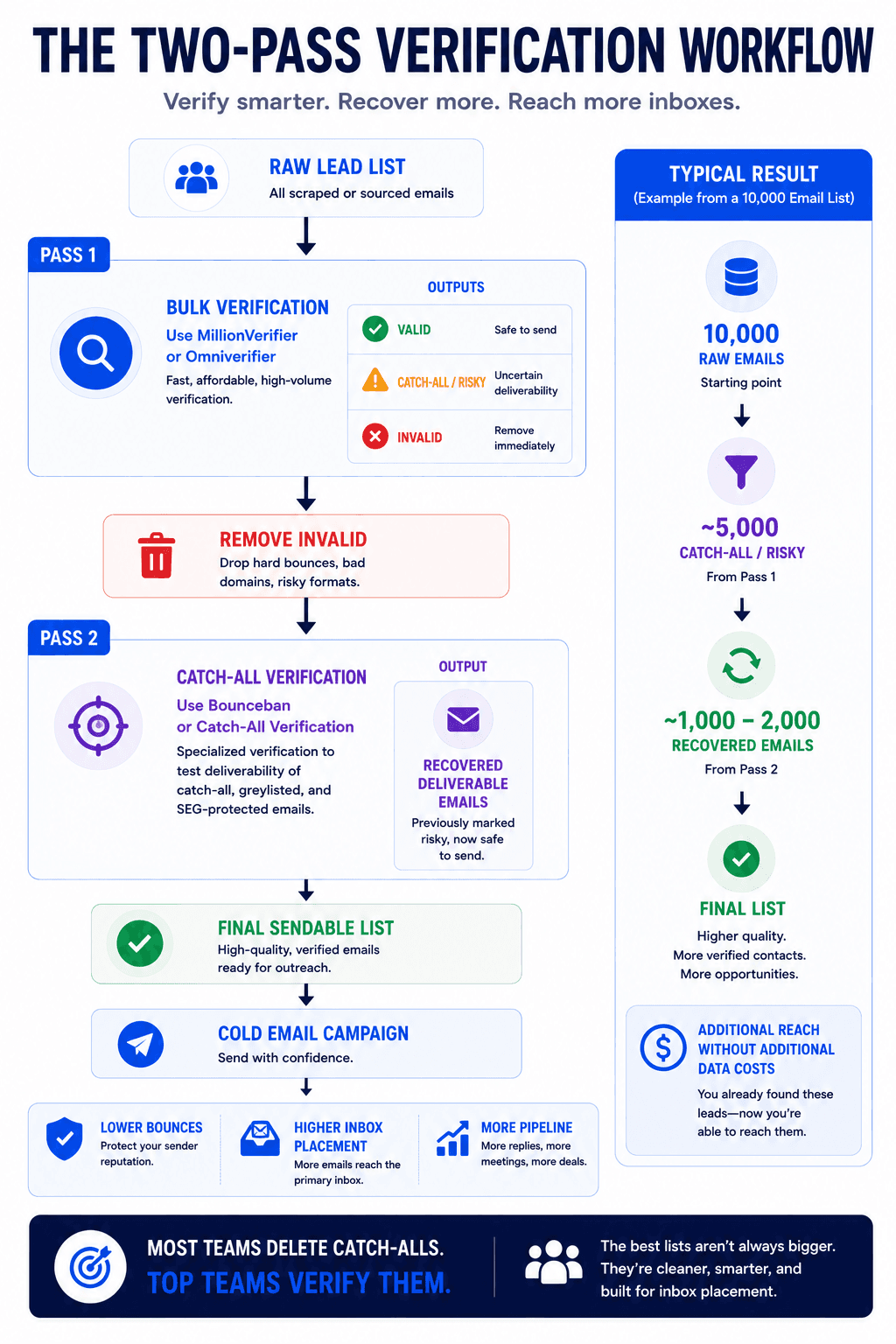
Picking a tool is the easy part. The mistake we see constantly is teams running one verification pass, keeping only the "valid" addresses, and deleting everything marked catch-all or unknown. On a typical B2B list, that can mean throwing away 20% to 30% of your leads, many of which are perfectly sendable.
Here is the workflow that recovers them. Run your full list through a general verifier first, like MillionVerifier or Omniverifier. That cleanly sorts most addresses into good and bad. Then take the catch-all and unknown addresses, the ones the first tool could not commit on, and run only those through a catch-all specialist like Bounceban or Omniverifier's catch-all check. That second pass tells you which of the "risky" addresses are actually deliverable, and you fold those back into your sendable list.
The payoff is real. On a list where the first pass leaves you 5,000 catch-alls, a second catch-all pass often recovers 1,000 to 2,000 usable leads that most senders never touch. Because so few teams bother, those addresses tend to be less saturated, which can mean a higher reply rate from that segment. This is the same logic behind enriching and validating your lead list properly instead of treating data hygiene as a single box to tick. It pairs naturally with the rest of a real cold email system, where clean data feeds your sending platform rather than fighting it.
Do you really need to verify a purchased or scraped list?
Yes, and more carefully than a list you collected yourself. Scraped and purchased lists carry the highest share of dead addresses because they age fast, email lists decay around 23% per year, and you have no idea how old the data is. Sending to one unverified is the quickest way to spike your bounce rate past the danger line on the first campaign.
For these lists, a single verification pass is the floor, not the ceiling. On high-value lists it is worth running double verification, meaning two different tools, and trusting the consensus. The few extra dollars are trivial compared to the cost of a burned domain. This is one of the most common mistakes that quietly kills reply rates, and it is entirely avoidable.
Should you send to catch-all addresses?
It depends on whether you have verified them properly. If you are only running a basic verifier and a domain comes back as catch-all, the conservative move is to skip it, because you genuinely do not know if the mailbox exists and the bounce risk is not worth the marginal reach.
But "skip all catch-alls" leaves a lot of pipeline on the table, since catch-alls are common at exactly the kind of established B2B companies you want to reach. The better answer is to run those addresses through a catch-all specialist that can tell deliverable from undeliverable, then send only to the ones confirmed deliverable. That is the difference between avoiding catch-alls out of fear and handling them with data. Either way, bad data sinks campaigns before the first send, so the goal is a confident decision, not a guess.
How much should email verification cost?
Less than you think, and far less than the alternative. Dedicated verifiers run roughly $0.003 to $0.008 per address, so a 5,000-contact list costs $15 to $40 to clean. Budget tools like MillionVerifier come in cheaper per email with non-expiring credits, while premium tools charge more for bundled features like inbox placement testing and AI scoring.
The right question is not which tool is cheapest, but which pricing model fits how you send. If you verify in campaign bursts, pay-as-you-go credits that never expire (MillionVerifier, Omniverifier) save you from paying for idle months. If you verify continuously at high volume, a subscription or volume-tiered API (NeverBounce) may work out cheaper. Match the billing to your sending rhythm and you stop overpaying.
Which tool is best for cold email specifically?
There is no universal answer, but the pattern is clear. For cheap, reliable bulk cleaning on campaign-based sending, MillionVerifier is hard to beat. For lists heavy with catch-all and SEG-protected B2B domains, Bounceban recovers reach the others discard. For very high volume where speed and conservative accuracy matter, NeverBounce or Omniverifier fit. And for small teams that need to find addresses before verifying them, Hunter.io keeps both jobs in one place.
The strongest setup is not one tool but a sequence: a general verifier for the bulk pass and a catch-all specialist for the second. That combination keeps your bounce rate low without quietly deleting a third of your sendable leads. It also slots into the wider cold email stack rather than sitting off to the side, which is where deliverability is won or lost.
Verification is the floor, not the finish line
Three things are worth keeping in front of you. First, verification is the cheapest protection you have against the bounce rate that decides your domain's fate, so it is never the place to cut corners. Second, the tool you pick should match your volume and your billing rhythm, not just the headline accuracy number, which usually collapses on catch-all domains anyway. Third, the real edge is the two-pass workflow that recovers catch-alls instead of deleting them, because reach your competitors throw away is reach you keep.
A clean list still needs the rest of the system around it: solid infrastructure, the right inbox providers, a sending platform that fits your volume, and a way to monitor deliverability across your domains once campaigns are live. Verification is where it starts, not where it ends, which is exactly why so many campaigns stall before they get going.

If you would rather have all of this built and run for you, book a call with our team. We will look at your current setup, your list quality, and where your deliverability is leaking, then show you exactly what to fix first.