Article
May 27, 2026
Best Cold Email Infrastructure Setup for B2B Companies (2026)
Learn the exact cold email infrastructure setup B2B companies need in 2026. Domains, DNS, warm up, sequencers, verification, and monitoring.
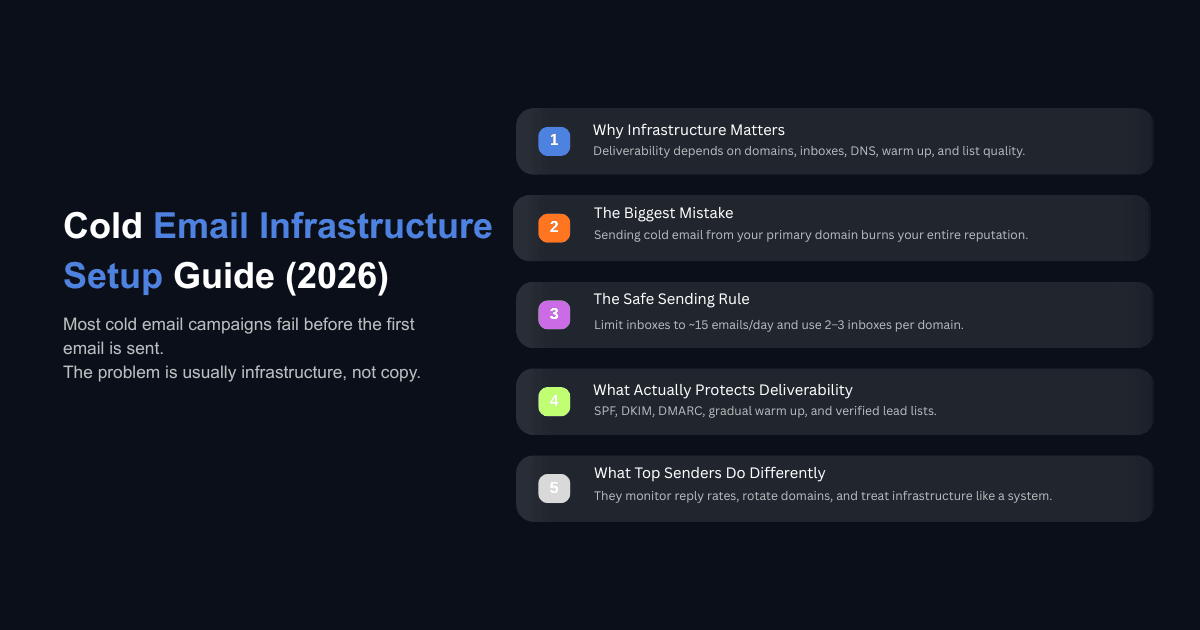
Most cold email campaigns do not fail because the copy is weak or the targeting is off. They fail because the infrastructure underneath was broken before the first email was ever sent.
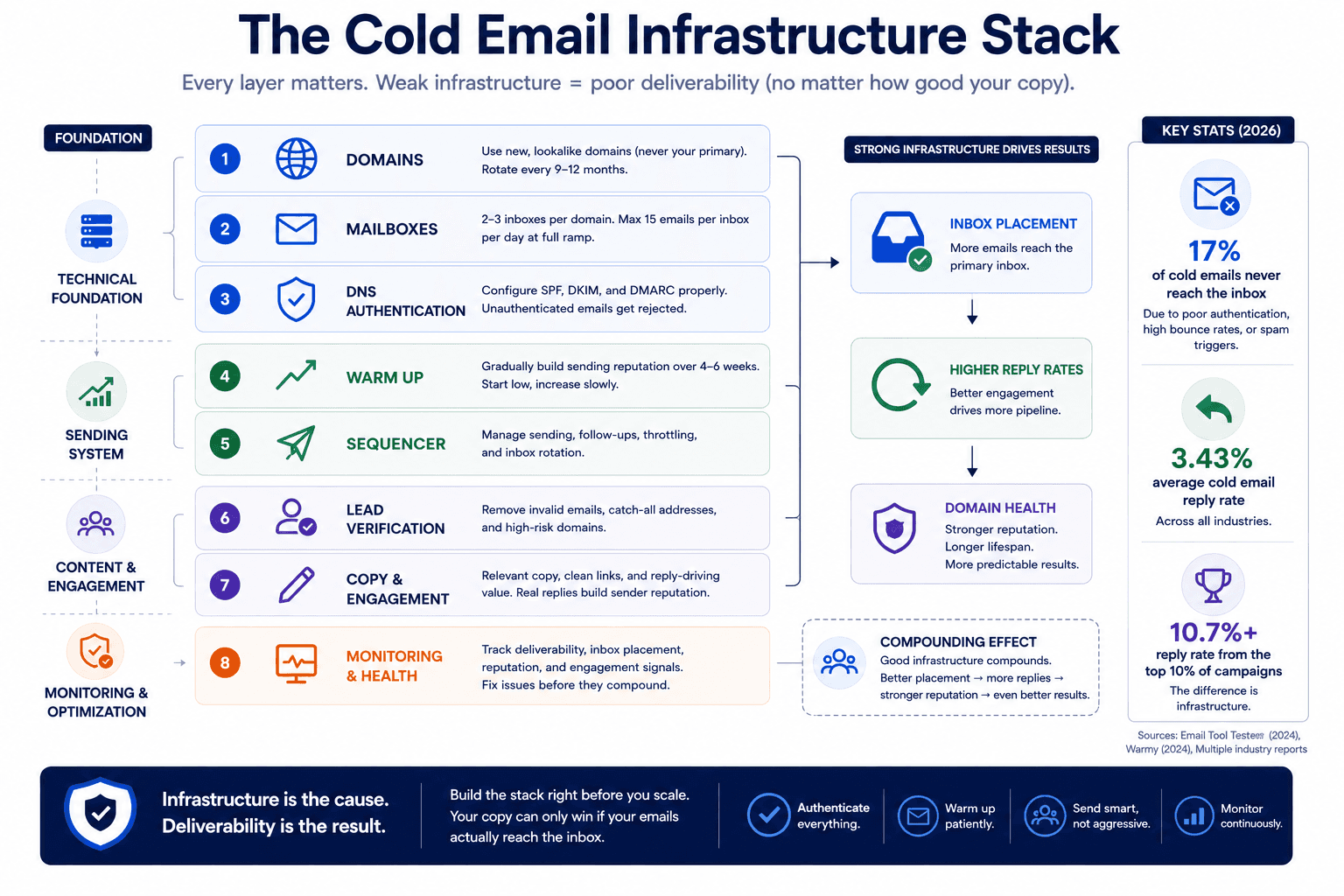
In 2026, email providers like Google, Yahoo, and Microsoft have made their filtering more aggressive than at any point in the past decade. Unauthenticated emails are no longer routed to spam. They are rejected outright. Spam placement rates climbed from 4.5% in Q1 2024 to 8.6% by Q4 2024, and the bar continues to rise. The average cold email reply rate across the industry sits at 3.43%, while the top 10% of campaigns exceed 10.7%. The difference between those two groups is not better subject lines. It is the infrastructure stack they built before writing a single word of copy.
If you have been watching your cold email campaigns die slowly and cannot figure out why, this guide covers the full infrastructure setup from domains to monitoring, with the specific numbers and reasoning behind each decision. If you are building a B2B cold email system from scratch, this is the order to do it in.
Why Cold Email Infrastructure Matters More Than Copy or Targeting
Infrastructure is the cause. Deliverability is the result. Good infrastructure produces consistent inbox placement. Bad infrastructure produces spam folder placement regardless of how well written or well targeted your emails are.
The term "infrastructure" gets used loosely in the cold email space, so it helps to define it clearly. Cold email infrastructure is everything that gets your email from your sending account to the recipient's primary inbox. That includes your domains, your email accounts, your DNS records, your warm up process, your sequencer, and even the quality of your lead list and the content of your copy. If something in your setup affects whether an email reaches the primary inbox, it is part of your infrastructure.
Most people think infrastructure means domains and inboxes. That definition is incomplete, and it leads to incomplete troubleshooting. When reply rates drop, teams panic and replace their inbox provider when the actual problem might be an unverified lead list or copy that triggers spam filters. You cannot fix what you cannot define.
The reason infrastructure matters more right now than it did two years ago is the enforcement timeline that started in 2024. Google and Yahoo introduced mandatory authentication standards for bulk senders in February 2024. Microsoft followed in May 2025 with even stricter enforcement, rejecting non-compliant emails entirely rather than filtering them to spam. Around 17% of cold emails never reach the inbox at all due to poor domain authentication, high bounce rates, or language that triggers spam filters. That is roughly one in six emails disappearing before a prospect ever sees them.
The cost of getting this wrong goes beyond one bad campaign. Burned domains affect every mailbox running on them. We have seen B2B companies kill their primary domain by sending cold emails from it at scale, which then prevented their internal team, their clients, and their partners from receiving normal business communication. At that point, you are not just losing pipeline. You are rebuilding your entire email system.
How to Plan Your Cold Email Sending Volume Before Buying Anything
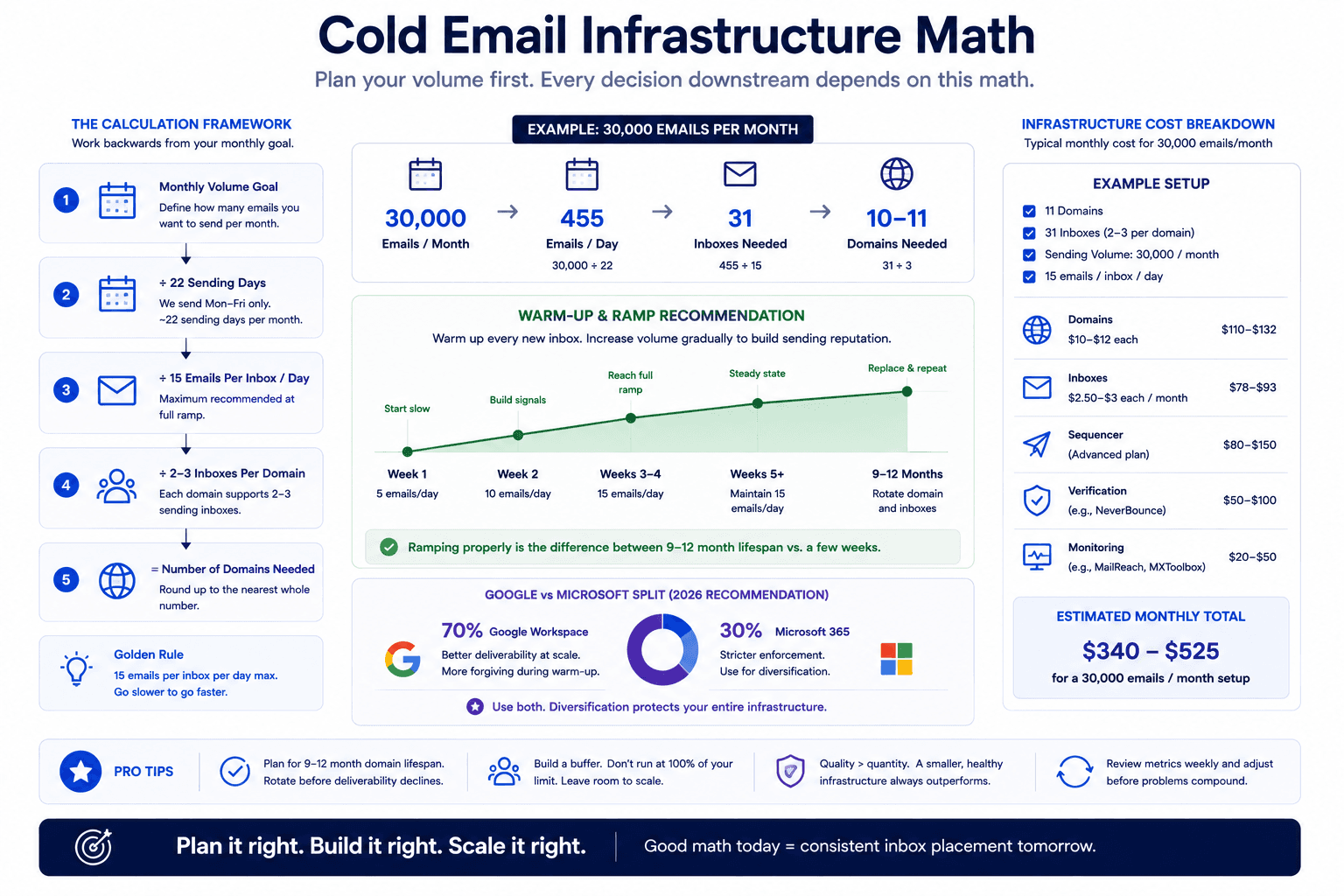
Before you buy a single domain, you need to know how many emails you want to send per month. This number drives every purchase decision downstream: how many domains, how many inboxes, and how much budget you need.
The math works backwards from your monthly volume goal. Every email account should send a maximum of 15 emails per day at full ramp up. There are roughly 22 sending days per month (weekdays only, no weekends). Each domain can support 2 to 3 inboxes.
Here is the formula:
Monthly volume ÷ 22 = daily volume needed
Daily volume ÷ 15 = number of inboxes needed
Number of inboxes ÷ 3 = number of domains needed
So if you want to send 10,000 emails per month, you need about 455 emails per day, which requires roughly 31 inboxes across 10 to 11 domains. If your target is 30,000 per month, you need about 91 inboxes across 31 domains. If you skip this calculation and just buy 5 domains with 6 inboxes each, sending 30 or more emails per inbox per day, your infrastructure will burn within weeks instead of lasting 9 to 12 months.
Plan this before you spend money. The cost per domain runs $10 to $12, and inbox resellers charge $2.50 to $3 per mailbox per month. A small but well built infrastructure costs a couple hundred dollars monthly. The cost of rebuilding it every few weeks because you sent too aggressively is significantly higher.
Domain Setup for Cold Email: What to Buy and Where
The first rule is non-negotiable: never send cold emails from your primary business domain. If your company is acme.com, you do not send outbound from anyone@acme.com. You buy separate, lookalike domains specifically for cold email, and you treat them as disposable infrastructure that gets rotated every 9 to 12 months.
Lookalike domains should be variations of your brand that redirect to your main website. If your main domain is acme.com, your cold email domains might be hiacme.com, tryacme.com, or meetacme.com. When recipients look up the domain, they land on your real site, which builds trust. But if one of those sending domains gets flagged, you lose that domain and its mailboxes, not your entire business communication.
For registrars, you can use GoDaddy, Porkbun, Spaceship, or Namecheap. The registrar does not meaningfully affect deliverability. What matters is the domain extension. Stick with .com as your default. If you need more domains and .com options are exhausted, .co, .info, and .net are acceptable. Stay away from .biz, .xyz, or anything that looks like it was purchased by a spammer.
Domain lifespan is finite. At scale with proper setup, expect 9 to 12 months of healthy sending before performance starts to degrade. Plan rotation schedules so you are not replacing all your domains simultaneously. When domains hit their 12 month renewal, you can port them to a cheaper registrar to save 30 to 50% on renewal costs rather than renewing at the original provider's higher rate.
If you want a full breakdown of every layer in the stack with specific costs, we wrote a detailed guide on the best cold email stack for B2B companies that covers tooling and pricing.
How Should You Set Up Email Accounts for Cold Outreach?
Once your domains are purchased, you set up 2 to 3 inboxes per domain. Three is the maximum. More than that looks unusual to receiving servers and increases the blast radius if a domain gets flagged. Fewer than two means you are paying for a domain that is underutilized.
On the Google vs. Microsoft question, the common advice is to split 50/50 for diversification. In practice, this means 50% of your infrastructure is underperforming every day, because one provider is almost always outperforming the other at any given time. In 2026, Google Workspace inboxes have been outperforming Microsoft for B2B cold email based on reply rate data across multiple agencies and providers.
A better approach is the insurance policy model. Put 80% of your sending budget into the best performing provider (currently Google) and keep 20% as insurance accounts on the second provider (Microsoft). Those insurance accounts stay warmed up and ready to deploy if the primary provider starts underperforming. You get full performance from your main stack and a fallback if conditions change, instead of paying a performance tax on the weaker provider every single day.
For naming conventions, always use real names. john@tryacme.com, john.smith@hiacme.com, j.smith@meetacme.com. Never use generic prefixes like sales@, info@, or contact@. Set up each account with a profile picture of a real person, a display name with first and last name, and a minimal email signature that includes only your name and title. No links in the signature, no phone numbers, no calendar booking URLs. Add spintax to the signature as well so it is not identical across every send.
The simplest path for most B2B companies is to use an inbox reseller rather than setting up everything manually. Resellers handle domain DNS configuration, connect accounts to your sequencer, and start the warm up process. This eliminates the most common setup mistakes that lead to early deliverability problems.
DNS Authentication: SPF, DKIM, and DMARC Explained
DNS records are the authentication layer that tells receiving servers your emails are legitimate. There are four records that matter, and in 2026 all of them are required. Unauthenticated emails are sent to spam across all major providers, and Microsoft now rejects them with a hard bounce error.
MX (Mail Exchange) tells other servers where to deliver replies sent to your domain. Without it, replies bounce.
SPF (Sender Policy Framework) is a text record that lists which servers are authorized to send email from your domain. Receiving servers check this to verify your email is not spoofed.
DKIM (DomainKeys Identified Mail) attaches a cryptographic signature to your emails. The receiving server verifies this signature against a public key in your DNS to confirm the email was not tampered with in transit.
DMARC (Domain-based Message Authentication, Reporting, and Conformance) ties SPF and DKIM together and tells receiving servers what to do if either check fails. For cold email, this is typically set to "none" or "quarantine" at the start, though Google and Microsoft are moving toward favoring stricter policies.
The enforcement specifics in 2026: Google requires both SPF and DKIM for any domain sending 5,000 or more emails per day to Gmail addresses, plus a published DMARC record and spam complaint rates below 0.3%. Microsoft enforces the same requirements and rejects non-compliant mail outright rather than filtering it. Yahoo follows the same standards.
If you use an inbox reseller, they configure all four records for you. If you set up accounts manually, you need to verify each record yourself. Either way, if your DNS is misconfigured, nothing else in your infrastructure matters because your emails will not reach the inbox.
How Does Email Warm Up Work and Why Can't You Skip It?
Warm up is the process of building a sending reputation for new email accounts before you use them for cold outreach. Warm up tools have your new account send small numbers of emails to other accounts in a network. Those accounts reply, your account replies back, and this generates a track record of conversations that looks like normal human email activity. Think of it as building a credit score before you ask for a loan.
The minimum warm up period is 14 days. You start by sending about 15 warm up emails per day, and these accounts exchange messages within the warm up pool of your sequencer (Smart Lead, Instantly, or Email Bison all have built in warm up pools). We have not seen significant improvement from warming up beyond 14 days, though 21 days does not hurt if you have the time.
A critical mistake that many teams make is using a separate warm up tool that runs on a different server from their sequencer. If your warm up pool runs on one server and your cold emails run on another, email providers will notice the discrepancy. One server shows high engagement rates from warm up, while the other shows low engagement from cold sends. This inconsistency is a flag. Keep everything on one platform, under one server.
The volume ramp after warm up should be gradual. Start with 7 emails per day in the first 5 days, move to 10, then 12, and reach 15 by the end of the second week. Jumping straight to full volume on day 15 defeats the purpose of the ramp.
One point that most guides skip: keep warm up running after you go live with campaigns. When you are sending cold emails, only 3 to 5% of recipients will reply in a good campaign. That means 95% non-engagement, which pulls down your sender reputation. The warm up pool, running in parallel with reduced volume, keeps engagement signals flowing and protects the reputation score of each account.
Choosing a Sequencer and Configuring It for Deliverability
Your sequencer is the platform that sends your emails on a schedule. Without it, you would be copying and pasting emails manually. The common options are Smart Lead, Instantly, and Email Bison. The choice of sequencer matters less for deliverability than your domains, inboxes, and DNS setup. Pick one that you are comfortable with and that offers the reporting features you need.
Configuration is where sequencers affect deliverability. Set the maximum sending limit to 15 cold emails per inbox per day at full ramp. Space emails at least 20 minutes apart, so your 15 daily emails go out over roughly 5 hours rather than in a burst. This mimics human sending behavior and avoids pattern detection.
For follow up sequences, 3 to 5 emails is the standard in 2026. Anything longer becomes wasteful and increases your exposure to spam reports. You can automate your cold email sequences with tools like Claude Code if you want to build and manage sequences programmatically rather than through the sequencer UI.
Teams that are running high volume campaigns across dozens of domains should also look at cold email system frameworks that organize the relationship between infrastructure, copy, and feedback loops into a repeatable process.
Lead List Quality as Infrastructure
Most teams treat their lead list as a targeting problem. It is also an infrastructure problem. When you send emails to addresses that do not exist, your bounce rate climbs. Bounce rates above 2% trigger reputation damage that compounds across every future send. Verified email lists achieve roughly 2x the response rate of unverified lists. The data is clear: list quality is a deliverability issue, not just a targeting issue.
After you build your list from databases like Apollo, ListKit, or Sales Navigator, run it through a verification tool. Million Verifier, NeverBounce, ZeroBounce, and Bouncer are all reliable options. Then run it through a second verification tool. Different verifiers catch different bad addresses, and a second pass typically removes another 5 to 10% of invalid emails that the first tool missed.
On catch all emails: these are addresses where the domain accepts all incoming mail regardless of whether the specific mailbox exists, making them impossible to verify with certainty. You might get 5 to 10% more contacts by including them, but you risk bouncing and burning domains you have spent weeks warming up. The risk is rarely worth it. If you do include catch alls, validate them separately and run them in a segmented campaign so you can isolate the impact on deliverability.
Keep your block list current. If someone has already booked a meeting, entered your pipeline, or become a customer, they should not receive cold emails. A prospect marking you as spam because they already work with you is an avoidable reputation hit.
If you want to take list quality further, you can enrich your lead list using Claude Code to validate emails, score leads against your ICP, and generate personalized copy from a single workspace.
How Does Your Email Copy Affect Deliverability?
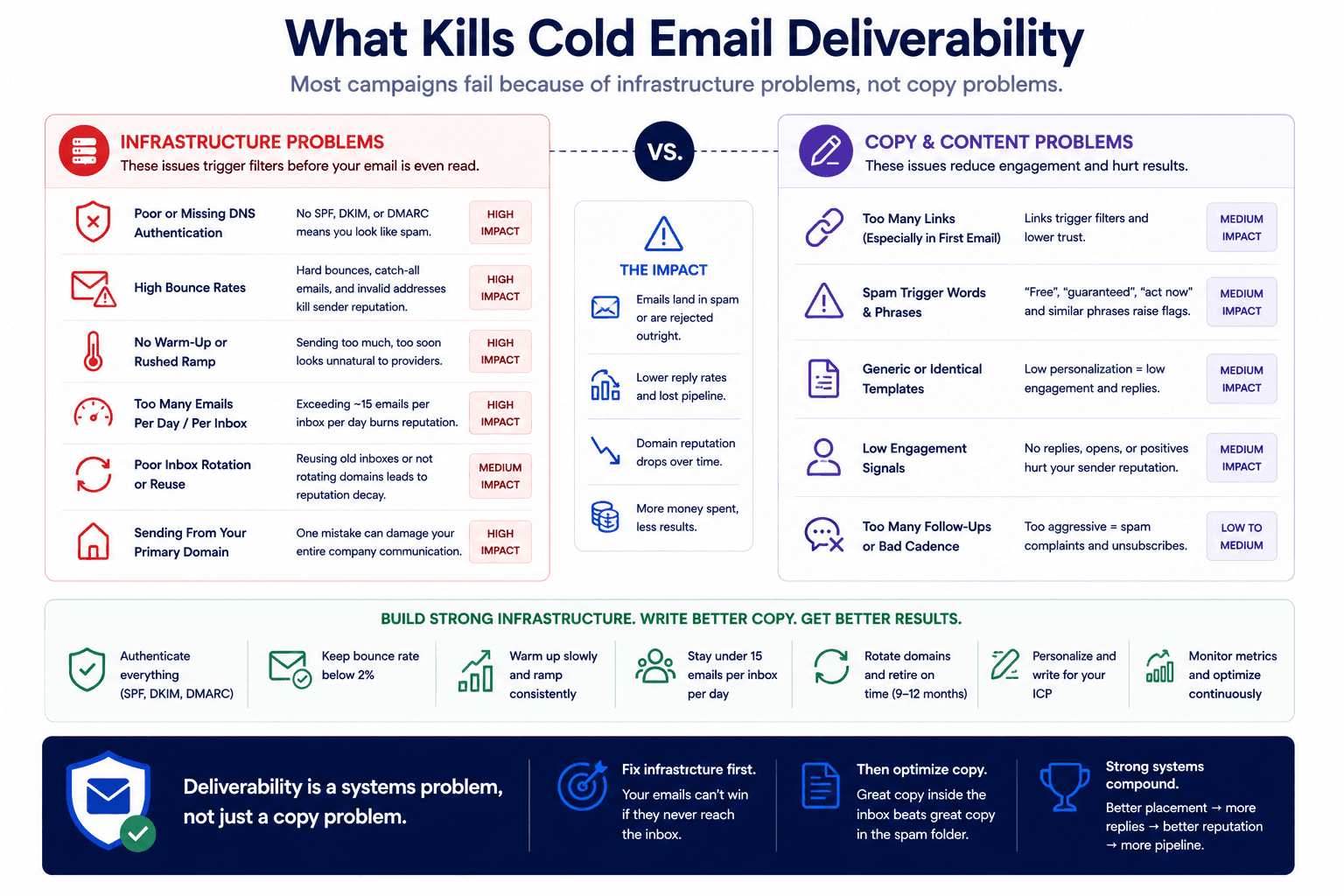
Copy affects deliverability in two ways. First, the content itself can trigger spam filters. Second, irrelevant or poorly written copy causes recipients to manually report you as spam, which damages your sender reputation over time.
Start with the structural rules. Remove all links from your cold emails, especially in the initial send. No meeting links, no website URLs, no free resource downloads, no links in your signature. Links are one of the strongest spam filter signals, and the marginal benefit of tracking clicks does not outweigh the deliverability cost for most B2B senders.
Run your scripts through a spam word checker like MailMeteor or Email Guard before launching. Words like "free," "guarantee," "act now," and "risk free" trigger filters. These tools flag the specific phrases you need to remove.
Use spintax to introduce variance across your sends. Spintax randomizes individual words or phrases so that no two emails leaving your accounts are identical. Greetings, transition phrases, action verbs, benefit descriptions, and CTA openers are all good candidates for spinning because changing them does not alter the meaning of your message. For every 100 emails you can send per day, plan to test at least one new split test per week.
One underused tactic for protecting deliverability: include a PS line encouraging people who are not interested to reply with a short "not interested" or "no thanks." Negative replies still count as engagement. From a deliverability standpoint, a "not interested" reply is far more valuable than no reply at all, because it signals to email providers that real humans are reading and responding to your messages. If you want to audit and improve your cold email copy, you can use Claude Code to diagnose what is suppressing replies and rewrite sequences accordingly.
Avoid the common mistakes that kill reply rates by treating copy as a deliverability variable, not just a conversion variable.
Health Monitoring and Long Term Infrastructure Management
Once your infrastructure is live, monitoring is how you protect it and iterate toward better results. The single most important metric is your reply rate. If your reply rate drops below 1 to 1.5%, including out of office replies, you likely have a deliverability problem. Open rates and click rates are unreliable indicators and should not drive decisions. Open rate tracking also inserts a pixel into your emails, which itself hurts deliverability.
Track reply rates at the domain level, not just the campaign level. If you have 30 domains in a campaign, 25 might be performing well while 5 are dragging down the average. In your sequencer, pull inbox level statistics after each account has sent at least 500 to 1,000 emails. If a specific inbox has a reply rate below 0.3% or a bounce rate above 3%, retire it and replace it.
Sending during holidays is a useful diagnostic tool. Out of office replies almost always mean your email landed in the primary inbox. If you send during a holiday period and get almost no out of office responses, your emails are probably not reaching the inbox.
For domain health over time, keep sending volumes consistent. Sending 500 emails on Monday, nothing Tuesday through Thursday, and 1,000 on Friday looks suspicious to providers. Steady, predictable volume builds trust. When you track cold email deliverability across multiple domains, you can automate the monitoring of DNS authentication, domain reputation, and spam rates from one place.
Expect disconnections between your sequencer and your inbox provider. Google and Microsoft enforce token rotation that requires periodic reauthentication, and sequencer API connections occasionally drop. This is normal. The fix is to reconnect and move on, not to switch providers. Switching providers means burning your existing warm up, setting up new accounts, waiting another 14 days, and disrupting live campaigns, only to encounter the same disconnection issues with the new provider.
One enterprise client we worked with doubled their sales efficiency by building a properly instrumented outbound system with clean infrastructure, verified data, and AI backed sequencing. They went from guessing at deliverability to engaging leads at the right time with data they could actually trust. That kind of improvement comes from treating infrastructure as the foundation, not an afterthought.
What to Do Next
Cold email infrastructure in 2026 is a system with interdependent components. Each layer affects the one above it. Domains support inboxes. DNS authentication validates those inboxes. Warm up builds their reputation. Your sequencer controls the pace. Your lead list determines bounce rates. Your copy determines engagement signals. And monitoring tells you which layer needs attention when results slip.
The order matters. Build in this sequence: calculate your volume, buy and configure domains, set up inboxes with an inbox reseller, warm up for 14 days, connect to your sequencer, verify your lead list twice, write copy with spintax and no links, launch at a gradual ramp, and monitor at the domain level from day one.
If you are scaling outbound and want AI SDRs replacing manual prospecting work, or if you want to build a cold email system that handles lead scoring, enrichment, copy, and campaigns from one workspace, the infrastructure covered here is the prerequisite. Without it, nothing downstream works.
If you want help building this system for your B2B company, or you want us to audit your current infrastructure and identify what is actually causing low reply rates,book a 45 minute call with our team. We will walk through your setup, identify the gaps, and show you what a properly built outbound infrastructure looks like for your specific volume and market.