Article
Apr 3, 2026
How To Write Personalized First Lines For Cold Email Outreach Using Claude
Learn how to use Claude to write personalized cold email first lines at scale using company research, persona data, and structured prompts.
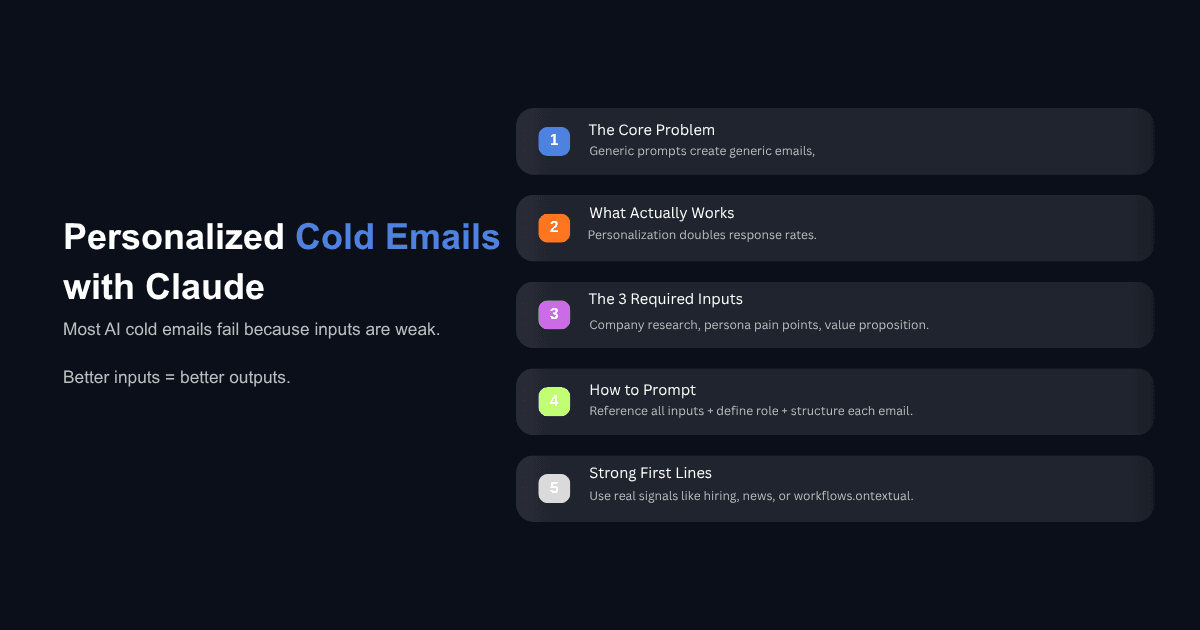
Most sales teams are using AI for cold email the same way. They open Claude or ChatGPT, type something like "write me a cold outbound sequence for a VP of marketing," and get back something that sounds like every other email sitting in their prospect's inbox. The output reads fine on the surface, but it contains nothing specific to the company, the person, or the problem. It gets deleted.
The issue is not the AI model. The issue is what you feed it. When teams move from vague one line prompts to structured, research backed inputs, the quality of the output changes completely. Personalized cold emails that reference real company context see roughly double the response rate of generic messages, according to 2026 B2B cold email benchmarks. The model is capable of producing first lines that sound like you spent twenty minutes researching a prospect. It just needs the right material to work with.
This post walks through the exact workflow for using Claude to generate personalized first lines for cold email outreach, based on three structured inputs that most reps skip entirely.
Why Most AI Cold Emails Still Sound the Same
The Default Prompt Problem
The most common way sales reps use Claude for cold email is something like this: "Write me a three email outbound sequence for a VP of sales." That prompt gives Claude almost nothing to work with. There is no information about the target company, no detail about what the prospect actually deals with day to day, and no context about what you sell or how it connects to their world.
The result is predictable. You get an email that opens with "I hope this finds you well" or "I noticed you're the VP of sales at [Company]." That kind of output is what 61% of decision makers describe as irrelevant, and nearly half of them specifically call out generic, impersonal messaging as the reason they ignore cold outreach.
Claude is not producing bad emails because it lacks capability. It is producing bad emails because the prompt contains no real information to personalize against. The model can only work with what it receives.
What Changes When You Control the Inputs
The difference between a forgettable cold email and one that gets a reply is almost always in the first two sentences. If your opening line references something specific, such as a recent funding round, a shift in hiring patterns, or a known pain point for that exact role, the prospect registers that this email was written with some understanding of their situation.
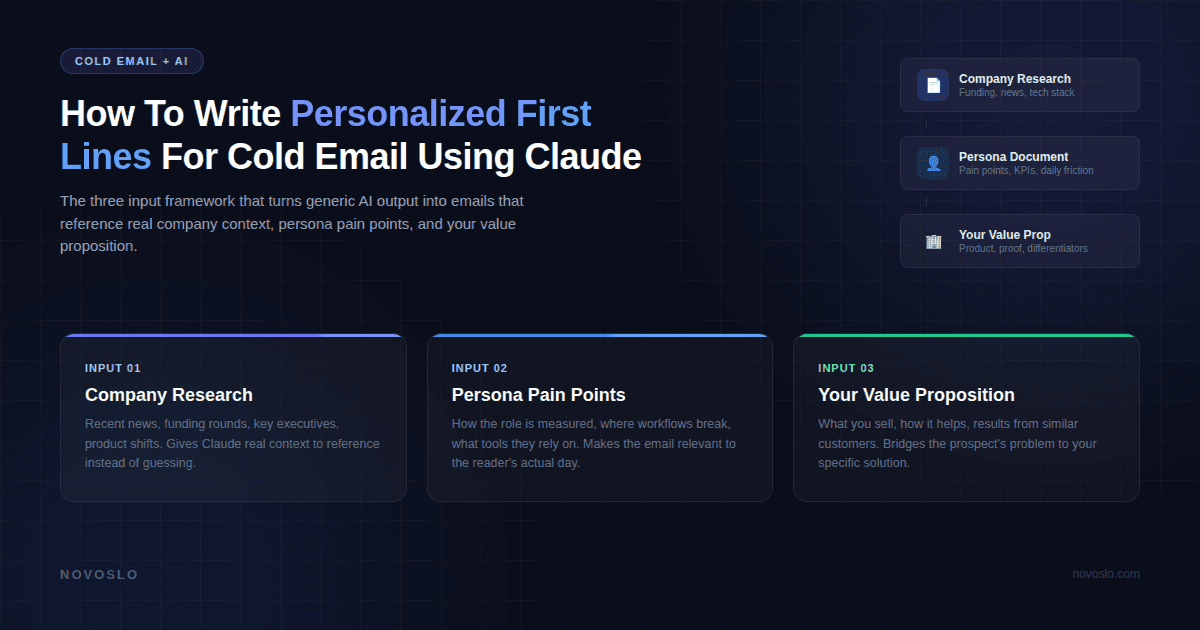
When you give Claude three specific inputs instead of one vague instruction, the output shifts from generic to contextual. The AI stops guessing and starts reasoning from actual data. That is the core of this entire approach: control the inputs, and the outputs take care of themselves.
The Three Inputs That Make Claude's Output Worth Sending
This framework comes from a practical workflow used by sales teams running outbound at scale. Instead of prompting Claude with a single sentence, you provide three structured documents before asking it to write anything. If you have tested Claude against other models for cold outreach, you already know it tends to produce more natural sounding copy. These inputs are what make that natural tone actually relevant.
Input 1: Company Research
The first document you feed Claude is a research brief on the target company. This should cover what the company does, how it makes money, recent news or funding, key executives, and any notable shifts in strategy or product direction.
You can build this research using Claude's own research capabilities, or pull it together manually from the company's website, press releases, and LinkedIn. The important thing is that the document gives Claude enough context to reference specifics. Instead of "I noticed your company is growing," the output can reference a real event, a real product, or a real business challenge tied to what the company is actually doing right now.
For example, if you are targeting executives at a revenue intelligence company like Gong, your research document would cover their product suite, recent integrations, how their reporting tools work, and what their expansion into new market segments looks like. That level of detail is what allows Claude to write a first line like "Pulling together reports from three different dashboards before Monday morning is a lot of manual hours for a number that is still directional" instead of "I noticed you work at a fast growing company."
Input 2: Persona Pain Points
The second input is a document that describes the role you are targeting, not the individual, but the persona. A VP of marketing faces different daily challenges than a VP of sales or a CFO. This document should cover how the role is measured, what problems come up repeatedly, what tools and processes they rely on, and where their workflows tend to break down.
This is not about guessing what one person cares about. It is about understanding what someone in that role, at that type of company, deals with structurally. When Claude has this input, it can connect the company research to a pain point that actually resonates. Instead of a vague reference to "improving efficiency," the email can speak to the specific friction of compiling pipeline reports across disconnected systems, because that is what a VP of marketing at a mid stage SaaS company actually does every week.
Building persona documents takes time upfront, but they are reusable across every campaign targeting that role. One solid VP of Marketing persona document works for fifty different prospects.
Input 3: Your Company's Value Proposition
The third input is a document about your own company. What you sell, how it helps customers, the specific results your product delivers, and how it compares to alternatives in the market.
Without this input, Claude has no way to bridge from the prospect's problem to your solution. The first line might be relevant to the company, but the rest of the email will be generic because the model does not know what you do or why it matters to this specific person. When all three inputs are present, Claude can write a sequence where the first email leads with company specific insight, the second uses social proof from a similar customer, and the third asks a question tied to a process the prospect likely handles manually.
How To Structure Your Prompt for Personalized First Lines
What the Prompt Should Tell Claude
Once your three input documents are attached, the prompt itself should be specific about what you want. A good prompt tells Claude who the email is for (name, role, company), references the three attached documents by name, and gives clear instructions for each email in the sequence.
Here is a practical structure that works well:
Tell Claude you are generating a three email outbound sequence for a specific person at a specific company. Reference your attached company research and note which signals to pull from, such as key metrics, recent news, or hiring data. Reference the persona document and list the pain points you want addressed, like operational efficiency, limited budget visibility, or manual reporting. Reference your company document so Claude can connect the prospect's challenge to your solution.
Then, define what each email should do. Email one should open with a specific insight from the company research, connect it to a challenge the role faces, explain how your solution helps, and close with a low friction question rather than a hard call to action. Email two should include a brief example of how a similar company solved the problem using your platform, kept under four sentences. Email three should lead with a simple question about the prospect's current process, stay under one hundred words, and use a conversational tone.
Keeping Each Email in the Sequence Distinct
One of the strengths of this approach is that each email in the sequence attacks from a different angle. The first leads with research. The second leans on social proof. The third leads with curiosity. This variation happens naturally when you structure the prompt to assign a distinct purpose to each step, and it means the sequence does not feel repetitive even if the prospect reads all three.
You can also specify what Claude should avoid. Telling the model not to use phrases like "I hope this finds you well" or "I noticed that" or "just checking in" removes the most common patterns that signal a mass email. The output reads more like something a thoughtful salesperson would write after actually studying the prospect.
What Does a Good Personalized First Line Look Like?
First Line Based on Company Research
A research based first line references something real about the company that connects to a problem your product solves. If your research document mentions that a company's marketing team is pulling data from multiple reporting tools manually, a strong first line might read: "Pulling weekly reports from three platforms sounds like a full day of work that produces a number everyone still second guesses."
That line works because it is specific to the company's actual situation, it speaks to a frustration the reader likely recognizes, and it creates a natural opening to discuss how your product automates that exact process.
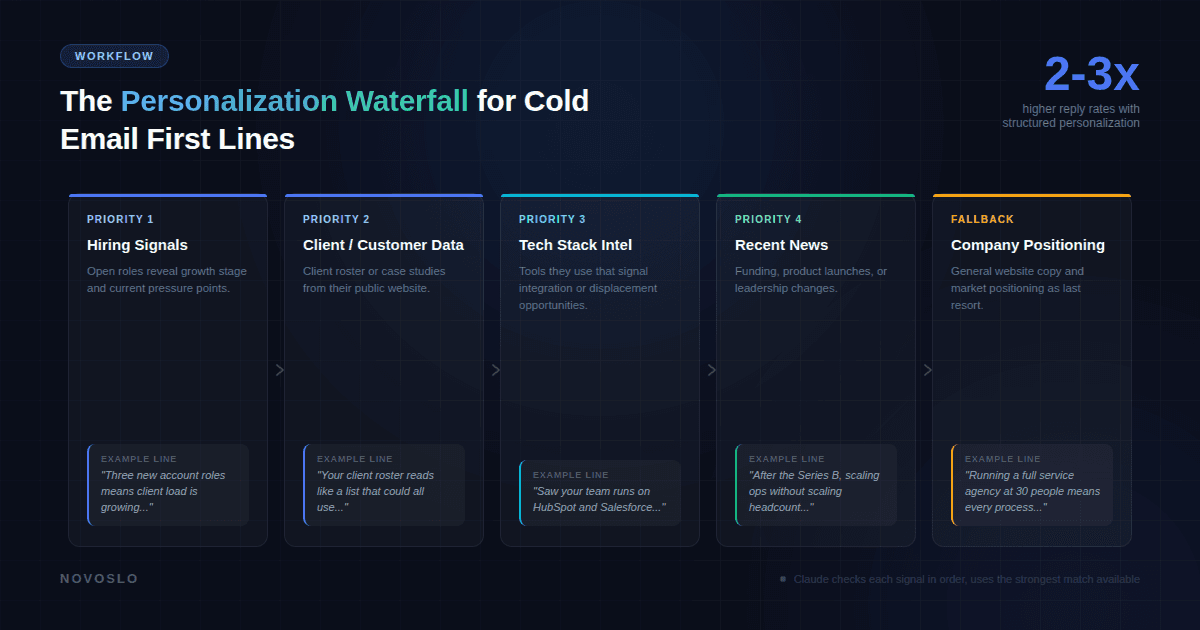
First Line Based on Hiring Signals
Hiring data is one of the strongest personalization signals available. If a company is hiring for three new account management roles, that tells you something about where they are in their growth cycle and what pressures they are likely facing.
A first line built from this signal might read: "Three new account roles means the client load is growing. Do you have a reliable way to bring in new business outside of referrals?" That line connects a visible signal (the hiring) to a likely challenge (demand generation) without making assumptions about the prospect's internal strategy.
Fallback Lines That Still Feel Specific
Not every company will have a clear hiring signal or recent news event to reference. In those cases, a fallback line should still pull from whatever information is available on the company's website, such as their client roster, their positioning, or the industries they serve.
A fallback line like "Your client roster reads like a list of companies that could all use a better way to track campaign performance" is not as targeted as a line built from a specific event, but it still demonstrates that the sender looked at the company's actual business rather than sending a template to a list.
Can You Do This at Scale?
The Personalization Waterfall Approach
Running this process for one prospect at a time works well for high value accounts, but most outbound teams need to cover more ground. A personalization waterfall solves this by establishing a priority order for which signals to use when generating first lines.
The waterfall works like this. For each prospect, Claude first checks whether there is a hiring signal to reference. If that is available, it builds the first line around it. If not, it looks for client or customer data from the company's website. If that is not available, it checks for technology stack information or recent news. If none of those signals are present, it falls back to a line built from the company's general positioning.
This approach means every email gets some level of personalization, but the strongest signals get priority. It also simplifies campaign management because you do not need separate campaigns for each signal type. One outreach team we worked with reported strong enough results from AI personalized sequences using this method that they expanded the engagement to cover ongoing cold email campaigns.
Using Claude Code to Run the Full Workflow
For teams that want to move beyond manually feeding documents into Claude's chat interface, Claude Code offers a way to automate the entire pipeline. You can enrich your lead list using Claude Code and then have it run the personalization waterfall across every prospect automatically.
The workflow looks like this: pull a list of target companies from a prospecting tool, have Claude Code scrape each company's website and pull relevant signals, run the personalization waterfall to select the best first line angle for each prospect, generate the full email sequence, and export everything in a format ready for your sending platform.
Teams building this kind of system can also build a Claude Skill for email marketing that encodes their copywriting standards, tone preferences, and quality checks directly into the workflow. Once the Skill is built, every campaign follows the same standards without requiring manual prompt engineering each time. You can also automate your sales workflow with Claude Skills to handle everything from call prep to follow up sequences.
For teams already using automation tools like Smartlead or Instantly for sending, the output from Claude Code plugs directly into those platforms. The variables, formatting, and structure are all compatible. What used to require a combination of Clay, a copywriter, and six other tools can now run through two: a prospecting API and Claude Code.
What About Reply Rates? Does This Actually Work?
The data on personalized cold email is consistent across multiple large scale studies. The average cold email reply rate in 2026 sits around 3.4%, according to Instantly's benchmark report analyzing platform wide data. But that average includes a massive volume of generic, template based outreach.
Campaigns that use advanced personalization, meaning personalization that goes beyond first name and company name to include role specific context and company signals, consistently see reply rates in the range of 8 to 15%. Research from Mailshake found that only 5% of senders personalize every email, and those who do see two to three times better results than the rest.
The approach described in this post is specifically designed to move your outreach into that higher performing category. By giving Claude company research, persona pain points, and your value proposition, you are producing emails that land in the small percentage of cold outreach that prospects actually read and respond to.
Email length matters too. The best performing cold emails tend to be under 80 words. The three input approach helps here because Claude is working from real context, so it does not need to pad the email with filler to sound credible. The specificity of the first line does the heavy lifting, and the rest of the email can stay short and direct.
If you want to automate email responses with Claude as well, the same principles apply to reply handling. Structured inputs and clear instructions produce better output at every stage of the outreach process.
The Framework in Practice
The entire approach comes down to three reusable documents and a structured prompt. Build your company research document once per target account. Build your persona documents once per role you sell to. Keep your value proposition document updated as your product evolves.
With those three inputs ready, every new campaign is a matter of attaching the right documents, writing a clear prompt, and reviewing the output. The upfront investment in building these documents pays off across every subsequent campaign because the quality of Claude's output scales directly with the quality of the inputs you provide.
Cold email is not dead. But the version of cold email where you send the same template to a thousand people and hope for the best is over. The teams that are still getting strong results are the ones investing in the research and structure that make AI generated personalization actually personal. Claude makes that process faster. The three input framework makes it repeatable.