Article
Aug 14, 2026
Claude Code for Lead Generation: 7 Ways to Use It
Claude Code for lead generation: 7 practical ways teams use it to build lists, enrich leads, filter ICP, personalize copy, and run outbound faster.

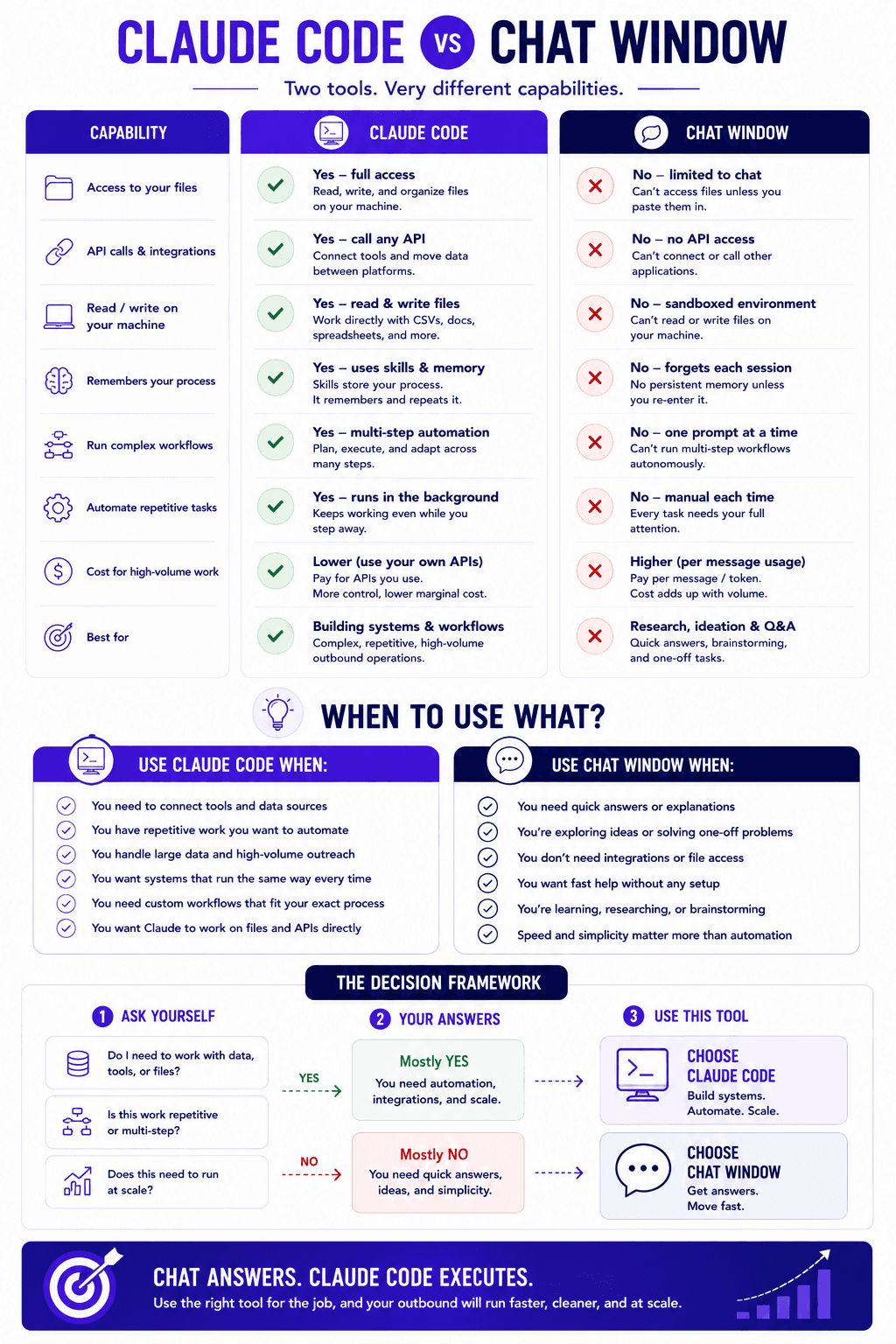
Most people use Claude the same way they use any chatbot. They open a browser tab, ask a question, and read the answer. That works fine for quick research, but it puts a ceiling on what the tool can do for outbound. The chat window has no access to your files, it cannot make calls between your tools, and it forgets your process the moment the session ends.
Claude Code for lead generation removes that ceiling. It runs on your machine, it connects to your data sources and sending platforms, and it holds onto the way your team likes to work. That difference changes what is possible across the whole outbound workflow, from building a list to launching a campaign.
This guide walks through 7 practical ways teams are using Claude Code for lead generation right now. At the end, we give a straight recommendation on when it is the right tool and when a plain chat window is still good enough.
Why Claude Code is different from a chat window
A regular chatbot lives inside a sandbox. You type something in, it responds, and that is the boundary of what it can do. If you ask it to look at a spreadsheet on your computer, it has no way to reach that file.
Claude Code works differently because it sits on your machine and can act on it. It reads and writes files, makes API calls between two pieces of software, and stores instructions so a process you defined once keeps running the same way. A skill in Claude Code is a small folder with a markdown file inside that the tool loads only when the task calls for it, which is what lets it remember your workflow without you spelling it out again.
Setup is lighter than most people expect. You install it from the terminal or the desktop app, and if anything breaks during setup, a screenshot dropped into the web version of Claude usually sorts it out. You do not need a coding background to run any of this.

The 7 ways to use Claude Code for lead generation
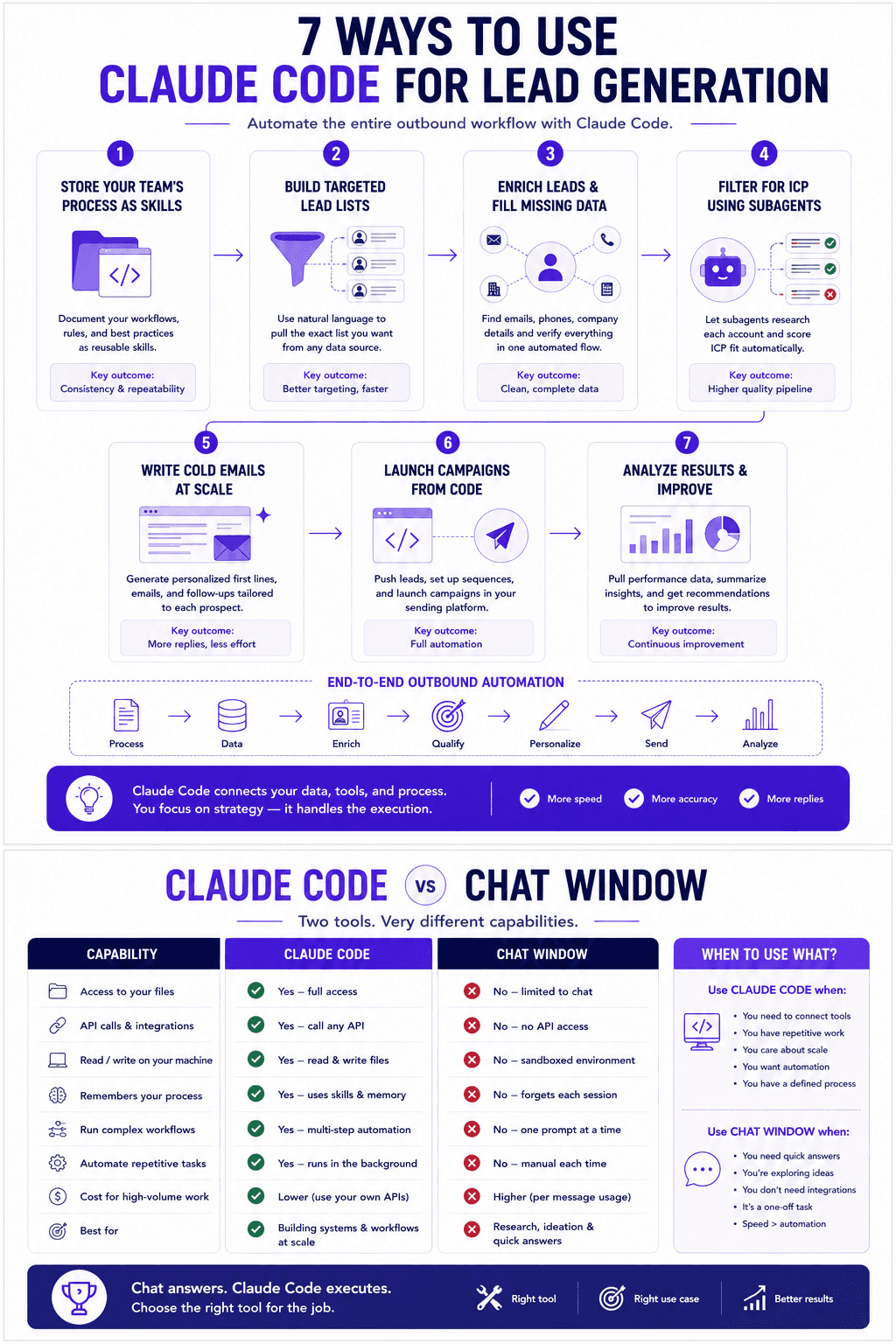
1. Store your team's process as skills
Before skills, teams tried to encode their process through custom GPTs or models they trained themselves. Those approaches worked in a limited way, but they were fragile and hard to maintain. Skills are simpler. A skill file holds the rules, the boundaries, and the step order for a workflow, so instead of spelling out step one, step two, and step three every session, you set it once and Claude Code follows it from then on.
For lead generation this matters in two ways. You can build a process yourself by going back and forth with Claude Code until it runs the way you want, for example a report that flags which domains are most likely landing in spam. You can also use other people's skills instead of learning every edge case yourself, which means pulling in a proven skill for grading cold email copy or setting up domains rather than figuring out the API quirks on your own. If you want the full breakdown, our guides on what Claude skills are and how to use them and the best Claude skills for cold email cover where to start.
2. Build targeted lead lists from your data sources
This is where the file and API access pays off. You point Claude Code at a prospecting database through a skill and describe the list you want, for example marketing leaders at companies with a set headcount range that raised money recently. It reads the skill, proposes the filters it plans to use, and asks clarifying questions before it runs.
You can drive the whole thing with your voice while it pulls the export and opens the file for you to review. No clicking through a filter panel by hand. For a step by step version of this, see how to find B2B leads with Claude Code, and if you are still choosing a data source, our roundup of the best prospecting tools for B2B sales teams helps you decide.
3. Enrich leads and fill in missing data
A raw list is rarely ready to send. Search endpoints often return the contact without the email, so you need a second pass to enrich the records. Claude Code handles that by calling the enrich endpoint, collecting the missing email addresses, and pulling extra fields like the company description at the same time.
You can chain verification into the same flow so the list comes out clean rather than needing a separate cleanup pass later. We break the full process down in how to enrich your lead list using Claude Code, and picking the right checker matters here, so the guide to the best email verification tools for cold email is worth a look before you send.
4. Filter for ICP using subagents
This is one of the more useful patterns and it is easy to miss. Once a list has company descriptions attached, you often want to confirm each account actually fits your ICP. Is this a software company? Do they match the profile you sell to? Doing that by hand across hundreds of rows is slow.
The usual way to automate it is to make direct API calls to a separate model with your own key and prompt, which adds token costs on top of your plan. Claude Code lets you run that classification through subagents instead. A subagent is a separate Claude session with its own context window that the main session spawns to handle a scoped task and report back. Because these run inside your Claude Code usage, the ICP filtering happens without a second bill for every record. The subagent reads each description, decides whether the company fits, and returns its reasoning so you can review and adjust the calls it made. One enterprise client of ours doubled their sales efficiency once this kind of filtering let them engage the right accounts at the right time. If you want to sharpen the criteria you filter on, our guides on what buying signals are and the best Claude MCPs for lead generation are a good next read.
5. Write personalized first lines at scale
The same subagent pattern that filters ICP also writes personalization. Once each lead has enriched context attached, you can ask Claude Code to spin up subagents that draft an opening line for every contact based on what the company actually does. Running these tasks in parallel keeps each one in a clean context window, which is why the quality holds up across a large list instead of degrading as the session fills up.
This is the difference between a personalized field that reads like a template and one that reads like you looked at the account. Our walkthrough on how to write personalized first lines for cold email outreach using Claude shows the prompt structure, and why sales teams are using Claude Code to personalize cold outreach covers why this beats the manual approach.
6. Set up and launch campaigns end to end
Because Claude Code connects to your sending stack, it can carry a list from export all the way into a live campaign. It builds the sequence, wires the leads into your sending platform, and handles the setup steps that usually eat an afternoon. The domain and inbox configuration that trips people up on tools like DynaDot and Zapier can be packaged into a skill so the vocabulary quirks in those APIs stop causing confusion.
That means one operator can go from a fresh list to a scheduled campaign without switching between five interfaces. We cover the sequencing side in how to automate your cold email sequences with Claude Code and the full lead to launch flow in how to use Claude Code for outreach.
7. Run continuous experiments with an optimization loop
This is the newest pattern and the one with the most room to grow. The idea comes from an open source repository by Andrej Karpathy called autoresearch, which lets an agent describe a metric, run an experiment, and keep the change only if it beats the current best. Applied to outbound, you give the loop context on your business, the boundaries of what it is allowed to test, and the outcome you want to improve, such as reply rate.
From there it can pull recent campaign results, check whether the last experiment beat baseline, read your rules again, then change the list filter and the copy and relaunch, all without you touching it. It stores what it tried so it learns which filtering and which copy work best over time. Teams tend to dedicate a slice of total volume to this rather than the whole account, and in some cases the loop starts to match or edge past the human written campaigns. For the fuller picture, see how we built an AI lead generation engine with Claude Code and the GTM engineer's guide to Claude Code.
What does Claude Code cost to run for outbound?
The cost question usually comes down to how you handle the steps that lean on AI, like ICP classification and personalization. If you make direct API calls to a separate model for every record, those tokens add up on top of whatever you already pay for the model and for your sending tools.
Running those same steps through subagents inside Claude Code folds the work into your existing usage instead of billing it separately. That is the practical reason teams lean on the subagent pattern for filtering and first lines. It is not a loophole, it is just using the plan you already have rather than opening a second meter for classification work. The exact economics depend on your volume and plan, so the sensible move is to run a small batch first and measure before you scale it up.
Do you need to know how to code to use it?
No. This is the part that surprises people most. You install Claude Code from the terminal or desktop app with a copy and paste command, and from there you interact with it in plain language. Plenty of operators run their entire list building and enrichment workflow by voice, describing what they want and letting the tool propose filters and confirm details before it runs.
The name has "code" in it, but the day to day experience is closer to briefing a capable teammate than writing software. When setup hits a snag, a screenshot into the web version of Claude usually returns the fix. If you want to see how a whole team gets set up, the GTM engineer's guide to Claude Code lays out the workflow.
Which tool should you actually go for?
Here is the straight answer. If your outbound has repeatable steps and real volume, Claude Code is the right pick. The moment you find yourself explaining the same process over again, building lists on a schedule, enriching in batches, or wanting experiments to run without you babysitting them, the file access, skills, and subagents pay for themselves. That is the situation most B2B teams doing serious cold email are in.
A plain chat window is still fine when the work is genuinely one off. If you need a quick research answer, a single draft, or a one time list you will never rebuild, opening a browser tab and asking is faster than setting anything up. The chat window is the right tool for occasional questions, and Claude Code is the right tool for a running outbound operation.
For most teams reading this, the honest recommendation is to start with Claude Code and build one skill for the process you repeat most. That single step tends to make the rest of the case for you.
Closing thoughts
Three things are worth holding onto. Claude Code matters because it breaks the chat window sandbox and can actually touch your files, tools, and sending stack. Skills and subagents are what turn that access into a repeatable outbound system rather than a series of one off prompts. And the optimization loop points at where this is heading, campaigns that improve themselves inside boundaries you set.
If you want a team that already runs this stack to build it for you, book a call with Novoslo and we will map it to your outbound.