Article
May 25, 2026
The GTM Engineer's Guide to Claude Code
Learn how GTM engineers use Claude Code skills, sub agents, MCP, hooks, and routines to build compounding go to market systems in 2026.
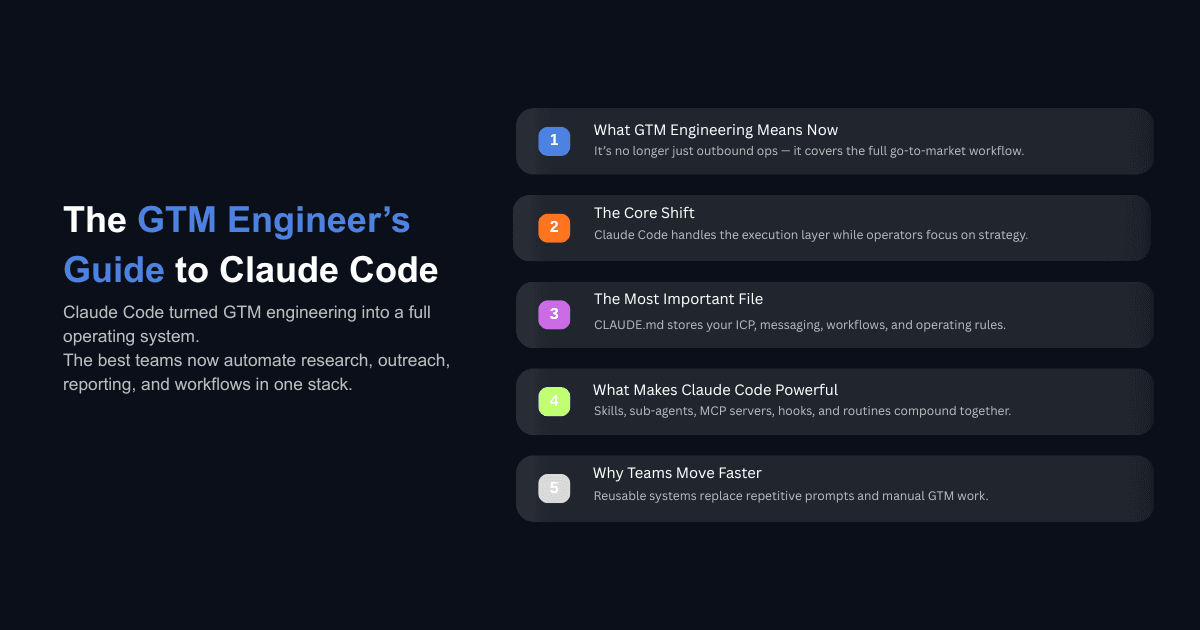
GTM engineering used to mean cold email infrastructure. You would build enrichment tables in Clay, chain together API calls for lead scoring, and manage sending tools. The role was defined by outbound ops.
That scope has expanded. In 2026, GTM engineering covers the entire surface area of how a company goes to market: prospecting, enrichment, content, ad campaigns, CRM automation, sales coaching, and reporting. Claude Code is the reason that expansion is practical for small teams.
Claude Code reached a $2.5 billion annualized run rate by February 2026, with weekly active users doubling over the same period. Eight of the Fortune 10 are now Anthropic customers. But the adoption story that matters most for GTM teams is not about scale. It is about what the tool can actually do. Claude Code reads your file system, executes commands, connects to external APIs, writes and runs code, and carries context forward across every step in a session. That means the entire middle layer of GTM work, the part where you are manually touching keyboards and switching between tabs, can be handed to an agent while you focus on strategy and quality control.
This guide breaks down every Claude Code primitive that matters for go to market work: skills, sub agents, MCP servers, hooks, the /goal command, and routines. Each one maps to a specific layer of GTM execution, and the real value comes from understanding how they compound on top of each other.
What GTM Engineering Actually Means in 2026
From Cold Email Ops to Full Stack Go to Market
The term "GTM engineering" originated with Clay and the workflows around data enrichment and outbound sequencing. That was the first wave. The second wave is broader. GTM engineers now own keyword research that feeds into blog content published directly to a CMS. They build Facebook ad campaigns through the API, analyze performance data, and kill underperformers automatically. They pull call transcripts from tools like Fathom, extract objections and buying signals, and feed that context into outreach sequences. They monitor Google Search Console data and use it to improve existing content based on what is actually ranking.
A survey of 200 GTM operators conducted in early 2026 found that operators are now roughly split between Claude Chat, Claude Code, and Claude Cowork as their primary tool. The average GTM operator adopts 3.5 different use cases, with the top five being productivity, content creation, product marketing, growth marketing, and prospecting. This is not a single function anymore. It is a discipline that touches every revenue generating activity.
The Role of the Conductor, Not the Keyboard
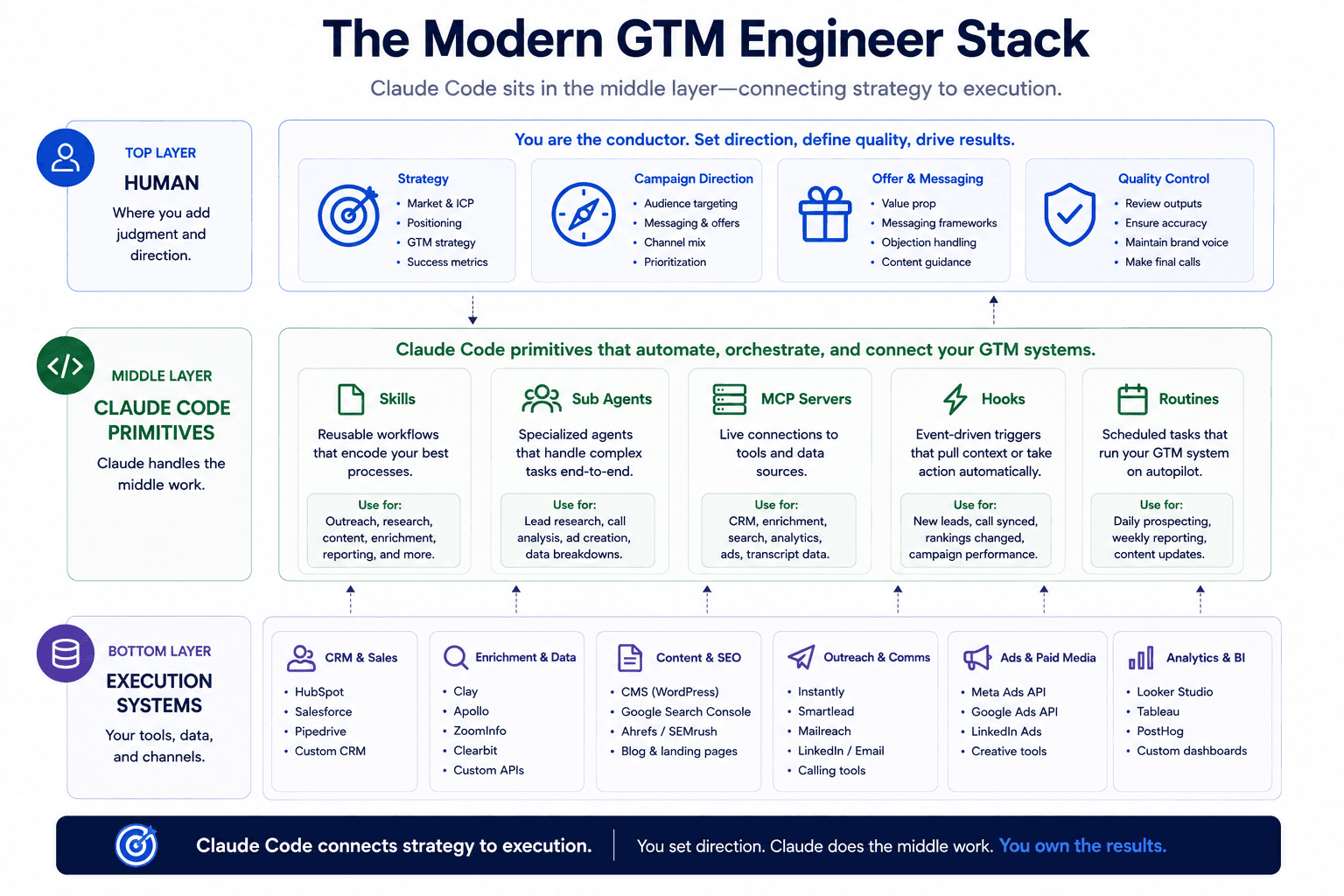
The mental model that matters here is simple. You have ideas. Claude Code does the middle work. You are the quality check at the end. Your job is not to type every email, build every dashboard, or manually research every prospect. Your job is to direct agents toward the right work, provide them with the right context, and verify that the output meets your standard.
This means the core skill for a GTM engineer in 2026 is not prompting. It is system design. Knowing when to use a skill versus a sub agent, when to connect an MCP server versus call an API directly, when to write a hook versus let Claude handle something on its own. That operator taste, the ability to make good judgment calls about how to structure your systems, is what separates teams that get compounding results from teams that treat Claude Code as a fancy chatbot.
How to Set Up Claude Code for GTM Work
If you have not installed Claude Code yet or want to understand the full setup process, we wrote a detailed walkthrough in our guide on how to set up Claude Code for your GTM team. Here is the condensed version of what matters most.
Folder Structure and the Environment File
The foundation is a working folder on your local machine. Inside that folder, you need two things before you do anything else: an environment file that stores all of your API keys, and a CLAUDE.md file that tells Claude how to behave inside your project.
The environment file is where you store credentials for every tool in your stack. Your CRM API key, your enrichment provider credentials, your sending tool access tokens, your search API keys. Every time you add a new tool, the API key goes into this file so Claude can access it across sessions. One practitioner described running five terminal windows simultaneously, each pointed at the same project folder, bouncing between agents working on different tasks. That only works because the environment file makes every API available in every session without re-entering credentials.
Why CLAUDE.md Is Your Operating System
The CLAUDE.md file is the single most important file in your project. Every prompt, every session, every question you ask Claude will be read against this file first. It defines your company context, your ICP, your messaging frameworks, your preferred tools, and any rules you want Claude to follow.
Think of it as the operating system for your GTM work. A well written CLAUDE.md means you can say "write me a cold email for this prospect" and Claude already knows your value proposition, your target audience, your tone preferences, and which data sources to pull from. You do not re-explain any of that. The initial investment in writing a thorough CLAUDE.md pays dividends every day you use the tool.
Skills: Encoding Your Best Workflows Once
What a Skill Actually Is
A skill is a markdown file that teaches Claude a repeatable workflow. Instead of pasting the same long prompt every time you want Claude to research a company, write an email sequence, or build a prospect list, you write the instructions once in a SKILL.md file and invoke it whenever you need it. If you are new to this concept, our explainer on what Claude Skills are and how to use them covers the fundamentals.
Skills are not templates. They carry logic. A signal builder skill does not just scrape a company website. It loads your client context, identifies specific signals that matter for your outreach (funding history, AI adoption intent, leadership transitions, hiring patterns), and structures the output in a format that feeds directly into your email writing skill. Each skill builds on the work of others. Your email writer skill references the output from your signal builder. Your creative variable skill pulls unique personalization angles that your database cannot provide. The whole system compounds because skills are designed to chain together.
Building Custom Skills with Anthropic's Skill Creator
You do not need to write skills by hand. Anthropic released a skill creator tool that handles the iteration process for you. It runs four agents under the hood: one to execute, one to evaluate outputs against your expectations, one to run blind A/B tests, and one to analyze results and suggest improvements.
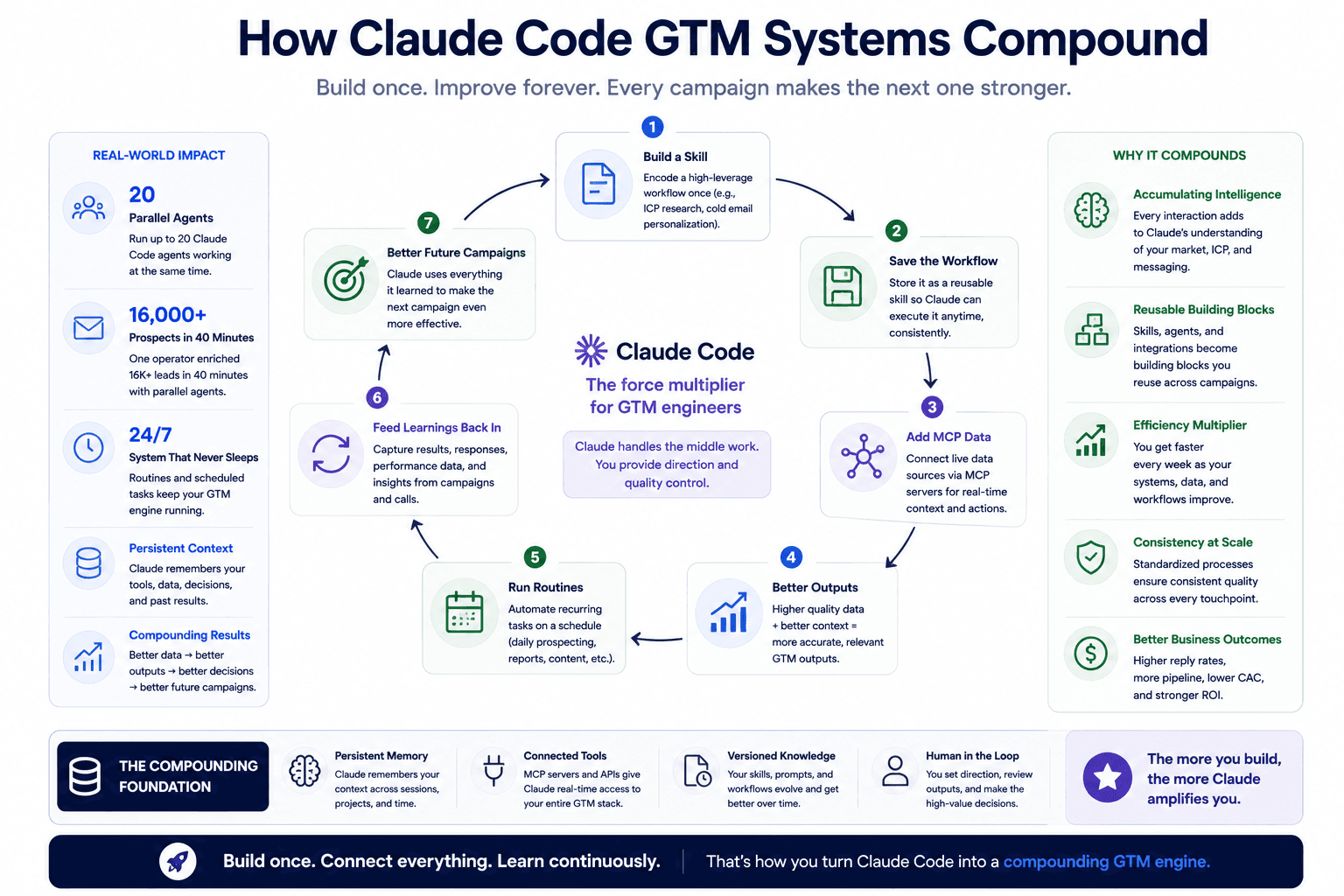
This is the highest leverage way to capture your team's knowledge. Instead of maintaining wikis, recording two hour onboarding videos, or writing ten page SOPs, you encode your best processes into composable, reusable skills that improve over time. One team reported running a signal builder skill across 16,000 prospects in 40 minutes, producing research that would have taken a human team weeks to compile manually. The Claude Skills for writing approach works the same way for content workflows, encoding brand voice, structure rules, and audience context into a reusable format.
Practical GTM Skills Worth Building First
Based on what teams are actually shipping, these are the skills that deliver the most value early:
A signal builder skill that scrapes company websites, funding announcements, LinkedIn posts, and job listings to identify actionable signals for outreach. A reply triage skill that classifies inbound email responses by intent (interested, not now, unsubscribe, wrong person) so you can prioritize follow ups without reading every reply manually. An email writer skill that takes signals, prospect context, and your messaging framework and produces personalized sequences for specific prospects. A creative variable skill that finds personalization data your enrichment tools cannot surface, like specific conference attendance, podcast appearances, or public product announcements. These skills stack. The output of one feeds the input of another, and the quality improves every time you refine the underlying SKILL.md files.
Sub Agents: Scaling Research Without Burning Context
Why Single Session Research Breaks Down
Claude Code has a context window of up to a million tokens on Opus 4.7. That sounds like a lot until you try to research 20 companies in a single session. Each company requires website scraping, LinkedIn analysis, funding data, hiring signals, and tech stack research. That volume of raw information fills up context fast, and output quality degrades as the window fills. Keeping sessions under 200,000 tokens produces noticeably better results than pushing toward the limit.
This is the same problem you would hit in a ChatGPT conversation. You would ask about one company, get a good answer, ask about five more, and by the tenth company the responses would become shallow and repetitive. The model is drowning in its own context.
Running 20 Parallel Agents for Company Intel
Sub agents solve this by isolating research tasks into separate contexts. Instead of researching all 20 companies in your main session, you tell Claude to spin up four sub agents per company, each focused on a specific signal: AI adoption priority, funding history, tech stack, and hiring patterns. Twenty companies with four signals each means 80 parallel research tasks, all running simultaneously, with only the summarized output fed back into your main session.
The practical result is depth that single session research cannot match. One team running this workflow found that sub agents identified specific GTM engineer job postings at target companies, complete with the tools the role would use (Salesforce, Clay, Outreach, Salesloft). That level of detail informed their outreach angles in ways that a surface level company search never could. Teams using Claude Code for prospecting at scale consistently report that sub agents are the feature that made their research actually usable rather than generic.
The Claude Code desktop app now shows sub agent progress in real time through a tasks panel. You can click into any running sub agent, see its output before the full batch completes, and verify quality without waiting for all 80 tasks to finish. This visibility matters because it lets you catch problems early and adjust your approach mid run.
MCP Servers: Connecting Your Entire GTM Stack
CRM, Enrichment, and Call Data Through One Protocol
MCP (Model Context Protocol) is how Claude Code connects to external tools. Instead of writing custom API integration code every time you want to pull data from HubSpot, enrich leads through a data provider, or access your sales call transcripts, you register an MCP server and Claude handles the connection.
The practical setup for most GTM engineers involves three categories of MCP connections. Web search, usually through Brave Search, which lets Claude research companies and prospects in real time. Data enrichment through providers like Databar, Forager, or individual enrichment APIs. And CRM access through HubSpot or Salesforce MCP servers, ideally set to read only access initially until you trust the workflow. If you want to go deeper on how enrichment works within Claude Code, our guide on enriching lead lists using Claude Code walks through the full process.
One particularly powerful use of MCP is connecting your sales call data. Teams using tools like Fathom or Granola as their call recorder can load every sales call transcript into their project folder through MCP. Claude then creates a folder for each prospect with call notes organized by date. When you need to reference a specific objection from a call two months ago or pull pain points for a proposal, the data is already structured and searchable. You do not have to re-watch recordings or search through scattered notes.
When to Use MCP vs CLI vs Direct API
MCP is the right choice when you need persistent access to external data that Claude will reference across multiple sessions. Your CRM data, your call transcripts, your enrichment providers. These connections should be set up once and available whenever Claude needs them.
Direct API calls through CLI are better for one off tasks or when you need more control over exactly how an API is called. Building a custom scraper for a specific conference attendee list, for example, is a task where you want Claude to write and execute a targeted script rather than going through a generic MCP connector. The best business process automation tools in 2026 work together rather than in isolation. The winning stack for most GTM teams is Claude Code for intelligence and custom automation, Clay for data orchestration, and your CRM and sending tools for execution. MCP is the connective tissue that makes all of these tools accessible from one workspace.
Hooks: Getting the Right Context at the Right Time
How Hooks Auto Load Client and Prospect Folders
Getting the right context at the right time is the biggest operational bottleneck for GTM teams that are not technical. Your company knowledge lives in Salesforce, your competitive intel lives in Slack, your call insights live in Fathom, and your prospect research lives in scattered documents. Hooks solve this by creating deterministic rules that fire automatically at specific points in a Claude Code session.
The most immediately useful hook for GTM work is a folder matcher. You configure a hook that monitors every message you send to Claude for words that match your client or prospect folder names. When Claude detects a match, it automatically loads the relevant folder with all its context files, call notes, research outputs, and previous campaign data. No searching, no manually specifying paths, no wasted tokens browsing your file system. You mention "Acme Corp" and Claude already has the folder open.
This is different from Claude making its own judgment about which files to read. Hooks are deterministic. They use regex matching, so the behavior is guaranteed every time. You do not rely on the model deciding it should probably check for relevant files. The hook forces it.
Deterministic Rules in a Probabilistic System
Hooks fire at four lifecycle points: before a tool call, after a tool call, at session start, and at session end. Each point serves different GTM use cases. A pre tool call hook can block dangerous commands before they execute. A post tool call hook can auto lint every file Claude creates. A session start hook can load your CLAUDE.md context and any active campaign files. A session end hook can save a summary of what was accomplished.
For personalizing cold outreach, hooks ensure that every time you mention a prospect company, Claude loads their LinkedIn posts, their funding announcements, their job listings, and any previous interactions your team has had. The personalization layer works because the context layer underneath it is reliable. Without hooks, you would manually tell Claude which files to read every session, which is exactly the kind of repetitive work that makes people abandon tools.
How Do You Improve GTM Campaigns Over Time Using Claude Code?
Reply Triage and Performance Scoring
Most GTM teams approach campaign improvement one dimensionally. They A/B test subject lines, swap CTAs, and let tests run for a week. The analysis stays shallow because the data is messy and no one wants to manually sift through hundreds of email replies to find patterns.
Claude Code makes deeper analysis practical. You pull all replies from a campaign through your sending tool's API or MCP connection. A reply triage skill classifies each response (interested, timing issue, wrong contact, unsubscribe, auto reply). Then you feed the classified data back into Claude for pattern analysis across multiple variables simultaneously: which signals correlated with responses, which prospect profiles converted, which messaging angles landed, and which fell flat.
This is where Claude Code for outreach goes beyond what any single email tool can tell you. Your sending platform can report open rates and reply rates by template variant. It cannot tell you that prospects at companies with active VP of Marketing searches respond at 3x the rate of companies without leadership transitions, but only when the email references their expansion plans rather than their funding round. That kind of multivariate insight requires cross referencing enrichment data with reply data, which is exactly what Claude Code does well.
Using /goal for Iterative Optimization
Anthropic's /goal command, released in May 2026, adds an iterative loop to Claude Code that is particularly useful for optimization tasks. You state a measurable outcome, like "improve the prediction accuracy of which prospects will respond from 30% to 50%," and Claude runs multiple iterations, evaluating its own progress against your stated criteria after each pass.
For GTM work, /goal is useful when you need many iterations to get something right and you are tired of the feedback loop of reviewing v1, giving notes, reviewing v1.1, and giving more notes. One team used /goal to optimize their lead scoring model by feeding it campaign reply data, prospect enrichment data, and the signals they had collected. The system ran multiple turns overnight, adjusting signal weights and evaluating prediction accuracy after each iteration. The output showed which signals were genuinely predictive (funding over $50M combined with active GTM hiring) and which were noise (CEO posting about AI on LinkedIn, which almost everyone does).
This is not something a human team would realistically do. The manual version would require someone to sit with a spreadsheet for hours, testing different signal combinations and scoring thresholds. Claude Code does it in multiple automated passes while you sleep.
Routines: Scheduling Your GTM System to Run Itself
Weekly Prospecting on Autopilot
Routines are scheduled tasks in the Claude Code desktop app. You define what you want done, point it at the right folder, set a frequency, and it runs without your involvement. For GTM teams, the most obvious use is weekly prospecting. You maintain a list of target companies in your prospect folder, and every Monday at 9 AM, Claude runs your full skill stack against them: signal builder, prospect posts, creative variables, email writer. The output lands in your folder as HTML and CSV files ready for review.
This is the payoff for all the infrastructure work in the earlier layers. Your skills define what good research and good email copy look like. Your MCP connections provide access to enrichment data and CRM context. Your hooks ensure the right folders load automatically. Your sub agents handle the research at scale without burning context. Routines tie all of it together into a system that produces campaign ready output on a recurring basis without you opening a terminal.
From Manual Sessions to Recurring Workflows
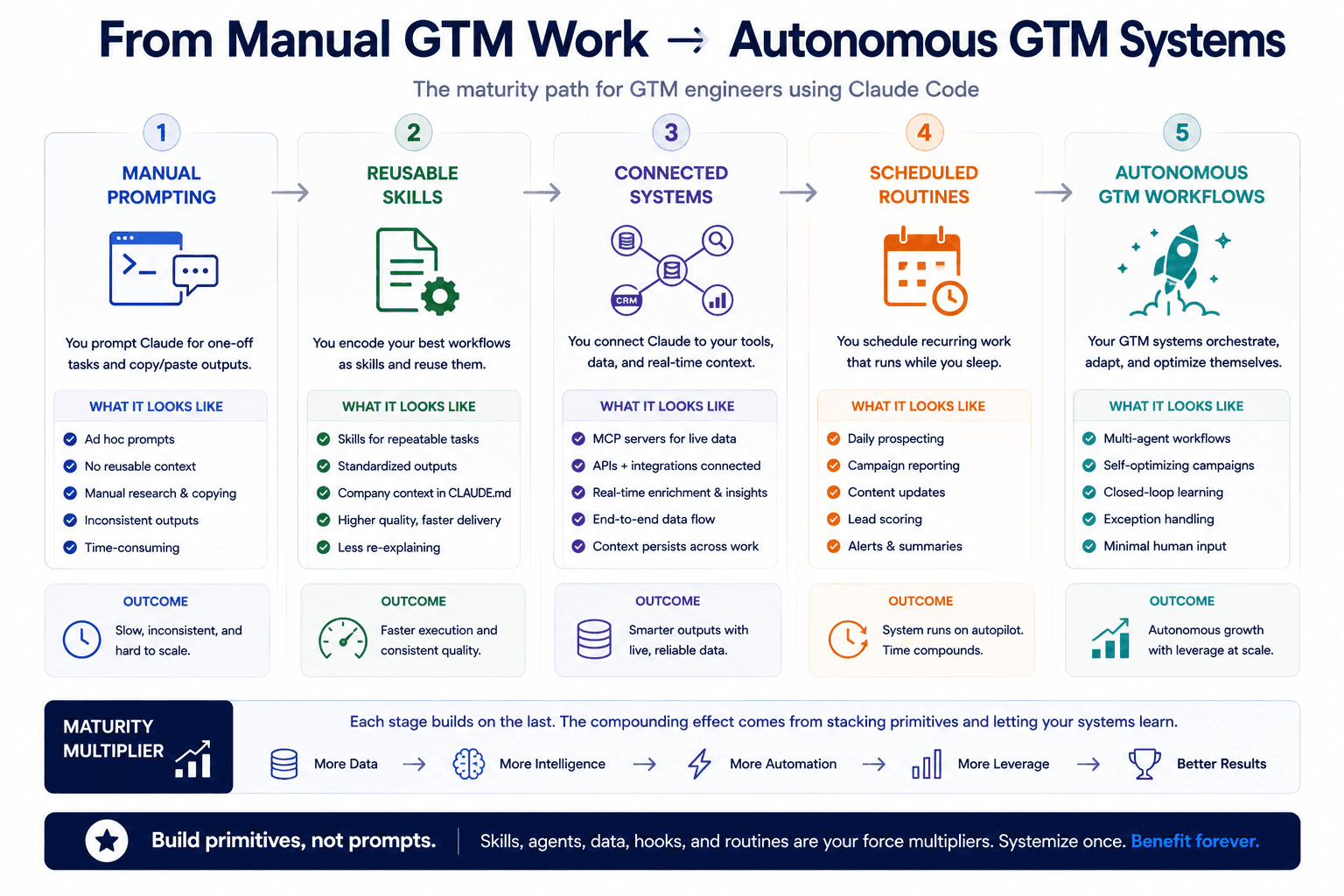
The shift from manual Claude Code sessions to scheduled routines mirrors a larger pattern in how AI operating systems are being built inside companies. The first phase is interactive: you sit with Claude, prompt by prompt, getting work done. The second phase is systematic: you build skills, connect MCP servers, and create reusable workflows. The third phase is autonomous: your workflows run on schedule, produce consistent output, and you only intervene when something needs your judgment.
Most GTM teams are somewhere between phase one and phase two. The teams seeing the largest returns have moved into phase three for at least a few core workflows, usually prospecting and competitive monitoring, while keeping higher judgment tasks like final email approval and strategy decisions in their own hands.
What Separates Teams That Get Results from Those Who Don't?
Operator Taste and System Thinking
The teams getting the most from Claude Code are not the ones with the best prompts. They are the ones who have built the best primitives. A well constructed signal builder skill that has been refined over dozens of iterations will outperform a brilliant one shot prompt every time, because the skill carries institutional knowledge and improves with each use.
Operator taste means knowing when to build a skill versus when to prompt directly. It means understanding that a hook should handle context loading because you need it to be reliable, not optional. It means recognizing that sub agents are worth the setup cost for research tasks because the depth of output justifies the complexity. None of this comes from reading a guide once. It comes from many iterations, from making mistakes, from seeing what produces good output and what produces garbage.
Build Primitives, Not Prompts
The compounding nature of Claude Code primitives is the key insight. Every skill you build makes future skills better because they reference each other. Every MCP connection you set up makes every session more capable. Every hook you configure saves context loading time across hundreds of future sessions. Every routine you schedule replaces hours of manual work every week.
This is why the teams that invested in infrastructure early are pulling ahead. They spent weeks building their CLAUDE.md, their folder structure, their core skills, and their MCP connections. Now they ship in minutes what used to take days. The gap between teams that built systems and teams that kept prompting manually is getting wider every month.
Start Building Your GTM System
Three things to take from this guide. First, Claude Code's value for GTM work comes from its primitives (skills, sub agents, MCP, hooks, routines) working together, not from any single feature in isolation. Second, the hard work is upstream of the email being written, which is in building context, signals, and research systems that make the personalization layer meaningful. Third, the teams winning with Claude Code are building reusable systems that improve over time, not writing one off prompts that start from zero every session.
If you are a founder or GTM leader looking to build these systems for your team and want help setting up the infrastructure that makes Claude Code actually useful for your go to market operations, book a call with us. We have shipped Claude Code into production for multiple go to market organizations and can help you skip the trial and error phase.