Article
May 20, 2026
How to Use Claude Code for Outreach: Automate Cold Email From Lead List to Sent Campaign
Learn how to use Claude Code for outreach. Automate lead scoring, enrichment, email copy, and campaign deployment from one workspace.
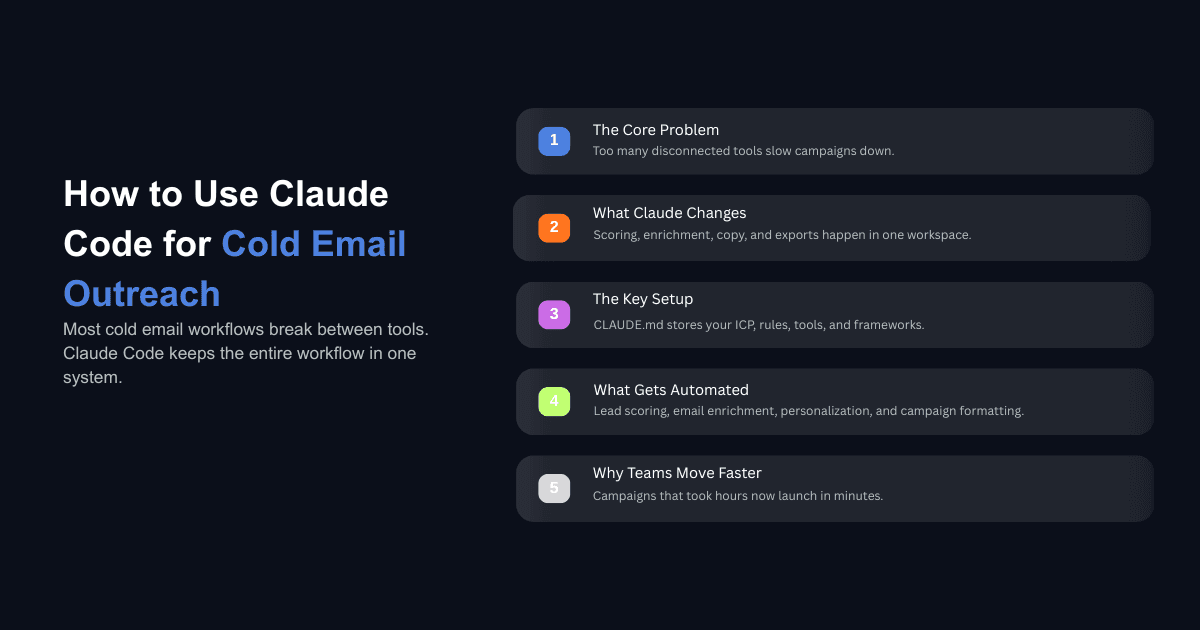
Most cold email operations run on a stack of five or six disconnected tools. A list building platform, one or two enrichment providers, a copywriting layer (or a prompt library someone built in Google Docs), a sequencer, and spreadsheets gluing everything together. The actual campaign is a small fraction of the work. Moving data between tools is where most of the time goes.
This is the part that Claude Code changes. Instead of operating across separate platforms that each own one step, you keep the lead list, the scoring logic, the copy frameworks, and the sequencer integration inside one workspace. The same project that scored your leads last week already knows your ICP, your best performing subject lines, and which API to call for email enrichment. You do not re-explain anything between sessions.
This post walks through the full workflow for using Claude Code for outreach, from a raw lead list to a deployed campaign, with the specific setup, prompts, and integrations that make it work.
Why Cold Email Stacks Keep Breaking
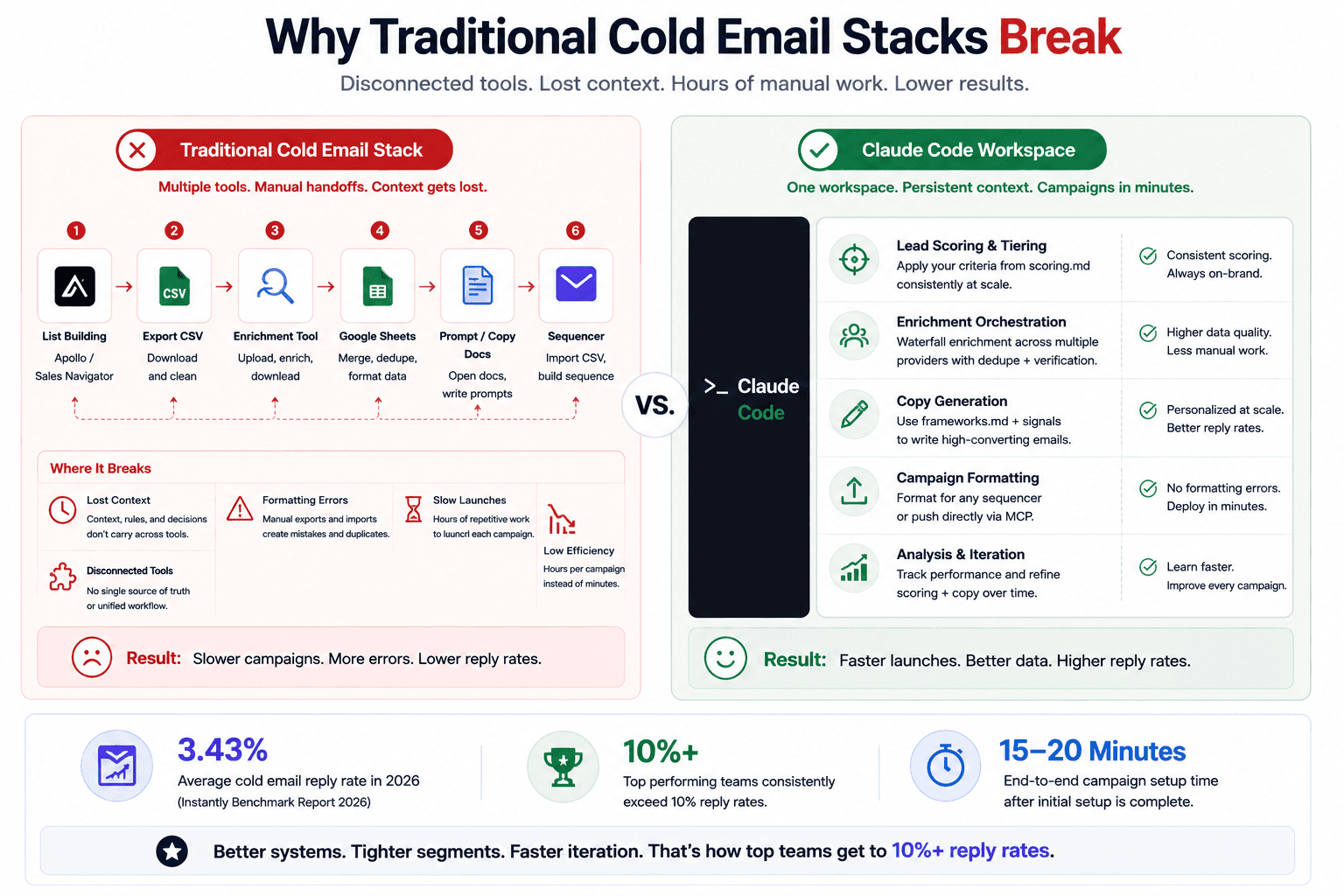
The average cold email reply rate in 2026 sits at 3.43% according to Instantly's benchmark report, which analyzed billions of interactions across thousands of active workspaces. Top performers consistently exceed 10%, and tightly targeted segments occasionally hit 15% or higher. The gap between average and top tier has never been wider.
The teams closing that gap are not sending more emails. They are running more campaigns with tighter segments, better signals, and faster iteration cycles. The bottleneck for most teams is not copywriting or even targeting. It is the operational overhead of building, segmenting, enriching, personalizing, and launching each campaign. What used to take half a day per campaign now needs to happen multiple times per week for teams that want to compete with the top 10%.
This is where the typical stack falls apart. Each tool owns one step and does it reasonably well, but the transitions between tools eat hours. Exporting from Apollo, cleaning the CSV, uploading to an enrichment tool, downloading the enriched file, importing into your sequencer, manually building the sequence. Every handoff introduces delay, formatting errors, and lost context.
Claude Code is Anthropic's CLI tool that runs in your terminal with access to your local file system and the ability to execute code directly. It is not a chatbot interface. It reads and writes files, runs scripts, calls APIs, and remembers project context across sessions through a file called CLAUDE.md. For cold email, this means every step from scoring to copy generation to campaign export happens in one environment where the context carries forward. If you are making cold email mistakes that kill reply rates, consolidating your workflow into a single context aware workspace is one of the fastest ways to start catching them.
One thing to be clear about upfront: Claude Code does not send emails. It does not replace your sequencer, and it does not manage domain warming. It handles the data processing, enrichment orchestration, copy generation, and campaign formatting that happen before you hit send. Your sending tool (Instantly, Smartlead, Salesforge, or whatever you use) still handles delivery.
How to Set Up Claude Code for Cold Email Outreach
The setup has three parts: a context file that acts as the project's memory, supporting reference files that encode your rules, and API connections to external tools.
CLAUDE.md: The Project Brain
CLAUDE.md is a plain text file that lives in your project folder. Claude Code reads it automatically at the start of every session. It is injected into the context before you type anything, which means every session starts with full awareness of your ICP, your scoring criteria, your copy rules, and your tool preferences.
A good CLAUDE.md for cold email outreach includes your business description in two or three sentences, your ICP definition with firmographic and role level criteria, your default tools and API endpoints, your scoring rubric, and any copy rules you have established through testing. Think of it as onboarding documentation for a new hire who needs to run campaigns by next week. For a deeper walkthrough of this setup, the guide on setting up Claude Code for your GTM team covers the folder structure, CLAUDE.md conventions, and MCP connections in detail.
Supporting Files
Beyond CLAUDE.md, create two files before your first campaign:
scoring.md defines the criteria Claude uses to tier your leads. This includes firmographic filters (company size, industry, funding stage), role level filters (titles you target and titles you exclude), and signal data (recent hiring, tech stack, funding rounds). Each criterion gets a weight, and the total determines which tier a lead falls into.
frameworks.md contains your email copy frameworks. This is where you encode what you have learned about subject lines, first line angles, body copy structure, CTAs, and follow up sequencing. If you know that emails under 80 words with a single CTA outperform longer messages, that rule lives here. Claude reads this file during copy generation and applies the rules without you having to repeat them.
API Keys and MCP Connections
Claude Code connects to external tools through the Model Context Protocol (MCP), which is an open standard Anthropic launched for AI tool integrations. For cold email, the connections you need are an enrichment provider (Apollo, Prospeo, or similar) and optionally a direct connection to your sending platform if it supports MCP.
The setup is a config block with your API keys. No custom code required. After the initial configuration, you describe what you want in plain language and Claude Code picks the right tool. The full guide on building a cold email system using Claude Code walks through each of these connections step by step.
How to Score and Tier Your Lead List Inside Claude Code
Start with a raw CSV. This is typically an export from Apollo, LinkedIn Sales Navigator, or whatever list building tool your team uses. Drop it into your project folder.
Prompt something like: "Go through my company list and score each row using the criteria in scoring.md. Bucket the results into Tier 1, Tier 2, Tier 3, and disqualified."
Claude writes a short Python script in the background, reads every row, applies your scoring rules, and outputs a tiered list. Tier 1 gets your best copy and most attention. Tier 2 gets a solid but less customized sequence. Tier 3 gets a simpler approach or gets saved for later. Disqualified leads get removed entirely.
The scoring criteria in your scoring.md file do the heavy lifting here. If you have defined that Series B SaaS companies with 50 to 200 employees that are currently hiring SDRs score highest, Claude applies that consistently across every row. One cold email operations team reported processing 10,000 leads in 15 to 20 minutes with higher consistency than manual classification, which previously took 8 to 12 hours of focused work from a senior team member. The consistency matters because humans start cutting corners after a few hours of repetitive classification work, while the scoring criteria get applied the same way on row 9,000 as on row 1.
The tiering step is also where you start to see the compounding benefit of CLAUDE.md. Your second campaign uses the same scoring criteria as your first, refined by whatever you learned. Your tenth campaign reflects nine rounds of iteration. The project remembers what works.
How to Enrich Contacts and Verify Emails
Once your companies are tiered, you need contacts with verified email addresses. A waterfall approach works best, and Claude Code can orchestrate the entire sequence.
The first pass calls your primary enrichment API (Apollo is the most common choice) and pulls contacts matching your role criteria for each company. For contacts that come back without a verified email, Claude runs a second pass through a backup provider like Prospeo. Typical recovery rates with this two step waterfall land between 85% and 95%, which means you lose far fewer leads than teams relying on a single enrichment source.
The prompt is straightforward: "Enrich the Tier 1 and Tier 2 companies with contacts matching our ICP roles. Use Apollo first, then run Prospeo for any missing emails. Output a clean CSV with company data, contact data, and verification status."
Claude handles the API calls, deduplication, and formatting. The output is a single file ready for the next step. For the full waterfall setup with detailed prompts and API configurations, the guide on how to enrich your lead list using Claude Code covers every step.
This step is where Claude Code saves the most raw time compared to doing it manually. The enrichment waterfall involves calling two or three APIs, matching results, deduplicating contacts, validating email formats, and merging everything into a clean output. Doing this by hand across multiple tools typically takes an hour or more per batch. Claude Code runs it in minutes because it handles the scripting, API calls, and data merging in a single session.
How to Write Cold Email Copy That Sounds Like a Human Wrote It
This is the step where most AI generated cold email falls apart. The default approach of prompting "write me a cold email sequence for a VP of Sales" gives the model almost nothing to work with, and the output reads like every other AI generated email in the prospect's inbox.
The difference with Claude Code is that your frameworks.md file and your CLAUDE.md context give the model structured inputs that produce meaningfully better output. Instead of a generic prompt, Claude already knows your ICP, your value proposition, and your copy rules. On top of that, you feed it the enriched lead data from the previous step, which includes company signals, role context, and any other data points your enrichment pulled.
For personalized first lines, the approach that consistently produces the best results uses three structured inputs: company research (pulled from the prospect's website during enrichment), persona pain points (defined in your CLAUDE.md based on the role you are targeting), and your specific value proposition for that persona. Campaigns using this level of personalization consistently see reply rates in the 8 to 15% range, compared to the 3.43% average. The full method for building these inputs is covered in the guide on personalized first lines for cold email outreach.
A few copy rules that should live in your frameworks.md based on what top performing teams are doing in 2026: keep emails under 80 words, use one clear CTA per email, write the first line based on a real signal from the prospect's company (not a generic "I noticed your company is growing" opener), and shift the angle on each follow up rather than repeating the same pitch with different words. If your existing sequences are underperforming, you can also audit and rewrite weak cold email copy using Claude Code to diagnose what is specifically killing replies before you rebuild.
The important thing to understand is that Claude Code generates the copy and you review it. The goal is not to remove the human from the process. It is to move your time from copy generation (which takes an hour per sequence when done manually) to copy review (which takes five minutes when the drafts are already solid). One outreach team we worked with reported strong enough results from AI generated sequences that they expanded the engagement to cover ongoing campaigns, which suggests the quality holds up across repeated use rather than degrading over time.
Sales teams that want to personalize cold outreach at scale are finding that the combination of structured context (CLAUDE.md), encoded rules (frameworks.md), and enriched lead data produces emails that read like someone spent twenty minutes researching each prospect, even though the generation takes seconds.
How to Deploy Campaigns from Claude Code to Your Sending Tool
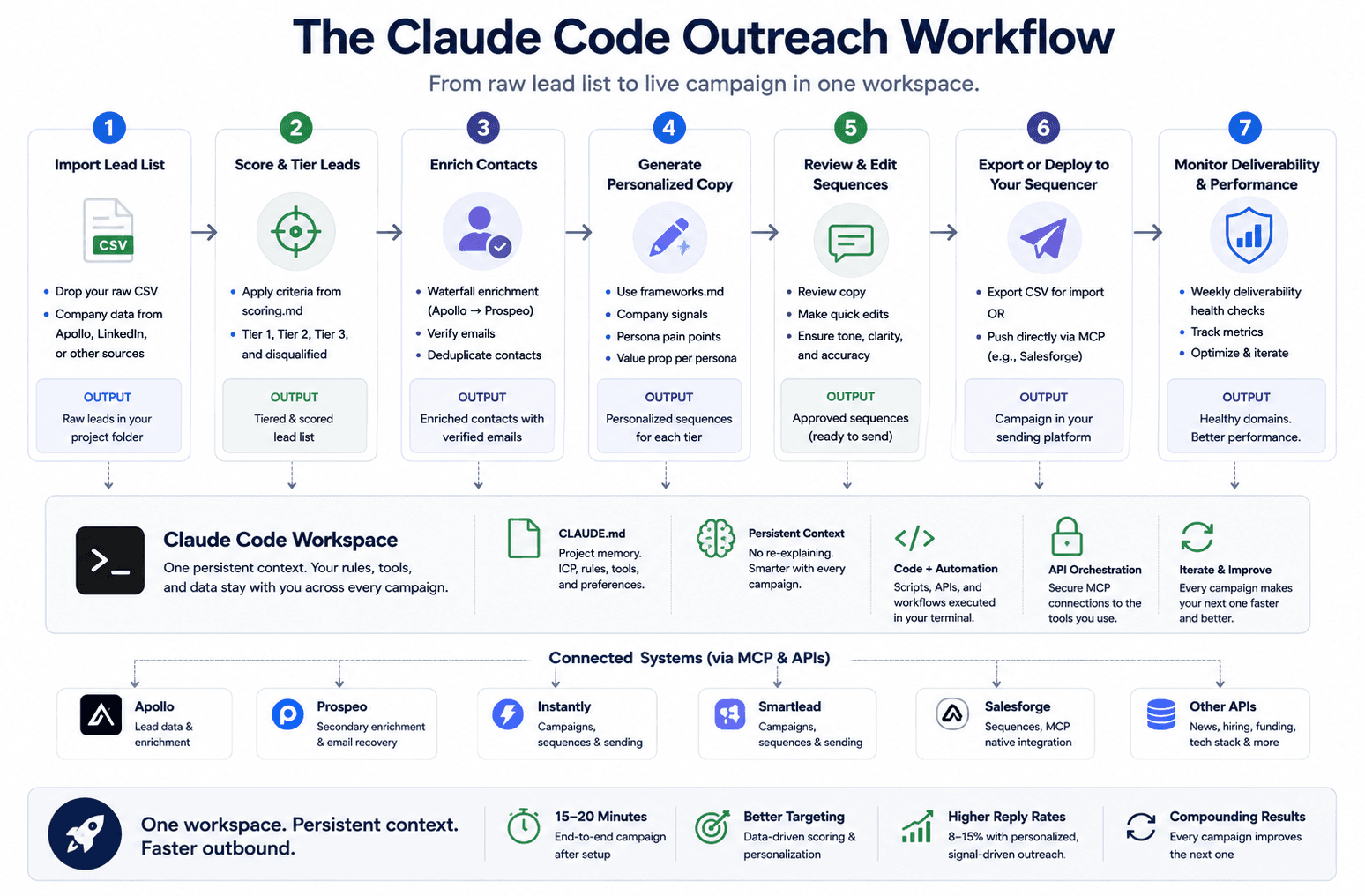
Once your copy is reviewed and approved, the last step is getting it into your sequencer. There are two approaches depending on your sending tool.
CSV Export for Manual Import
The simpler approach is to have Claude Code format the output as a CSV that matches your sequencer's import format. Every sending tool has its own column structure for contact data, personalization variables, and sequence steps. You tell Claude which format you need (or better yet, encode it in your CLAUDE.md), and it outputs a file you can upload directly.
Prompt: "Format the Tier 1 campaign for Instantly import. Include all personalization variables. Use the frameworks file for sequence structure. Three follow ups, each shifting the angle."
Direct MCP Connection
If your sending tool supports MCP (Salesforge is the most notable example), you can create sequences directly from Claude Code without exporting and importing files. Claude drafts the sequence, you review it, and a follow up prompt pushes it into the platform with the right mailboxes and schedule.
This is the fastest path from lead list to live campaign. The full loop runs in about 15 to 20 minutes once your setup files are solid. The first time takes longer because you are still building up the CLAUDE.md and frameworks files, but every subsequent campaign gets faster as your context compounds.
For teams that want to automate their cold email sequences end to end, the direct MCP connection eliminates the last manual step in the workflow. And for teams already using Claude for related work, the same logic applies to automating your broader sales workflow with Claude Skills. Encode your rules once, reuse them across every campaign.
What About Deliverability?
The best copy and targeting in the world will not matter if your emails never reach the inbox. Claude Code can help with the monitoring side of deliverability, though the infrastructure setup (domain warming, DNS authentication, mailbox rotation) still needs to be handled through your sending platform.
What Claude Code can do is run weekly health checks across your sending domains and mailboxes. Through MCP connections to your sending infrastructure, you can prompt Claude to pull deliverability metrics, flag mailboxes with reply rates below a threshold, identify domains with authentication issues, and surface spam rate trends before they become problems.
The guide on tracking cold email deliverability across multiple domains covers the specific setup for monitoring DNS authentication, domain reputation, and spam rates from within Claude Code. For teams managing 50 to 100 mailboxes across multiple clients or campaigns, this replaces the manual process of checking each mailbox individually through sending platform dashboards.
Where Claude Code Fits and Where It Does Not
Claude Code is strongest as a prototyping and weekly campaign tool for teams that run targeted outreach to defined segments. If you are sending a few thousand emails per week across multiple campaigns with different ICPs, different angles, and different offers, the workflow described in this post will save significant time and produce better results than running the same process across disconnected tools.
Where it fits less well is at extreme volume. Teams sending hundreds of thousands of emails per day on shared infrastructure will still need a dedicated platform as the system of record. Claude Code does not manage sending queues, mailbox rotation, or real time deliverability at that scale. It handles everything that happens before the send and everything that happens during the analysis phase afterward.
The other limitation is that Claude Code requires clear instructions. The quality of the output depends entirely on the quality of your CLAUDE.md, your scoring criteria, and your copy frameworks. Teams that invest time in building those files see compounding returns. Teams that skip the setup and prompt generically will get generic results.
The Full Workflow at a Glance
Here is what the end to end process looks like once your setup is in place:
Drop a raw lead list CSV into your project folder.
Prompt Claude to score and tier the list using your criteria in scoring.md.
Prompt Claude to enrich Tier 1 and Tier 2 leads using the waterfall approach.
Prompt Claude to generate email sequences using frameworks.md and the enriched data.
Review and edit the copy (five minutes instead of an hour).
Prompt Claude to format the output for your sequencer or push it directly via MCP.
Run weekly deliverability checks and campaign analysis through Claude Code.
The first campaign takes an hour or two because you are building the setup files. Every campaign after that runs in 15 to 20 minutes. The tenth campaign is meaningfully better than the first because your context, scoring rules, and copy frameworks have been refined through nine rounds of real data.
Cold email in 2026 rewards teams that test more variations, target more specific segments, and iterate faster than their competitors. Claude Code removes the operational bottleneck that has always prevented teams from testing at the pace the channel now demands.
If your team is running outbound and wants help building this workflow from scratch, or if you have an existing cold email operation that needs to run faster and convert better, book a 45 minute call with our team. We will walk through your current stack, identify where Claude Code fits, and map out the implementation together.