Article
Apr 22, 2026
Automate Your Cold Email Sequences with Claude Code
Learn how to automate cold email sequences with Claude Code. Score leads, write copy, and launch campaigns from one workspace
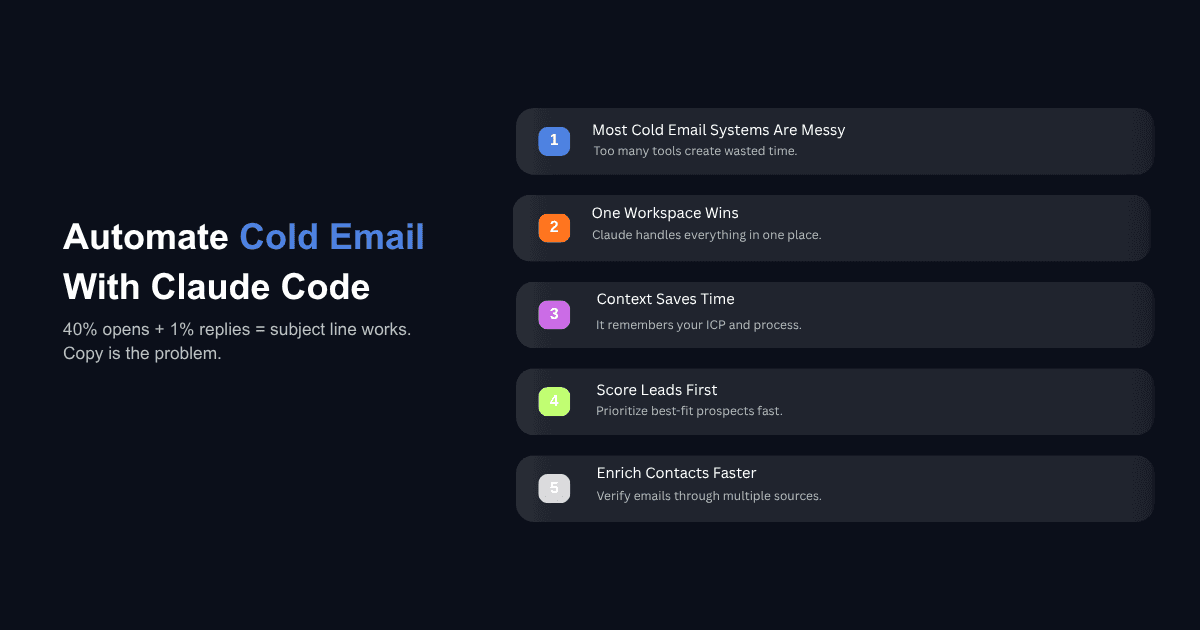
Most cold email operations run on five or six disconnected tools. A list builder, enrichment services, a spreadsheet for scoring, a prompt library for the emails, and a sequencer to send everything. The person running the campaign spends most of their time exporting CSVs, cleaning columns, and re-uploading data between platforms. The campaign itself is a small part of the work.
Claude Code changes where that work happens. Instead of spreading your workflow across disconnected dashboards, you run the full sequence from one workspace that holds your lead list, scoring logic, copy frameworks, and API connections. The same project that scored your leads last Tuesday remembers your ICP, your best subject lines, and which enrichment provider to call first.
This post walks through how to set that up using a workflow we've built and tested across multiple cold email campaigns.
Why Cold Email Stacks Break Down Before the Copy Does
The Real Time Cost Is Data Movement, Not Writing
Writing the emails is rarely the bottleneck. The bottleneck is everything around the writing: pulling a list from Apollo, exporting it, running enrichment, exporting again, cleaning data, feeding it into a copywriting prompt, then formatting for your sequencer. Each handoff introduces friction, errors, and time.
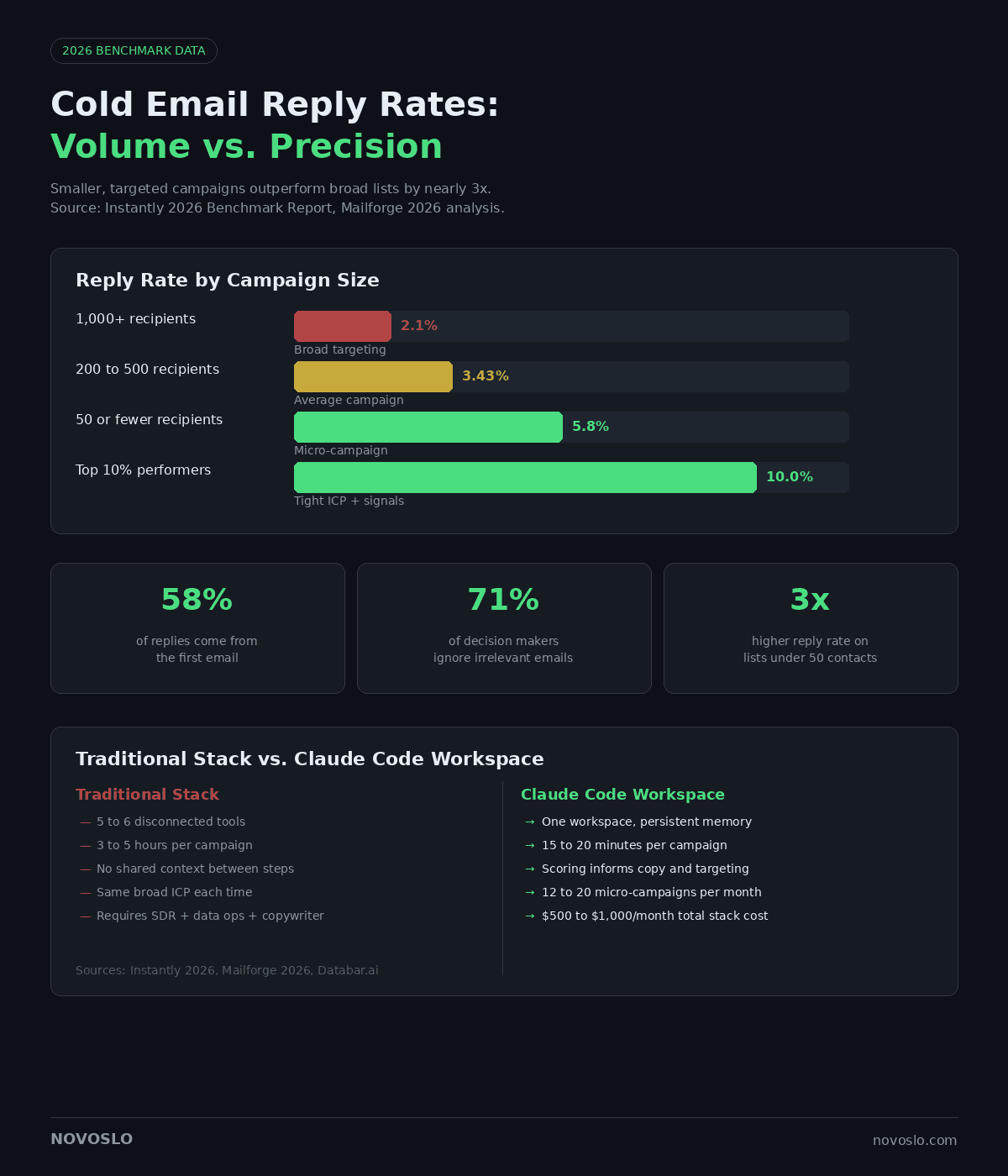
A single campaign built this way takes three to five hours of active work, most of it spent on logistics. When each campaign costs that much time, teams default to fewer campaigns with broader targeting. According to Instantly's 2026 Cold Email Benchmark Report, the overall average reply rate sits at 3.43%, but top performers consistently exceed 10% by running tighter segments with more relevant messaging.
What Happens When Your Tools Don't Share Context
The deeper problem is that no single tool sees the full picture. Your enrichment platform doesn't know which leads scored highest. Your copywriting prompt doesn't know which subject lines performed best last month. Your sequencer doesn't feed reply data back into your scoring logic.
Every campaign starts from scratch because the tools have no shared memory. Claude Code keeps everything in one project with persistent context. When you start a new campaign, it already knows your ICP definition, your scoring rules, which enrichment APIs to call, and what copy frameworks have produced replies in the past.
How Claude Code Changes the Shape of a Cold Email Workflow
The CLAUDE.md File and Why It Matters
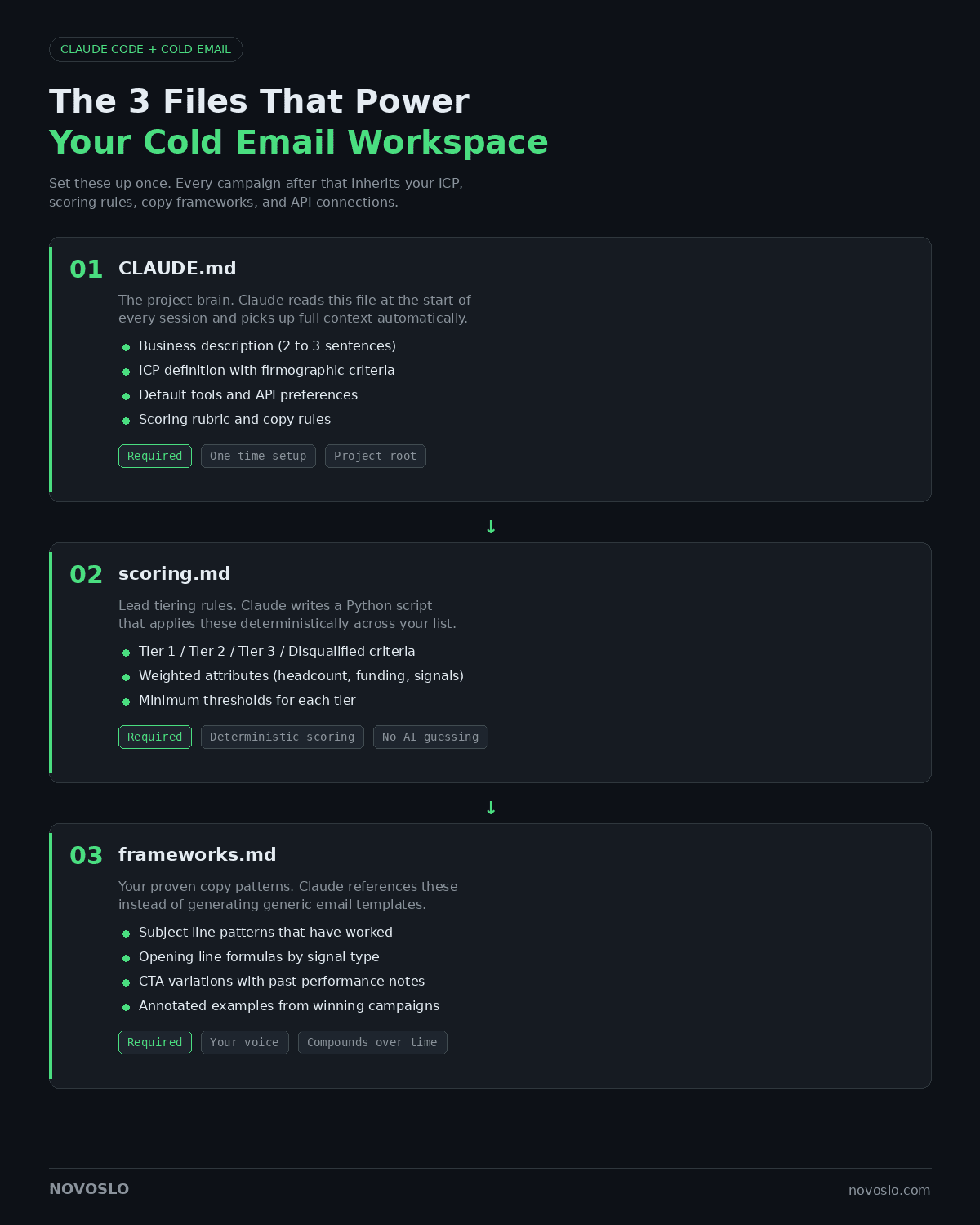
The single most important file in your project is CLAUDE.md. This is a plain text document that lives in your project folder and tells Claude Code who you are, who you sell to, and how your workflow operates. Every time you start a new session, Claude reads this file first and picks up the full context without you re-explaining anything.
A good CLAUDE.md for cold email includes your business description in two or three sentences, your ICP definition with firmographic and role criteria, your default tools (enrichment APIs, sequencer), your scoring rubric, and any copy rules you've established through testing. Think of it as onboarding documentation for a new hire who needs to run campaigns by next week. This file is what makes the system compound over time. Without it, every session starts cold. With it, your tenth campaign builds on everything you learned from the first nine.
Setting Up Your Project Folder
Beyond CLAUDE.md, create two additional files before your first campaign. The first is scoring.md, where you define how leads get tiered. Specify which attributes matter (employee count, funding stage, tech stack, hiring signals) and how they map to Tier 1, Tier 2, Tier 3, and disqualified. Claude uses this file to write a Python script that applies your rules mathematically. The scoring is deterministic, not generative, so it won't hallucinate a lead into the wrong tier.
The second file is frameworks.md, where you store your copy structures: subject line patterns, opening line formulas, CTA variations, and sequence templates that have worked. If you already have campaigns with strong reply rates, paste the copy into this file and annotate what made them work. Claude references these when writing new sequences, so the output reflects your voice and proven patterns rather than generic AI email copy.
Finally, feed Claude the API documentation for each tool in your stack. You do this once per tool. Claude stores the relevant endpoints and calls them automatically in future sessions.
How Do You Build a Cold Email Sequence in Claude Code?
Step 1: Score and Tier Your Lead List
Drop your company CSV into the project folder. This can be a list from Apollo, Sales Navigator, or any paid database. Prompt something like: "Go through my company list and score each row using the criteria in scoring.md. Bucket the results into Tier 1, Tier 2, Tier 3, and disqualified."
Claude writes a short Python script, reads every row, applies your scoring rules, and outputs a tiered list. Tier 1 gets your best copy and most attention. Tier 3 gets a simpler sequence or gets saved for later. This step typically takes two to three minutes for a list of 500 companies.
Step 2: Enrich Contacts and Verify Emails
Once your companies are tiered, you need contacts with verified email addresses. A waterfall approach works best. Claude calls your primary enrichment API first (Apollo, for example), and for contacts that come back without a verified email, it runs a second pass through a backup provider like Prospeo or Lemlist data. Typical recovery rates with a two-step waterfall land between 85% and 95%. For the full waterfall setup, the guide on how to enrich your lead list using Claude Code covers every step.
Step 3: Write Sequences Using Your Own Frameworks
This is where most AI-generated cold email falls apart. A generic prompt like "write me a cold email to this person" produces generic output. The fix is structured context.
Claude reads frameworks.md for your proven copy patterns, then writes sequences that reference real signals from the enrichment data: a recent product launch, an open role that indicates a pain point, a technology they use that connects to your offer. The first touch establishes relevance with a signal-based opening line. The follow-up adds proof or a different angle. The final email is short and direct.
For teams that want to go deeper on opening lines, the walkthrough on writing personalized first lines for cold email covers the structured inputs that produce the strongest results.
Keep sequences short. Two to three emails work better than five or six. Benchmark data from Instantly shows that 58% of all replies come from the first email in a sequence. Each additional follow-up after the third carries an increasing risk of spam complaints, and deliverability damage affects every future campaign you send from those domains.
Step 4: Push to Your Sequencer via API or MCP
Once your sequences are written, Claude can push everything directly into your sending platform. If you use Instantly, Smartlead, or Salesforge, Claude calls the API to create the campaign, upload the contacts, map personalization variables, and set the sending schedule. The campaign lands in draft mode so you can review before activating.
For teams using Salesforge, the MCP (Model Context Protocol) server integration makes this more direct. Claude connects through a single endpoint and handles sequence creation, mailbox assignment, and scheduling through natural language prompts. The same connection works for pulling analytics back into your workspace later.
The full loop from tiered list to scheduled campaign takes about 15 to 20 minutes once your setup files are solid. The first time through, expect an hour or two while you build your CLAUDE.md and frameworks. Every campaign after that gets faster.
What Makes Claude Code Personalization Different from Mail Merge?
Signal-Based First Lines vs. Token Insertion
Most cold email "personalization" is token insertion. A first name, a company name, maybe a recent funding round dropped into a generic template. According to 2026 B2B cold email benchmarks, 71% of decision makers cite lack of relevance as the top reason they ignore cold outreach, and 43% say the email feels impersonal even when it contains personalization tokens.
Claude Code personalization works differently because it has access to the full enrichment data for each prospect. It reads the company's recent activity, the prospect's role context, and the specific signals your scoring identified as relevant. The opening line references something specific enough that the recipient recognizes it as researched rather than templated.
One outreach team we worked with found that this approach produced strong enough results that they expanded the engagement to cover all ongoing cold email campaigns. The improvement came from connecting the research step directly to the copy step inside a single workspace where context carries forward automatically.
For teams evaluating which AI model handles this kind of writing best, the comparison of ChatGPT, Gemini, and Claude for cold outreach emails breaks down the differences with real test results.
The Micro-Campaign Approach and Why Smaller Lists Win
The data on list size and reply rates is consistent across every major benchmark study in 2026. Campaigns targeting 50 or fewer recipients average a 5.8% response rate. Scale that to 1,000 or more contacts and the rate drops to 2.1%. Smaller lists force better targeting, and the reply rate difference is nearly three times higher before you even change the copy.
The reason most teams don't run micro-campaigns is that the setup cost per campaign has always been too high. Claude Code removes that constraint. You describe a new micro-segment in plain language, and Claude builds the list, enriches the contacts, writes the copy, and formats everything for your sequencer in a single session.
Instead of sending 5,000 emails to one broad ICP, you send 300 emails each to fifteen narrow segments and compare response rates. This turns outbound into a testing engine where you learn which segments, pain points, and offers produce the best results before investing more volume behind the winners.
Can Claude Code Handle Campaign Analytics and Iteration?
Pulling Performance Data Back into the Workspace
If your sequencer exposes an API (most do), Claude can pull campaign analytics directly into your project. Reply rates, open rates, bounce rates, and the actual messages that are generating responses. This data lives alongside your lead list, your scoring logic, and your copy frameworks, which means Claude can reason about all of it together rather than you interpreting dashboards in isolation.
A weekly review prompt might look like: "Pull the stats across all active campaigns. Show me reply rates by segment, and pull the actual email copy from the top three and bottom three campaigns by reply rate."
Identifying Which Copy Patterns Drive Replies
The real value of pulling analytics into Claude Code is pattern recognition across campaigns. Claude can map performance back to the specific copy decisions that produced it: which personalization angles worked for VP-level prospects versus director-level, which CTA format converted better in each industry, whether shorter or longer first-touch emails performed better for different company sizes.
Feed those patterns back into frameworks.md and the next round of campaigns starts from a stronger baseline. This is also where it helps to audit and rewrite weak cold email copy using Claude Code, identifying the specific elements dragging down reply rates and replacing them with patterns from your top performers.
Where Claude Code Fits and Where It Doesn't
Weekly Campaign Ops vs. High-Volume Infrastructure
Claude Code is strongest as a campaign building and iteration tool for teams running weekly outbound. A single GTM engineer can realistically build and launch three to five campaigns per week, each targeting a different micro-segment, adding up to 12 to 20 campaigns per month with 300 to 1,000 contacts each.
For teams sending hundreds of thousands of emails daily, a dedicated platform still fits better as the system of record. Claude Code won't replace that kind of volume infrastructure. But it can sit alongside it as the workspace where you prototype campaigns, test messaging, and figure out which segments deserve the volume investment.
The Realistic Cost of Running This Stack
The total cost for a Claude Code cold email operation breaks down to roughly $500 to $1,000 per month: a Claude subscription ($100 to $200/month), data enrichment API costs ($300 to $500/month depending on volume), and your sending tool ($100 to $300/month for platforms like Instantly or Smartlead).
That replaces what previously required an SDR, a data ops person, and a copywriter working across disconnected tools. The cost reduction matters, but the bigger change is speed. A campaign that took a full day of coordination now takes one person 20 minutes of active work in a single workspace.
What This Looks Like in Practice
Cold email in 2026 rewards precision over volume. The teams seeing 10% or higher reply rates are running more campaigns against tighter segments with copy that reflects actual research.
Claude Code makes that approach operationally viable by collapsing tool fragmentation. You score leads, enrich contacts, write sequences, push to your sequencer, and pull analytics back into one workspace that remembers everything from campaign to campaign. The judgment still sits with you: which segments to target, which offers to test, when to double down. Claude Code handles execution so your time goes toward those decisions instead of moving CSVs between tools.
For a full end-to-end walkthrough, the guide on building a cold email system using Claude Code covers the complete setup from project creation to live campaigns.