Article
Dec 31, 2025
How to Implement AI in Your Business in 2026
Learn how you can implement AI transformation in your business without the hype. A workflow first framework that actually works for operators in 2026.
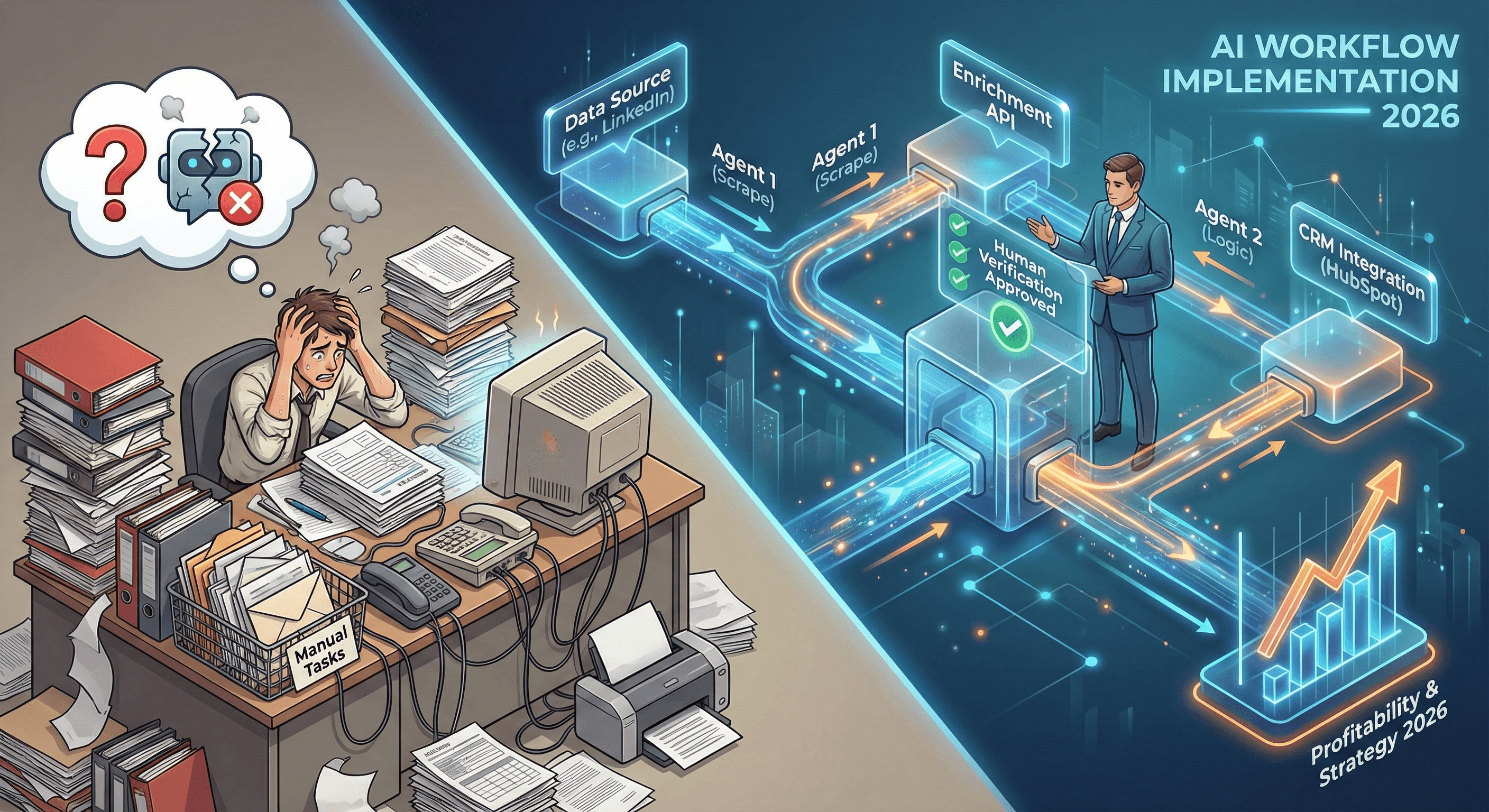
Your team is drowning in manual processes. You've tried AI tools. They failed.
The problem isn't AI. It's that you started with the tool instead of the workflow.
Here's the framework that actually works.
The Real Problem: You're Implementing AI Backwards
Most businesses buy an AI tool first, then try to force it into their process.
A founder uses ChatGPT to generate marketing copy. The output is generic. They spend more time editing than writing. They quit.
A COO buys an AI chatbot for support. It hallucinates. Customers complain. The team goes back to manual support.
A CFO approves an AI expense tool. It doesn't integrate with the ERP. It creates more work. It becomes shelfware.
Same pattern every time: buy tool, force into process, tool fails, blame AI.
But the real issue is the approach. Tool-first thinking doesn't work. It never has.
The market proves this. Eighty-six percent of businesses plan to invest in AI, but only six percent trust it with end-to-end processes.
Why? Because in 2026, the CFO is the economic buyer. Profitability is weighted 2:1 over growth. And they're asking one question: "What does this actually save us?"
Most AI can't answer that. Because it's vaporware built on prompts, not systems.
Why Your Past AI Attempts Failed
Let's be honest about what didn't work.
Failed Approach 1: Buying Tools Without Strategy
You saw a demo. It looked impressive. You bought the subscription. Then you realized it doesn't connect to your CRM. Or your ERP. Or your actual workflow.
The tool sits unused. Shelfware.
Failed Approach 2: Prompting Instead of Building
You spent weeks perfecting prompts. You built a "prompt library." Then OpenAI changed the model. All your prompts broke. You started over.
Prompts aren't infrastructure. They're duct tape.
Failed Approach 3: No Integration Plan
You automated one task. But the output has to be manually copied into another system. You saved 10 minutes but added 15 minutes of copy-paste work.
Net result: slower than before.
These approaches fail because they start with the wrong question. They ask "What can AI do?" instead of "What should AI do for us?"
The Workflow-First Framework: The Only Approach That Works
AI implementation has one starting point: your business logic.
Not the tool. Not the model. Your specific process.
This is workflow-first architecture. Here's how it works.
Stage 1: Map the Exact Bottleneck
You can't automate what you don't understand.
Don't document the ideal process. Document the real one. The one your team actually uses.
Ask three questions:
Where does work get stuck waiting for someone?
Where do errors happen repeatedly?
Where does your team do low-value repetitive work?
Real Example: A sales team spends 4 hours every Monday pulling lead lists from LinkedIn. They manually enrich contact data in Apollo. They copy-paste 200 leads into HubSpot. Then they write personalized first lines for each lead.
That's 4 hours of pure repetitive work. That's the bottleneck.
Stage 2: Define the Business Logic in Plain Language
Once you know the bottleneck, extract the decision-making logic.
What rules does your team follow? What data do they check? What makes them say yes or no?
Write this out step-by-step. If you can't explain it clearly to another human, you can't code it.
Real Example: The sales team's logic:
Search LinkedIn for "Founder" or "CEO" titles
Company must have 10-50 employees
Must be located in the United States
Must be in B2B SaaS industry
If all criteria match: enrich contact data, find email
If email found: write personalized first line mentioning their company
If criteria don't match: skip to next lead
Add qualified leads to HubSpot with tags: "Outbound," "Founder," and today's date
That's the logic. Clear. Specific. Codifiable.
Stage 3: Build the System Architecture (Not a Prompt)
Now you build. But you're not building a chatbot. You're building a multi-agent system with error handling.
What this actually looks like:
Agent 1 (Prospecting Agent):
Scrapes LinkedIn using Phantombuster or Apify
Applies the company size and location filters
Outputs a CSV of raw leads
Agent 2 (Enrichment Agent):
Takes the CSV
Calls Apollo API to enrich contact data
Validates email deliverability using NeverBounce
Flags any leads with incomplete data
Agent 3 (Personalization Agent):
Calls GPT-4 with the lead's LinkedIn profile
Generates a personalized first line using a structured prompt
Ensures the output is under 140 characters
Logs the generation for quality control
Agent 4 (CRM Integration Agent):
Takes the enriched, personalized data
Pushes it to HubSpot via API
Adds the correct tags and properties
Logs the transaction
Human-in-the-Loop Checkpoint: If any agent encounters an error (API timeout, missing data, low confidence score), it flags the lead for manual review instead of proceeding.
This is infrastructure. Not a prompt. Not a shortcut. A system.
Stage 4: Test in Parallel, Then Deploy
Before you turn off the manual process, run the system alongside it.
Compare the outputs. Check accuracy. Verify data quality.
Run this for two weeks. If the automated output matches the manual output at 95%+ accuracy, you deploy.
If it doesn't, you debug. You don't go live until it's bulletproof.
Once deployed, you don't walk away. You monitor logs. You track errors. You iterate.
This is a permanent operational asset. It requires maintenance.
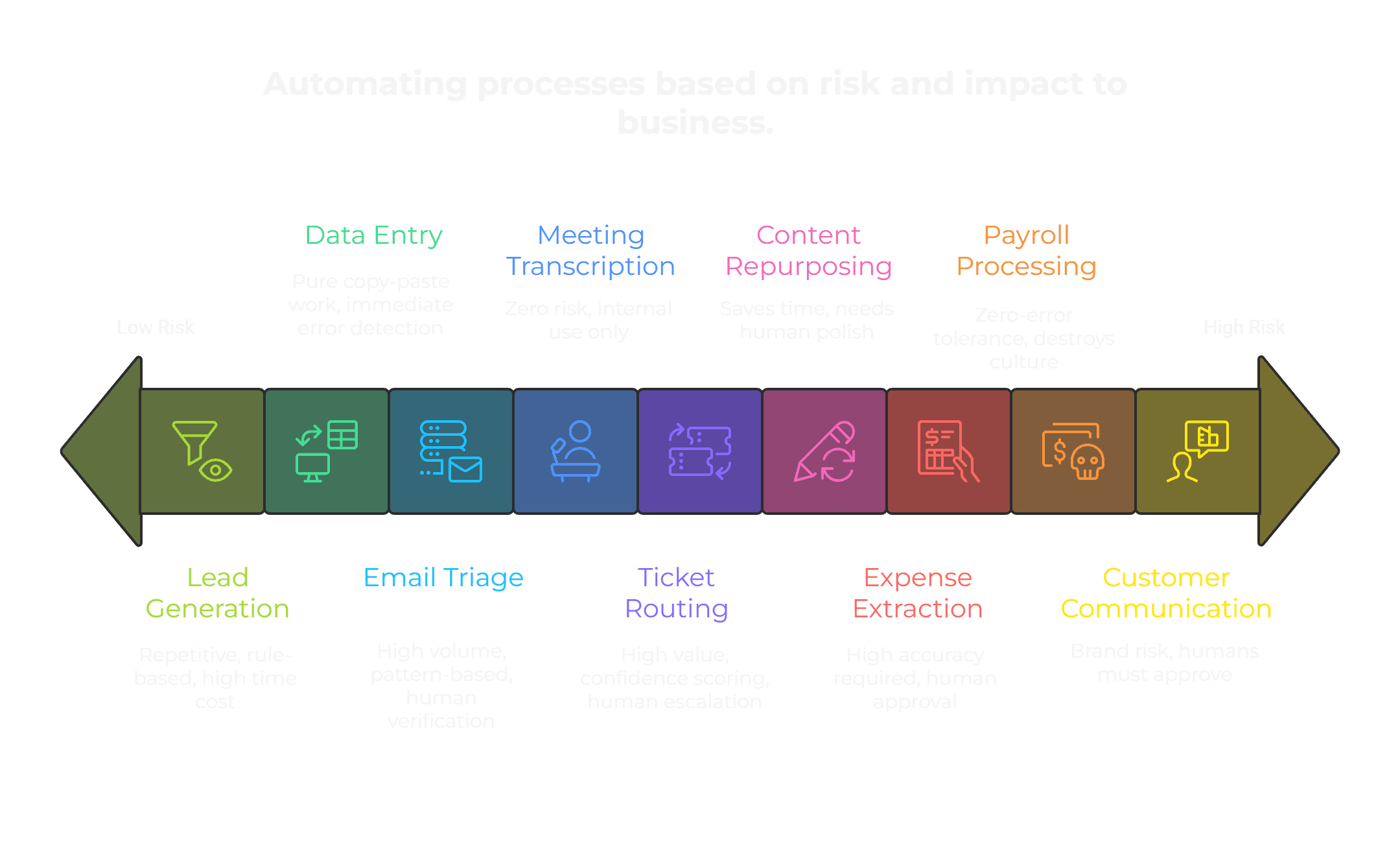
What to Automate First: The Priority Map
Not all processes are equal. Some are easy wins. Others will break your business if done wrong.
Tier 1: High-Impact, Low-Risk (Start Here)
Lead list generation and enrichment Why: Repetitive, rule-based, high time cost, low error risk.
Data entry between systems Why: Pure copy-paste work. If it breaks, you catch it immediately.
Email categorization and triage Why: High volume, pattern-based. Easy to add human verification.
Meeting transcription and action item extraction Why: Zero risk. Output is for internal use only.
Tier 2: Medium-Impact, Medium-Risk (Do After Tier 1)
Customer support ticket routing Why: High value, but requires confidence scoring and human escalation paths.
Content repurposing workflows Why: Saves time, but needs human polish before publishing.
Invoice and expense data extraction Why: High accuracy required. Needs human approval step.
Tier 3: High-Risk (Do Not Automate Yet)
Payroll processing Why: Zero-error tolerance. One mistake destroys culture.
Final customer communication Why: Brand risk. AI can draft, but humans must approve and send.
Strategic decision-making Why: AI can inform. It should not decide.
The rule: automate the repetitive grunt work. Keep humans in control of judgment calls.
The 5 Implementation Mistakes That Kill AI Projects
Mistake 1: Chasing New Tools Instead of Building Systems
Every week, a new AI tool promises to "10x your productivity." You don't need more tools. You need systems.
If the tool dies tomorrow, your workflow should still be portable. That's the test.
Mistake 2: No Human Verification Layer
Fully autonomous AI sounds efficient. It's actually dangerous.
AI makes mistakes. Hallucinations happen. Edge cases break systems.
Always include human checkpoints. The AI does the work. The human verifies it before it touches customers or money.
Mistake 3: Automating a Broken Process
If your manual process is inefficient, automating it just makes you fail faster.
Fix the process first. Optimize the workflow. Then automate.
Mistake 4: Ignoring Integration Requirements
An AI tool that doesn't connect to your CRM, ERP, or database is useless.
Integration is where the value lives. If you can't connect systems via API, don't start.
Mistake 5: Treating AI as a One-Time Project
AI implementation is not a project. It's a system you maintain.
APIs change. Models update. Business logic evolves.
If you're not willing to own it long-term, don't build it.
What Success Actually Looks Like
You'll know AI implementation is working when:
Your team stops doing data entry and starts doing strategy. Tasks that took hours now take seconds. Error rates drop to near zero.
You have full visibility. Dashboards show every action. Logs track every decision. You have control.
Your AI doesn't replace people. It removes the work that burns them out.
And most importantly: your AI executes your business logic while you sleep.
The Only Way Forward
AI in 2026 is not about magic. It's about math.
It's not about buying tools. It's about building systems that execute your business logic autonomously.
The businesses that win won't be the ones talking about AI. They'll be the ones who quietly automated the boring work and moved on to what matters.
Stop chasing tools. Start building workflows.
That's how you implement AI.
Frequently Asked Questions
How long does it take to implement AI workflows?
It depends on complexity. A simple workflow like lead list generation takes 2-3 weeks. More complex multi-agent systems take 6-8 weeks. The key is starting small with one bottleneck, proving it works, then expanding.
Do I need a technical team to implement AI?
You need someone who understands your business logic. The technical build can be outsourced. But if you can't clearly explain your process, no developer can automate it. Start with process documentation first.
What if the AI makes a mistake?
That's why human-in-the-loop systems exist. The AI handles the repetitive work, but humans verify before anything touches customers or financials. You build checkpoints into the system. Mistakes get caught before they cause damage.
How much does AI implementation cost?
Less than hiring full-time employees to do the same work. A workflow that saves 20 hours a week costs less than one month of a junior employee's salary. The system runs indefinitely. The employee doesn't.
Can I use AI if I have legacy systems?
Yes. You don't rip and replace. You build wrapper integrations that sit on top of your current systems. The AI acts like a digital employee clicking buttons in your existing software. No core code changes required.
What happens if the AI tool I'm using shuts down?
If you built your system correctly, the logic is portable. You swap out the AI model or tool, but the workflow architecture stays the same. That's why you build systems, not prompt collections.
How do I know which process to automate first?
Look for high-volume, low-complexity tasks. If your team does it more than 10 times a week and it follows clear rules, automate it. Start with the task that causes the most frustration, not the most strategic one.
Is AI implementation secure?
Only if you build it that way. Use SOC2-compliant infrastructure. Don't send sensitive data to public AI models. Keep data in your own secure environment. Treat AI like any other software tool—security is your responsibility.
Ready to Stop Experimenting and Start Executing?
Most businesses waste months testing AI tools that don't integrate with their actual workflows.
If you're tired of pilots that go nowhere and tools that become shelfware, we can help.
We don't sell you software. We build audit and build custom ai workflows that execute your business logic autonomously.
Book an AI audit. We'll map your bottlenecks, define your logic, and show you exactly what's automatable in your business.
No generic advice. No sales pitch. Just a clear roadmap of what to build and why.