Article
Jan 1, 2026
AI Agents vs AI Tools: Why Most Businesses Are Wasting Money on the Wrong Solution
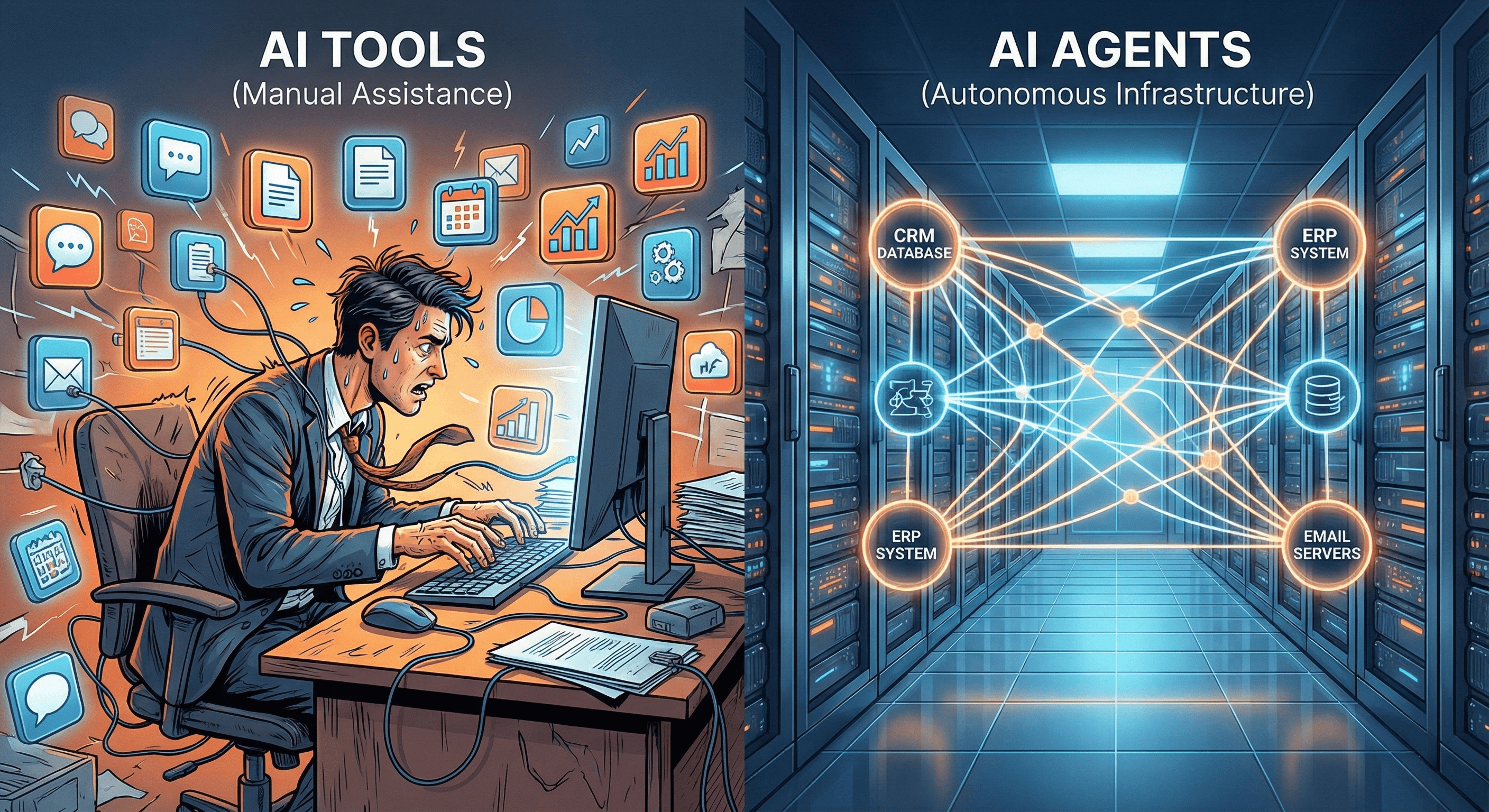
Everyone's talking about AI transformation. Your competitors are posting about it. Your board is asking about it. LinkedIn is drowning in it. But here's what nobody's telling you: Most businesses are buying the wrong thing. They're spending thousands on AI tools thinking they're transforming operations. They're not. They're just adding more software to an already bloated stack. The confusion isn't your fault. The market has deliberately blurred the line between AI tools and AI agents. One is a productivity app. The other is infrastructure. And if you don't know the difference, you're burning money. Here's what you'll learn: - Why most "AI transformations" stall at the pilot phase - The fundamental difference between tools and agents (and why it matters to your P&L) - A decision framework to know which one you actually need - How to avoid the most expensive mistakes companies make
Why Most "AI Transformations" Fail Before They Start
Here's the pattern.
A company buys ChatGPT licenses for the team. Maybe they add Notion AI. Throw in a few automation templates from an "AI agency." Six months later, nothing has changed operationally.
The CEO is frustrated. The CFO flags it as wasted spend. The team goes back to their spreadsheets.
Sound familiar?
The data backs this up. According to recent surveys, 86% of companies plan to invest in AI. But only 6% trust AI agents with end-to-end processes. The gap between adoption and transformation is massive.
The culprit isn't the technology. It's the category mistake.
Most businesses are treating AI transformation like a software purchase. They're buying tools when they need infrastructure. They're adding subscriptions when they need workflow redesign.
Tools don't transform operations. They accelerate tasks you're already doing manually.
Real transformation happens when you stop doing the task entirely. When the workflow runs autonomously. When you've replaced the manual process with logic that executes itself.
That's the difference between AI tools and AI agents.
And it's the reason most transformations fail before they start.
What AI Tools Actually Are (And What They're Good For)
Let's define terms clearly.
An AI tool is software that assists you in completing a task. You're still the operator. The tool makes you faster, but it doesn't remove you from the loop.
Examples:
ChatGPT for writing emails
Grammarly for proofreading
Jasper for content drafts
Notion AI for summarizing meeting notes
These are valuable. They save time. They reduce cognitive load. But here's the limitation:
You're still doing the work.
Think about it. ChatGPT doesn't send the email for you. It drafts it. You still have to review it, edit it, paste it into Gmail, and hit send.
Notion AI doesn't attend your meetings. It summarizes the notes you took.
The workflow hasn't changed. You're just moving faster through the same manual steps.
This is fine for individual productivity. If you're a founder writing 50 emails a day, ChatGPT is a legitimate efficiency gain.
But it's not transformation.
Your finance team is still manually entering invoice data into your ERP. Your sales team is still copying leads from LinkedIn into your CRM. Your ops team is still chasing approvals across Slack and email.
AI tools don't fix that. They might make the copy-paste faster, but the process is still manual.
If your goal is operational leverage—scaling output without scaling headcount—tools won't get you there.
For that, you need agents.
What AI Agents Actually Are (And Why They're Different)
Here's the simplest way to understand an AI agent:
It's software that executes a complete workflow without you.
Not "helps you execute." Not "drafts for you to review." It runs the entire process autonomously based on the business logic you define.
Let me give you a real example.
Most B2B companies generate lead lists manually. Someone opens LinkedIn, searches for decision-makers, copies their info into a spreadsheet, cross-references it with company data, and passes it to sales.
This takes 5-10 hours per week. It's repetitive. It's low-value. But it's essential.
An AI tool might help you write better LinkedIn search queries. Maybe it drafts outreach copy faster.
An AI agent does the entire job:
Searches LinkedIn based on your ICP criteria
Extracts contact information
Enriches it with company revenue data from third-party APIs
Cross-checks against your CRM to avoid duplicates
Scores leads based on fit
Populates your sales pipeline
Sends a Slack notification when it's done
You wake up Monday morning. The list is ready. No human touched it.
That's an agent.
The Four Characteristics of AI Agents
1. Multi-step decision logic
Agents don't just respond to prompts. They execute conditional workflows. "If the company has 50-200 employees AND is in fintech AND has raised Series A funding, add to high-priority list."
2. System integration
Agents connect to your actual business systems. Your CRM. Your ERP. Your email. Your database. They don't live in isolation—they're wired into your operations.
3. Runs without human input
Once deployed, an agent executes on a schedule or trigger. You don't prompt it every time. It just runs.
4. Business logic codification
This is the critical part. An agent is your process turned into permanent code. It's not a subscription you rent. It's infrastructure you own.
The shift isn't subtle.
You're moving from "AI helps me work" to "AI does the work."
From assistant to employee.
That's what transformation actually looks like.
Not sure where your business falls on this spectrum? Most operations have a mix of tasks that need tools and workflows that need agents. We've built a simple framework to help you identify which processes are actually automatable—and which ones you're wasting money trying to automate. See the framework here.
The 5 Key Differences That Actually Matter
Let's break this down into a decision framework you can use.
1. Autonomy vs Assistance
AI Tools: Require you to initiate, review, and finalize.
AI Agents: Initiate, execute, and complete without you.
Ask yourself: Does this run while I sleep?
If no, it's a tool.
2. Integration vs Isolation
AI Tools: Usually standalone apps. You copy-paste between systems.
AI Agents: Directly integrated with your tech stack. They read from and write to your databases, CRMs, ERPs.
Ask yourself: Does it talk to my other systems, or do I have to manually move data?
If you're still the middleware, it's a tool.
3. Workflows vs Tasks
AI Tools: Handle discrete tasks (draft an email, summarize a doc).
AI Agents: Execute complete workflows (generate leads → enrich data → score fit → update CRM → notify sales).
Ask yourself: Does this complete an end-to-end process, or just assist with one step?
If it's just a step, it's a tool.
4. ROI Model
AI Tools: Time saved (you move faster).
AI Agents: Headcount avoided (you don't need to hire for this function).
Ask yourself: Am I measuring this in hours saved or FTEs avoided?
If it's hours, it's a tool. If it's headcount, it's an agent.
5. Implementation
AI Tools: Sign up, log in, start using.
AI Agents: Require workflow mapping, integration work, testing, and deployment.
Ask yourself: Can I use this in 5 minutes, or does it require infrastructure build?
If it's instant, it's a tool. If it requires architecture, it's an agent.
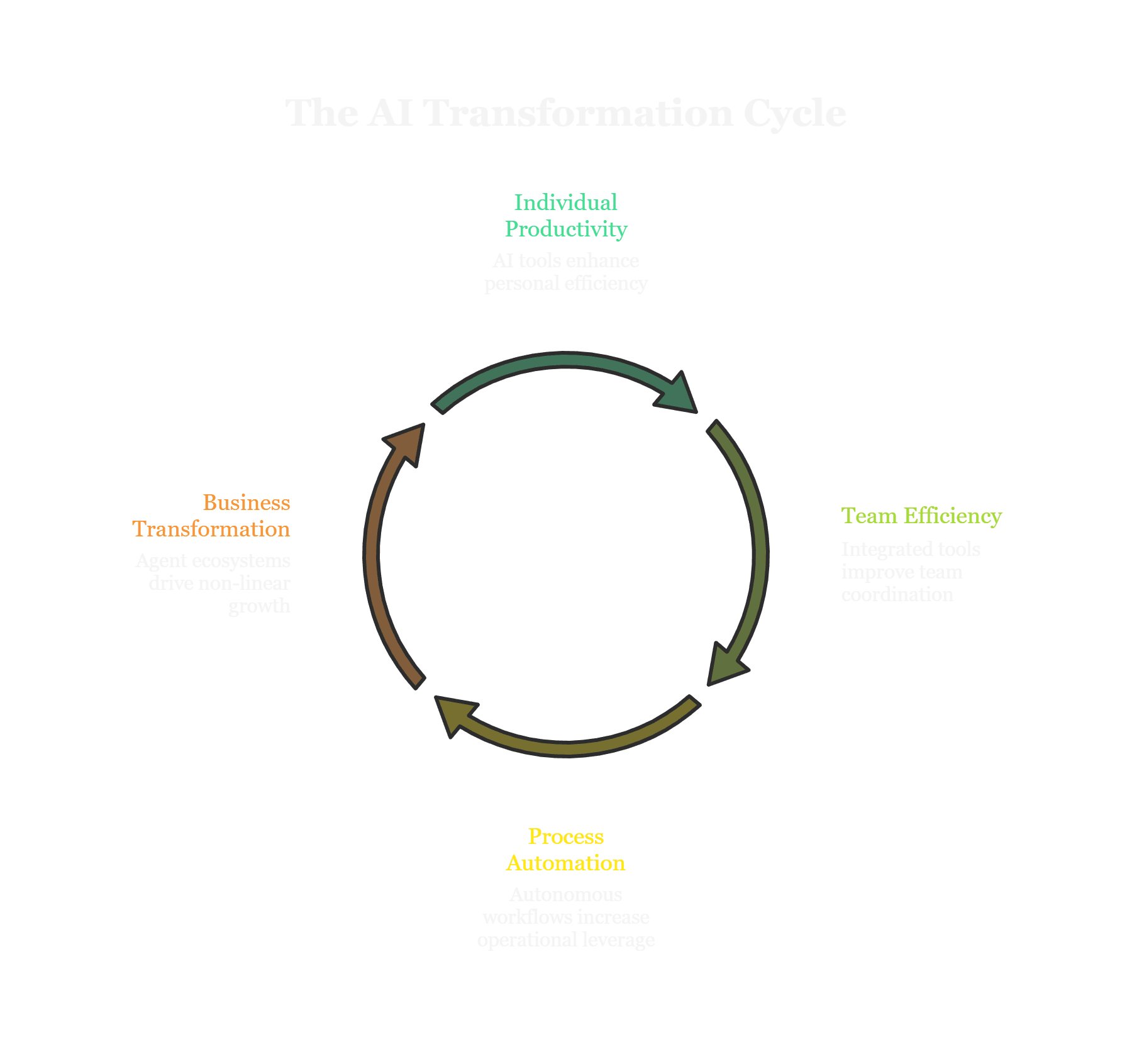
The AI Transformation Ladder: Where Tools and Agents Fit
Not all AI adoption is created equal.
Most businesses think transformation is binary—you either "have AI" or you don't. But in reality, there's a hierarchy.
Here's the framework we use with clients:
Level 1: Individual Productivity (Tools)
At this level, individuals are using AI to work faster. ChatGPT for emails. Grammarly for writing. Notion AI for summaries.
Impact: Personal time savings. Maybe 5-10 hours per person per week.
This is where most companies are.
Level 2: Team Efficiency (Connected Tools)
Here, teams are using AI tools that integrate with each other. Slack AI summarizes threads. Notion AI pulls data from Google Drive. There's some connective tissue.
Impact: Coordination overhead decreases. Meetings get shorter. Documentation improves.
This is where "AI-forward" companies are.
Level 3: Process Automation (Agents)
At this level, entire workflows run autonomously. Lead generation happens overnight. Invoice processing requires zero manual data entry. Customer support triage is handled by agents before humans see it.
Impact: Operational leverage. You're scaling output without scaling headcount.
This is where transformation starts.
Level 4: Business Transformation (Agent Ecosystems)
Here, multiple agents work together across departments. Your finance agent talks to your sales agent. Your ops agent triggers your compliance agent. You've built a nervous system for your business.
Impact: Non-linear growth. You can 10x revenue without 10x-ing staff.
This is where market leaders are going.
The insight: True AI transformation happens at Level 3-4, but most businesses are stuck at Level 1.
Why?
Because they're buying tools thinking it's transformation. They're spending budget on productivity software when they need infrastructure engineering.
The companies winning aren't buying more apps. They're redesigning workflows around autonomous execution.
We've helped dozens of companies climb from Level 1 to Level 4. The pattern is always the same: They thought they needed more tools. What they actually needed was someone to map their workflows and architect the automation layer. If you want to see what that process looks like for your specific operations, let's talk.
How to Know Which One You Actually Need
Here's the decision tree.
You Need AI Tools If:
The task is creative or judgment-heavy (writing, strategy, design)
The process changes frequently and requires flexibility
You're optimizing individual contributor productivity
The workflow is too unique to standardize
You're a small team (<10 people) without repetitive processes
Examples: Content creation, ad copy, research, brainstorming.
Tools are the right answer here. Don't overcomplicate it.
You Need AI Agents If:
The task is repetitive and rule-based
The process is documented (or could be)
Multiple people do the same thing the same way
The workflow spans multiple systems
Errors or delays have material cost
You're hiring for capacity, not expertise
Examples: Data entry, lead generation, invoice processing, compliance reporting, customer onboarding.
This is where agents create leverage.
The Hybrid Reality (What Most Businesses Actually Need)
Here's the truth: You probably need both.
Your marketing team might use ChatGPT to draft ad copy (tool). But your sales team should have an agent generating lead lists overnight.
Your finance team might use AI to summarize earnings calls (tool). But your AP/AR workflow should run autonomously (agent).
The question isn't "tools or agents."
It's "which workflows deserve infrastructure, and which workflows just need assistance."
Red Flags You're Using the Wrong Solution
Red Flag 1: You bought an AI tool expecting transformation, but you're still doing the same manual work (just faster).
Red Flag 2: You hired an "AI agency" and all they built you was a chatbot or a Zapier template.
Red Flag 3: Your AI "automation" breaks every time an API changes or a form field updates.
Red Flag 4: You can't explain how the AI works, what it does, or why it makes decisions. (Black box anxiety is real—and valid.)
Red Flag 5: You're paying monthly subscriptions for tools nobody uses. (The average company wastes 30% of its SaaS spend on shelfware.)
If any of these resonate, you're likely in the wrong category.
The Real Cost of Choosing Wrong
Let's talk about what this actually costs.
Cost 1: Tool Sprawl (Shadow IT Chaos)
You buy ChatGPT. Then Jasper. Then Notion AI. Then Grammarly. Then a few Zapier templates.
Six months later:
Your finance team can't track which subscriptions are actually being used
Your IT team is dealing with security questions from tools they didn't approve
Nobody knows what data is going where
The average company now has 130+ SaaS apps. Most are redundant. This isn't efficiency—it's chaos.
Cost 2: Still Manual (No Leverage Gained)
The bigger cost isn't the subscription fees. It's the opportunity cost.
You bought tools thinking they'd scale operations. They didn't. You're still manually entering data. Still chasing approvals. Still copying information between systems.
You're faster at doing the wrong thing.
Meanwhile, your team is burned out because the workload hasn't actually decreased.
Cost 3: Competitive Disadvantage (Stalled Transformation)
Here's the brutal reality:
While you're prompting ChatGPT to draft an email, your competitor built an agent that sends 500 personalized emails overnight.
While your team is manually qualifying leads, their agent is scoring, enriching, and routing leads automatically.
While you're trying to "do more with less," they're doing 10x more with the same headcount.
The gap compounds.
The Specific Math (For CFOs)
Let's make this concrete.
Say your operations team spends 10 hours per week on manual data entry. That's 520 hours per year. At a $50/hour fully loaded cost, that's $26,000 per year in labor.
Option A (Tool): You buy a $30/month AI tool to help them work faster. Maybe they save 2 hours per week. That's $5,200/year saved. ROI: 4x.
Option B (Agent): You build an agent that automates the entire workflow. Cost to build: $10,000 one-time. Maintenance: $2,000/year. The process now runs autonomously. That's $26,000/year saved (minus $2k maintenance). ROI: 12x in year one, infinite thereafter (because the agent is a permanent asset).
The numbers aren't subtle.
Choosing wrong doesn't just cost you money. It costs you leverage.
Frequently Asked Questions
Can AI agents replace entire teams?
No. And that's not the goal.
AI agents replace tasks, not judgment.
Your finance team still makes decisions about budget allocation. Your sales team still builds relationships. Your ops team still handles exceptions.
What changes is that the repetitive, low-value work—data entry, list building, status updates—runs automatically.
The result isn't fewer people. It's people focused on high-value work instead of administrative drudgery.
Think of it this way: Your finance team stops being data janitors and becomes strategic analysts.
That's the shift.
How much does it cost to build an AI agent vs buying an AI tool?
AI Tool:
$20-$100/month per user
Ongoing subscription forever
No ownership
AI Agent:
$5,000-$50,000 one-time build (depending on complexity)
$1,000-$5,000/year maintenance
You own the asset
The ROI math favors agents for any repetitive workflow you'll run for more than 6-12 months.
Here's the break-even example:
If you're paying $50/month for a tool ($600/year), and you use it for 3 years, that's $1,800.
If you build an agent for $10,000 and maintain it for $2,000/year, your 3-year cost is $16,000.
But the agent eliminates the labor cost entirely. If that workflow was taking 10 hours/week at $50/hour, you're saving $26,000/year.
The agent pays for itself in 5 months. After that, it's pure margin.
Do I need to be technical to use AI agents?
No. But you do need someone who understands workflow logic.
The barrier isn't coding. It's codifying.
Can you explain your process clearly? Can you map the decision points? Can you document the exceptions?
If yes, an agent can be built.
Think of it like this: You don't need to be a mechanic to drive a car. But you do need to know where you're going.
The technical work—API integrations, error handling, deployment—is someone else's job. Your job is defining what "done" looks like.
That said, most companies don't have internal bandwidth for this. Which is why they either hire an AI infrastructure partner or waste 6 months trying to DIY it with their IT team.
What's the difference between AI agents and RPA (Robotic Process Automation)?
Good question. They're often confused.
RPA (Robotic Process Automation):
Mimics human clicks on a UI
Brittle (breaks when the interface changes)
No adaptive logic
Best for highly stable, repetitive tasks
AI Agents:
Interact with systems via APIs
Adaptive (can handle variability)
Decision-making logic
Best for workflows with conditional branching
Example:
An RPA bot logs into your ERP, clicks 17 buttons in sequence, and enters data. If the UI changes, the bot breaks.
An AI agent connects directly to your ERP's API, validates the data, applies business rules, and writes to the database. If the API changes, the agent adapts.
RPA is a robot following a script. An AI agent is executing logic.
Both have use cases. But for most modern businesses, agents are more resilient.
How long does it take to implement AI agents?
Depends on the complexity of the workflow.
Simple workflows (e.g., lead list generation, email parsing):
2-4 weeks to map, build, and test
Medium workflows (e.g., invoice processing with multi-system integration):
4-8 weeks
Complex workflows (e.g., end-to-end customer onboarding across 5 systems):
2-3 months
Compare that to setting up an AI tool, which takes 5 minutes.
That's the tradeoff. Tools are instant but shallow. Agents take time but deliver permanent infrastructure.
The companies that win are the ones willing to invest upfront for long-term leverage.
What happens if the AI agent makes a mistake?
This is the #1 fear. And it's valid.
Here's how we (and any competent team) handle it:
1. Human-in-the-Loop (HITL) Workflows
Agents are trained to flag low-confidence decisions. Anything below a 95% confidence threshold gets routed to a human for review.
You get the speed of automation with the safety of oversight.
2. Shadow Mode Testing
Before an agent goes live, it runs in parallel with your manual process. We compare the outputs. If they don't match 100%, we debug.
You don't flip the switch until you're confident.
3. Error Logging and Alerts
Every agent logs its actions. If something fails—an API timeout, a data validation error—you get notified immediately.
You're not flying blind.
4. Version Control and Rollback
If an update introduces a bug, we roll back to the previous stable version. Your operations don't stop.
The goal isn't perfection. It's reliability. And the data shows that well-designed agents make fewer errors than humans doing repetitive manual work.
Humans get tired at 4 PM on Friday. Agents don't.
The Path to Real AI Transformation
Here's what we've covered:
AI tools are productivity software. They make you faster at tasks you're still doing manually.
AI agents are operational infrastructure. They execute workflows autonomously while you focus on high-value work.
Most businesses are stuck at Level 1 of the transformation ladder because they're buying tools thinking it's transformation. Real transformation happens at Level 3-4 when workflows run autonomously, when you scale output without scaling headcount, when you've codified business logic into permanent infrastructure.
The decision isn't binary. You probably need both tools and agents. But you need to know which workflows deserve infrastructure vs which just need assistance.
The companies that figure this out early are building a compounding advantage. While their competitors are prompting ChatGPT, they're sleeping while their agents work.
That's not hype. It's math.
Transformation isn't about adopting AI. It's about redesigning workflows around autonomous execution.
If you understand that, you're already ahead of 90% of the market.
What Most Companies Do Next (And Why It Fails)
Here's the pattern we see:
Option 1: They try to DIY this with their internal IT team.
Result: 6 months of experimentation, fragile Zapier workflows that break constantly, and a CTO who's frustrated because "AI is harder than we thought."
Option 2: They hire an "AI agency" that builds them a chatbot and calls it transformation.
Result: A glorified FAQ bot that nobody uses and $30k down the drain.
Option 3: They do nothing and hope the noise dies down.
Result: Competitors automate, they fall behind, and 18 months later they're in crisis mode trying to catch up.
There's a fourth option.
Get a Deep-Dive AI Operational Audit.
Here's how it works:
We map your current workflows. We identify what's actually automatable (and what's not). We show you the specific processes bleeding time and money. We give you a roadmap with prioritized opportunities and ROI estimates.
No retainers. No ongoing dependencies. Just a clear plan you can execute internally or hire us to build.
Most companies waste 6-12 months figuring out what we diagnose in 2 weeks.