Article
May 22, 2026
Best Cold Email Stack for B2B Companies (2026)
The complete cold email stack for B2B in 2026. Domains, mailboxes, enrichment, AI copy, sequencing tools, and what each layer actually costs.
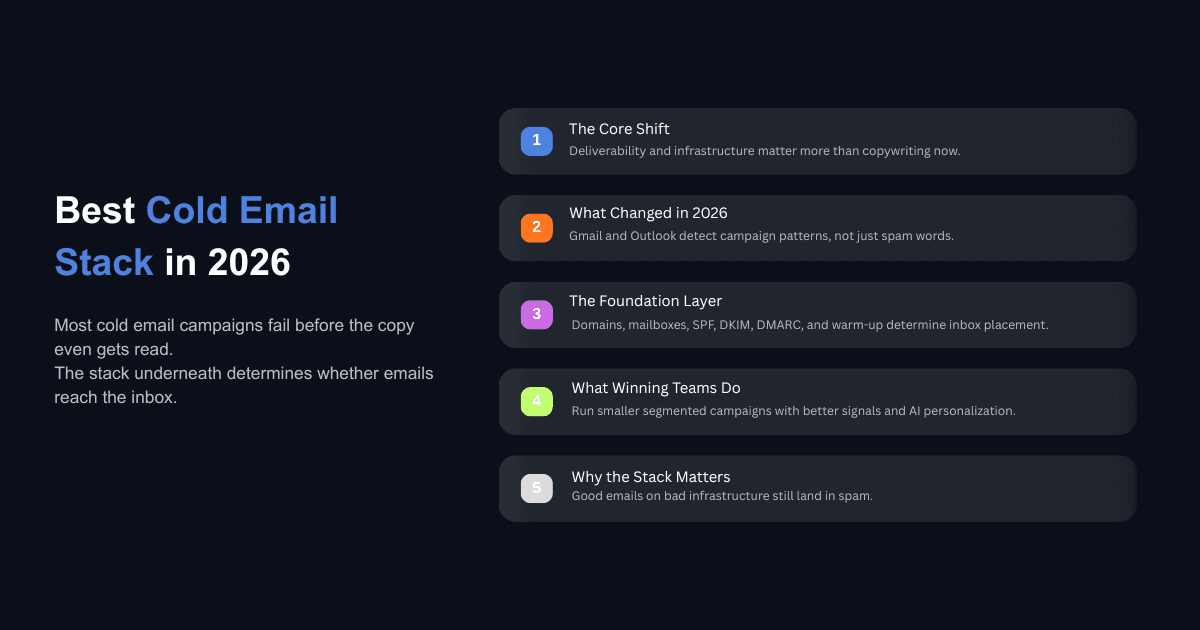
The average cold email reply rate in 2026 sits at 3.43%. That number comes from Instantly's benchmark report analyzing billions of cold email interactions. Meanwhile, the top 10% of senders consistently exceed 10% reply rates, and tightly targeted campaigns reach 15 to 25%.
The gap between those two groups has almost nothing to do with copywriting. It comes down to infrastructure, list quality, and the systems running underneath every email that gets sent. The companies booking meetings from cold email in 2026 are not writing better subject lines. They are running a fundamentally different stack.
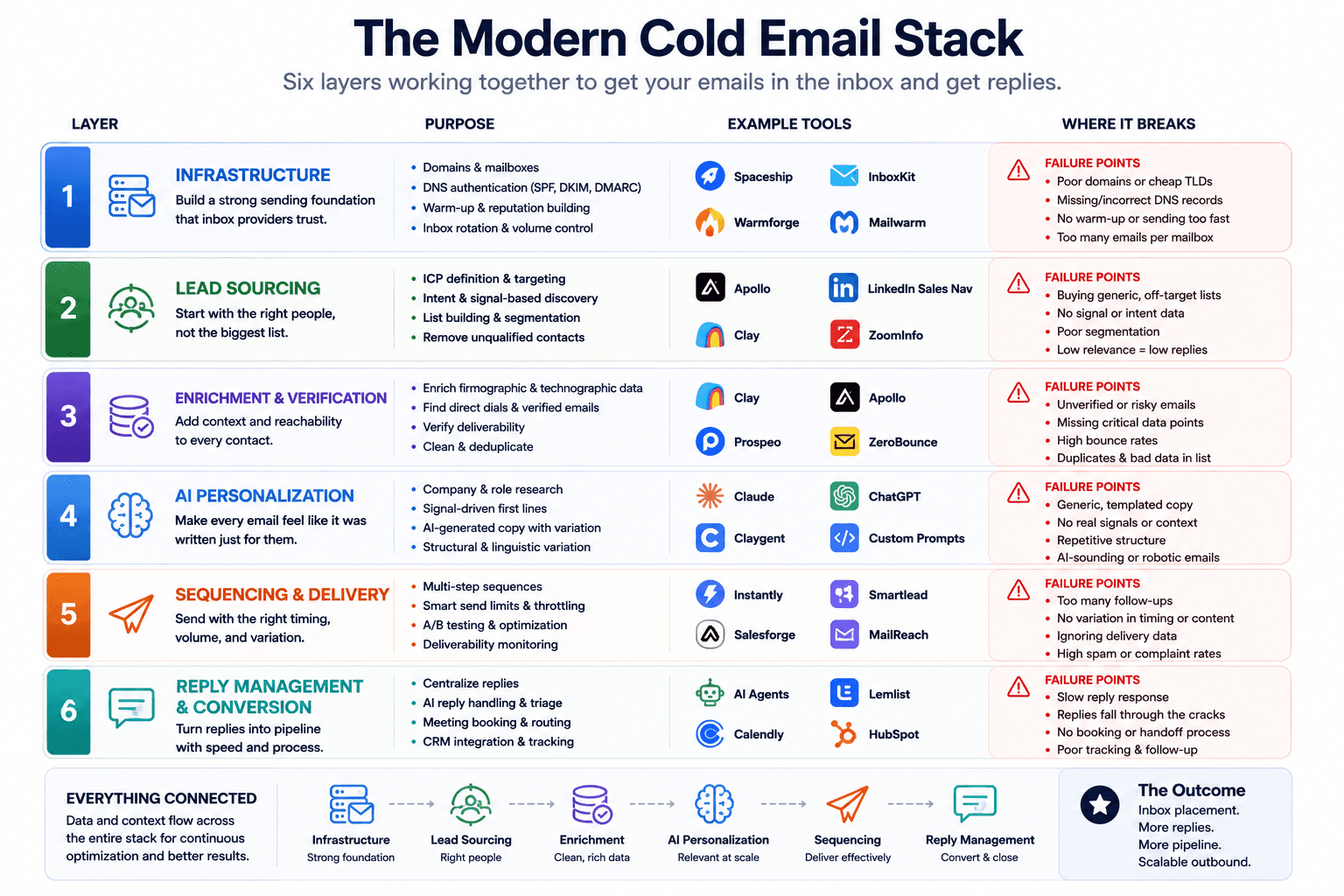
This post breaks down every layer of that stack, from domains and mailboxes to AI personalization and reply management, with specific tools, real costs, and the configuration details that actually determine whether your emails reach an inbox or disappear into spam. If you have been wondering why most cold email campaigns are dying in 2026, the answer almost always lives in one of these layers.
Why the Cold Email Stack Changed in 2026
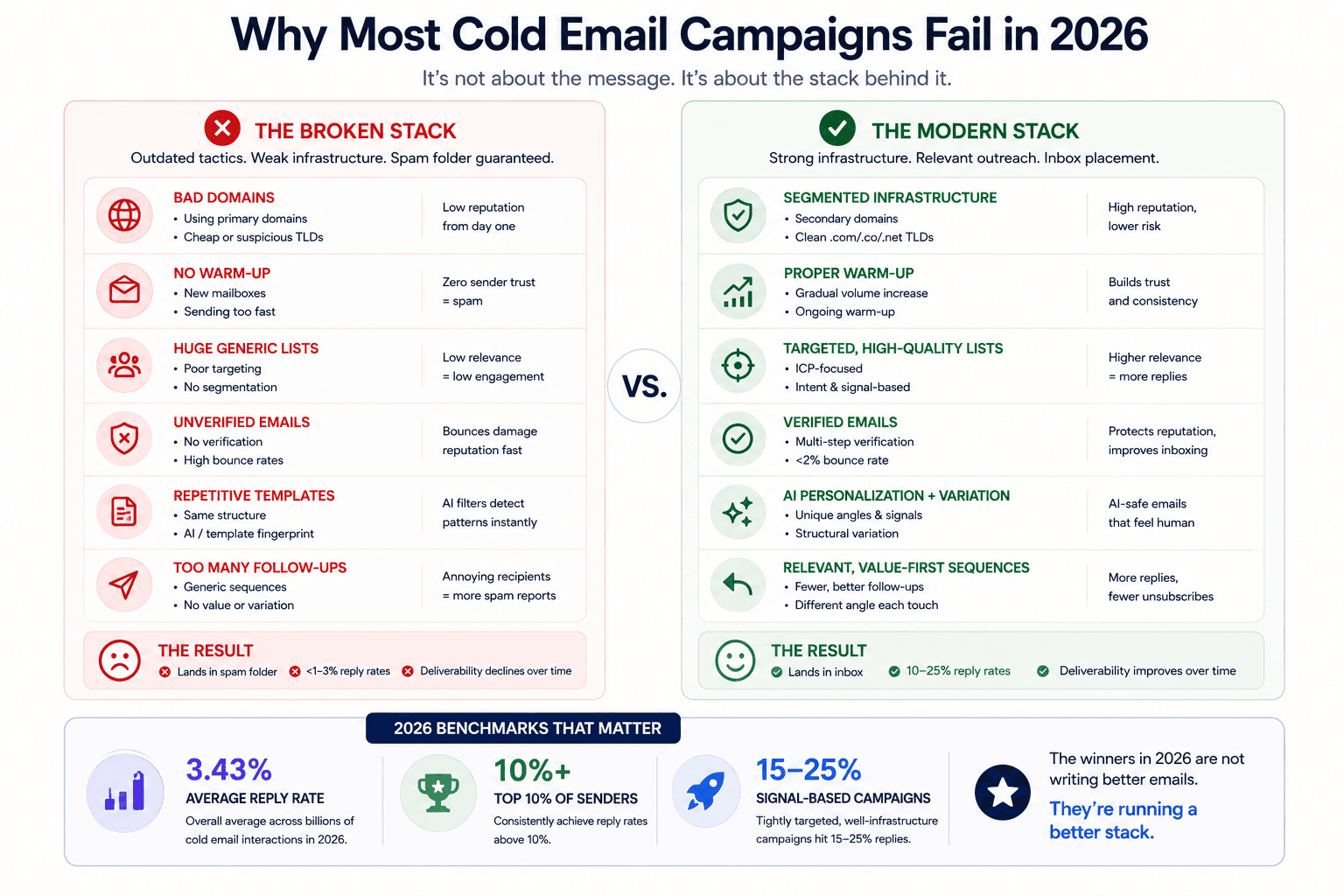
The old playbook was simple. Buy a list of 10,000 contacts, write a seven-touch sequence, add some first-name personalization, and send as fast as possible. That approach worked in 2022 and 2023 because email service providers mostly relied on keyword filters and basic sender reputation to sort incoming mail.
That system no longer exists. Gmail, Yahoo, and Microsoft rolled out AI-powered spam filters between 2024 and 2025 that detect mass campaign patterns rather than individual words. These filters analyze sender behavior, engagement rates, and the structural fingerprint of every email. A structural fingerprint is the combination of sentence patterns, paragraph order, opening hooks, and call-to-action placement that makes an email recognizable as a template, even if you swap individual words with spintax.
The consequence is measurable. Inbox placement for bulk senders dropped significantly in early 2025 compared to the year before, and the decline has continued through 2026. Email service providers now weight engagement quality (time spent reading, reply depth, whether the recipient continues the conversation) as a major factor in future inbox placement. If your campaigns generate low engagement, your deliverability gets worse over time, which generates even lower engagement. It compounds in the wrong direction.
This is why the stack matters more than the message. A well written email sent from broken infrastructure will never be seen. A decent email sent from a properly built stack will at least reach the inbox, where copy and relevance can do their job.
Layer 1: Sending Infrastructure
Infrastructure is the foundation that everything else sits on. Skip this layer and nothing downstream matters, because your emails will land in spam regardless of how good your list or copy is.
Domains
Never send cold email from your primary business domain. If your cold outreach gets flagged, it can damage deliverability for your entire company, including internal communication and transactional emails.
Buy secondary domains that are close variations of your brand. If your company domain is acmecorp.com, register things like acmecorp.co, getacmecorp.com, or acmecorpmail.com. Stick to .com, .co, and .net TLDs. Avoid cheap extensions like .xyz, .online, or .link because they carry worse reputation out of the gate. Also avoid .io and .ai since they are expensive and surprisingly likely to land in spam despite the premium pricing.
For naming conventions, use brandable single-word or two-word combinations without hyphens or numbers. If you are sending at serious volume, consider generic domains with made-up but pronounceable names to reduce pattern recognition across your sending fleet.
Domain registrars like Spaceship offer .com domains at around $9/year and .info domains at around $3.50/year. A 50/50 split between .com and .info keeps cost down while maintaining diversity. You can track cold email deliverability across multiple domains to monitor which ones are performing and which need to be rotated out.
Mailboxes
Each domain should have 2 to 3 dedicated mailboxes. Do not buy these directly from Google Workspace unless you are based in the US, Germany, Canada, or another high-income country with strong IP reputation. If you buy Google Workspace mailboxes from regions with poor IP reputation, your deliverability will suffer even if everything else is set up correctly.
Instead, use resellers like InboxKit, which are official Google Cloud partners that provide US-IP Google mailboxes at around $3/month each. They handle the full technical setup (DNS records, DKIM, DMARC, SPF, and mailbox authentication) so you are not spending hours on manual configuration.
DNS Authentication
SPF, DKIM, and DMARC records are non-negotiable. These authentication protocols tell inbox providers that your emails are actually coming from an authorized sender. If any of these fail validation, your emails get treated as suspicious before the recipient even has a chance to see them. Gmail has required all three since 2024, and Microsoft enforced similar requirements in 2025. Every domain you use for cold outreach needs clean authentication before you send a single email.
Warm-Up
Warm-up is not a one-time step that you complete before launching campaigns. It is an ongoing process that builds and maintains the sender reputation of every mailbox.
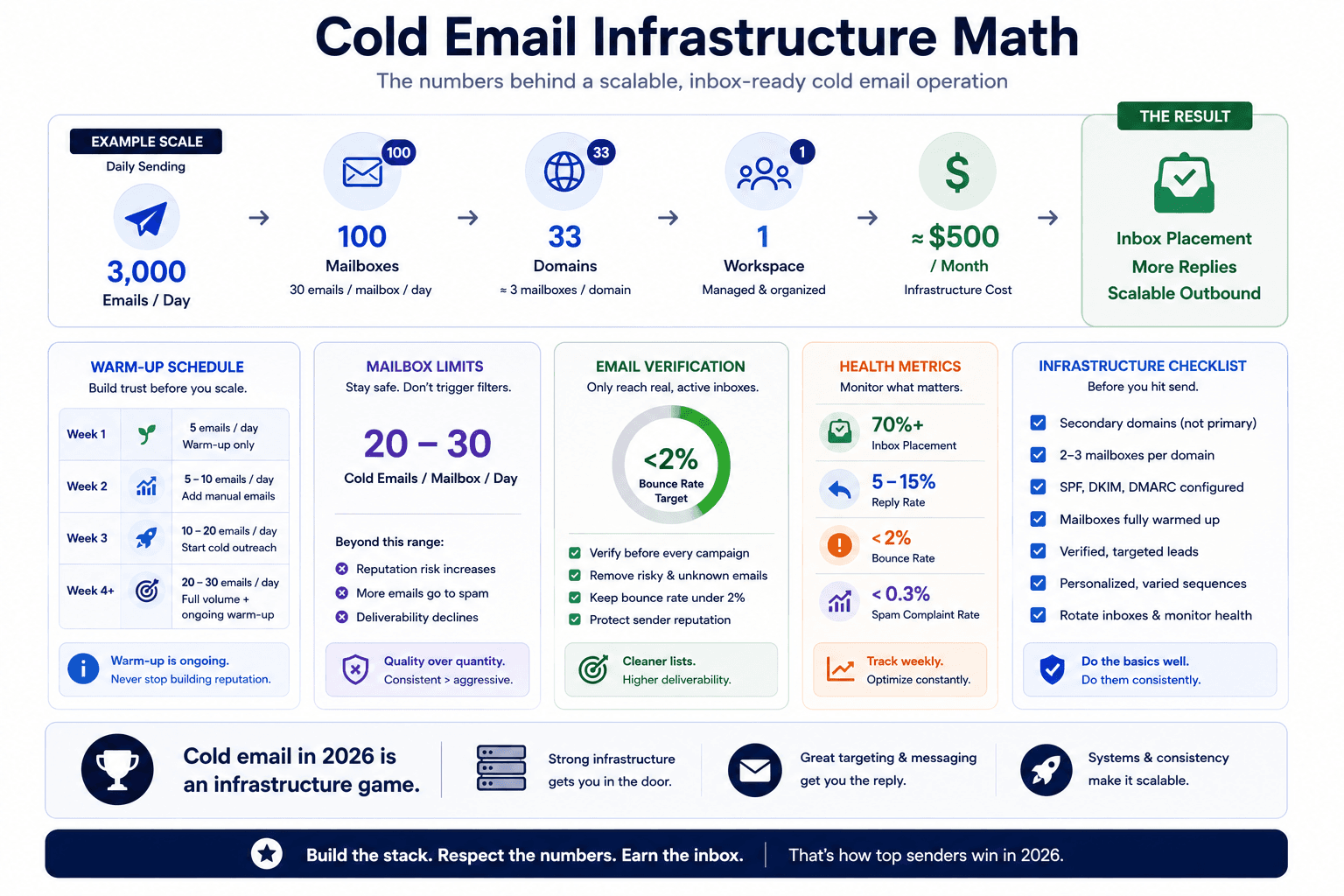
A new mailbox has zero reputation. Sending volume immediately is a red flag that triggers spam filters. The standard warm-up schedule looks like this: week one at 5 emails per day with automated warm-up exchanges only, week two at 5 to 10 per day while adding a few manual emails to real contacts, week three at 10 to 20 per day with low-volume cold outreach starting alongside continued warm-up, and week four onward at 20 to 30 per day at full sending volume with warm-up still running indefinitely.
Most sequencing tools (Instantly, Smartlead) have built-in warm-up features that handle this automatically. The key discipline is to never stop warm-up, even during active campaigns.
The Math
If you want to send 3,000 cold emails per day, divide by 30 (emails per mailbox per day) to get 100 mailboxes. Divide by 3 (mailboxes per domain) to get roughly 33 domains. At a 50/50 split between .com ($9/year) and .info ($3.50/year), domains cost about $200 as a one-time annual expense. Mailboxes at $3/month each come to $300/month. Total infrastructure cost for 3,000 emails per day: roughly $500/month, plus the one-time domain purchase.
Layer 2: Lead Sourcing and List Building
The data on campaign size and reply rates is clear. Campaigns targeting fewer than 50 recipients average a 5.8% reply rate, compared to 2.1% for campaigns sent to more than 1,000 recipients. That difference is not about personalization tricks. It is about relevance. A smaller, more specific list means every email is more likely to address something the recipient actually cares about.
This does not mean you should only send 50 emails per day. It means you should build many small, tightly segmented lists rather than one massive list with a single message.
Multi-Source Scraping
Relying on a single lead database (even a large one like Apollo's 210 million contacts) creates gaps in your total addressable market coverage. The teams getting the best results in 2026 pull from multiple sources.
For B2B contacts with LinkedIn-based personas (founders, executives, marketing leaders), tools like Apollo, Instantly SuperSearch, and Sales Navigator scraping via PhantomBuster or Weriffy cover the broadest ground. For local businesses, Google Maps scraping combined with Yelp and Yellow Pages captures the long tail. For technology-based targeting (companies using Shopify, HubSpot, or a specific CRM), platforms like BuiltWith and StoreLeads let you filter by tech stack.
Ocean.io deserves special mention for complex ICPs because it uses lookalike modeling. You provide five to ten websites of companies you have worked with or want to work with, and Ocean.io generates a list of structurally similar companies across whatever geography and industry filters you set. This approach regularly surfaces 40 to 50% of a total addressable market that would be difficult to find through traditional filters alone.
The shift toward AI SDRs replacing manual prospecting has accelerated this multi-source approach because automated systems can run parallel searches across providers without the bottleneck of a human SDR researching one account at a time.
Intent Signals
Beyond static firmographic data, the best list building in 2026 incorporates buying signals. These include companies that are actively hiring for roles your product or service supports, recent funding rounds that suggest budget availability, competitor follower scraping on LinkedIn (people following your competitor's company page are already problem-aware), and job listing scraping from LinkedIn Jobs, Indeed, and Glassdoor via tools like Apify.
Emails that reference specific buying signals like funding rounds, leadership changes, or hiring surges achieve response rates of 15 to 25%, which is a five times improvement over the average.
Layer 3: Lead Enrichment and Qualification
Raw lead lists are not ready to email. They need enrichment (adding verified contact information, company data, and qualification signals) and verification (confirming that the email addresses actually exist and will not bounce).
Clay vs. Claude Code
This is where the cold email stack has changed most dramatically in 2026. Clay built its business as the central orchestration platform for outbound teams, connecting 90+ data providers through a visual workflow builder with waterfall enrichment that queries multiple sources in sequence until it finds the data you need.
Clay still works well for non-technical teams that need a visual interface. But the pricing model changed in 2026 to charge based on actions on top of enrichments, which makes it significantly more expensive for high-volume senders. At scale, Clay can cost $350 to $700 per month or more.
Claude Code has emerged as the primary alternative for technical founders and growth teams. You connect your enrichment providers (LeadMagic, Prospeo, Findymail, Blitz API) via MCP connections or API keys, describe your ICP in plain language, and Claude Code builds the scraping, enrichment, and qualification pipeline for you. It will scrape company websites, pull decision-maker contacts, enrich and verify emails, and upload personalized leads to your sequencing tool, all from a single prompt session.
The cost difference is substantial. Claude Code is included with a Claude Pro subscription at $20/month or Claude Max at $100 to $200/month, with no per-enrichment or per-action fees. For a team sending 3,000 emails per day, that can represent a 10x or greater cost reduction compared to Clay. If you want to learn the full setup, we have written a detailed walkthrough on how to enrich your lead list using Claude Code.
The tradeoff is that Claude Code is not a plug-and-play tool. There is no visual workflow builder or pre-built integration marketplace. You are building workflows from scratch, though they can be saved and reused. For teams that need both strategic thinking and enrichment execution, the pattern emerging in 2026 is to use Claude Code for ICP research, campaign architecture, and qualification logic, and then use a dedicated enrichment provider (or Clay, if budget allows) for the data operations layer. We covered the broader distinction between these approaches in our piece on AI agents vs AI tools.
Email Verification
Email verification is a deliverability gate that too many teams skip. Verified lists achieve roughly 2x the reply rate of unverified lists and 5 to 6x the reply rate of purchased lists. The reason is simple: every bounced email damages your sender reputation, and that damage compounds across your entire domain.
Keep bounce rates under 2%. Tools like MillionVerifier and Bounceban check whether an email address is valid, catch-all, or dead before you send to it. At high volume, Blitz API ($500/month, everything unlimited) consolidates email finding, enrichment, and verification into a single subscription that becomes cost-effective once you pass roughly 5,000 emails per day.
Layer 4: AI Personalization and Copy
Copy matters, but not in the way most people think. The emails that perform best in 2026 are not the cleverest or most polished. They are the ones that sound like a real person wrote them for a specific recipient, while avoiding the structural patterns that get flagged by spam filters.
Structural Variation Over Spintax
ESP fingerprinting is one of the biggest shifts in 2026. When you send the same email template to thousands of people, inbox providers recognize the structural shape of that email (sentence count, paragraph order, hook-pitch-CTA pattern, and overall length). Once enough recipients mark that shape as spam, every future email with a similar structure gets filtered.
Spintax (swapping individual words or phrases) helps marginally, but it does not change the structural fingerprint. An email that opens with a question, runs three paragraphs, and ends with a meeting request looks the same to an AI filter whether you swap "Hi" for "Hey" or "interested" for "curious."
What works is creating five or more structurally different versions of every email. Each version should have a different sentence count, different paragraph order, a different opening style (question vs. observation vs. direct statement), and a different call to action (soft ask vs. specific meeting times vs. simple "yes" reply). This is where AI becomes essential, because writing five genuinely different email structures by hand for every campaign is not realistic at scale.
Use a prompt that tells Claude (or your chosen model) to create structurally different variations of your base email while keeping the offer identical. Ask it to change sentence structure, sentence count, paragraph order, opening hook, and call to action so that each variation feels like a completely different email written by a different person. We tested which AI writes the best cold outreach emails in 2026 and found that Claude consistently produces the most natural-sounding copy for cold email, particularly when given a founder's real voice as input.
Cost Optimization for AI Copy
If you are personalizing emails at scale (3,000+ per day where each email includes an AI-generated section based on the recipient's company, role, or LinkedIn data), API costs from OpenAI or Anthropic can add up. An alternative is to host open-source models through providers like DeepInfra, which costs roughly 20x less than commercial API pricing. Models like GPT-OSS 20B deliver performance close to GPT-4 Mini at a fraction of the cost.
For smaller operations (under 1,000 emails per day), the API costs are manageable and the quality difference favors commercial models. Scale is where open-source becomes worth the tradeoff.
The Value Offer Framework
The other copy element that separates high-performing campaigns is the offer itself. In 2026, asking someone to "hop on a quick call" is not compelling enough to generate a reply. The campaigns hitting 10%+ reply rates lead with something the recipient actually gets.
The structure: identify the core service your company provides, then offer a meaningful piece of it for free. If you do SEO, offer to audit their Google Business profile. If you do paid ads, offer to create three custom ad concepts for their business. If you do AI automation, offer to automate one specific workflow at no cost. The value must require a call to deliver, which is how the call gets booked. You never deliver the value inside the email itself.
This approach works because it reverses the typical cold email dynamic. Instead of asking the recipient to give you something (their time), you are offering something first. The call becomes a delivery mechanism, not a sales pitch, and trust is established before the conversation even begins. You can learn more about building this type of system in our guide on how to build a cold email system using Claude.
Layer 5: Email Sequencing and Sending
The sequencing layer is where your infrastructure, lists, enrichment, and copy come together into actual campaigns.
Choosing a Sending Tool
Instantly and Smartlead are the two dominant platforms for cold email sequencing in 2026, and both are built specifically for high-volume outbound. Instantly tends to win on UI simplicity and warm-up quality. Smartlead offers more granular deliverability controls that appeal to agencies managing multiple client accounts.
What you should avoid: general-purpose platforms like Lemlist (built more for SDR workflows with manual steps like cold calling), Apollo (good for prospecting, unreliable for high-volume sending), and marketing automation tools like Mailchimp or HubSpot (shared IPs that automatically place cold emails in spam).
The core features that matter in a sequencing tool are unlimited sending accounts on a flat fee (so cost does not scale linearly with volume), built-in inbox rotation across all connected mailboxes, automated warm-up that runs in parallel with active campaigns, a unified inbox (unibox) for managing all replies in one place, and campaign analytics that track reply rates at the domain level (so you can diagnose which infrastructure is working and which is degrading). For teams that want to understand the broader frameworks at play, our breakdown of cold email system frameworks that high-performing teams use covers the strategic layer that sits above tool selection.
The Two-Touch Rule
Data from 2026 shows that the first follow-up boosts replies by 49%, but from the third email onward, response rates drop. By the fourth follow-up, responses decline by 55% compared to the second email. The old seven-touch sequence is now actively hurting campaigns for two reasons: more emails train spam filters to classify you as a bulk sender, and if someone did not respond after two emails, they are not interested in that particular angle.
Instead of sending more follow-ups, recycle non-responders into a new campaign with a completely different opener and angle. The first email is what generates interest. The follow-up is just a bump. If neither works, try a different approach entirely rather than repeating yourself.
For recipients you are recycling, wait at least 30 days (60 is better) before the next contact. This approach lets you keep reaching your total addressable market over time without burning it through over-emailing.
Routing by ESP
If you are sending at meaningful volume, use Google's DNS Resolve API to check the MX records on your recipients' domains before sending. Recipients using enterprise security gateways (Barracuda, Mimecast, Proofpoint) should receive emails from Outlook mailboxes or SMTP infrastructure rather than Google. Keep Google inboxes for SMB and mid-market recipients where they perform best.
This routing step is invisible to the recipient but makes a measurable difference in inbox placement for enterprise targets.
Layer 6: Reply Management and Conversion
Getting replies is not the end of the process. How fast you respond and what happens after the reply determines whether interest converts into a booked call.
Speed to Lead
The data on response time and conversion is consistent: faster replies convert at higher rates. AI reply agents trained on your business context and common objection scenarios can respond to positive replies within three minutes, which is faster than any human team can manage across multiple campaigns.
Building a reply agent involves training an AI model on your product or service details, typical objections (pricing concerns, timing, "send me more info" stalls), and the specific next step you want (a booked call, not more email). These agents can be built with Claude Code and hosted on platforms like Vercel, handling the initial reply while flagging high-intent leads for human follow-up.
One enterprise client we worked with doubled their sales efficiency after implementing AI-driven reply handling and lead engagement, engaging prospects at the right moment with data-backed decisions instead of waiting for a human rep to check the inbox.
The Conversion Path
Every positive reply should lead to a call booking page, not more back-and-forth email. Use a dedicated landing page with a video (VSSL-style) that reinforces the value offer from your email, followed by a calendar booking tool like Cal.com for scheduling. Set up automated nurture emails before and after the call to reduce no-shows.
The principle is straightforward: never deliver your value offer inside the email. Always book the call first, deliver value on the call, uncover real problems during the conversation, and then present your full solution. The email's job is to get the "yes." Everything else happens on the call.
For the full picture on how to write personalized first lines for cold email outreach that lead to these conversations, we have covered the prompt engineering and data enrichment side in a separate guide.
What Does a Full Cold Email Stack Cost in 2026?
Here is a realistic cost breakdown for a B2B company sending 3,000 emails per day, which is the minimum volume we recommend for companies with a total addressable market above 20,000 accounts.
Infrastructure (monthly):
Domains: ~$200/year (one-time, roughly $17/month amortized)
Mailboxes (100 at $3/month): $300
Total infrastructure: ~$317/month
Lead Sourcing and Enrichment (monthly):
Lead database (Apollo, Instantly SuperSearch, or Ocean.io): $100 to $200
Email enrichment and verification (LeadMagic + MillionVerifier): $100 to $200
Or Blitz API for everything at scale: $500 (unlimited)
Total enrichment: $100 to $500/month
AI and Orchestration (monthly):
Claude Code (Claude Pro or Max): $20 to $200
Open-source model hosting (DeepInfra, if scaling AI personalization): $50 to $150
Total AI: $70 to $350/month
Sequencing (monthly):
Instantly or Smartlead: $97 to $200
Total sequencing: $97 to $200/month
Full stack total: $600 to $1,400/month depending on volume, tool choices, and whether you use Blitz API or individual providers.
At the lean end ($600 to $800), you are running Claude Code for orchestration, individual enrichment providers, and Instantly for sequencing. At the mid-range ($1,000 to $1,400), you add Blitz API for unlimited enrichment, an open-source model for scaled AI personalization, and possibly Clay for visual workflow building alongside Claude Code for strategy.
To get a more precise estimate for your specific operation, our AI implementation cost estimator can help you model the numbers based on your volume and tool choices.
Common Mistakes That Kill Cold Email Campaigns Before They Start
Why Are My Emails Landing in Spam?
In almost every case, the answer is infrastructure, not copy. If your reply rate is below 1%, the problem is most likely that your emails are not reaching the inbox at all. The diagnostic order should be: check inbox placement first (are your test emails landing in primary, promotions, or spam?), then check domain reputation via Google Postmaster Tools, then check bounce rates, then check open rates, and only then look at your email copy. Most teams start at the copy level and never address the infrastructure underneath.
Pre-warmed inboxes outperform fresh inboxes by roughly 2.5x on reply rate in controlled tests using the same copy and the same list. If you are sending from domains that were not properly warmed up, or from mailboxes less than a few weeks old, that is your most likely problem. We wrote a detailed breakdown of cold email mistakes that kill reply rates covering the most common issues and their fixes.
Should I Send More Follow-Ups to Increase Replies?
No. The data in 2026 clearly shows diminishing returns after the second email. Additional follow-ups increase the risk of spam complaints, which damages sender reputation and hurts future campaigns. Recycle non-responders into new campaigns with different angles instead of adding more touches to the same sequence.
Using Your Primary Domain for Cold Outreach
This is the single most expensive mistake a B2B company can make with cold email. If your cold campaigns get flagged, the reputation damage spreads to every email your company sends, including invoices, client communication, and internal messages. Always use secondary domains and keep your primary domain completely separated from outbound.
Skipping Email Verification
Sending to unverified lists means accepting a bounce rate that will degrade your sender reputation within days. Verified lists get double the reply rate of unverified lists. This is one of the highest-ROI steps in the entire stack, and it takes minutes with the right tool.
Building the Stack That Actually Works
The cold email stack in 2026 is not about finding one tool that does everything. It is about assembling layers that each do their job well: infrastructure that gets you into the inbox, sourcing that finds the right people, enrichment that gives you accurate data, AI that writes relevant copy at scale, sequencing that manages sends and rotation, and reply management that converts interest into calls.
The companies that treat cold email as an infrastructure problem rather than a copywriting problem are the ones consistently booking meetings. The message matters, but only after the systems underneath are solid.
If you want help building this stack for your business, or you want us to audit your existing cold email setup and identify where the breakdowns are happening, book a call with our team. We will walk through your current infrastructure, list quality, and campaign performance to show you exactly where the opportunities are.
You can also explore our full library of cold email resources, including how to automate cold email sequences with Claude Code, how to use Claude Code for outreach from lead list to sent campaign, and our guide on using Claude Code to audit and rewrite weak cold email copy.