Article
May 6, 2026
Why Most Cold Email Campaigns Are Dying in 2026
Cold email reply rates fell to 3.43% in 2026. Here is what changed, why most campaigns are failing, and the infrastructure setup that still works.
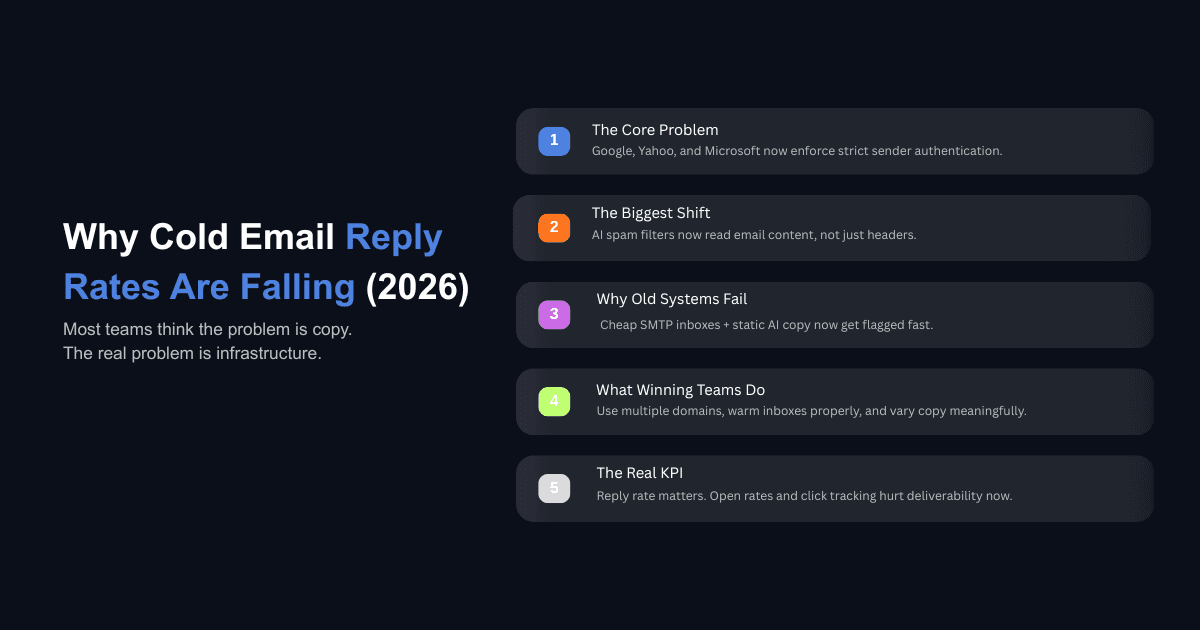
If you run cold outreach for your company or your clients, you have probably noticed something over the last twelve months that is hard to explain by looking at your email copy alone. Reply rates are falling. Domains are burning faster. Inboxes that were healthy last quarter are landing in spam this quarter, and no one changed anything on the sending side.
The instinct is to rewrite subject lines and try a new angle. But most of the time the copy is not the problem. Three things shifted in parallel during 2025 and into 2026: mailbox providers started enforcing rules they had only recommended before, AI filters began reading email content rather than just scanning headers, and the volume of generic AI-written outreach saturated the inboxes of the people you are trying to reach. Each of these changes on its own would be manageable. Together, they have made the old cold email playbook quietly obsolete.
This is what actually changed, what it means for your infrastructure, and what a functional setup looks like now.
What Actually Changed in 2026
The shift did not happen overnight, but the enforcement did.
Google and Yahoo introduced bulk sender requirements in February 2024, requiring SPF, DKIM, and DMARC authentication for anyone sending more than 5,000 emails per day. For most of 2024, enforcement was gradual, limited mostly to temporary delivery delays. In November 2025, Gmail escalated from delays to permanent rejections. Emails that previously got through with partial setups or edge-case configurations started bouncing outright.
Microsoft followed. Starting May 5, 2025, Outlook began enforcing its own sender requirements for Outlook.com, Hotmail, and Live.com domains. Non-compliant messages now receive a permanent 550 5.7.515 rejection. The email is refused, not deferred, and it never reaches the recipient.
All three major providers now enforce the same baseline: authenticated sending domains, spam complaint rates below 0.3% (with 0.1% as the practical target for reliable placement), and functional unsubscribe mechanisms. As of 2026, these are not recommendations. They are the cost of entry.
The results are visible in aggregate data. According to Instantly's 2026 cold email benchmark report, which analyzed billions of interactions across 700,000+ businesses, the average reply rate dropped from 5.1% in 2025 to 3.43% in 2026. That follows a longer decline from 8.5% in 2019 to 7% in 2023 to 5% in 2025. The industry-wide trend points to three structural causes: technical decay in sending infrastructure, stricter inbox filtering, and buyer fatigue from years of low-effort outreach.
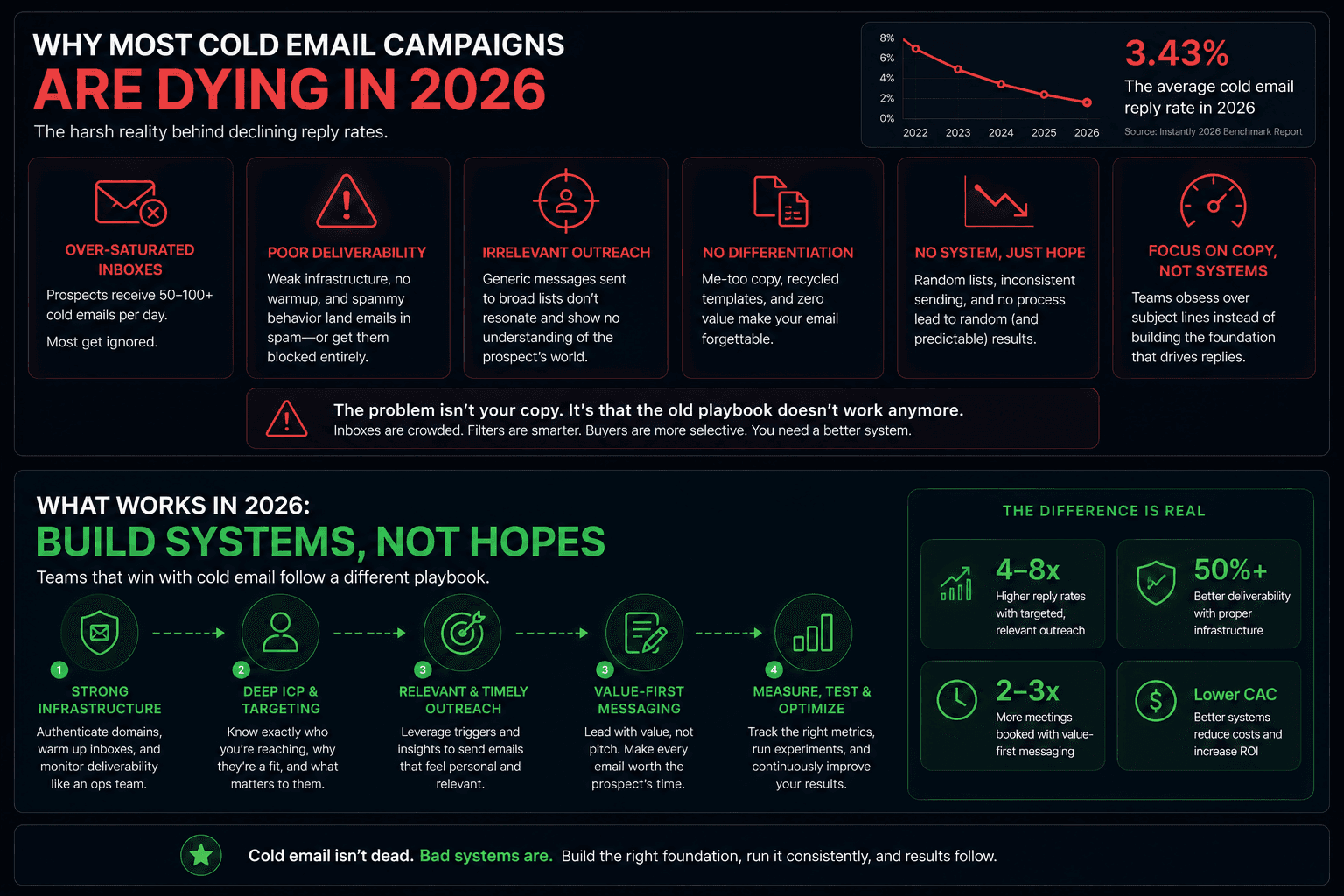
Why Cheap Email Infrastructure Stopped Working
SMTP Inboxes Were the First to Go
For years, teams bought cheap SMTP inboxes because they were half the price of Google or Outlook mailboxes. That math made sense when inbox filters were more forgiving. It does not make sense anymore.
When Gmail and Microsoft tightened their filters, SMTP setups were the first to be flagged. These providers typically share IP pools with hundreds of other senders, which means your reputation is tied to the behavior of everyone else on that infrastructure. If a few senders in that pool get flagged for spam, the entire IP range takes a hit, and your emails go with it.
Google and Outlook mailboxes carry stronger built-in reputation signals because the sending infrastructure is tied to the provider's own ecosystem. That alone does not guarantee inbox placement, but it provides a foundation that third-party SMTP providers cannot match under the current filtering environment.
Mailbox Provider Matters More Than It Used To
The filtering gap between a properly configured Google Workspace mailbox and a generic SMTP setup has widened considerably. Controlled testing on inbox placement shows that switching from fresh inboxes with 61% primary placement to pre-warmed inboxes with 94% placement moved reply rates from 1.7% to 4.2% using identical copy and identical lists. The infrastructure underneath the email made the entire difference.
If your campaign is producing reply rates below 1%, the cause is almost certainly deliverability, not messaging. Roughly 17% of cold emails never reach the inbox at all, typically due to poor domain authentication, high bounce rates, or content that triggers spam classification before a human ever sees it.
Why Static Cold Email Copy No Longer Lands
AI Filters Now Read Content, Not Just Headers
The second major shift is less visible but equally important. Gmail's spam filters now assess content relevance and engagement signals rather than relying solely on sender reputation. This means the content of your email is being evaluated by machine learning models that are looking for patterns, specifically the patterns that mass outreach produces.
When every email in a campaign uses the same body copy word for word, AI filters can detect the pattern across recipients sharing the same inbox provider. The emails do not need to be reported as spam by the recipient. The system identifies them as bulk content and routes them accordingly.
How Variation Helps (and Where It Stops Helping)
Varying your email copy so that each recipient receives a slightly different version of the same message, sometimes called spintax, reduces the pattern signal that AI filters detect. The idea is not to change the meaning but to change enough of the wording that no two emails are identical.
This works within limits. If the variation is surface-level, swapping "Hey" for "Hi" or rearranging a single sentence, the filters will still catch the underlying similarity. Meaningful variation needs to touch sentence structure, word choice, and the order of ideas. AI tools can generate these variations at scale, but the output needs to be reviewed because generic AI-written copy creates its own detectable pattern. Inbox providers are now flooded with outreach that sounds the same because it was generated by the same models using similar prompts.
The teams seeing strong reply rates in 2026 are the ones that combine variation with genuine relevance. Campaigns with advanced personalization, meaning research-backed references to a specific company, role, or situation, achieve reply rates of 8 to 15%, which is two to four times the average. You can audit and rewrite weak cold email copy systematically using AI, but the output has to reflect something the recipient would recognize as relevant to their actual situation, not just their name and company plugged into a template.
What Your Cold Email Infrastructure Needs to Look Like Now
Never Send From Your Main Domain
This is the most basic rule and still the most commonly broken one. If your company domain is yourcompany.com, cold outreach should never come from inboxes on that domain. When cold emails from your primary domain get flagged or reported, the reputation damage affects every email you send from that domain, including internal communication, investor updates, and customer correspondence.
Buy lookalike domains that are visually similar to your main domain and use those exclusively for outbound. Keep them completely separate from your operational email.
How Many Domains and Mailboxes You Actually Need
The general rule is two to three mailboxes per domain, and each mailbox should send no more than 25 to 50 cold emails per day. Autobound's 2026 cold email guide puts the safe ceiling at 50 to 100 per mailbox per day, but most experienced operators stay at the lower end to preserve long-term deliverability.
The math is straightforward. If you want to reach 3,000 prospects per month and send three emails per sequence, that is 9,000 emails. At 25 emails per mailbox per day across 20 sending days, you need about 18 mailboxes spread across 7 to 9 domains. Distributing sends across multiple domains prevents any single domain from accumulating enough volume to trigger bulk sender classification. Teams that have documented cold email frameworks for high-performing operations consistently follow this kind of distribution model.
The Right Way to Warm Up (and Keep Warming)
New domains need two to four weeks of warm-up before you send a single cold email. Start at 5 to 10 emails per day using a warm-up network that generates opens and replies, and ramp gradually. Do not skip this step and do not cut it short.
The part most teams miss is that warm-up does not stop once campaigns begin. Maintain a 50/50 split between cold emails and warm-up emails throughout the life of a domain. If a domain is sending 30 emails per day, 15 should be warm-up and 15 should be outreach. This ongoing engagement signal is what keeps your reputation stable over months rather than weeks.
Domains degrade with heavy use. Rotating fatigued domains out and bringing them back gradually after a rest period extends their useful life significantly. If you manage outreach across multiple clients or campaigns, you can track cold email deliverability across multiple domains to catch reputation drops before they compound.
Plain Text, No Tracking, Tight Bounce Limits
Three settings will make or break your inbox placement:
Send in plain text mode. HTML emails carry formatting data, embedded tracking pixels, and metadata that increase your spam score. Plain text emails look like what a person would actually type, which is exactly how you want your cold email to appear to inbox filters.
Turn off open tracking and link click tracking. Both require injecting tracking pixels or redirect links into your email, which means sending in HTML format even if the visible text looks plain. The data you get from open tracking is unreliable anyway, especially on Apple devices, and the deliverability cost is not worth the marginal insight.
Set an automatic pause at a 5% bounce rate. Every bounced email damages your sender reputation, and the damage compounds quickly. If your bounce rate hits 5%, your list quality is the problem and continuing to send will hurt every other campaign running on those domains. Prospeo's 2026 reply rate analysis shows that spam complaints more than triple by the fourth email in a sequence, which means keeping sequences to three or four total emails is a structural safeguard, not just a copy decision.
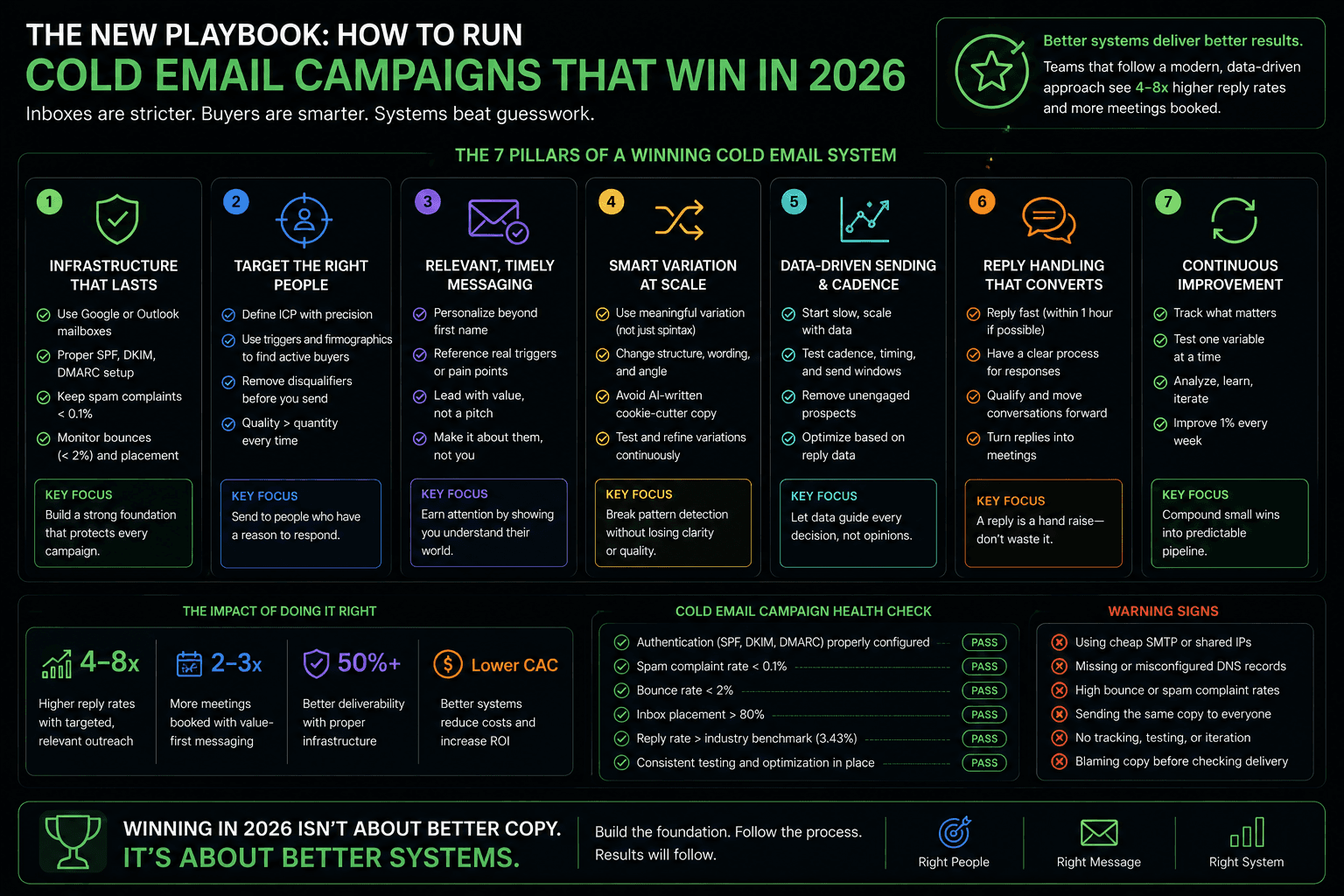
How to Diagnose a Dying Campaign in Under an Hour
Most teams diagnose deliverability problems in the wrong order. They start with copy, which is the last thing to look at. Here is the sequence that actually isolates the issue:
Start by checking inbox placement. Send a test email to a personal Gmail account and see where it lands, whether that is primary, promotions, or spam. If it is going to spam, your problem is not the subject line. Next, check Google Postmaster Tools for your sending domain's reputation. If reputation is "Low" or "Unknown," your emails are being filtered before anyone reads them. Then check your bounce rate. If it is above 2%, your list quality is degrading your domain reputation with every send. After that, look at open rates as a directional signal, keeping in mind that Apple Mail Privacy Protection inflates these numbers. Only after all of these check out should you start examining your email copy.
This diagnostic order is the one recommended by deliverability specialists and operators who build cold email systems for daily use. The majority of "copy problems" are infrastructure problems in disguise.
Common Questions Operators Are Asking in 2026
What Is a Good Cold Email Reply Rate in 2026?
A realistic benchmark for well-targeted B2B cold email is 3 to 5%. Teams running personalized, signal-based outreach to narrow lists consistently hit 8 to 15%. If your reply rate is below 1%, the issue is almost certainly infrastructure or list quality rather than messaging. One enterprise sales team we worked with doubled their outreach efficiency by fixing targeting and infrastructure before touching a single line of copy.
How Many Emails Can I Send Per Mailbox Per Day?
The safe range is 25 to 50 for cold outreach. Some operators push to 100 per day on well-warmed mailboxes, but this creates risk over a four to six week window as the inbox reputation gradually degrades under sustained volume. Using three to five mailboxes per SDR or campaign and distributing sends across them is the standard approach for scaling volume without concentrating risk.
Do the Bulk Sender Rules Apply If I Send Under 5,000 a Day?
The formal enforcement threshold at Gmail, Yahoo, and Microsoft is 5,000 emails per day to consumer addresses. But the filtering algorithms favor authenticated mail regardless of volume. If your domains lack proper SPF, DKIM, and DMARC records, your emails are more likely to hit spam even at low volumes. The classification also does not reset. Once Gmail marks a domain as a bulk sender, that label persists even if sending volume later drops.
Should I Track Opens and Clicks on Cold Emails?
No. Both require HTML elements that increase your spam score and reduce inbox placement. Open rates are also increasingly unreliable due to Apple Mail Privacy Protection, which inflates numbers by pre-loading tracking pixels. The only metric worth tracking for cold email in 2026 is reply rate. Everything else is either too noisy to act on or actively hurts your deliverability to measure.
What This Means Going Forward
The barrier to starting cold email has never been lower. Tools and templates are everywhere. But the barrier to doing it well has never been higher, and the gap between those two realities is where most campaigns die.
The teams that are still getting strong results in 2026 are not doing anything exotic. They are using authenticated domains on reputable providers, warming properly, sending in plain text at controlled volumes, varying their copy meaningfully, and diagnosing problems in the right order. None of this is complicated. All of it requires discipline.
If your outreach is underperforming and you are not sure where the breakdown is, the place to start is your infrastructure, not your copy. You can use our AI ROI calculator to see how much operational efficiency you are leaving on the table, and from there work backwards to the specific system that needs fixing.