Article
Apr 13, 2026
How to Build a Cold Email System Using Claude (Step-by-Step Guide)
Learn how to build a cold email system using Claude Code. Score leads, enrich emails, write copy, and launch campaigns from one workspace.
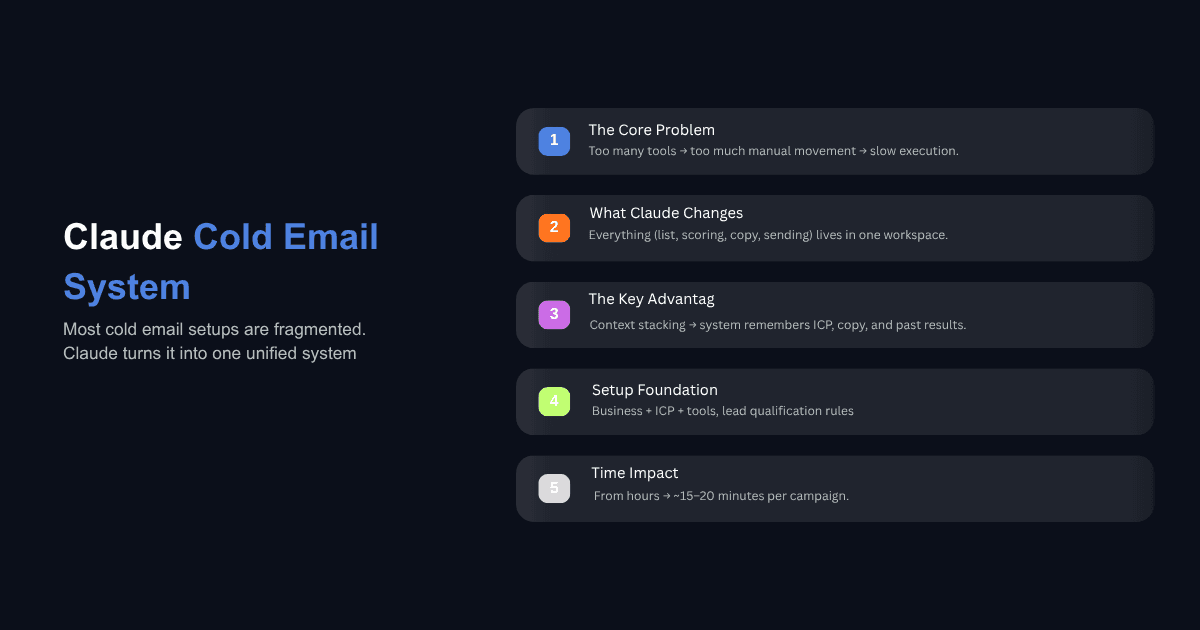
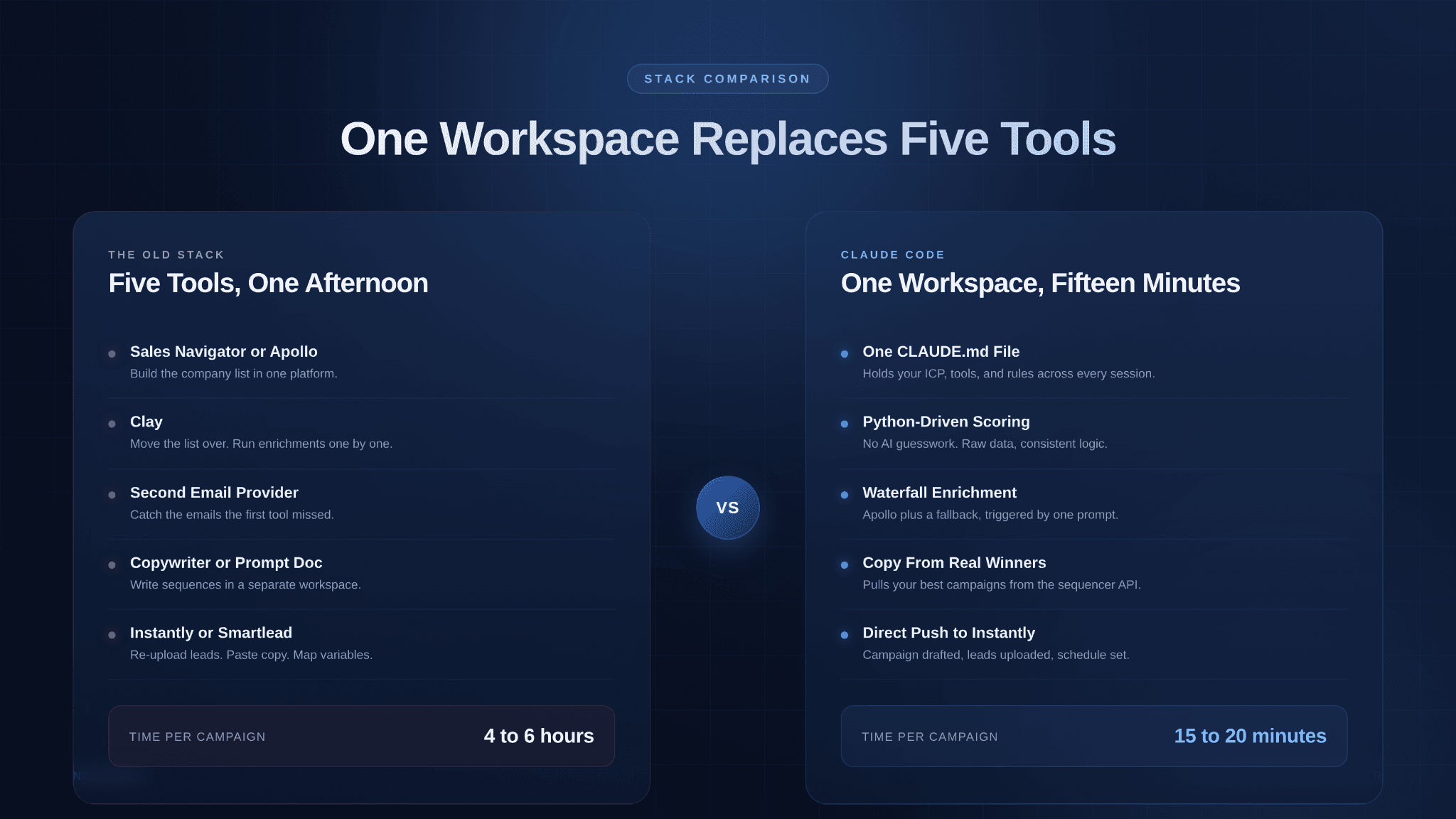
Most cold email stacks have quietly become a mess. A list-building tool, an enrichment platform, a second enrichment platform for the emails the first one missed, a copywriter or a prompt library, a sequencer, and some spreadsheet glue in between. Each tool owns one step, and the operator spends most of their time moving data between them. The campaign itself is a small part of the work.
Claude Code changes the shape of that stack. Instead of running the workflow across five silos, you keep the lead list, the scoring logic, the copy frameworks, and the sequencer integration inside one workspace that remembers everything. The same project that scored your leads last week knows your ICP, your best performing subject lines, and which API to call for email enrichment. You prompt in natural language, and the work that used to take an afternoon takes about fifteen to twenty minutes.
This guide walks through how to build a cold email system using Claude, end to end. You do not need to be a developer to follow it. You need a lead list, a few API keys, and patience for the first setup.
Why Claude Code Changes the Cold Email Stack
The reason Claude Code works for cold email is context stacking. When you are building a list in Apollo, enriching in Clay, and writing copy in a separate doc, the tools do not talk to each other. Each one sees its own slice of the work. Running the full workflow from one connection means Claude can pull analytics from your sequencer, identify your best performing campaigns, and inject that structure into the next campaign you launch. The system learns from its own output.
The second reason is accuracy where it matters. Scoring is one of those places where people assume AI will hallucinate. In a well-set-up project, Claude writes a short Python script that reads the raw CSV and applies your scoring rules mathematically. There is no guessing involved because the data does the scoring, not the model. The model handles the parts where language actually helps, like writing copy and deciding which signal is worth referencing in a first line.
For teams already using Claude for related work, automating the broader sales workflow with Claude Skills follows the same logic. Encode your rules once, reuse them across every campaign.
What You Need Before You Start
You need four things: a Claude subscription with Claude Code access, an API key from a lead data provider like Apollo or Prospeo, a sending tool such as Instantly or Smartlead, and a warmed-up sending infrastructure. That last part is outside the scope of this guide but worth mentioning because the best copy in the world will not land if your domains are not warmed.
You will also create one file at the start that does most of the heavy lifting later. It is called CLAUDE.md and it lives in your project folder. This is where you describe your ICP, your scoring criteria, your copy frameworks, and which tool handles which step. Every time you start a new session, Claude reads this file first and picks up the context without you having to re-explain anything. Using a CLAUDE.md file for project rules is the single most important habit to get right, because it is what makes the whole system scale beyond one campaign.
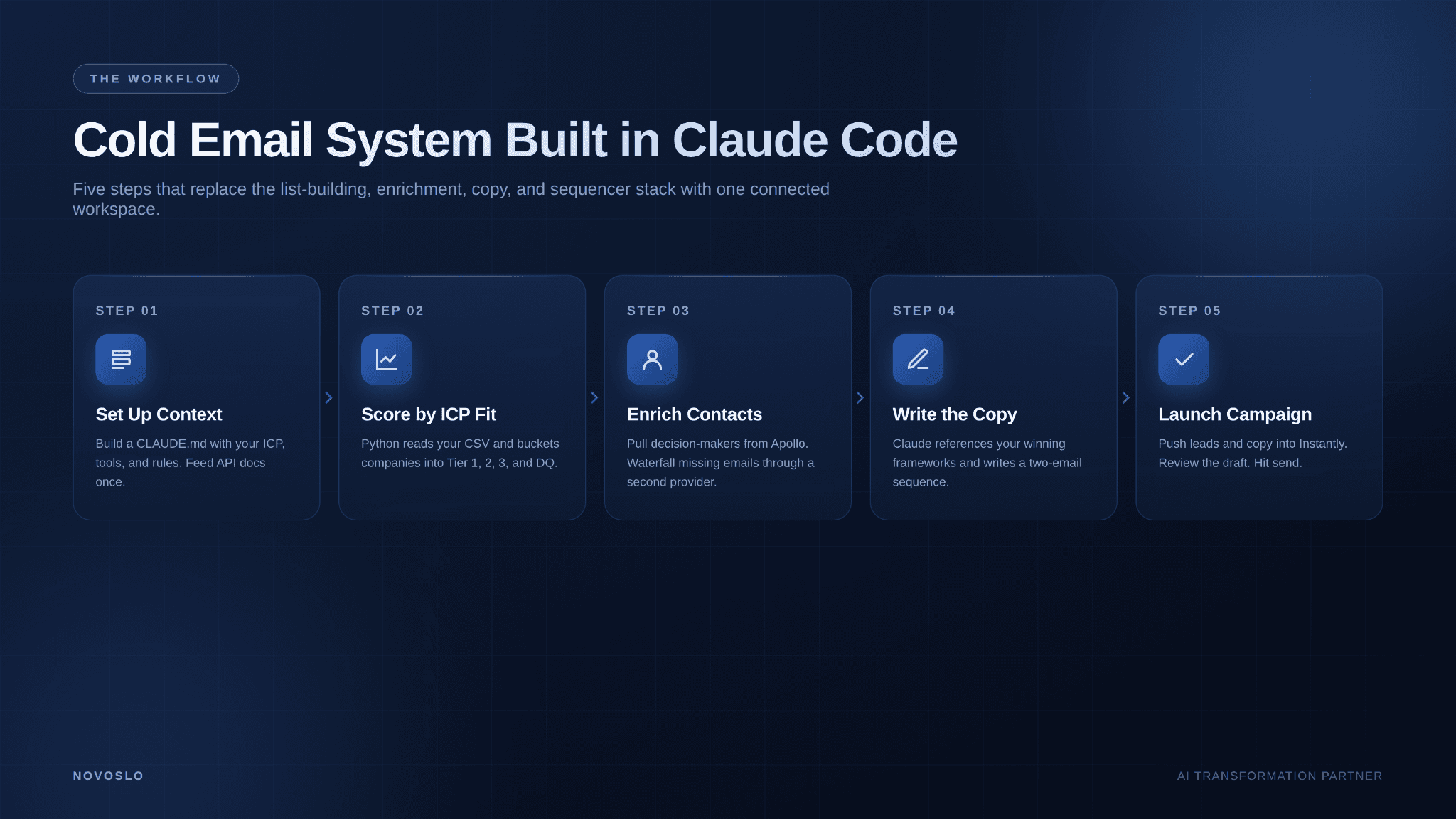
Step 1: Set Up Your Project and Context Files
Open Claude Code in your terminal and create a folder for your cold email work. Inside it, create three files.
The first is CLAUDE.md. Write a one-page document that describes your business, your ICP, and the tools you use. Say things like "Apollo is my default for contact data. Lemlist data is my fallback for missing emails. Instantly is my sequencer. My scoring criteria lives in scoring.md. My copy frameworks live in frameworks.md." Keep it plain. Claude will read it and follow it.
The second is scoring.md. This holds your tiering logic. Industries that qualify, headcount ranges, funding stages, tech stack signals that matter, and disqualification rules. Be specific. "Tier 1: US-based SaaS companies, 50 to 500 employees, raised Series A or later in the last 24 months, using HubSpot or Salesforce." The more concrete this file is, the less you will argue with the scores later.
The third is frameworks.md. This is where your best performing copy lives. Winning subject lines, first line templates, CTA patterns, length rules, formatting rules, and words you never use. If you already have a few campaigns that have worked, paste their copy into this file and annotate why they worked. Claude will reference these when writing new sequences.
Finally, feed Claude the API documentation for each tool you plan to use. You do this once per tool. "Here is the Apollo API docs. Read through them and save the endpoints you will use most." Claude takes a minute to digest each one and stores the summary in its memory. After that, you do not need to paste docs again.
Step 2: Score Your Lead List by ICP Fit
Drop your company CSV into the project folder. This might be a list you pulled from Apollo, from Sales Navigator, from LinkedIn, or from a paid database. Format does not matter much as long as it has columns Claude can read.
Then prompt something like: "Go through my company list and score each row using the criteria in scoring.md. Bucket the results into Tier 1, Tier 2, Tier 3, and disqualified." Claude will write a Python script that reads the CSV, applies your rules, and produces an output table. For a list of a hundred companies, this takes under a minute. For ten thousand, it takes a few minutes longer, but the logic is identical.
Review the buckets before moving on. The first run usually reveals at least one rule that needs tightening. Maybe your tier one criteria is too loose and 80% of the list qualifies. Maybe your disqualification list missed a country or an industry. Adjust the scoring file and rerun. Two or three iterations and the tiering reflects how you actually think about fit.
One operations team that moved lead qualification into a Claude-driven workflow saw AI-driven insights double their sales efficiency because reps stopped working leads that were never going to convert. The scoring was not magic. It was consistent, applied at the same standard to every row, and visible enough that the team could argue with it and improve it.
Step 3: Find Contacts and Enrich Emails
With the company list tiered, the next step is finding the right decision makers and getting verified emails for them. Prompt Claude to pull contacts at the Tier 1 and Tier 2 domains using the Apollo API. Specify the titles you want, such as VP Sales, Head of Growth, or Director of Operations. Specify how many contacts per company. Four to five is a reasonable sweet spot for most B2B offers, though two to three is better if you are targeting only senior buyers.
Apollo will find emails for most of the contacts. It will miss some. For those, run a second enrichment through a waterfall provider like Lemlist data, Prospeo, or Lead Magic. Prompt: "For any contacts without a work email, run them through Lemlist data and merge the results back into the list." Claude calls the second API, pulls the missing emails, and updates the file. Full details on how this waterfall step works are in the enrich your lead list using Claude Code walkthrough.
At this point you should have a list of tiered companies, named contacts at each, and verified emails for most of them. Typical recovery rates are around 85 to 95 percent depending on the providers and the niche.
Step 4: Write Copy From Your Best Performing Frameworks
Copy is where most AI-generated cold email falls apart. Generic prompts produce generic emails, which is why "write me a cold email to this person" almost never produces something worth sending. The fix is to give Claude a real reference point.
Start by pointing it at frameworks.md. Then have it pull the best performing campaigns from your sequencer. "Use the Instantly API to fetch my three highest reply-rate campaigns from the last ninety days. Show me the subject lines, body copy, and reply rates." Claude pulls the data, identifies the common structures, and uses them as the template for the new campaign. This is important because your best copy contains patterns you probably cannot articulate, and pulling from real results keeps those patterns intact.
Now give it the campaign brief. "Write a two-email sequence for Tier 1 contacts. The offer is a free backlink audit for SaaS marketing teams. Keep each email under 80 words. One clear CTA. Use the frameworks file. Reference the prospect's company in the first line using their website data." Claude generates the sequence, injects personalization variables in the format your sequencer expects, and runs a quality check against the rules you set in frameworks.md.
Review the output. You will almost always tweak one or two lines. That is normal and healthy. The goal is not to remove the human from copy review. It is to remove the human from copy generation, so the review takes five minutes instead of an hour. For a deeper look at the personalization layer, the guide on personalized first lines for cold outreach explains how to structure prompts that pull real signals from a prospect's site rather than generic first-name-company variables.
For teams running multiple campaigns a week, encoding these patterns as Claude Skills for email marketing means you stop re-prompting from scratch. The voice, structure, and QA rules live inside a reusable skill instead of a fresh prompt every time.
Step 5: Push the Campaign Into Your Sequencer
The final step is getting the campaign into Instantly, Smartlead, or whichever tool you send from. Prompt Claude: "Create a new campaign in Instantly called SaaS Backlink Audit November. Upload the Tier 1 contacts from the list. Inject the email sequence we just wrote. Set a three-day gap between email one and email two. Use my standard sending schedule." Claude uses the Instantly API to create the campaign, uploads the leads, maps the personalization variables, and sets the schedule.
The campaign is created in draft mode by default. Open it in the Instantly dashboard, review the preview for two or three leads, confirm the copy renders correctly with the variables, and hit start. If anything looks off, you can ask Claude to adjust the copy or the schedule and push the update without leaving the terminal.
The full loop, from tiered list to scheduled campaign, runs in about fifteen to twenty minutes once the setup files are solid. The first time you run it, expect an hour or two because you are still building up the CLAUDE.md file and the frameworks.
Do You Need to Be Technical to Use Claude for Cold Email?
No. The whole workflow runs on natural language prompts. If you can write clear instructions to a new hire, you can prompt Claude Code. The terminal looks intimidating the first time you open it, but it functions like a chat window once you get past the visual.
The one technical-adjacent task is pasting API keys into a config file during setup, which takes about five minutes per tool and has step-by-step docs from every provider. Nothing in the ongoing workflow requires code. You describe what you want, Claude writes any scripts that are needed in the background, and you see the results.
How Is This Different From Using Clay or Apollo Alone?
Clay and Apollo are strong at what they do, but they operate inside their own interfaces. Your list, your enrichment rules, and your copy live in different places, and moving a campaign from one tool to another means exporting, cleaning, and re-uploading. Claude Code holds all of it in one project with shared memory across steps.
The second difference is flexibility. If you want Clay to do something its interface does not support, you are stuck. With Claude Code you describe the new behavior in plain language and it writes the logic. The tradeoff is that Claude Code is stronger as a prototyping and weekly-campaign tool. For teams running hundreds of thousands of contacts a day on shared infrastructure, a dedicated platform still fits better as the system of record.
What Reply Rates Can You Expect From a Claude-Built System?
Instantly's 2026 benchmark data puts the overall average cold email reply rate at 3.43%, with top performers clearing 10% and sometimes 15% on tight segments. Operators who have moved their workflows into Claude Code report reply rates in the 4 to 10 percent range depending on niche, offer, and the quality of their personalization.
The reply rate lift does not come from Claude writing better sentences than a human. It comes from consistency and speed. You can run more campaigns per month because each one takes less time, which means you can test more offers, more subject lines, and more angles. The compounding effect of running eight campaigns a month instead of two is larger than any single copy tweak.
When Should You Still Use a Dedicated Platform?
Use Claude Code when the workflow is still evolving, when the list sizes are in the hundreds to low thousands, and when one or two people are running the campaigns. It is excellent at this scale. The flexibility is worth more than the operational polish.
Move to a dedicated platform when the workflow needs to run reliably every day across a team, when volumes push past tens of thousands of contacts per week, or when you need audit trails, role permissions, and compliance reporting. Most teams land on a hybrid setup: Claude Code for prototyping and list preparation, a dedicated platform for the production sending layer. That is a healthy end state, not a failure mode.
Closing Thought
The shift worth noticing here is not that Claude writes emails. Lots of tools write emails. It is that the full cold email workflow, from ICP scoring to campaign launch, can live inside one context that remembers your rules and learns from your results. Setup takes a few hours. After that, a weekly campaign is a fifteen-minute exercise.
If you are rebuilding how your go-to-market team operates and want a starting point that is more structured than a blog post, the Novoslo AI ROI calculator and the AI business audit tool are reasonable places to map which workflows are worth automating first. Cold email tends to be near the top of that list for most B2B teams, which is why it is usually where we start.