Article
Apr 17, 2026
Using Claude Code to Audit and Rewrite Weak Cold Email Copy
Learn how to use Claude Code to audit cold email copy, diagnose what's killing replies, and rewrite sequences that actually get responses.
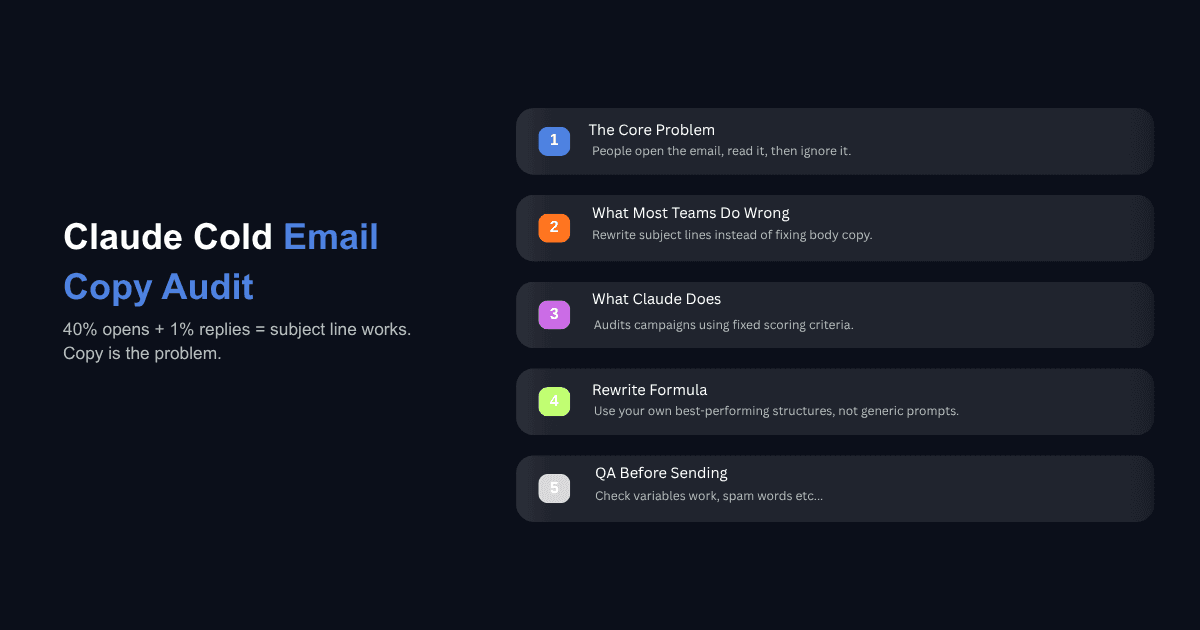
A 40% open rate with a 1% reply rate tells you something specific. The subject line is doing its job. People are opening the email. They are reading the first line, skimming the body, and deciding it is not worth a response. That is a copy problem, and most teams respond to it by rewriting the subject line, which is the one part that was already working.
Cold email copy fails for structural reasons that are consistent enough to diagnose. The email is too long, too centered on the sender, too vague in its ask, or too generic in its personalization. These are patterns, and patterns can be audited. Claude Code is well suited for this because it can pull your campaign analytics, score every email against a fixed set of criteria, compare failing copy against your best performing sequences, and rewrite the weak ones using the structures that are already working for you.
This guide walks through how to set up that audit and rewrite process from scratch. If you have already built a cold email system using Claude, this is the next layer: maintaining and improving the copy over time instead of letting campaigns decay.
Why Most Cold Email Copy Fails (And What to Audit First)
Before rewriting anything, it helps to understand where copy sits in the cold email performance hierarchy. The order of impact runs deliverability first, then list quality, then segmentation, then the offer, and finally the copy itself. If your emails are not reaching inboxes, or you are emailing the wrong people, no amount of copywriting will fix the reply rate. Copy optimization only matters once the layers underneath it are solid.
That said, copy is the layer most teams spend the least structured time on. They test subject lines, swap CTAs, and tweak first lines based on instinct. What they rarely do is run a systematic audit across an entire campaign to identify repeated structural failures.
The five most common ones we see are emails that exceed 120 words when the first-touch emails under 80 words consistently outperform longer versions, emails where the majority of sentences describe the sender rather than the recipient, emails with more than one CTA which creates decision paralysis and suppresses replies, emails that reference a company name and job title as if that counts as personalization, and emails that include proof claims so vague they could apply to any company in any industry.
The personalization point deserves extra attention because it is the one that has shifted the most in the last year. Referencing a prospect's company size and title is no longer personalization. Every automated tool does it, and inbox providers are trained to recognize that pattern. What moves reply rates is signal-based personalization that outperforms firmographic targeting by three to five times, which means referencing something the prospect or their company actually did recently: a job they posted, a product they launched, a funding round they closed. If your emails reference signals, audit whether those signals are real and recent. If they reference firmographics, that is the first thing to fix.
Setting Up Claude Code as a Cold Email Copy Auditor
The audit works best when Claude has three things: a scoring framework, your copy standards, and real campaign performance data to compare against.
Start by creating an audit framework file called email-audit.md in your project. This is the document Claude will reference every time you ask it to evaluate copy. A practical starting point includes word count (target under 80 for first touch), sender-to-recipient ratio (sentences about you versus about them, targeting at least 3:1 in favor of the recipient), CTA count (exactly one), first line relevance (does it reference something specific to this person), proof specificity (named client, concrete number, timeframe), subject line length (under 50 characters), and a spam trigger word check.
This follows the same logic as a structured copy review framework where every issue gets a location, a diagnosis, a fix, and a principle. Without that structure, copy reviews become subjective. With it, they become repeatable diagnostics.
Next, add your copy standards file. If you already have a frameworks.md from your cold email system, point Claude to it. If not, create one with your best performing templates, your banned words and phrases, and formatting requirements for your sequencer's variable syntax.
Finally, connect Claude to your sequencer's API. If you are using Instantly, Smartlead, or Salesforge, feed Claude the API documentation and your key. Prompt: "Read the Instantly API docs and save the endpoints for fetching campaign analytics, email copy, and reply metrics." Claude digests the docs once and remembers them across sessions.
How to Run a Copy Audit in Claude Code
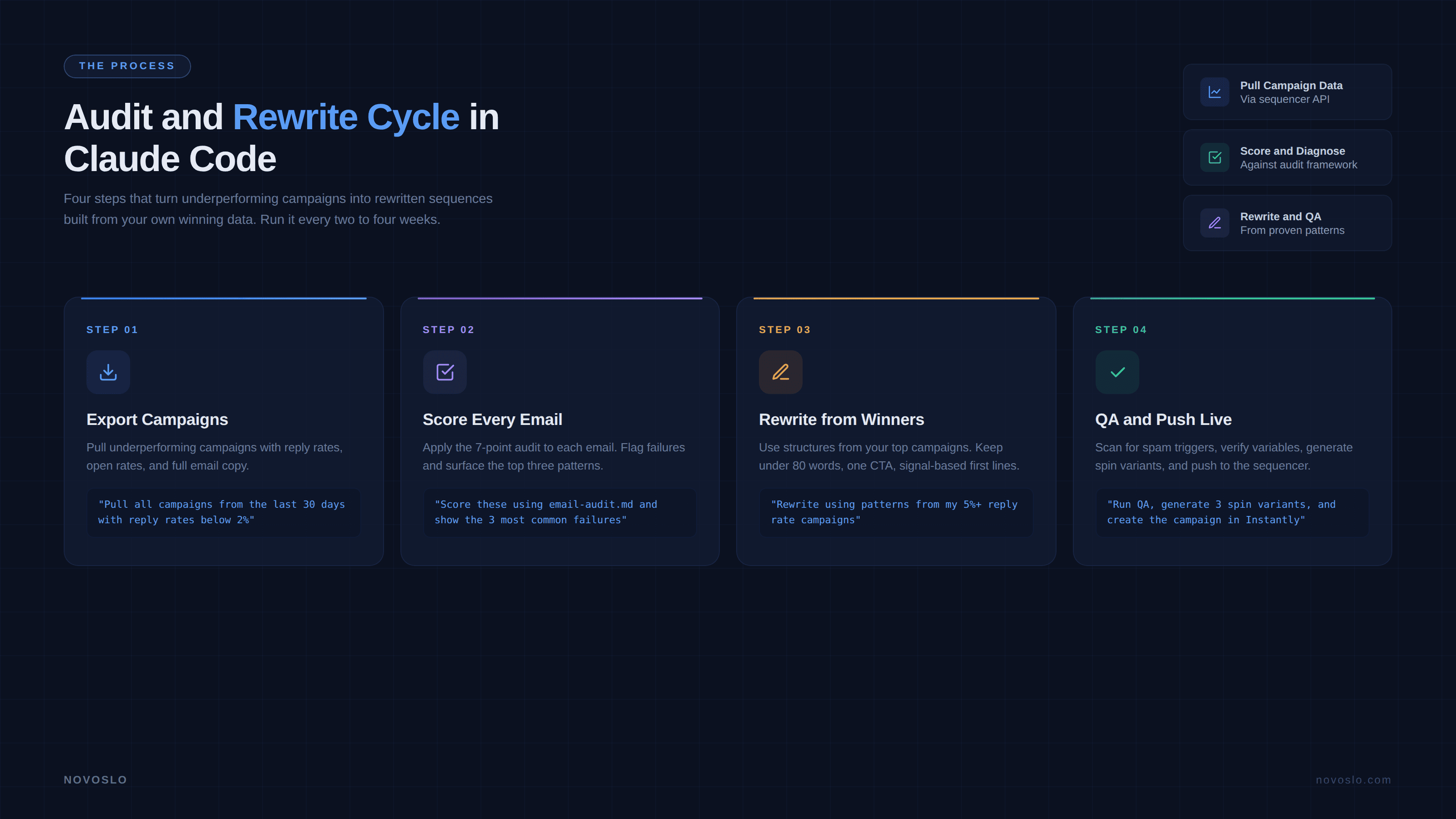
With the setup files in place, the audit itself follows four steps.
Export your underperforming campaigns. Prompt Claude: "Pull the last 30 days of campaign data from Instantly. Show me every campaign with a reply rate below 2%, including the subject lines, email body, and per-step metrics." Claude calls the API, pulls the data, and presents it in a table. You now have a clear view of which campaigns are underperforming and can see the actual copy side by side with the numbers.
Score each email against your audit criteria. Prompt: "Score every email in these underperforming campaigns using the audit framework in email-audit.md. For each email, give me a score per criterion and flag any that fail." Claude runs through each email, counts words, measures the sender-to-recipient ratio, checks for spam triggers, evaluates the first line, and scores the proof. The output is a structured report that tells you exactly where each email breaks down.
Identify patterns across failing emails. This is where the audit becomes more than a checklist. Prompt: "Look across all the failing emails and tell me the three most common structural problems." Claude aggregates the scores and surfaces the patterns. You might find that 80% of your failing emails have first lines that reference nothing specific about the recipient, or that your follow-up emails are consistently twice as long as your first touches. These patterns are the actual diagnosis.
Compare against your best performing copy. Prompt: "Now pull my campaigns with reply rates above 5% from the same period. Score them using the same audit framework and show me how they differ from the underperformers." This comparison is where the real insight lives. You will see that your winning emails share specific structural traits that your losing emails do not, and those traits become the blueprint for the rewrite.
Rewriting Cold Email Copy With Claude Code
The rewrite should not start from a blank prompt. Generic instructions like "write me a better cold email" produce generic output that sounds like every other AI-written email in a prospect's inbox. Claude produces more natural cold email copy than most models, but only when you give it specific context to work from.
Start by pointing Claude at the winning patterns from your audit. Prompt: "Using the structural patterns from my top performing campaigns and the frameworks in frameworks.md, rewrite the failing emails. Keep each email under 80 words. Use one CTA. Write the first line from a real signal for each prospect, not a name-company variable." Claude generates the new copy using structures that are already proven in your own data, which is meaningfully different from generating copy based on generic best practices.
For the first line specifically, the quality of the rewrite depends on how much prospect data Claude has access to. If you have already run enrichment and have company descriptions, recent news, hiring data, or tech stack information in your lead file, Claude can pull from those fields to write first lines that reference something real. The personalized first lines using Claude guide covers this in detail, but the core idea is that Claude should be selecting from a priority list of signals rather than filling in a template variable.
Once the new copy is generated, run a QA pass before pushing it to your sequencer. Prompt: "Run a QA check on all rewritten emails. Scan for spam trigger words, confirm all variable placeholders match Instantly's format, verify reading level is below sixth grade, and check that no two emails in the same sequence share the same CTA." Claude catches formatting errors and structural inconsistencies that a manual review would miss across a batch of fifty or more emails.
If you need volume, Claude can also generate spin syntax variants so that no two recipients in the same campaign receive identical copy. Prompt: "Generate three spin syntax variants of each rewritten email. Keep the meaning identical but vary the wording enough that each version reads as a distinct message."
One pattern we have seen work well in our own cold outreach work is running the audit and rewrite cycle every two to three weeks rather than waiting for performance to visibly drop. One client team that adopted this cadence doubled their reply efficiency because they caught copy decay before it compounded.
Can Claude Code Pull Campaign Data From My Sequencer Automatically?
Yes. Instantly, Smartlead, and Salesforge all expose API endpoints for retrieving campaign analytics, email copy, and contact-level reply data. You feed Claude the API documentation once, provide your API key, and it builds the integration. After that, pulling campaign data is a natural language request. "Show me all campaigns from the last 14 days with reply rates and open rates per email step" is a valid prompt that Claude translates into the correct API call.
If your sequencer does not have an API, you can still run the audit by exporting campaign data as a CSV and dropping the file into your Claude Code project. The audit framework applies the same way. The difference is that you lose the ability to push rewritten copy back into the sequencer automatically, so there is a manual step at the end.
For teams running multiple clients or verticals, Claude Code handles this by keeping separate project contexts. Each client gets their own folder with their own frameworks file, their own audit criteria, and their own API connection. You tell Claude which client you are working on and it loads the correct context without mixing data.
What Does a Good Cold Email Audit Actually Score?
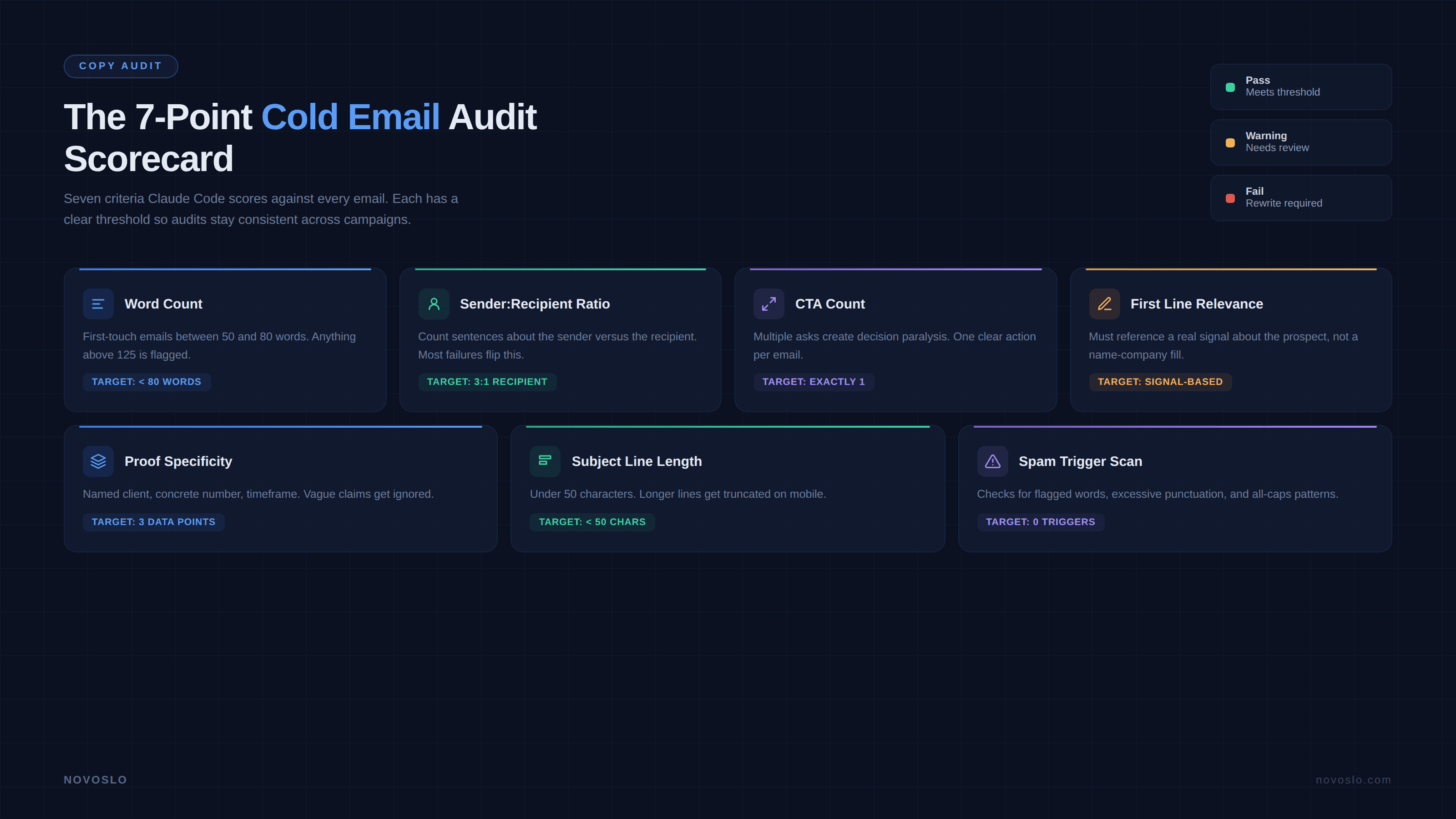
A useful audit evaluates seven areas. Word count: first-touch emails should land between 50 and 80 words, with anything above 125 flagged as a structural problem. Sender-to-recipient ratio: count sentences about the sender versus the recipient, targeting at least 3:1 in the recipient's favor. CTA count: exactly one, because multiple asks create decision paralysis. First line relevance: the opening sentence should reference something specific to the recipient beyond their name and company. Proof specificity: "We helped a Series B fintech reduce cost per lead from $180 to $40 in 90 days" is credible, while "We helped a company similar to yours grow revenue" is vague to the point of meaninglessness. Subject line length: under 50 characters, since longer ones get truncated on mobile and sound like marketing. Spam trigger scan: Claude checks for words and phrases that inbox providers flag, including "guaranteed," "free trial," "limited time," and excessive punctuation.
How Often Should You Audit Your Cold Email Copy?
Every two to four weeks for a full copy audit, and weekly for a lighter check on mailbox-level reply rates and bounce rates per sending domain. The weekly check catches infrastructure problems early. The monthly audit catches copy decay.
If you are running high volume with multiple campaigns launching each week, review every campaign's first-week performance and flag anything below your baseline for a copy review. Claude Code can automate this with a standing prompt: "Every Monday, pull all campaigns launched in the last 7 days. Flag any with a reply rate below 3% and run a quick audit against email-audit.md."
Should You Use Claude Code or Claude Projects for This?
Claude Code is the better fit for teams that want to connect to sequencer APIs, run batch analysis across dozens of campaigns, push rewritten copy back into the sending tool, and automate recurring audits. It handles the full loop from data retrieval to rewrite to deployment.
Claude Projects works for smaller operations where the workflow is more manual. You export a campaign as a CSV, upload it along with your audit framework, and ask Claude to evaluate and rewrite one campaign at a time. It does not integrate with external tools but requires no API configuration. If you are already enriching your lead list using Claude Code, staying in Claude Code for the audit keeps everything in one workspace. Encoding your criteria as reusable Claude Skills for email marketing means the audit runs identically every time without re-prompting.
What This Looks Like as a Repeatable Process
Copy auditing is not a creative exercise. It is a diagnostic process with fixed criteria, measurable inputs, and a clear output. The value of running it in Claude Code is consistency. The audit applies the same standards to every email regardless of who wrote it or when it was sent, and it learns from your own campaign data rather than relying on generic advice about what cold email should sound like.
The process condenses into a rhythm: pull campaign data, score the copy, identify patterns in the failures, compare against what is working, rewrite the weak emails using your proven structures, run a QA pass, and push the updated copy back into the sequencer. Once the setup files are in place, the full cycle takes about twenty minutes.
If your team is running outbound and the reply rates have flattened or declined, the copy audit is usually the fastest diagnostic you can run after confirming deliverability and list quality are healthy. If you want help setting up the audit framework, connecting your sequencer, or building the rewrite workflow into a repeatable system, book a call with us and we will walk through it with your data.