Article
Mar 13, 2026
How to Use Claude Skills to Automate Your Sales Workflow
Learn how to use Claude Skills to automate sales workflows with our SPEAR framework. Build reusable AI skills for outreach, call prep, and follow-ups.
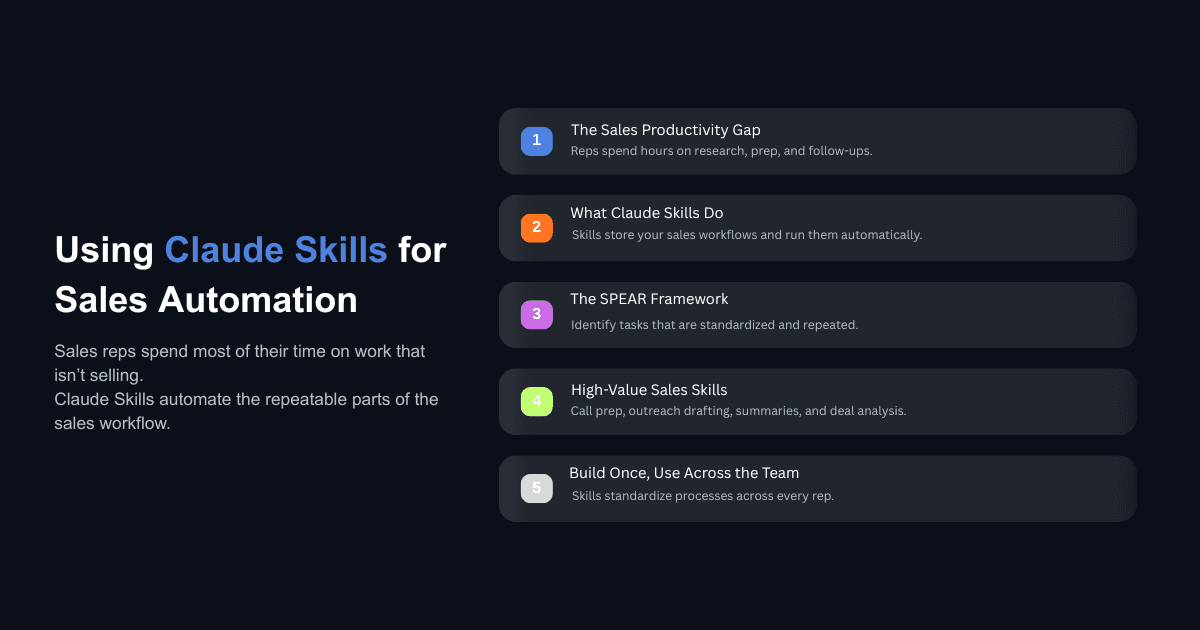
After adoption, 82% of sales reps say they spend more time nurturing relationships instead of doing data entry. That number tells you where selling is headed and where most teams are still stuck.
The average sales rep spends the bulk of their week on tasks that have nothing to do with talking to buyers. Research, CRM updates, follow-up drafts, call prep, pipeline reviews. All necessary, none of it selling, and most of it follows the same pattern every time.
Claude Skills solve this by encoding the repeatable parts of your sales process into reusable instructions that Claude runs on demand. You teach it your outreach format, your call prep checklist, and your follow-up structure once. It executes that workflow consistently without you re-explaining context every time.
This post walks through how to identify which sales workflows belong in a Skill, how to build one, and how to measure whether it is working. We introduce a framework called SPEAR that helps you decide where to start, along with examples of what sales-ready Skills look like in practice.
What Are Claude Skills (And Why Do They Matter for Sales Teams)
If you have used Claude for sales tasks, you have noticed the friction. Every new conversation starts from zero. You re-explain your ideal customer profile, your tone of voice, your email structure, and your qualification criteria. You paste the same reference documents, describe the same formatting rules, and hope the output stays consistent.
Claude Skills remove that loop. A Skill is a folder containing a SKILL.md file with structured instructions, context, and reference materials that Claude loads automatically when it recognizes a relevant task. Anthropic's documentation describes Skills as reusable resources that provide Claude with domain-specific expertise, turning a general-purpose assistant into a specialist. For a deeper explanation, see our guide on what Claude Skills are and how they work.
In a sales context, this means you can build a Skill that contains your discovery question framework, your ICP documentation, your preferred email structure, and your CRM field mapping. When you say "prep me for the Acme call," Claude does not ask what your process looks like. It already knows.
Every re-pasted prompt consumes context window tokens that could be used for actual work, and it introduces inconsistency because small phrasing changes lead to different outputs over time. Skills solve both problems by saving context, stabilizing quality, and making your process portable across team members. If you are evaluating whether your team needs AI agents vs AI tools, Skills sit in the middle. They are more structured than a prompt, less complex than a full agent deployment, and immediately useful without a long implementation cycle.
Where Claude Skills Fit in a Sales Workflow
The sales automation market has grown from $7.8 billion in 2019 to $16 billion in 2025, but most of that spending goes toward platform-level automation like CRM workflows, email sequences, and lead scoring engines. The gap that remains is the messy, semi-structured work between those systems: the research, the prep, the analysis, the drafting. That is where Skills create the most value.
ServiceNow offers a clear example of what this looks like at scale. After deploying Claude-powered tools across their 29,000-person workforce, their sellers saw up to a 95% reduction in preparation time for customer meetings. The tool synthesizes prospect information, account context, and relevant materials in one step, so reps can focus on the conversation instead of the research.
One of our own enterprise clients doubled their sales efficiency using AI-driven insights, engaging leads at the right time with data-backed decisions. The pattern holds: when you remove the manual overhead from sales prep, reps sell more effectively.
The SPEAR Framework for Identifying Sales Skill Opportunities
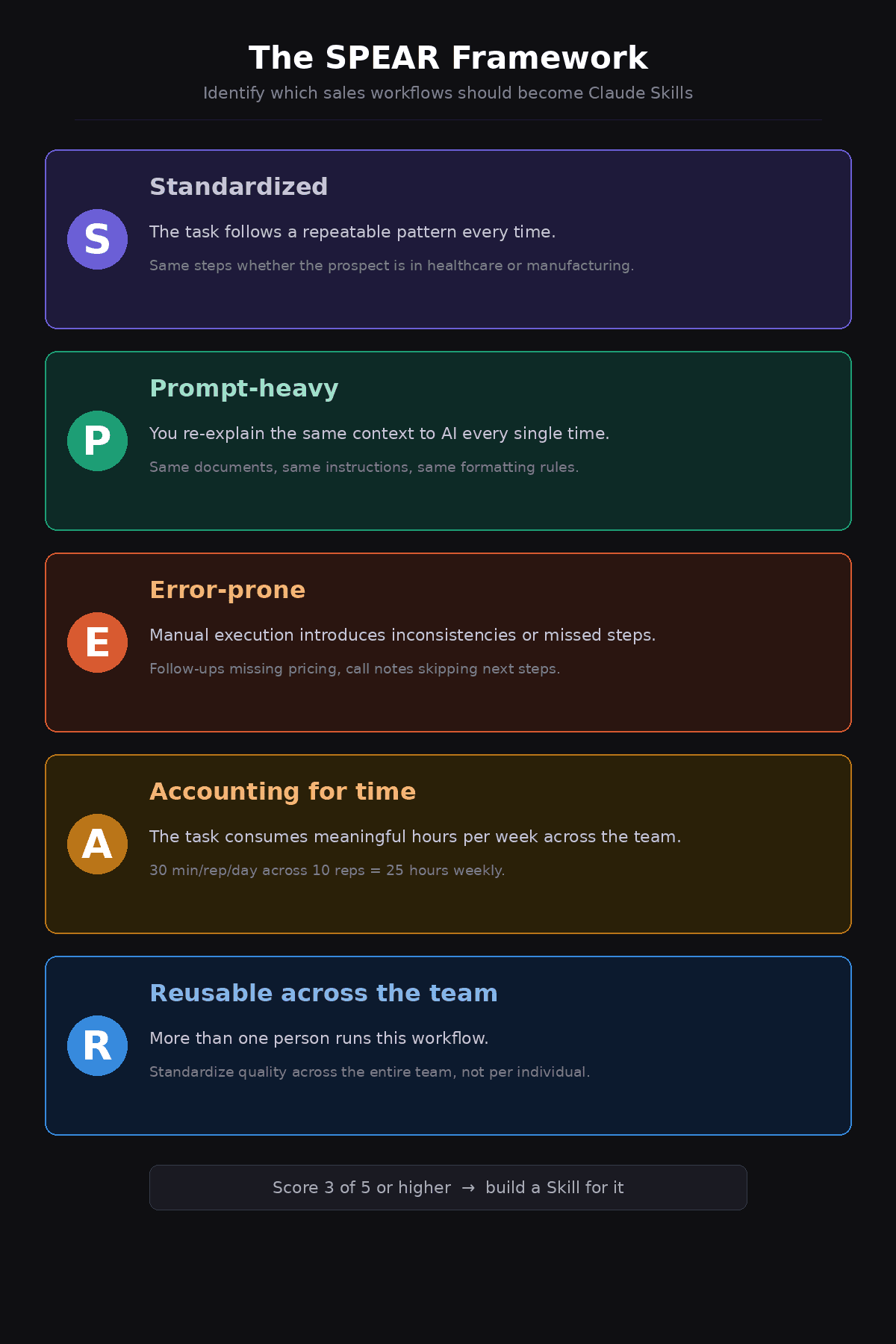
Not every task in your sales workflow should become a Skill. Some tasks are too simple to justify the setup, and others are too variable to benefit from standardized instructions. The SPEAR framework helps you identify the workflows where a Skill will create the most leverage.
S — Standardized. The task follows a repeatable pattern every time it runs. If your process for prepping a discovery call is roughly the same whether the prospect is in healthcare or manufacturing, that consistency makes it a good Skill candidate. If every instance requires fundamentally different judgment, a Skill will not help.
P — Prompt-heavy. You currently spend real effort re-explaining context to AI or building the same prompt from scratch. A task where you paste the same three documents and the same set of instructions every time should be encoded once and triggered automatically.
E — Error-prone. Manual execution introduces inconsistencies or missed steps. If your follow-up emails sometimes include pricing and sometimes do not, or your call notes sometimes capture next steps and sometimes skip them, a Skill can enforce completeness.
A — Accounting for time. The task consumes meaningful hours per week across your team. A workflow that takes 5 minutes once a month is not worth building a Skill for. A workflow that takes 30 minutes per rep per day across a 10-person team is costing you 25 hours a week.
R — Reusable across the team. More than one person runs this workflow. Skills become more valuable as they scale beyond a single user, because they standardize quality across the entire team rather than depending on each rep to maintain their own process.
If a sales workflow scores well on at least three of these five criteria, it is worth building a Skill for it.
Five Sales Workflows That Should Be Skills
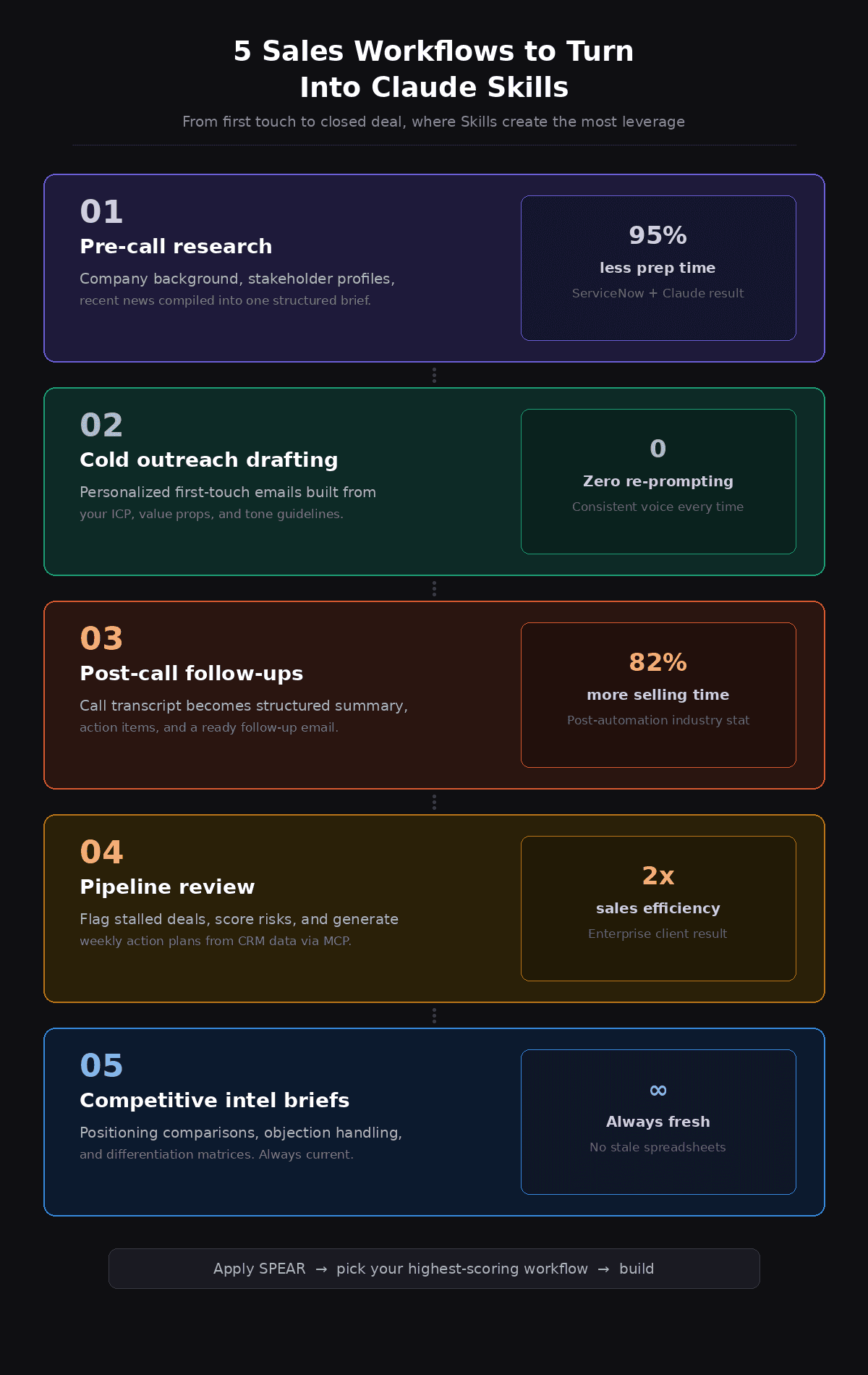
Based on the SPEAR criteria, these are the workflows where we see sales teams getting the most immediate value from Claude Skills:
1. Pre-call research and meeting prep. Pull together company background, recent news, stakeholder profiles, and relevant account history into a structured brief. This is the workflow ServiceNow automated to cut prep time by 95%.
2. Cold outreach drafting. Generate personalized first-touch emails based on your ICP, value props, and tone of voice. If you are curious about how different AI tools handle this, we tested which AI writes the best cold outreach emails and the results were instructive.
3. Post-call summaries and follow-ups. Convert raw call notes or transcripts into structured summaries with action items, then draft the follow-up email. This is one of the most time-consuming manual tasks in sales and one of the most standardizable. You can also audit sales calls using AI to extract objections, buying signals, and coaching insights.
4. Pipeline review and deal analysis. Analyze deal stages, flag stalled opportunities, and generate weekly action plans. Claude's Sales Plugin already supports pipeline review, forecast generation, and risk flagging.
5. Competitive intelligence briefs. Assemble positioning comparisons, objection handling scripts, and differentiation matrices for specific competitors. This is work that usually lives in a spreadsheet that nobody updates, and a Skill can keep it current.
How to Build a Claude Skill for Sales (Step by Step)
Building a Skill does not require coding expertise. If you can write clear instructions and organize reference files into a folder, you can build one. The process follows three phases (define, test, and refine), similar to the approach in our how to implement AI in your business guide.
What Goes Into a SKILL.md File
Every Skill starts with a SKILL.md file containing two sections: a YAML frontmatter header and the instruction body. The frontmatter tells Claude what the Skill does and when to activate it, including the name, description, and trigger keywords. The description is critical because Claude uses it to decide whether to load the Skill for a given task.
The instruction body is your workflow written in plain language: the steps Claude should follow, the inputs it expects, the output format, and decision logic for handling variations. You can bundle reference files alongside the SKILL.md (ICP documents, email templates, objection libraries, tone of voice guides) and Claude loads them when the Skill activates.
For a practical walkthrough, our guide on building a Claude Skill for LinkedIn posts shows the full process from start to finish.
The Build-Test-Refine Loop
The most reliable approach is to iterate on the workflow in conversation first. Run the task manually with Claude a few times, adjusting instructions until the output matches what you want. Then tell Claude to package what you just did into a Skill.
Once the Skill exists, run it against 5 to 10 real scenarios. Pay attention to where the output drifts. Those are the spots where your instructions need more specificity. Most Skills reach a reliable state within three to five iterations. Treat your SKILL.md file as a living document that improves over time rather than something you write once and forget.
Can Claude Skills Replace Your Sales Tools?
Not entirely, and that is not the point. Skills are not a CRM, a dialer, or a sequencing platform. They do not store data persistently or send emails on a schedule. What they do is handle the cognitive work that sits between your tools: the research, analysis, drafting, and decision making that currently requires a human to think through the same process for the hundredth time.
For a broader view of automation approaches, our comparison of business process automation tools covers the landscape by operational fit rather than feature checklists.
Skills work best for tasks that require language understanding, contextual judgment, and structured output like meeting prep, email drafting, deal analysis, and competitive positioning. They are less useful for real-time data access, transactional automation, or triggering actions in live systems. Understanding how AI is different from automation helps clarify where each approach fits.
The value of Skills increases when you treat them as the intelligence layer on top of your existing systems. Model Context Protocol (MCP) is the connection layer that makes this practical. Through MCP, a Skill can pull information from your CRM, access call transcription data, or read from enrichment tools. A call prep Skill that only works with pasted information is helpful. A call prep Skill that automatically pulls the prospect's CRM record, recent emails, and company news through MCP connectors is a different category of productivity.
For teams already working with Claude's broader ecosystem, Claude Cowork for business AI transformation covers additional ways to integrate Claude into daily operations.
What Does a Sales-Ready Skill Actually Look Like?
Example: A Cold Outreach Skill
This Skill would contain your ICP definition, messaging framework, tone guidelines, and three to five high-performing email examples. The SKILL.md instructions specify the input format (company name, contact role, one relevant insight), the output format (subject line, email body under 150 words, P.S. line), and decision logic for adjusting tone based on seniority level. The trigger description includes phrases like "write a cold email" or "draft outreach." When activated, the Skill produces output matching your voice and structure without any additional context.
Example: A Call Prep Skill
This Skill bundles your discovery question framework, qualification criteria (BANT, MEDDIC, or your team's equivalent), and meeting brief template. The instructions tell Claude to research the company, identify likely pain points based on industry and size, suggest tailored discovery questions, and format everything into a one-page brief. If connected via MCP to your CRM and a news source, the Skill pulls in deal history, stakeholder notes, and recent company developments automatically. Every rep on the team gets the same format without additional training.
How to Measure Whether Your Sales Skills Are Working
Building a Skill is only worthwhile if it changes outcomes. Track three metrics:
Time recovered per workflow. Measure how long the task took manually versus with the Skill. For meeting prep, time the old way, time the new way, multiply the difference by reps and frequency. This produces the ROI number you need for buy-in.
Output consistency. Review 10 outputs side by side. Are they hitting the same quality bar and following the same structure? If outputs vary widely, your instructions need tightening.
Downstream impact. Are reps having better conversations after using the call prep Skill? Are cold emails getting higher response rates? Connect the Skill output to the sales outcome it is supposed to influence and track the relationship over 30 to 60 days.
If you want to quantify the broader impact of AI automation, our AI ROI calculator can help you model the numbers. For teams exploring AI workflow transformation strategies more broadly, Skills are a practical starting point because they produce measurable results quickly without a large infrastructure investment.
Where to Start
The SPEAR framework gives you a clear way to identify which sales workflows should become Skills: look for tasks that are Standardized, Prompt-heavy, Error-prone, Accounting for significant time, and Reusable across the team. Start with the workflow that scores highest, build the Skill, test it against real work, and refine until reliable.
The value here is not about replacing your team or tools. It is about encoding the process that already works so it runs consistently, at lower cost, and at a quality level that does not depend on who is executing it. That is what separates teams that experiment with AI from teams that use AI to streamline operations. Understanding why automation matters is the first step. Building a Skill that runs your highest-value sales workflow is the second.
If you want help identifying where Claude Skills would create the most leverage in your sales process, book a call with our team. We will walk through your workflows, apply the SPEAR framework, and map out where automation fits.