Article
Feb 27, 2026
How to Use Claude Skills to Write LinkedIn Post
Learn how to build a Claude Skill for LinkedIn posts — encode your voice, structure, and audience once, and skip re-prompting every time.
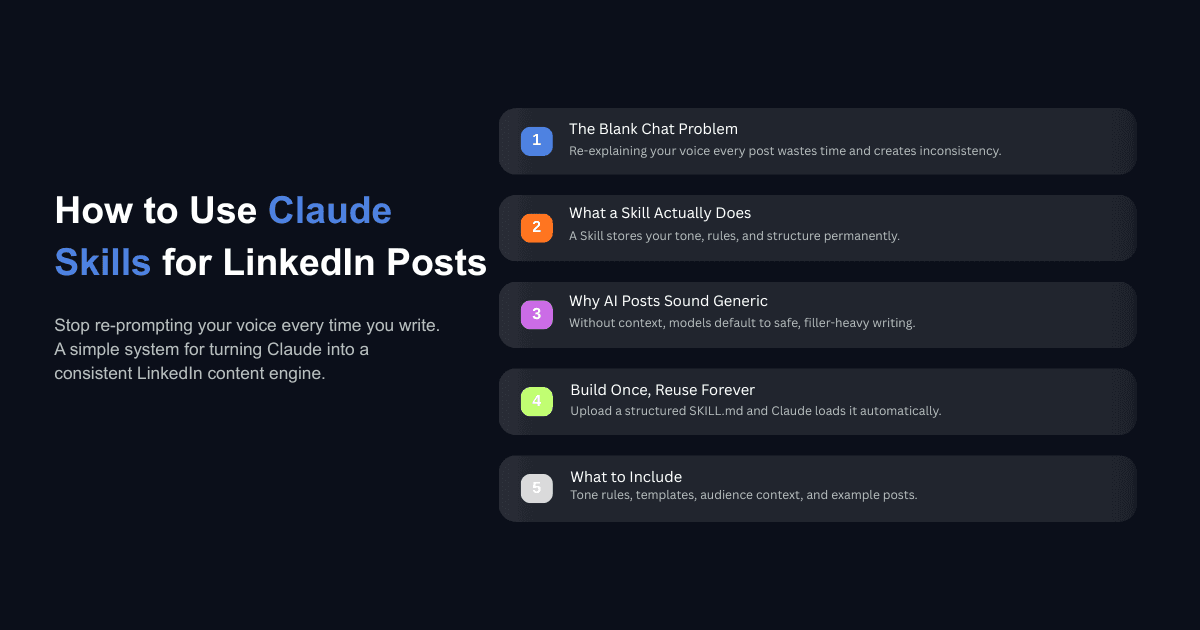
Most people using Claude for LinkedIn are still starting from a blank chat window every time they want to write a post. They re-explain their tone. They paste examples of what they want. They describe their audience, their formatting preferences, their dos and don'ts — and then do the whole thing again tomorrow.
Claude Skills eliminates that loop entirely. A Skill is a reusable instruction set that you build once, upload to Claude, and never have to re-explain again. Every time you ask Claude to write a LinkedIn post, it loads your Skill automatically — your voice, your structure, your rules — and starts from a foundation that already sounds like you.
This post walks through what Skills are, how to build one specifically for LinkedIn content, and what to put inside it so your posts come out sounding like something you actually wrote. If you've been looking at why automation matters for your content workflow, this is where it gets specific.
What Are Claude Skills and Why They Matter for Content Workflows
Claude Skills are self-contained folders that include instructions, scripts, and reference files. When you upload a Skill to Claude, it reads the metadata to determine when the Skill is relevant, and loads the full instructions only when it needs them.
This is different from pasting a long prompt at the start of every conversation. A Skill lives inside your Claude account and activates whenever you start a task that matches its description. Anthropic introduced Skills in October 2025 as a way to teach Claude repeatable workflows — and then expanded them in December 2025 with organization-wide management, a partner directory, and an open standard that makes Skills portable across platforms.
The architecture behind Skills uses what Anthropic calls progressive disclosure. When you start a conversation, Claude scans the metadata of all your available Skills — each one takes up roughly 100 tokens. If it finds a match, it loads the full instructions at under 5,000 tokens. Reference files and scripts only load when needed. This keeps conversations fast without sacrificing depth.
Skills work across claude.ai, Claude Code, and the API, which means a Skill you build for LinkedIn posts in the web app will also work if you later automate your content pipeline programmatically. If you've been exploring tools like Claude Cowork for business workflows, Skills are the underlying mechanism that makes those workflows repeatable.
Why Your LinkedIn Posts Still Sound Generic Even When You Use AI
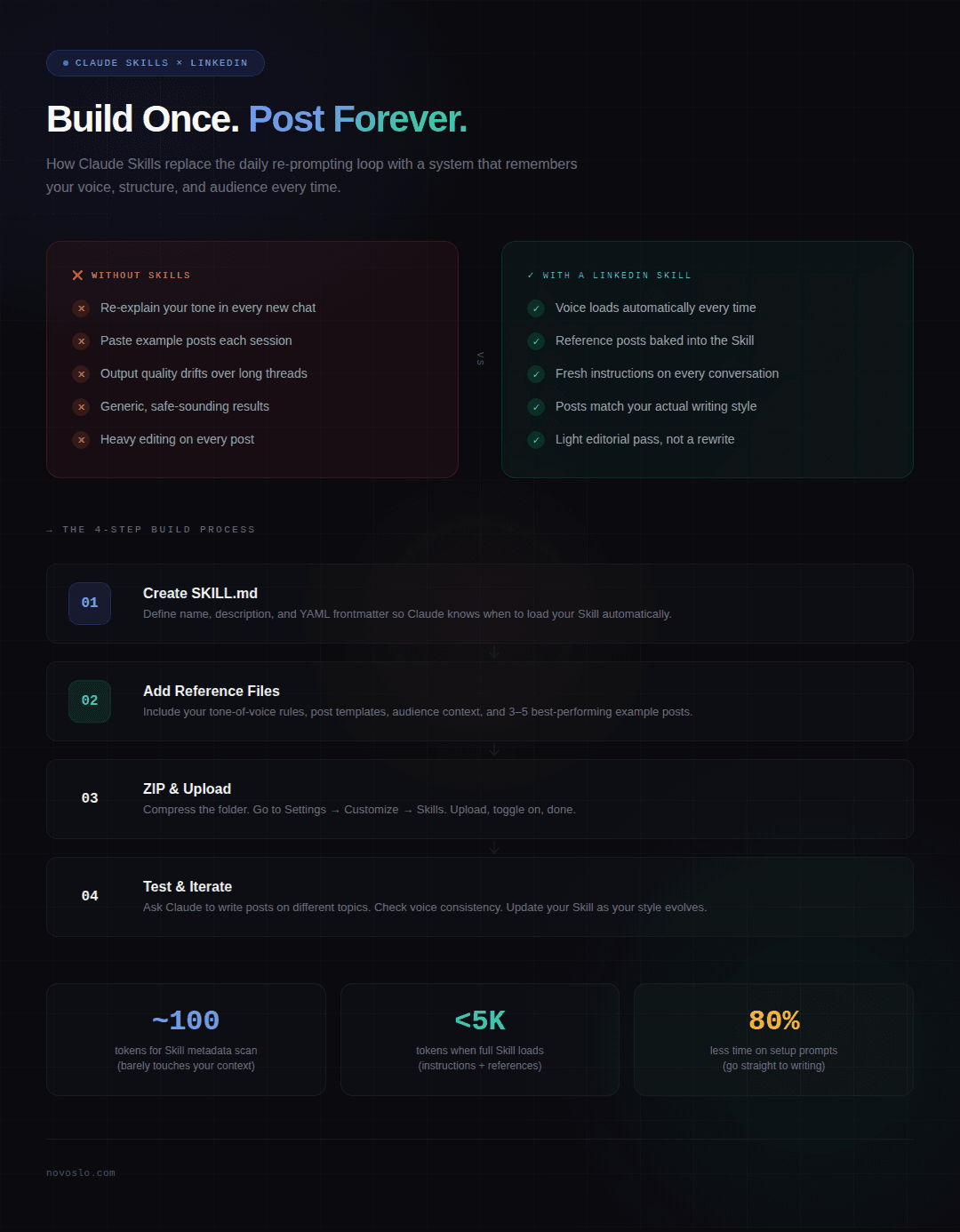
The most common complaint about AI-written LinkedIn content is that it sounds like AI-written LinkedIn content. And in most cases, the problem is not Claude (or whatever model you're using). The problem is how the model is being asked to write.
When you open a new chat and type "write me a LinkedIn post about hiring," Claude has almost nothing to work with. It doesn't know your voice. It doesn't know your audience. It doesn't know that you never use emojis, or that you prefer first-person anecdotes over data-driven arguments, or that your posts typically run 150 words with a question at the end.
So it defaults to something safe and generic — because that's what any reasonable system would do with limited context.
This is the re-prompting problem. Every new conversation resets Claude's understanding of who you are and how you write. Even if you paste the same instructions at the top of every chat, subtle differences in how you phrase those instructions lead to inconsistent results over time. One session produces something that sounds right; the next drifts into corporate filler.
The issue gets worse in longer conversations. As the context window fills up, early instructions carry less weight. Your carefully written tone guidelines from message one start competing with dozens of subsequent exchanges, and the output quality shifts. This is why even people who are good at prompting still end up doing heavy editing on every post.
Skills solve this structurally. Instead of explaining your preferences inside a conversation that will eventually reset, you encode them in a persistent file that Claude reads fresh every time. The instructions never degrade, never get buried, and never compete with other context. When you understand how Claude compares to other AI tools for content, this consistency advantage becomes one of the most practical reasons to invest in the Skills setup.
How to Build a LinkedIn Post Skill From Scratch
Building a Skill requires no code. At its core, a Skill is a folder containing a SKILL.md file — a Markdown document with some YAML metadata at the top — and optionally, reference files that provide Claude with additional context.
Here is the process, step by step.
Step 1: Define What the Skill Does
Create a folder on your computer called something like linkedin-post-writer. Inside it, create a file called SKILL.md. This file needs to start with YAML frontmatter — a small block of metadata between triple dashes that tells Claude when to use the Skill and what it does.
Here is a working example of that frontmatter:
The name field becomes the identifier (64 characters max). The description field is what Claude uses to decide whether this Skill applies to a given task, so make it specific. According to Claude's custom Skills documentation, a clear description is the single most important factor in whether your Skill triggers reliably.
Step 2: Add Your Voice, Formats, and Rules
Below the frontmatter, write your instructions in plain Markdown. This is where you tell Claude how to write your LinkedIn posts. Include sections covering your tone of voice (sentence length preferences, vocabulary to use and avoid, how formal or conversational you want it), your post structure (how to write hooks, how to close, typical post length), and your audience context (who reads your posts, what they care about, what language resonates with them).
You can also create separate reference files inside the same folder. For example, a references/tone-of-voice.md file that contains your detailed writing guidelines, or a references/example-posts.md file with 3-5 of your best-performing LinkedIn posts. Your SKILL.md can reference these files, and Claude will load them when it needs additional context.
Step 3: Package and Upload
Once your folder is ready, compress it into a ZIP file. Open Claude, go to Settings, then navigate to Customize and find the Skills section. Click the upload button, select your ZIP file, and Claude will read the frontmatter and register the Skill. You can toggle it on and off anytime.
For Claude Code users, place the folder in your .claude/skills/ directory and Claude discovers it automatically.
Step 4: Test With Different Post Types
Open a new chat and ask Claude to write a LinkedIn post. If your Skill description is specific enough, Claude will load it automatically — you can verify this in the reasoning view. Test with several different angles: a thought leadership post, a case study recap, a contrarian take, a personal story. Each should come back in your voice with your structure, even though the topics differ.
If something feels off, update your SKILL.md, re-upload, and test again. The iteration cycle is fast.
What Should Go Inside Your LinkedIn Skill
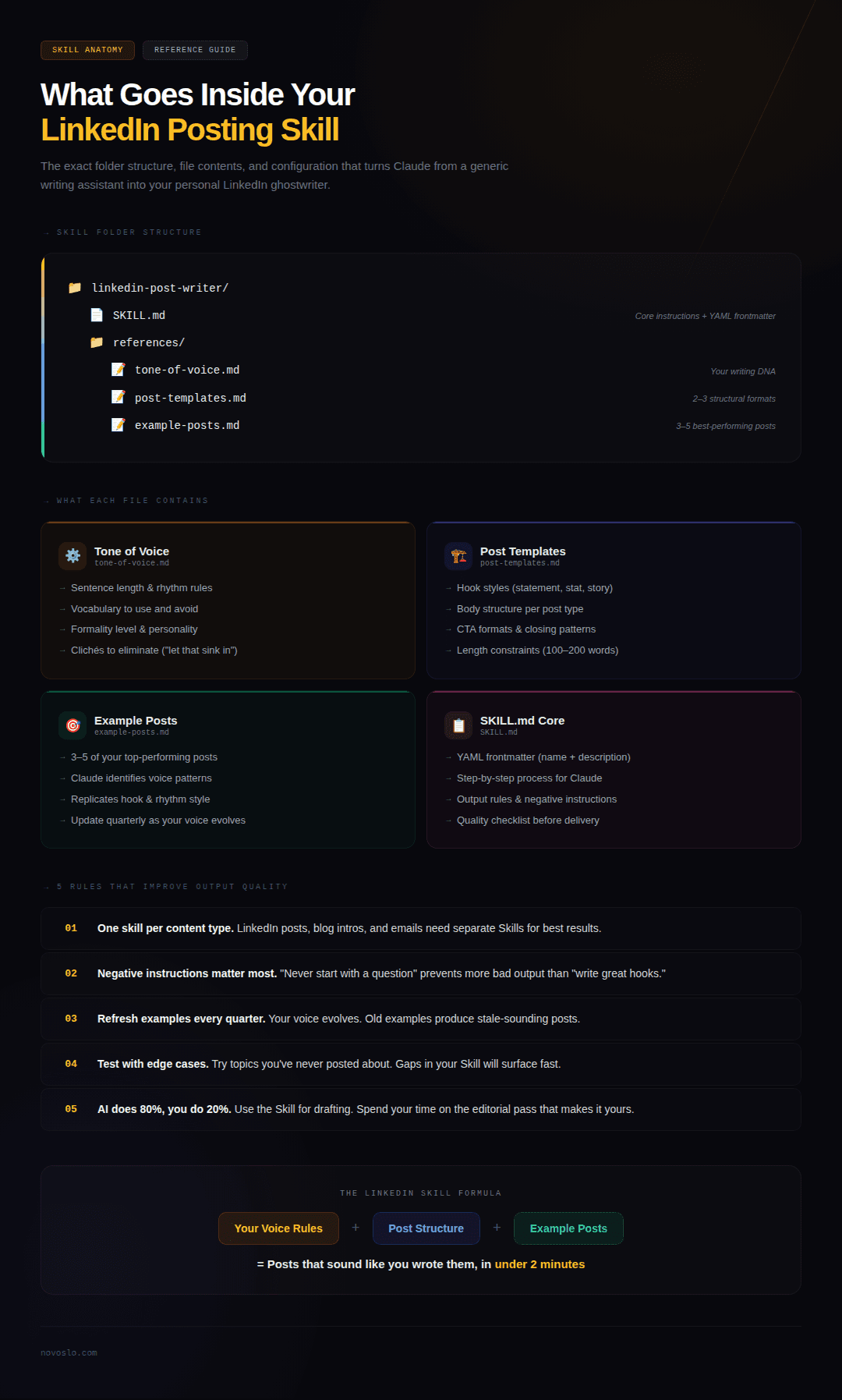
The quality of your Skill depends entirely on the quality of the instructions and references you put into it. Here is what matters most.
Tone of Voice Document
This is the most important reference file. It should specify how you write — not in abstract terms like "professional but approachable," but in concrete rules. Things like: sentences average 10-15 words, you never use the word "utilize," you open posts with a direct statement rather than a question, you avoid exclamation marks, you write in first person.
Include vocabulary you prefer and vocabulary you want Claude to avoid. If you have specific phrases that show up in your best posts, list them. If there are LinkedIn clichés you want eliminated ("I'm excited to announce," "here's the thing," "let that sink in"), name them explicitly.
Post Structure Templates
Define the formats you use most. A common LinkedIn thought leadership format might look like: one-line hook, two-paragraph body with a personal observation, one-sentence CTA, no hashtags. A case study format might be: problem statement, what was done, measurable result, one takeaway for the reader.
Having 2-3 templates inside your Skill means Claude can produce structurally varied posts without you needing to specify the format each time.
Audience Context
Tell Claude who reads your posts and what they respond to. If your audience is founders and operations leaders at mid-market companies, say so. If they respond better to specific examples than to abstract frameworks, say that too. The more Claude understands about who you're writing for, the better it calibrates word choice, complexity, and framing.
This kind of AI workflow transformation — encoding your audience understanding into a reusable system rather than re-explaining it each time — is what separates people who use AI effectively from people who use AI as a fancier text box.
Example Posts
Include 3-5 of your highest-performing LinkedIn posts as reference material. These give Claude a concrete model of what "good" looks like in your specific context. Claude can identify patterns in your hooks, your sentence rhythm, your closing style, and your use of whitespace — and replicate those patterns in new posts on different topics.
A Real Skill Structure You Can Copy
Here is a complete folder structure for a LinkedIn posting Skill:
And here is what a full SKILL.md might look like:
Claude reads the frontmatter first. If you ask it to "write a LinkedIn post about hiring remote engineers," it matches the description, loads the full SKILL.md, then loads each reference file as needed. The result is a post that sounds like you wrote it — because it's working from your rules, your examples, and your structure.
How Does This Compare to Custom Styles or System Prompts?
Claude offers a separate Styles feature that lets you define a writing tone applied across all conversations. Skills and Styles serve different purposes, and understanding the difference between AI tools and AI agents helps clarify when to use each one.
Styles control tone and voice globally. When you set a Style, it influences how Claude writes everything — emails, code comments, blog posts, LinkedIn content. It is a broad personality layer.
Skills control entire workflows. A Skill can include scripts, templates, reference documents, and multi-step instructions. It can tell Claude not just how to write, but what format to use, what structure to follow, what files to read, and what checks to run before presenting the output.
For LinkedIn content, the most effective approach is to use both. Set a Style that captures your general voice, and build a Skill that handles the specific workflow of creating LinkedIn posts — including structure, length, audience context, and example calibration. The Style provides the baseline tone; the Skill provides the task-specific instructions.
Practical Tips for Getting Better Results
After building your Skill, here are the things that make the biggest difference in output quality.
Keep each Skill focused on one content type. A LinkedIn post Skill should not also handle blog writing, email drafts, and presentation scripts. Separate Skills for separate content types means Claude loads only the relevant instructions for each task, and you can iterate on each one independently. This principle of AI workflow automation for writing applies broadly — specificity produces better results than generality.
Include negative instructions. Telling Claude what not to do is as important as telling it what to do. If you never want posts that start with a question, say so. If you want to avoid the word "journey," list it. Negative instructions prevent the most common failure modes and save you the most editing time.
Update your example posts periodically. Your LinkedIn voice evolves over time. A post you wrote six months ago might not reflect how you write today. Swap in your recent best-performing posts every quarter so Claude's reference material stays current.
Use AI for 80% and edit the last 20% yourself. Even a well-tuned Skill produces drafts that benefit from a human pass. The goal is not to eliminate your involvement — it is to eliminate the repetitive setup work so your time goes entirely toward the editorial decisions that actually matter. One creator documented cutting their per-post time from three hours to thirty minutes by building a similar system around Claude's Style and content pipeline features.
Test your Skill with edge cases. Try asking for a post on a topic you've never written about. Try a post that's supposed to be controversial. Try one that's purely personal. These tests reveal gaps in your Skill's instructions that are easy to fix before they affect your real content.
Where This Fits in a Broader AI Implementation
Building a LinkedIn Skill is a small, self-contained project that delivers immediate value. But the underlying pattern — encoding institutional knowledge into reusable AI workflows — is the same pattern that drives larger AI implementation across businesses.
The teams that get the most from AI are not the ones with the most advanced tools. They are the ones that take their existing expertise, document it clearly, and build systems that apply it consistently. A LinkedIn Skill does this for content. The same approach applies to sales outreach, client onboarding, financial reporting, and dozens of other workflows where quality depends on following a specific process every time.
If you're trying to figure out what AI can realistically do for your business and where the ROI actually shows up, calculate your AI ROI to see where automation makes the most financial sense. Content workflows are often a good starting point — not because they're the highest-value application, but because they're the easiest place to build the muscle of encoding expertise into AI systems. That muscle is what scales.