Article
Mar 9, 2026
Best Business Process Automation Tools
Compare the best business process automation tools in 2026 by operational fit, not feature lists. A practical guide for operations leaders.
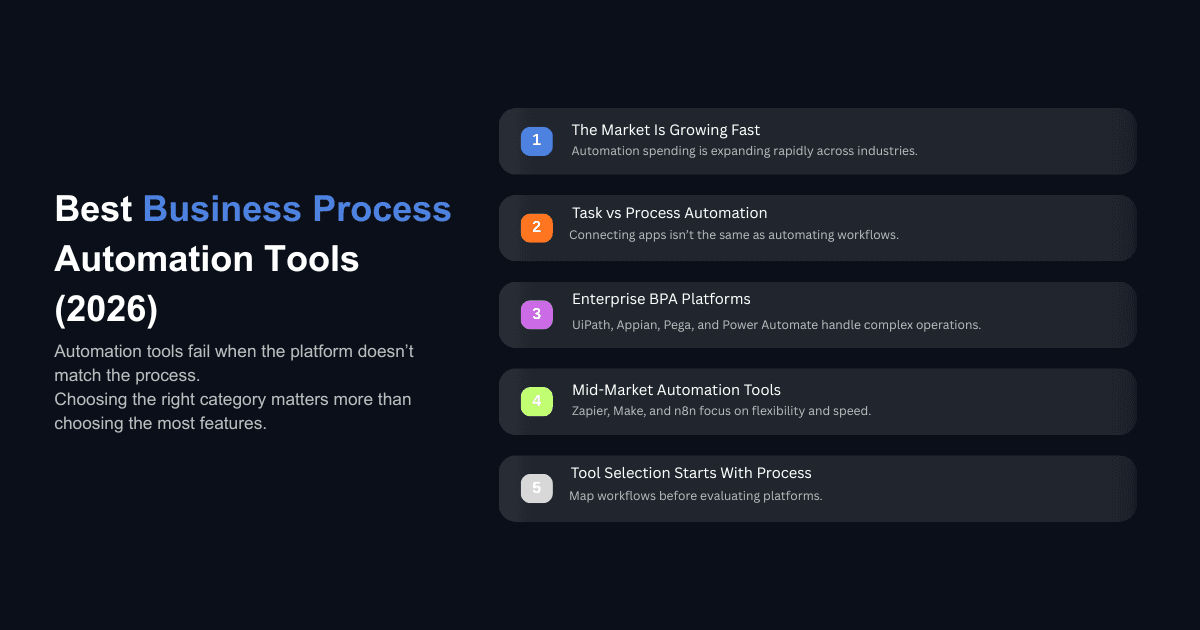
The business process automation market was valued at $18.7 billion in 2024 and is on track to reach $35.5 billion by 2030. That kind of growth tells you something: companies are spending heavily on automation. What it does not tell you is that a large number of those investments still underperform because the tool selection process is broken.
Most teams pick a business process automation tool based on feature lists, analyst rankings, or whatever their vendor demo made look easy. Then they spend six months discovering that the platform does not match how their operations actually run. The features were real. The fit was not.
This guide takes a different approach. Instead of ranking tools by popularity, we break them down by the type of organization, technical capacity, and operational complexity they actually serve well. If you are an operations leader, founder, or CFO trying to figure out where automation fits into your business, this is the practical starting point.
What Makes a Business Process Automation Tool Actually Work
The Difference Between Automating Tasks and Automating Processes
Most companies start with task automation. They connect two apps, move data from one place to another, or trigger a notification when something happens. That is useful, but it is not business process automation.
Real process automation means coordinating work across people, systems, departments, and sometimes external partners in a single, governed flow. It means handling exceptions, routing approvals, maintaining audit trails, and scaling without adding headcount. The tools that do this well look very different from the ones that just connect apps together.
This distinction matters because picking a task automation tool when you need process orchestration leads to the same frustration every time: the first few workflows work fine, and then everything stalls as complexity increases.
If you want to understand this distinction more deeply, the difference between AI agents vs AI tools explains why most businesses waste money on the wrong solution category entirely.
Why Most BPA Implementations Stall After the First Workflow
The pattern we see constantly is this: a team automates one process successfully, gets excited, and then tries to scale across the organization. That is where things break. The second and third workflows usually involve different departments, different approval chains, and systems that do not talk to each other cleanly.
The tool itself is rarely the problem at that point. The problem is that nobody mapped the operational dependencies before choosing a platform. Finance runs on one system, HR on another, and customer operations on a third. A business process automation tool that handles simple linear workflows beautifully will collapse under that kind of cross-functional complexity.
One enterprise sales team doubled their efficiency after implementing AI driven process automation for lead engagement timing. But they got there because they mapped the process first and chose the tool second. Most teams do it in reverse.
Best Business Process Automation Tools for Enterprise Operations
These platforms are built for organizations with complex processes, strict compliance requirements, multiple departments, and legacy systems that need to be integrated rather than replaced.
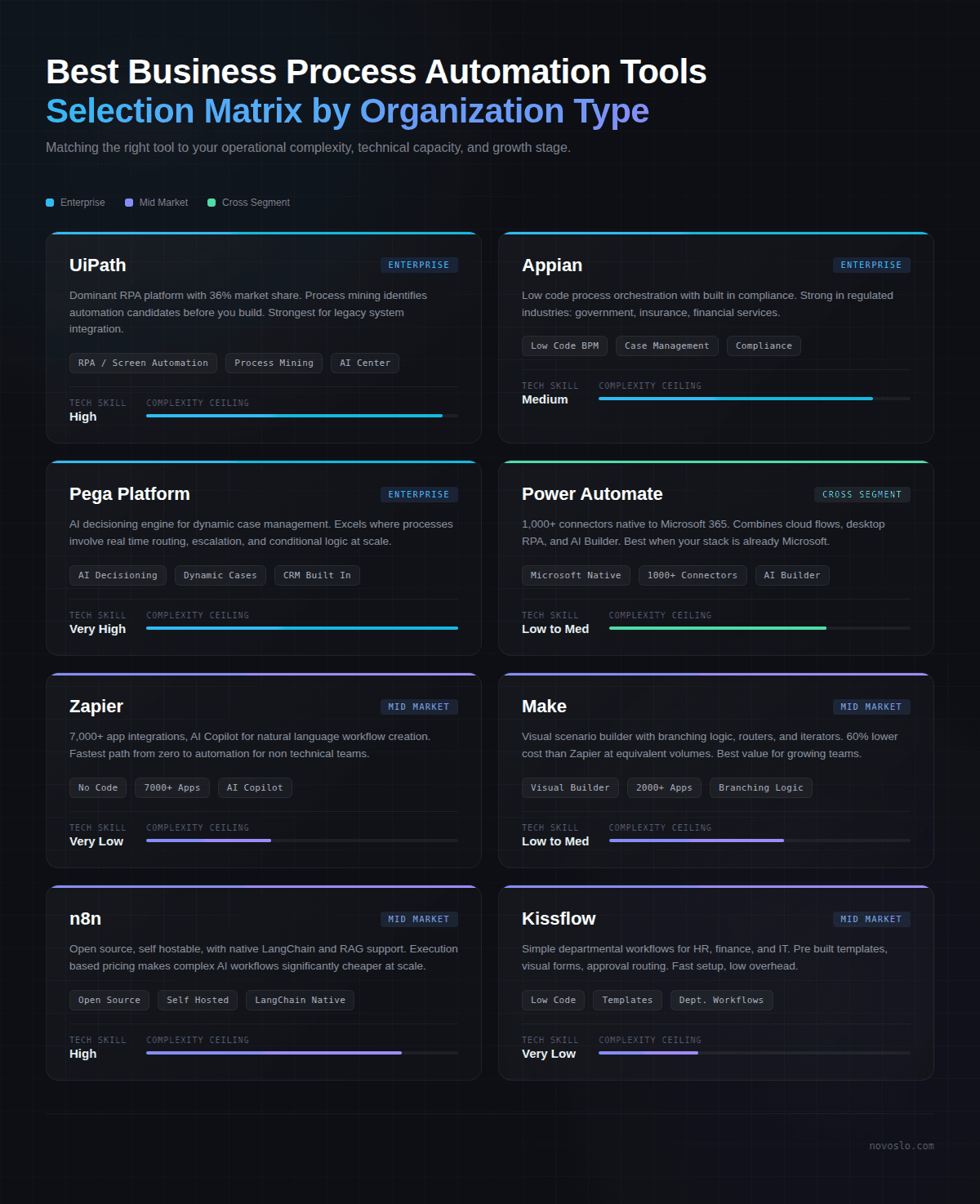
UiPath: Best for Legacy System Integration and Large Scale RPA
UiPath holds roughly 36% of the global RPA market share, making it the dominant platform for robotic process automation. Its strength is automating repetitive tasks across systems that were never designed to work together, which is the reality inside most large enterprises.
Where UiPath stands out is its process and task mining capabilities. Before you automate anything, the platform can observe how employees actually use their systems and identify the highest value automation candidates. This is useful for large organizations where the operations team knows there is waste but cannot pinpoint exactly where.
Pricing starts at around $420/month for an attended bot and automation developer combination, with unattended automation at $1,380/month. Enterprise licensing is custom. The UiPath Academy offers free training, which makes it more accessible for teams building internal automation skills.
Best for: Large enterprises with legacy systems, high volume repetitive processes, and dedicated automation teams. Not ideal for small teams or organizations that need fast, no code setup.
Appian: Best for Low Code Process Orchestration in Regulated Industries
Appian combines low code application development with business process management, making it a strong fit for organizations in regulated industries like government, insurance, and financial services. The platform allows business users to collaborate with IT to build applications that manage complex, multi step processes with built in compliance controls.
What separates Appian from pure RPA tools is its ability to unify process automation, case management, and AI in a single platform. Users can design process models visually and deploy them without heavy development cycles. Appian's pricing runs between $70 and $100 per user per month, which places it on the higher end but is consistent with enterprise BPM pricing.
Appian is a strong choice if your workflows span regulated environments where audit trails, approval chains, and compliance documentation are not optional. It is less suitable for organizations that just need simple workflow connections between cloud apps.
Best for: Regulated industries needing compliance built into process flows, organizations that want low code development with enterprise grade governance.
Pega Platform: Best for Complex Case Management and AI Decisioning
Pega is the platform that enterprises reach for when their processes are too complex for standard workflow tools. Its core strength is case management, where work does not follow a predictable sequence but instead requires dynamic routing, escalation, and real time decision making based on changing conditions.
The platform's AI powered decisioning engine determines next best actions across customer interactions and internal processes, applying business rules automatically. This is why Pega is heavily adopted in financial services, healthcare, and telecommunications, industries where a single case can involve dozens of decision points and handoffs.
Pega's trade off is cost and complexity. It requires specialized talent to implement well, and licensing is structured for large enterprises with significant budgets. Finding skilled Pega professionals remains a challenge in many regions, which adds to the total cost of ownership.
Best for: Large enterprises with dynamic, case based processes that require AI driven decisions. Not suitable for small or mid market teams without dedicated implementation resources.
Microsoft Power Automate: Best for Organizations Already in the Microsoft Ecosystem
If your company runs on Microsoft 365, Dynamics 365, and SharePoint, Power Automate is the natural starting point for business process automation. It offers over 1,000 connectors, including deep native integration with the entire Microsoft stack, and supports both no code and low code automation.
Power Automate combines workflow automation through cloud flows, desktop automation through RPA capabilities, and AI Builder for document processing and text analysis. The licensing is accessible at $15/month per user for attended automation, though costs can escalate quickly as usage grows with unattended bots at $150/month per process license.
The platform's process mining capabilities, inherited from the Minit acquisition, give organizations visibility into where their actual processes deviate from the intended design. This is valuable for mature operations teams that want to continuously improve rather than just automate once.
Best for: Microsoft centric organizations looking to automate across their existing stack. Less ideal for companies with diverse, non Microsoft tooling.
Best Business Process Automation Tools for Mid Market Teams
These tools are designed for organizations that need automation without a dedicated IT team managing the infrastructure. They prioritize speed of deployment, cost efficiency, and accessibility for non technical users.
Zapier: Best for Non Technical Teams Connecting SaaS Apps
Zapier dominates the no code automation space with over 7,000 app integrations and the most approachable interface of any platform on this list. If your team needs to connect cloud applications and automate data movement without touching code, Zapier is the fastest path to production.
The platform's AI Copilot now allows users to describe what they want to automate in plain language and have the workflow generated automatically. For simple, linear automations (new lead comes in, send to CRM, notify sales, create task), Zapier handles this in minutes.
The limitation is complexity. Zapier's linear workflow structure becomes restrictive when you need conditional branching, loops, error handling, or parallel execution. At scale, the task based pricing model can get expensive since every individual action within a workflow counts as a separate task. A 10 step automation running 100 times a day consumes 1,000 tasks daily.
Best for: Non technical teams automating straightforward SaaS connections. Marketing, sales, and HR teams that need quick wins without developer involvement.
Make (formerly Integromat): Best Balance of Visual Power and Cost Efficiency
Make occupies the middle ground between Zapier's simplicity and n8n's technical depth. Its visual scenario builder lets you construct complex, branching workflows with routers, iterators, and aggregators that would require premium plans on Zapier. Make's integration library covers approximately 2,000 to 3,000 apps, fewer than Zapier but with deeper access to each service's features.
The pricing advantage is significant. Make's operation based model often costs 60% less than Zapier at equivalent volumes, which makes it attractive for growing companies that are running hundreds of automations daily.
Where Make falls short is in deployment flexibility. It is cloud only with no self hosting option, which means organizations with strict data sovereignty requirements need to look elsewhere. The learning curve is also steeper than Zapier, though the payoff in workflow complexity handling is worth it for teams that outgrow basic automation quickly.
Best for: Mid market teams that need more workflow complexity than Zapier offers, at a lower price point. Growing companies where automation volume is increasing fast.
n8n: Best for Developer Led Teams Needing Full Control
n8n is the platform for technical teams that want complete control over their automation infrastructure. It is open source, can be self hosted on your own servers, and uses an execution based pricing model that makes complex workflows significantly cheaper to run than task based alternatives.
The platform supports native LangChain integration, self hosted LLMs, and retrieval augmented generation setups, making it the strongest option for teams building AI powered automation workflows. With full JavaScript and Python support in code nodes, n8n functions more like a backend orchestration service than a traditional automation tool.
The trade off is clear: n8n requires technical talent. Someone on your team needs to be comfortable with Docker, server management, and writing code. For organizations that have this capacity, n8n offers a level of customization, data sovereignty, and cost efficiency that neither Zapier nor Make can match.
Best for: Developer led teams, companies with strict compliance or data residency requirements, organizations building AI agent workflows.
Kissflow: Best for Simple Departmental Workflows
Kissflow is designed for small to mid sized businesses that want to automate common departmental processes like employee onboarding, purchase requests, and help desk ticketing without enterprise level complexity. Its low code platform is accessible to users without programming skills, which means individual departments can own their automation without waiting for IT.
Kissflow provides pre built templates for HR, finance, IT, and procurement workflows, reducing setup time considerably. The visual form builder and approval routing system handle the bread and butter of operational automation: getting the right information to the right person for the right decision at the right time.
Where Kissflow is limited is scale and sophistication. It does not offer the deep process orchestration of Appian or the RPA capabilities of UiPath. For organizations that need to automate simple, well defined departmental processes without building an enterprise automation practice, Kissflow delivers without the overhead.
Best for: Small to mid sized businesses automating departmental workflows. Teams that need quick deployment of approval and request management processes.
How Do You Choose the Right Business Process Automation Tool?
Start With the Process, Not the Platform
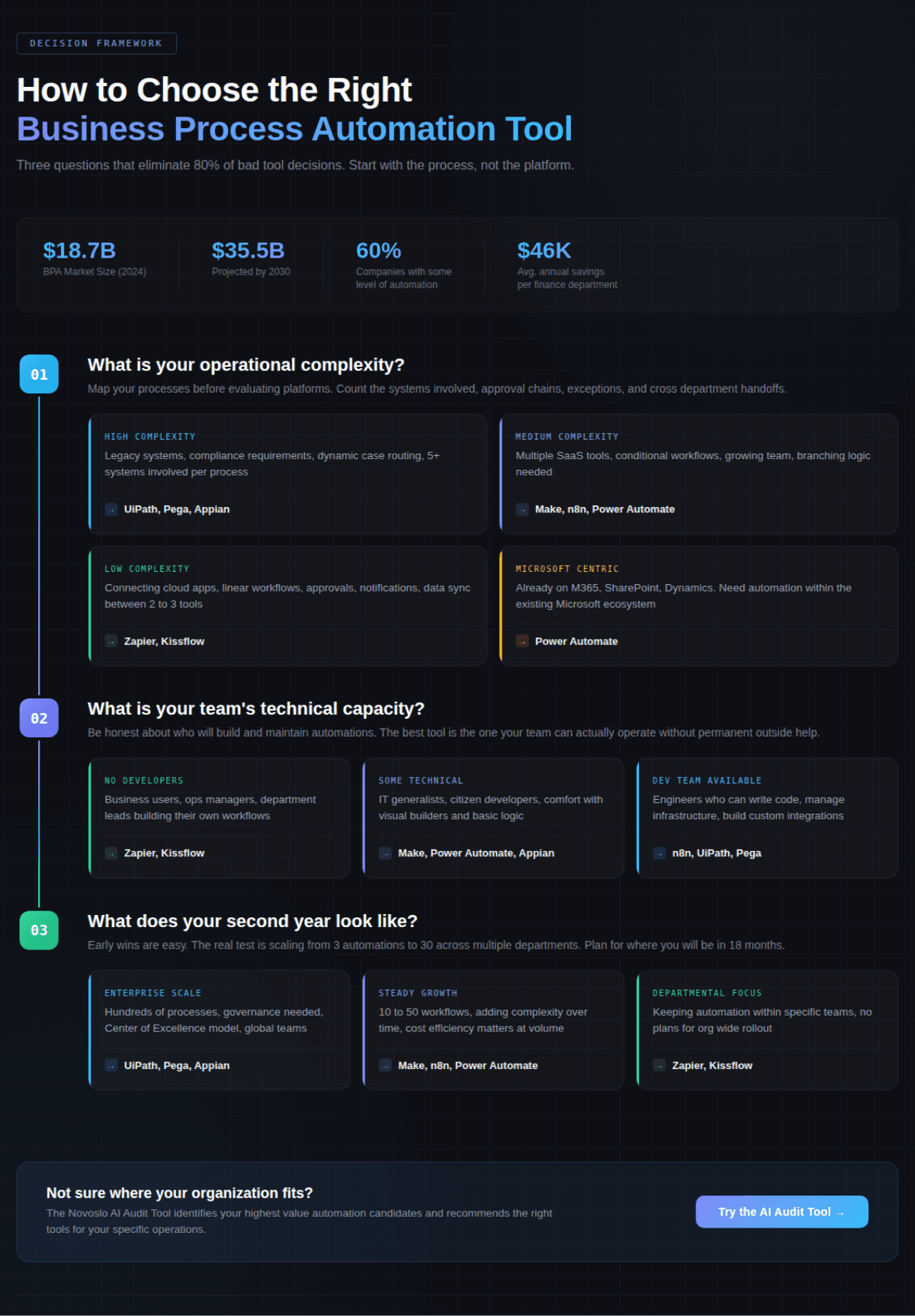
The single most common mistake we see is teams evaluating automation tools before they have documented what they are actually trying to automate. Every platform looks impressive in a demo. The question that matters is whether it can handle your specific process with your specific constraints.
Before you evaluate any tool, map out two or three of your highest friction processes end to end. Identify every handoff, every approval point, every system involved, and every exception that occurs regularly. This map becomes your evaluation criteria and it will eliminate most platforms immediately because the fit simply is not there.
If you are unsure where to start with that mapping exercise, this guide on how to implement AI in your business walks through a workflow first framework that avoids the common pitfalls.
Map Your Technical Capacity Honestly
A tool is only as effective as the team that maintains it. UiPath and Pega are powerful, but if you do not have the in house talent to implement and manage them, you will end up dependent on expensive consultants indefinitely. Zapier is accessible, but if your processes require complex conditional logic, you will hit the ceiling within months.
Be honest about where your team sits. If you have developers, n8n or Camunda give you the most control. If your automation team is the operations manager and a few department leads, Kissflow or Zapier are more realistic starting points.
What Happens After the First 90 Days
The tool you choose should be evaluated on what happens in months four through twelve, not month one. Early automations succeed because they target low hanging fruit. The real test is whether the platform supports the complexity that emerges when you try to automate cross departmental processes, handle exceptions, and integrate with systems that were not part of the original plan.
Ask vendors about their customers' second year experience, not their first. That will tell you more about the platform's actual fit for growing operational complexity. Understanding the total AI implementation costs upfront, including the hidden expenses that stall projects, is essential before committing to any platform.
What Most Companies Get Wrong About Business Process Automation
Buying for Features Instead of Operational Fit
The platform with the most features is not the best platform for your organization. A company with 50 employees and three core systems does not need Pega's enterprise case management engine. A financial services firm processing thousands of compliance sensitive transactions daily should not be running their operations through Zapier.
The best business process automation tool is the one that matches three things: your operational complexity, your team's technical ability, and your growth trajectory over the next 18 to 24 months. Everything else is noise.
For real world AI business transformation examples across different industries and company sizes, seeing how other organizations matched tools to their specific context is more valuable than any feature comparison chart.
Underestimating Integration Complexity With Legacy Systems
Nearly every mid market and enterprise company has at least one critical system that predates modern API standards. ERP platforms, custom databases, legacy CRM installations, and home grown tools that nobody wants to touch but everybody depends on.
Automation tools handle this reality differently. UiPath and Blue Prism use screen level RPA to interact with systems that have no API at all. Appian and Pega offer pre built connectors for major enterprise systems. Zapier and Make depend almost entirely on API availability.
If your automation strategy will eventually touch a legacy system, factor that into your evaluation from the start. The cost of integrating with a system that has no API is not a line item on any vendor's pricing page, but it can easily exceed the platform subscription itself. For a broader look at tools that handle data across complex environments, this guide on AI data transformation tools covers the landscape.
Should You Build or Buy Your Automation Stack?
This depends on your organization's core competency and where you want to invest engineering time. Building custom automation on top of open source frameworks like n8n or Camunda gives you maximum flexibility and avoids vendor lock in. But it requires ongoing engineering investment in infrastructure, maintenance, security, and updates.
Buying a managed platform like Zapier, Appian, or UiPath shifts that burden to the vendor. You trade some control for speed and reliability. For most organizations, the right answer is a combination: use a managed platform for standard business workflows and reserve custom development for the processes that represent genuine competitive advantage.
The key question is whether your automation needs are a commodity (approvals, notifications, data sync) or a differentiator (proprietary processes that define how you serve customers). Commodity automation should be bought. Differentiating automation might be worth building.
If you are still sorting out what AI transformation actually means for your organization and where it fits in your roadmap, start there before making platform commitments.
How AI Is Changing Business Process Automation in 2026
The defining shift in business process automation this year is the integration of AI directly into workflow execution. This is not about chatbots sitting alongside your processes. It is about AI agents that prepare work, validate inputs, monitor service level agreements, and make routing decisions within the workflow itself.
All three major mid market platforms (Zapier, Make, and n8n) now offer native connections to large language models from OpenAI, Anthropic, and Google. Enterprise platforms like Appian and Pega are embedding AI into decisioning engines that determine next best actions in real time.
The BPM market is projected to reach $25.88 billion in 2026, with AI integration cited as a primary growth driver. The practical implication for buyers is this: choose a platform that treats AI as a native capability within process flows, not an add on that requires separate licensing and custom integration.
For organizations in specific industries, the application of AI within business processes varies significantly. In healthcare, for instance, understanding what is actually working in AI healthcare can help you set realistic expectations for what automation can deliver in regulated environments.
Choosing the Right Tool Comes Down to Operational Honesty
The best business process automation tools in 2026 are not universally "best." They are best for specific types of organizations, at specific stages of maturity, with specific technical resources. UiPath and Pega serve large enterprises with complex, legacy heavy environments. Appian and Power Automate work well for organizations that need governance and compliance built into their process automation. Zapier, Make, and n8n serve mid market teams at different points on the technical spectrum. Kissflow handles straightforward departmental workflows without the overhead.
The companies that get the most from automation are the ones that start by understanding their own operations clearly, match the tool to that reality, and plan for what the second year of automation looks like rather than just the first 90 days.
If you are not sure where your organization stands or which processes represent the highest value automation candidates, try the Novoslo AI Audit Tool to get a clear picture of where automation fits in your operations and which tools match your specific situation.