Article
May 29, 2026
How to Build a Claude Skill for Cold Email Personalization
Learn how to build a Claude Skill for cold email personalization with signal research, copy frameworks, and QA rules that scale.
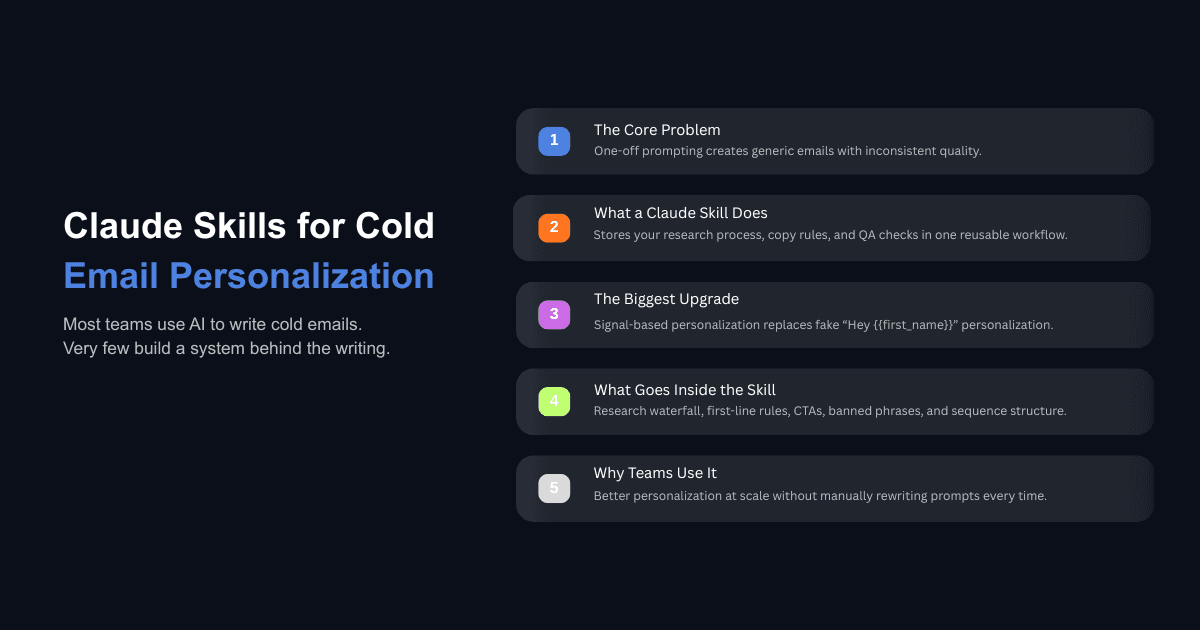
Cold email has always forced a trade-off between volume and quality. You either send thousands of generic messages and accept low reply rates, or you write deeply researched emails and accept that you can only send a few dozen per day. Both approaches have a ceiling, and most teams hit it faster than they expect.
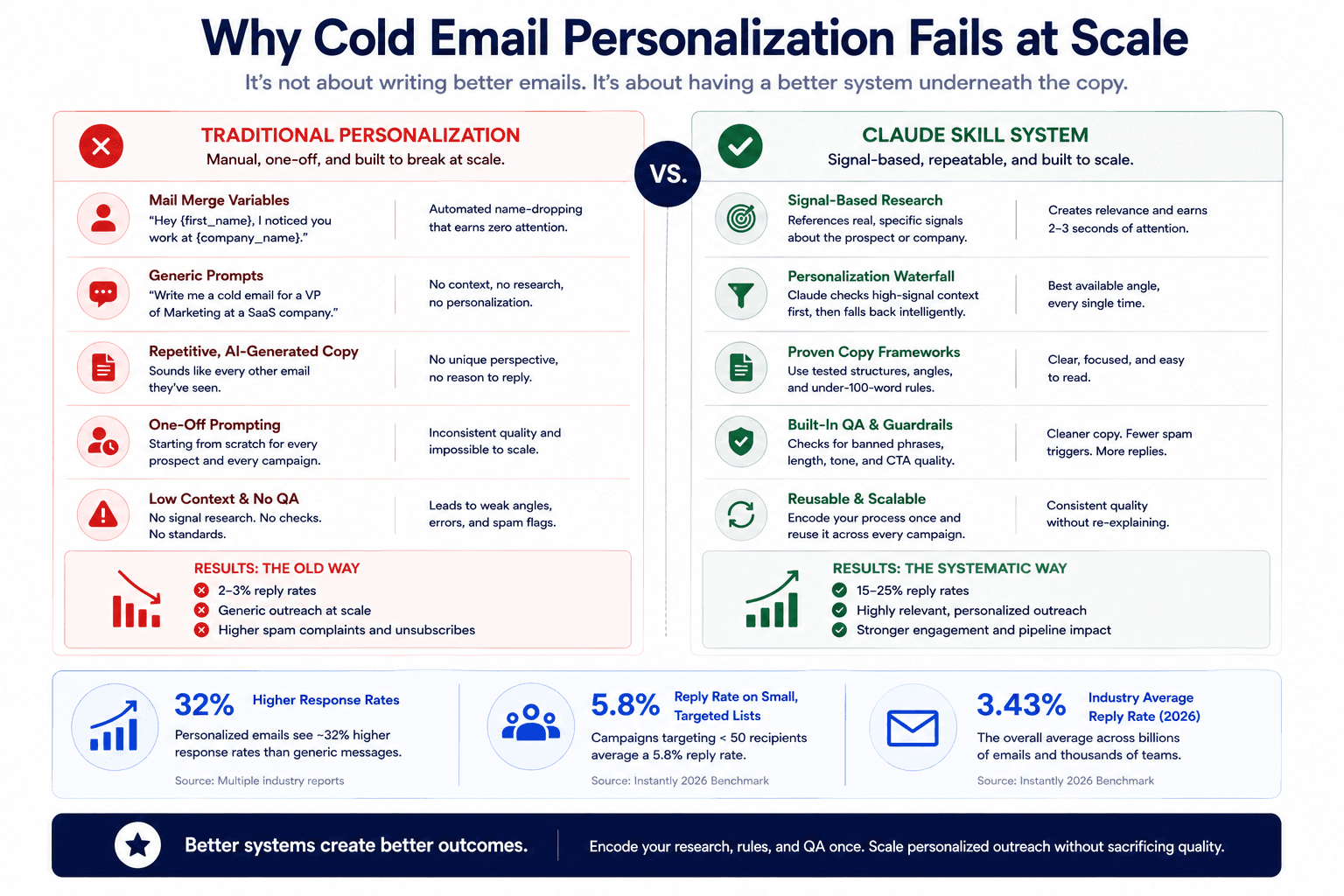
The average cold email reply rate in 2026 sits at 3.43%, according to Instantly's benchmark report analyzing billions of interactions across thousands of workspaces. That number includes every team still running the same playbook from 2019. The teams running signal-based personalized campaigns are seeing reply rates between 15 and 25%, which is a completely different outcome from the same channel. The difference is not better subject lines. It is a better system underneath the copy.
Most teams using Claude for cold email are still opening a chat window, pasting a one-line prompt, and hoping the output sounds good enough. That works for one email. It falls apart at fifty. A Claude Skill lets you encode your research process, copy rules, QA checks, and personalization logic once, then reuse it across every campaign without re-explaining your standards from scratch. If you want to understand why most cold email campaigns are dying, the answer is almost always that the system behind the copy does not exist.
Why Cold Email Personalization Breaks Without a System
The Difference Between Mail Merge and Real Personalization
Most cold email personalization in practice looks like this: "Hey {first_name}, I noticed you work at {company_name}." That is a mail merge. It is automated name-dropping, and the person reading it has seen some version of it thousands of times. It does not earn attention because it does not reference anything specific to the recipient.
Real personalization references a signal that shows you understand something about the prospect's situation. Maybe the company just announced a new product. Maybe they posted three job openings for account executives in two weeks. Maybe their CEO published a post about a specific operational challenge. These signals create the feeling that the email was written for one person, and that feeling is what earns the two to three seconds of attention needed for someone to keep reading.
The data supports this. Personalized emails see roughly 32% higher response rates than generic messages, and campaigns targeting fewer than 50 recipients average a 5.8% reply rate compared to 2.1% for lists over a thousand. Precision matters more than volume, and personalization is how you get there.
What Happens When You Rely on One-Off Prompting
When a salesperson opens Claude and types "write me a cold email for a VP of marketing at a SaaS company," the output sounds fine on the surface but contains nothing specific to the company, the person, or the problem. It reads like every other AI-generated email in the prospect's inbox.
The issue is not the model. The issue is what you feed it. A single prompt with no context, no research, no copy framework, and no QA criteria will produce exactly what you gave it to work with, which is almost nothing. When teams move from vague prompts to structured, research-backed inputs, the quality of the output changes completely. A Claude Skill is how you make that structure permanent instead of re-creating it every time you sit down to write.
What a Claude Skill Actually Is and Why It Matters for Outbound
If you are new to this concept, start with the guide on what Claude Skills are and how they work. In short, a Claude Skill is a folder containing a SKILL.md file that tells Claude how to handle a specific type of task in a repeatable, consistent way. Think of it as an onboarding document for a new hire who will be doing the same type of work across multiple projects.
The SKILL.md File Structure
Every Skill starts with a SKILL.md file that has two parts: YAML frontmatter at the top and instructions in the body. The frontmatter contains the skill's name and a description that Claude uses to determine when to invoke it. The body contains the actual instructions, structured in markdown, that tell Claude what to do when the skill runs.
Here is a simplified example of what the frontmatter looks like for a cold email personalization skill:
---
name: cold-email-personalization
description: Generate personalized cold email sequences from enriched lead data. Use when writing outbound copy, personalizing first lines, or building email campaigns from a CSV of prospects.
---
The description matters because Claude reads it to decide whether this skill applies to the current task. If you describe it vaguely, it fires at the wrong time or not at all. Be specific about the trigger scenarios: writing outbound copy, personalizing first lines, building campaigns from prospect lists.
Frontmatter, Body, and Reference Files
The body of your SKILL.md contains the step-by-step instructions Claude follows. For a cold email skill, this includes your research process, your copy framework, your QA checks, and your output format. You can also add a references folder alongside the SKILL.md for supporting files like tone of voice guidelines, example emails, or banned phrase lists.
According to Anthropic's skill authoring best practices, you want to keep the SKILL.md focused on core instructions and move detailed documentation to reference files. This matters because once a skill loads, its content stays in context across turns, and every line is a recurring token cost. State what to do rather than narrating how or why.
Teams building Claude Skills for email marketing follow the same principle: encode inputs, expected outputs, and decision logic once, then reuse across campaigns without starting from zero.
How to Define Your Personalization Waterfall Inside a Claude Skill
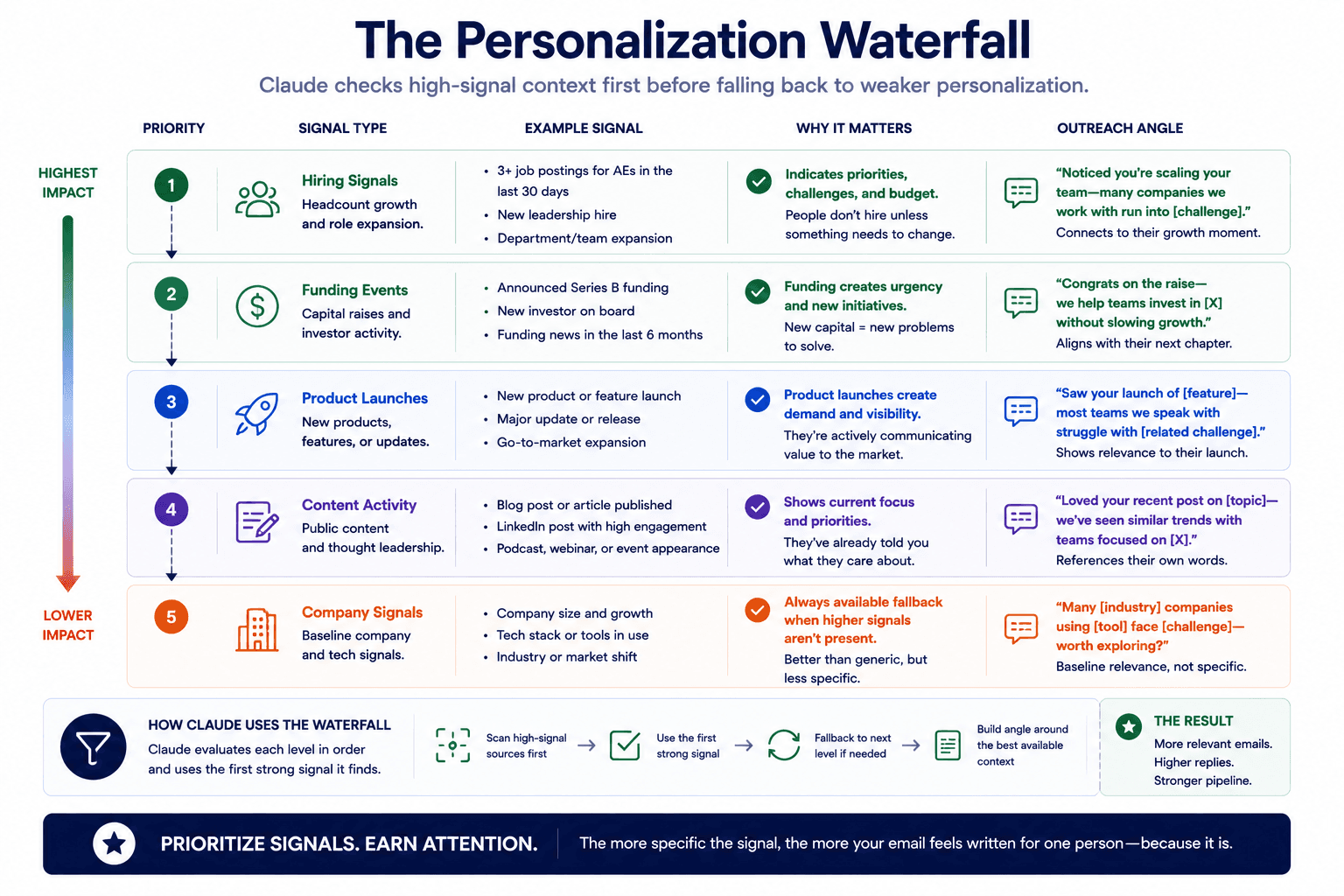
The personalization waterfall is the most important section of your cold email skill because it determines what Claude researches for each prospect and in what order. Without it, Claude defaults to surface-level personalization like company size and industry, which produces the same generic output you are trying to avoid.
Choosing Signal Types
A personalization waterfall is a ranked list of signal types that Claude checks for each prospect, starting with the most specific and falling back to more general options if the top signals are not available. Here are the signal types that work best for B2B cold email in 2026:
Hiring signals are among the strongest because they imply budget allocation and growth. If a company posts three new SDR roles in two weeks, that tells you something about where they are investing. Your email can reference the expansion directly and connect it to a relevant problem your service solves.
Funding and financial events like a recent raise or acquisition indicate that the company is in a growth phase and likely evaluating new vendors and systems. This signal works especially well for selling infrastructure, tooling, or operational services.
Product launches or feature announcements give you something specific to reference that shows you have looked at what the company is actually doing, not just their LinkedIn summary.
Content activity such as a recent blog post, podcast appearance, or LinkedIn post by the prospect gives you a personal angle that feels like genuine research rather than a scraped data point.
Fallback signals like company description, tech stack, or industry positioning are weaker on their own but still better than no personalization. The key is that your fallback should still reference something specific about the company's website or positioning rather than defaulting to a generic line.
Building a Priority Order for Fallback Signals
In your SKILL.md, define the waterfall as an ordered list with clear instructions for Claude to check each signal type and use the first one that produces a relevant, specific data point. Here is an example of how this looks inside the body of your skill:
## Personalization Waterfall
For each prospect, check signals in this order. Use the first one that returns specific, verifiable information:
1. Hiring signals — check job postings on their careers page or LinkedIn
2. Funding or financial events — check for recent raises, acquisitions, or revenue milestones
3. Product launches — check for new features, product announcements, or partnerships
4. Content activity — check the prospect's LinkedIn posts or company blog for recent publications
5. Fallback — use a specific detail from the company's homepage or about page that relates to your offer
Never use a generic fallback like "I noticed your company is growing." Every first line must reference something specific enough that the prospect can verify it.
This structure matters because it removes the judgment call from every individual email. Claude knows what to look for, in what order, and what the minimum standard is. The result is consistent quality across hundreds of prospects without you reviewing each research step manually.
What Should Go in Your Cold Email Skill's Copy Framework?
The research waterfall handles the input side. The copy framework handles the output. This is where you define what the email should look like, what rules it should follow, and what it should never contain. If you want a deeper look at the cold email frameworks used by high-performing teams, that guide covers the structural patterns worth encoding.
First Line Rules
The first line is what buys attention. If you stop the prospect in their tracks with something that feels specific and relevant, you earn the next three seconds. If the first line is generic or flattering, the email gets deleted before the offer even registers.
Your skill should include explicit instructions for how Claude writes first lines. Here is an example of rules you can include in your SKILL.md:
## First Line Rules
- The first line must reference a specific signal from the personalization waterfall
- Never open with "I hope this email finds you well" or any variation
- Never compliment their LinkedIn profile, website design, or company growth in vague terms
- The first line should make the prospect think: "How did they know that?"
- Keep the first line under 20 words
For a full walkthrough on this specific step, the guide on writing personalized first lines at scale covers how to structure the prompts that pull real signals from a prospect's site instead of using generic variables.
Email Length, CTA Style, and Sequence Structure
Your skill should define the parameters for the complete email, not just the first line. Based on what consistently works in 2026 outbound, here are the rules worth encoding:
Each email should be 100 words or fewer. Emails are read on mobile devices more often than desktop, which means short paragraphs, line breaks between ideas, and no dense blocks of text. The call to action should be soft and low-friction because the goal of a cold email is not to close a deal. It is to move from cold outreach to warm interest. Instead of "Let's book a 30-minute call," try "Worth exploring?" or "Want me to send over a quick breakdown?"
For sequence structure, a three-email sequence tends to work well. The first email goes out on day one. The second email follows up after three days. The third email follows up after seven days. Each email in the sequence should have a different angle rather than just re-sending the same message with a softer ask.
Your SKILL.md should contain these parameters explicitly so Claude does not default to writing long, formal emails with aggressive calls to action.
QA Checks and Banned Phrases
One of the most valuable parts of a Claude Skill is the ability to enforce quality standards automatically. At the end of your skill's instructions, include a QA checklist that Claude runs before returning the output. This prevents the common cold email mistakes that kill reply rates before they ever reach a prospect's inbox.
Here is an example QA section:
## QA Checks (Run Before Returning Output)
- Every email body is under 100 words
- No banned phrases: "hope this finds you well," "I'd love to pick your brain," "circle back," "deep dive," "just following up"
- No em dashes (use commas or periods instead)
- No special characters that break email clients
- Subject lines are under 40 characters
- Every first line references a specific, verifiable signal
- Soft CTA only (no "book a call" or "schedule a demo" in the first email)
- Variables follow the format your sequencer expects (e.g., {{first_name}} for Instantly)
Teams that automate their sales workflow with Claude Skills use this same pattern: define the rules once, let the skill enforce them every time, and focus your review time on strategy instead of catching formatting errors.
How Do You Connect a Claude Skill to Your Sending Infrastructure?
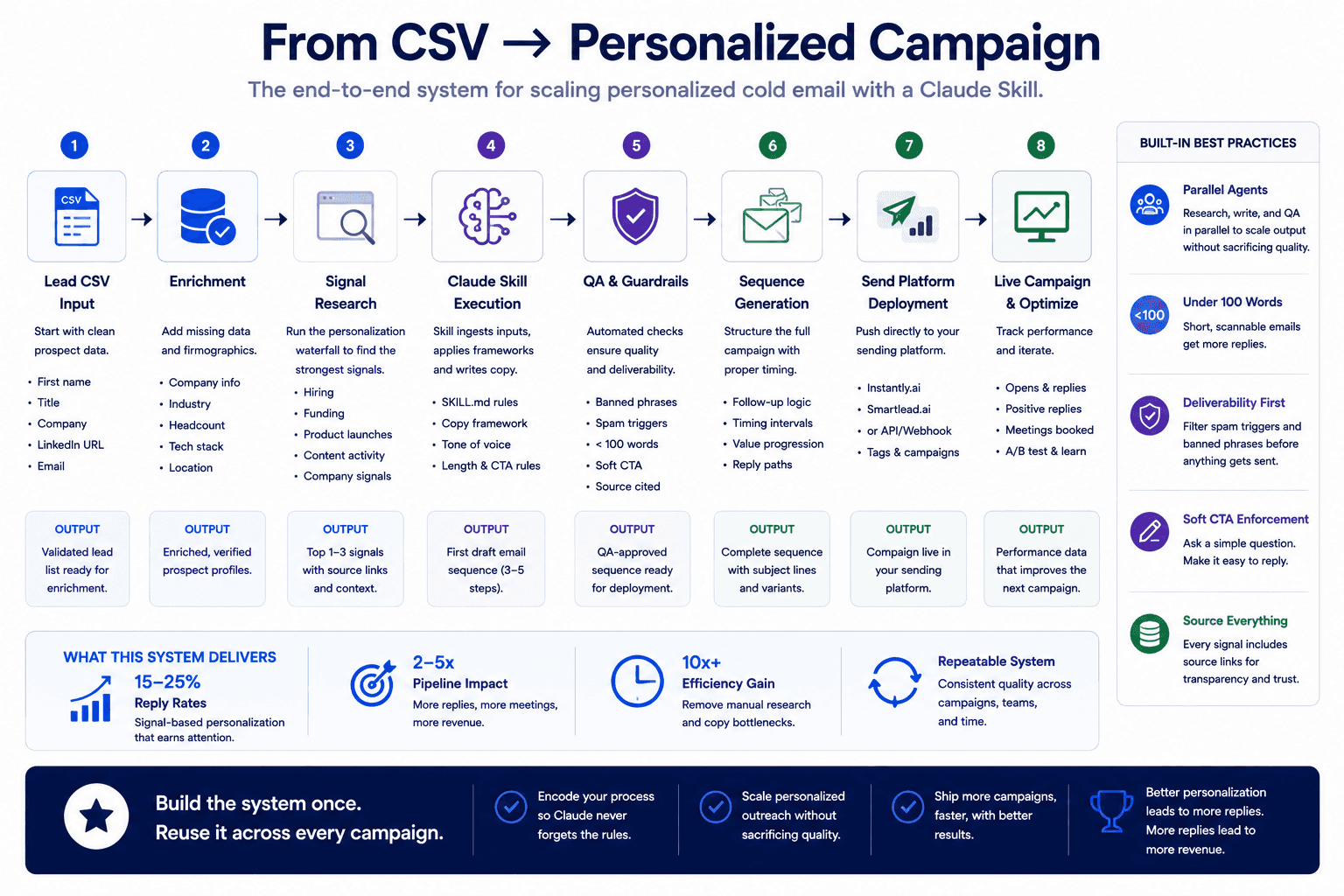
A skill that generates great copy in isolation is only useful if you can get that copy into your sequencer efficiently. The goal is to go from a CSV of leads to a campaign-ready output without manually copying and pasting each email.
From CSV to Enriched Output
The workflow starts with a lead list in CSV format containing names, companies, titles, and email addresses. When you run the skill inside Claude Code, it reads the CSV, researches each prospect using the personalization waterfall, and appends the research signals and generated email copy back to the same file.
If you want to go deeper on the enrichment step, the guide on how to enrich your lead list using Claude Code covers how to validate emails, score leads against your ICP, and run multiple enrichment sources in one workflow.
For processing speed, you can use a Python library like Polars to parse the CSV and launch parallel agents in the background so Claude researches multiple prospects simultaneously instead of going through them one by one. On a 20-lead pilot, this typically takes around 20 minutes. At scale, you can batch 1,000 leads and let it run while you focus on something else.
Pushing Campaigns into Instantly or Smartlead via CLI
Once your enriched CSV is ready with all the personalized copy, the next step is pushing it into your sequencer. Tools like Instantly offer a CLI (command line interface) that lets Claude create campaigns, upload leads, and set sending schedules directly from the terminal without you clicking through the UI.
The process looks like this: Claude creates a new campaign with your naming convention and the current date, uploads the leads from your enriched CSV, maps the email columns to the correct sequence steps, and sets default campaign parameters like text-only sending, no open tracking, and stop-on-reply. You then preview the campaign inside the sequencer to verify formatting before activating it.
For teams that want the full end-to-end setup, the guide on how to build a complete cold email system using Claude walks through each step from lead sourcing to campaign deployment. And if your infrastructure is not set up yet, start with the cold email infrastructure setup guide to get your domains, DNS records, and warm-up in order before sending anything.
How to Test and Iterate Before Scaling
Building the skill is the first step. Testing it with real leads before scaling is what separates a useful system from an expensive experiment.
Running a 20-Lead Pilot
Before running the skill on your full list, pull a sample of 20 leads that represent a cross-section of your target segments. If you are targeting multiple roles or industries, pick a few from each bucket so you can evaluate whether the personalization waterfall produces relevant signals across different prospect types.
Run the skill on the 20 leads and export the results to a markdown file for easy review alongside the enriched CSV. Read each email as if you were the prospect receiving it. Check whether the first line references something specific and verifiable. Check whether the body connects the signal to your offer in a way that creates relevance. Check whether the CTA is low friction. Check whether the banned phrases list caught everything.
One outreach team we worked with reported that structured AI-personalized sequences produced strong enough results from this exact pilot process that they expanded the engagement to ongoing campaigns. The pilot is where you refine the skill's instructions before those instructions run at scale.
What to Review Before Going to 1,000
After the pilot, update your SKILL.md based on what you learned. Common adjustments include tightening the first line rules if the output is too vague, adding new banned phrases that showed up in the pilot, adjusting the fallback signal instructions if the weaker personalizations are not specific enough, and refining the CTA language if it reads too aggressively or too passively.
Once the pilot copy passes your review, you can run the skill on your full list. At 1,000 leads, you are generating enough volume to produce real data on what markets respond, what angles create interest, and what messaging drives replies. That is where the system starts compounding because each round of campaign data feeds back into better instructions for the next version of the skill.
Build Once, Use Across Every Campaign
A Claude Skill for cold email personalization is not a prompt. It is an operational system that encodes your research standards, copy rules, and quality checks into a reusable file. You build it once, test it on a small sample, refine it based on real output, and then run it across every campaign without re-explaining your expectations from scratch.
The teams seeing the strongest results from outbound in 2026 are not writing better one-off emails. They are building better systems underneath the email. An enterprise client we worked with doubled their sales efficiency by moving to AI-driven workflows for lead engagement, and the pattern is the same across every team we see doing this well: encode the process, automate the execution, and spend your time on strategy instead of repetitive copy generation.
If you want help building a Claude Skill for your outbound system or need support setting up the full workflow from lead research to campaign deployment, book a call with our team and we will walk through what makes sense for your setup.