Article

Jul 1, 2026

Best Claude Prompts for Sales Teams

The best Claude prompts for sales teams in 2026, organized by pipeline stage and structured the way Claude actually reads them.

Infographic showing five best Claude prompts for sales teams, covering inputs, prospecting, prompt failures, systems, and automation.

Most reps who try Claude and walk away disappointed ran into the same wall. They typed a short request into a fresh chat, got back something that read like every other AI email in the inbox, and decided the tool was not for them. The model was rarely the problem. The prompt was thin, so the output was thin.

A prompt is the instruction that decides what Claude produces, and the quality of that instruction sets a ceiling on the quality of the result. The teams pulling ahead in 2026 are not the ones with access to a better model, since everyone has the same models. They are the ones who learned to give Claude the role, the context, and the exact output they want before asking for anything.

This is a working library of the best Claude prompts for sales teams, organized by the stage of the pipeline you are in when you need them. Each one is written the way Claude actually reads a prompt, and each one is ready to copy, fill in the brackets, and run today.

Why prompt structure decides your output quality

Claude was trained to pay attention to structure. When you separate the different parts of your request into labeled sections, the model stops guessing which part is the instruction and which part is the background, and it produces far more consistent results. Anthropic's own prompting guidance recommends wrapping each type of content in its own tag so nothing gets misinterpreted, and independent testing has found that XML-structured prompts return meaningfully more consistent output than the same request written as one flat paragraph.

Every prompt below follows the same five-part shape:

  1. Role. Who Claude is acting as. A seasoned AE, a data operations analyst, a negotiation coach.

  2. Context. The account, the buyer, the situation, and any real data you can paste in.

  3. Task. The specific job, broken into numbered steps when order matters.

  4. Constraints. Word counts, tone, things to avoid, proof points to include.

  5. Format. The exact shape of the output so you can use it without reformatting.
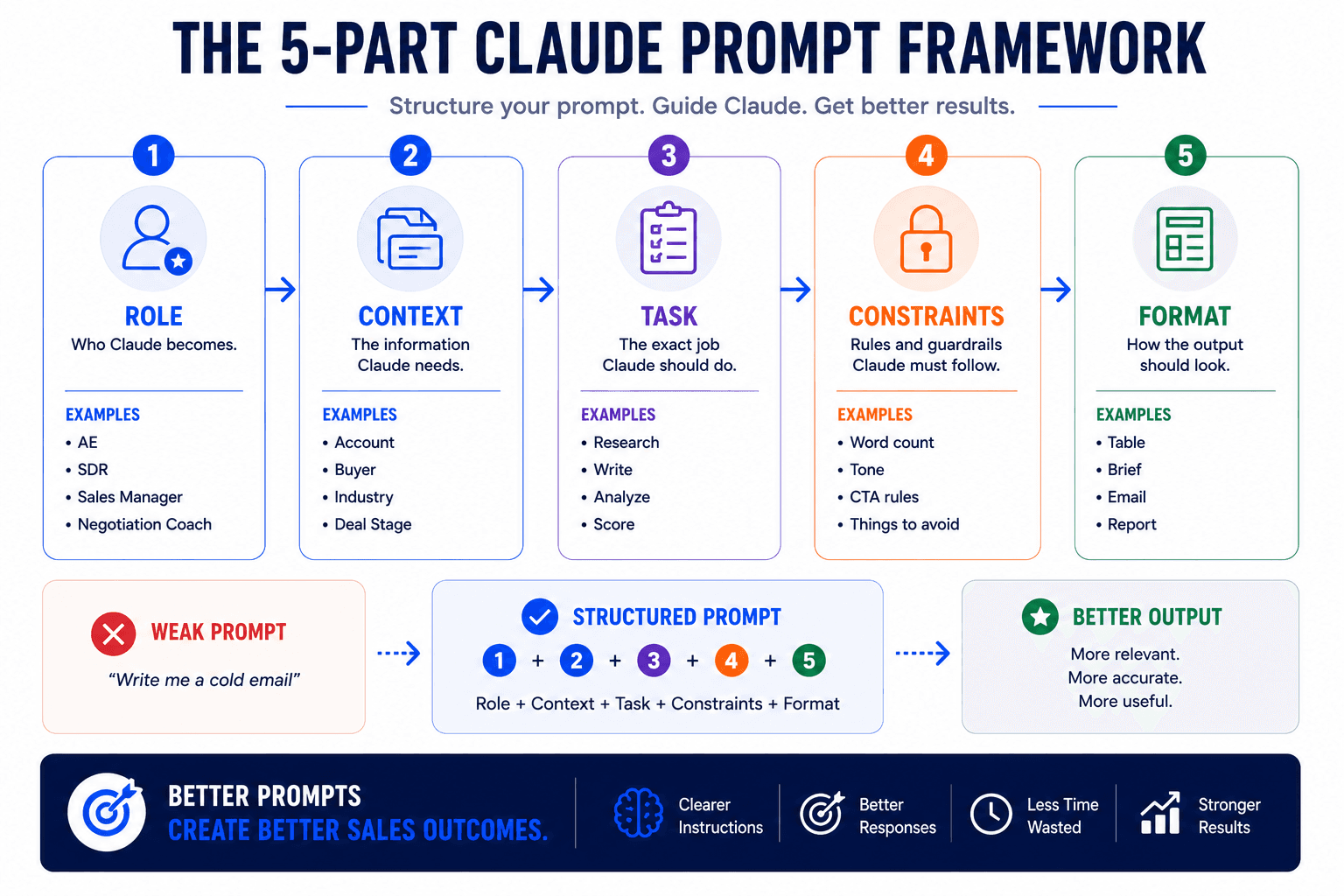
Infographic illustrating the 5-part Claude prompt framework: Role, Context, Task, Constraints, and Format for better AI outputs.

The other half of the equation is the data you feed it. Firmographics, the tech a company runs, recent funding, a title and a real pain point all give the model something specific to work with, and specific inputs are what separate a reply from a delete. This is also why account quality matters as much as prompt quality. If you want to sharpen the inputs before you write a single prompt, our guides on buying signals and intent data cover the signals worth pulling in.

Claude prompts for prospecting and account research

Research is where reps lose the most hours and where structured prompts pay off fastest. These four take the manual work of list building, account study, and committee mapping and compress it into minutes.

Find your real ICP from closed deals

<role>You are a B2B sales strategist who has spent fifteen years finding

patterns in win/loss data.</role>

<context>

Here are our last 20 deals, split into closed-won and closed-lost, with

company size, industry, deal size, sales cycle length, and the reason each

one closed or died:

[paste your deal data]

</context>

<task>

1. Identify the firmographic and behavioral patterns shared by the won deals.

2. Identify the patterns shared by the lost deals, including accounts that

   looked like a fit but stalled.

3. Tell me who we should be selling to and who we should stop chasing.

4. Build a 1 to 5 qualification rubric across five dimensions that an SDR can

   apply to a new lead in under a minute.

</task>

<constraints>

Ground every conclusion in the actual deals I gave you. Do not fall back on

generic B2B advice. Name specific phrases a rep might hear on a call that

signal strong fit.

</constraints>

<format>

Return a reference document with three sections: ICP profile, anti-patterns,

and the scoring rubric as a table.

</format>

Build a target account list

<role>You are a market researcher who builds outbound target lists.</role>

<context>

We sell [product] to [buyer role] at [company type]. Our best customers tend

to be [size, industry, region, tech stack].

</context>

<task>

Build a list of [number] companies that match this profile in [region].

For each one, include why it fits and one recent event or signal that would

justify reaching out now.

</task>

<constraints>

Prioritize companies showing a change that creates urgency, such as hiring,

funding, or a leadership move. Skip companies that only match on size.

</constraints>

<format>

A table: Company | Fit reason | Trigger to reference | Suggested first contact.

</format>

Pull the enrichment behind that list from the tools you already run. Our walkthrough on researching leads before outreach covers how to turn that raw list into scored, personalized briefs.

Write a pre-outreach account brief

<role>You are an account executive preparing for first contact.</role>

<context>

Target company: [name]. What we sell: [product category]. Anything I already

know about them: [paste notes, news, or CRM history].

</context>

<task>

Summarize the company's business model, size, recent news, and key executives.

Flag any funding, leadership change, product launch, or expansion in the last

three months that creates a reason to reach out now.

</task>

<constraints>

Keep it to 200 words. Focus only on information relevant to selling my product.

Separate confirmed facts from reasonable inference.

</constraints>

<format>

A short brief with headers for Company, Recent signals, Key contacts, and

Angle for outreach.

</format>

Map the buying committee

<role>You are an enterprise sales strategist who multi-threads deals.</role>

<context>

We are selling [product category] into a [company size] company in [industry].

</context>

<task>

Identify the likely buying committee. For each role, give the typical title,

what they care about in this decision, and the objection they are most likely

to raise.

</task>

<format>

A table: Role | Title | What they want | Likely objection | How to address it.

</format>

Claude prompts for cold outreach and follow-up

Cold outreach is where reps most want to sound human and most often sound like a template. The fix is giving Claude enough real context that it has something specific to say. If you want the deeper principles behind why so many campaigns fail, most cold outreach fails before the first email is sent is worth reading alongside these.

First-touch cold email, tuned to seniority

<role>You are a sales rep who writes cold emails that get replies.</role>

<context>

Buyer: [title] at a [size] company in [industry] that [specific situation,

tech stack, or recent event]. What we sell: [product] and the one outcome it

delivers is [outcome].

</context>

<task>

Write a first-touch cold email that opens with a relevant observation about

their situation, connects it to the outcome we deliver, and ends with a

single question.

</task>

<constraints>

Under 120 words. Match the tone to their seniority, so keep it direct and

concise for a VP or C-level reader. No jargon, no "I hope this finds you well,"

no more than one call to action.

</constraints>

<format>

Subject line under 50 characters, then the email body.

</format>

For the opening line specifically, which is the part that decides whether the rest gets read, our method for writing personalized cold email first lines at scale plugs straight into this prompt.

Trigger-based outreach

<role>You are a rep reaching out on the back of a real event.</role>

<context>

Contact: [title] at [company], which just announced [funding, expansion,

launch, or leadership change]. We sell [product].

</context>

<task>

Write an email that acknowledges the event, connects it to a growth challenge

it likely creates, and positions us as relevant to that challenge.

</task>

<constraints>

150 words maximum. Sound like a person who read the news, not a bot that

scraped it. End with a low-friction ask.

</constraints>

Build a full follow-up cadence

<role>You are a sales sequence writer.</role>

<context>

Prospect: [title] at [company type]. They went quiet after [demo, reply, or

first touch]. What we sell: [product]. Outcome we drive: [outcome].

</context>

<task>

Build a five-touch follow-up sequence across email and LinkedIn. Each touch

should add something new, such as an insight, a proof point, or a question,

rather than just checking in. Tell me when to stop.

</task>

<constraints>

Each email under 90 words. No guilt, no false urgency. The final touch should

leave the door open without begging.

</constraints>

<format>

For each touch: channel, day to send, purpose, and the copy.

</format>

Breakup and re-engagement

<role>You are a rep closing the loop on a cold thread.</role>

<context>

Prospect: [title] at [company]. Last real conversation was about [topic].

They have gone silent for [time period].

</context>

<task>

Write a breakup email that references the last point we discussed, gives them

an easy way back in, and makes clear this is the last message for now.

</task>

<constraints>

Under 75 words. Friendly, not passive-aggressive.

</constraints>

Claude prompts for call prep and discovery

Walking into a call cold is a top rep failure mode, and so is running discovery that never gets past surface pain. These prompts fix both.

Pre-call brief

<role>You are a chief of staff preparing your rep for a call.</role>

<context>

Company: [name]. Meeting is with [name, title]. Here are my CRM notes and any

prior context: [paste]. What we sell: [product].

</context>

<task>

Build a briefing that covers previous conversations, stated pain points, the

likely decision timeline, three talking points for this call, and the one

question I should make sure to ask.

</task>

<constraints>

Keep it to a single screen. Prioritize what changes how I run the call.

</constraints>

If your call recorder is connected, you can run this against real transcripts instead of typed notes. Our guide on analyzing sales calls using Claude shows how to set up scoring and extraction so the prep writes itself.

Discovery questions by persona

<role>You are a discovery coach.</role>

<context>

I am selling [product] to a [specific title] at a [company size] company in

[industry]. The business challenge I suspect they have is [challenge].

</context>

<task>

Generate 15 discovery questions split across five areas: pain, impact,

timeline, budget, and decision process. Flag the three questions most likely

to surface the real reason they would buy.

</task>

<constraints>

Open-ended questions only. Tailor them to this persona's KPIs, not generic

qualification.

</constraints>

Post-call debrief

<role>You are a sales manager reviewing a call with your rep.</role>

<context>

Here is the transcript of a call I just finished: [paste transcript].

</context>

<task>

Tell me what I did well, what I missed, and what the prospect was signaling

between the lines. Then give me the three things to change before the next call

and a draft follow-up email using their own language from the call.

</task>

<constraints>

Be direct. Push back on me rather than reassuring me. Quote the prospect's

actual words where they matter.

</constraints>
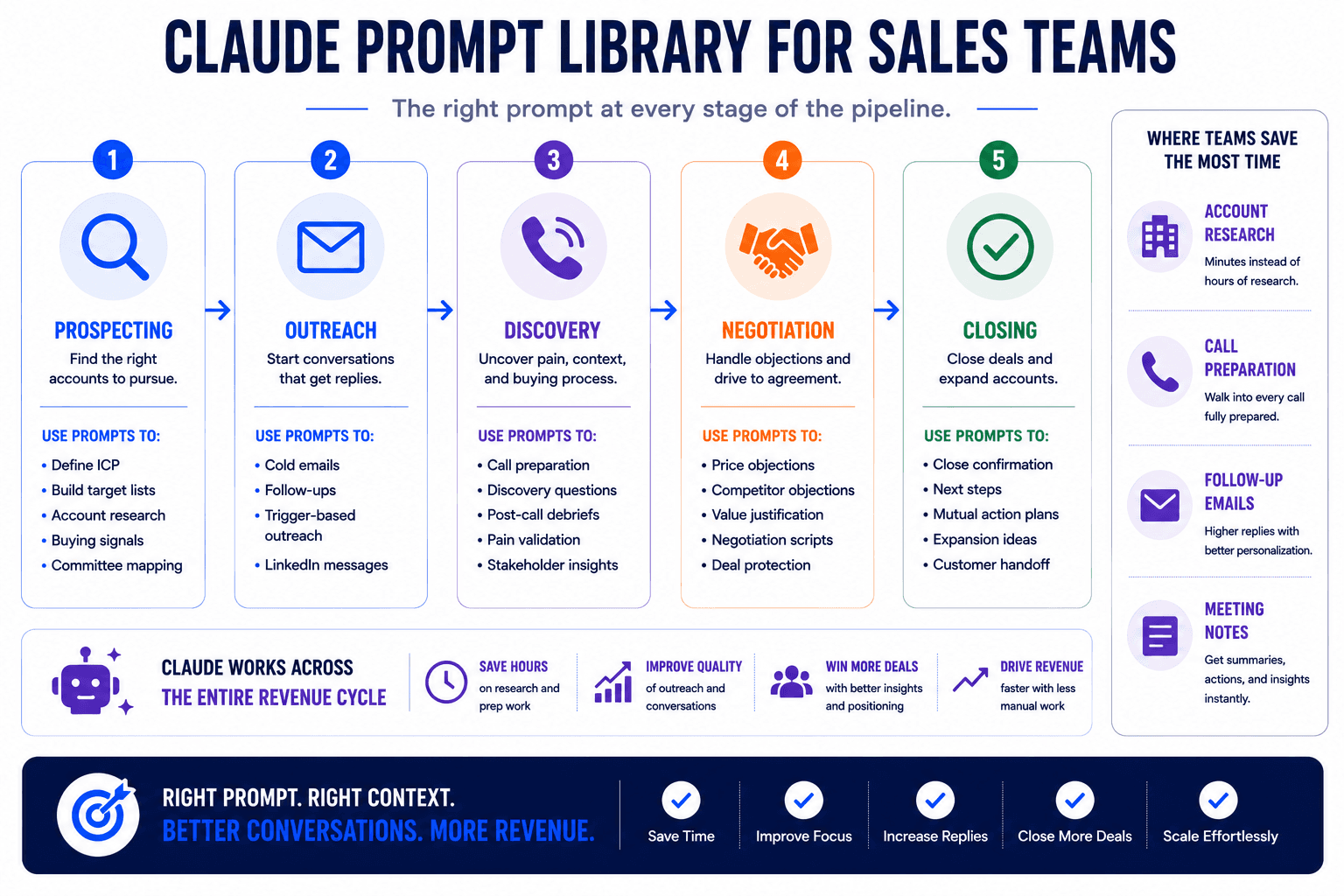
Infographic showing a Claude prompt library for sales teams, covering prospecting, outreach, discovery, negotiation, and closing.

Claude prompts for objections, negotiation, and closing

Claude can prepare the talk track, but you still own the room. These prompts give you responses that reframe value instead of reaching for a discount, and they help you hold margin at the finish line.

Reframe a price objection

<role>You are a negotiation coach who defends value.</role>

<context>

The prospect said our price is too high. What we sell: [product]. The cost of

their current situation is [quantify if you can].

</context>

<task>

Write two responses. One short, one longer. Both should reframe around the cost

of not solving the problem and the return on the investment, and neither should

lead with a discount.

</task>

<constraints>

Include a question that helps the prospect quantify their current cost. Do not

argue with them.

</constraints>

Handle competitor and status-quo objections

<role>You are a competitive positioning expert.</role>

<context>

The prospect said one of the following: "we are happy with our current vendor,"

"we are evaluating [competitor]," or "we built something in-house." Our key

differentiator is [differentiator].

</context>

<task>

Give me five talking points for the objection I specify. Acknowledge their

position honestly, contrast on our differentiator without knocking the

alternative, and end with a question that reopens the conversation.

</task>

Trade concessions for commitments

<role>You are a deal desk advisor.</role>

<context>

A prospect is asking for a [percentage] discount. Deal size: [amount].

Contract term: [term].

</context>

<task>

Give me three ways to respond that protect price. For each, name the concession

we could offer and the commitment we should ask for in return, such as a longer

term, a case study, or a faster signature.

</task>

<format>

A table: Response | What we give | What we ask for.

</format>

Confirm the close

<role>You are a rep closing cleanly.</role>

<context>

We have a verbal commitment from [contact] at [company]. Agreed terms:

[summarize].

</context>

<task>

Write a short email that confirms the terms, lays out next steps, states what I

need from them, and sets a specific date to follow up.

</task>

<constraints>

Clear and confirmatory, not salesy. No new selling.

</constraints>
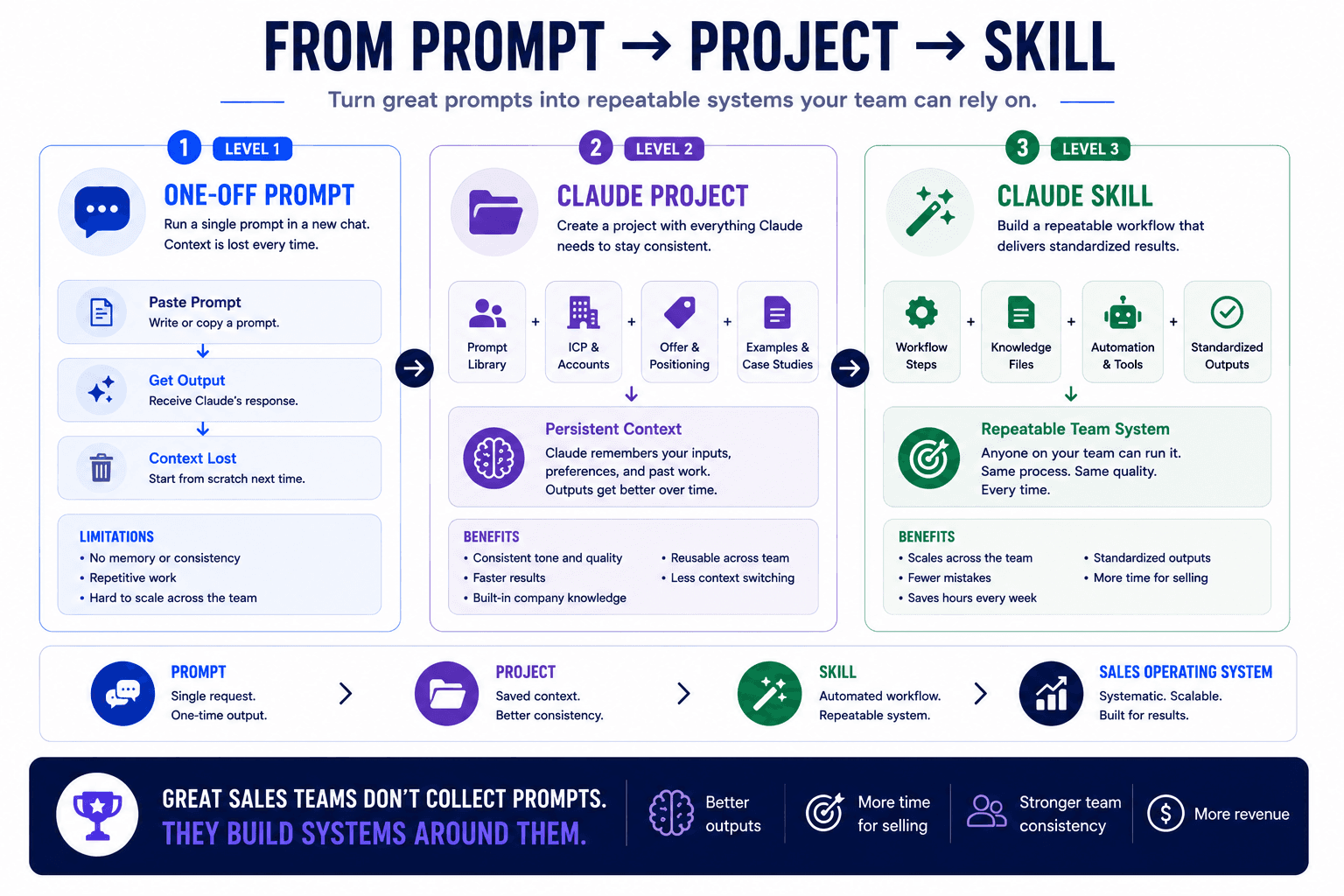
Infographic showing the journey from prompt to project to skill, highlighting Claude workflows, reusable systems, and team automation.

How do you turn a good prompt into a repeatable system?

A single prompt is a one-time ask. You paste it, you get output, and the context disappears when you close the chat. That is fine for a task you run once, but most sales work repeats, and re-pasting your ICP, your offer, and your voice into a blank chat every morning is where reps give up.

Two features solve this. A Claude Project for sales copy is a workspace that holds your instructions and reference files, so every new conversation inside it already knows your buyer, your offer, and your tone. You stop re-explaining yourself and start from a real baseline. A Claude Skill goes further, encoding a full workflow that runs on command, reads your files, and produces the same structured output every time. Once a skill exists, everyone on the team produces the same quality of brief or sequence without re-inventing the prompt.

The practical path is simple. Find the two prompts above that match where you lose the most time, run them as one-offs until the output is reliable, then promote the winners into a Project or a Skill. If you want to see that pattern applied end to end, we broke it down in how to automate your sales workflow with Claude Skills. The same discipline is what lets managers scale coaching without more headcount, which we cover in real-time sales coaching.

What should you never paste into a Claude prompt?

Treat prompts that contain customer data with the same care you apply to your CRM. Firmographics, job titles, company size, and public information like a funding round are safe to include and add useful context. Real prospect names paired with private notes, email addresses, phone numbers, internal deal values, and proprietary account details should stay out of any consumer tier tool that may use inputs for training.

For sensitive workflows, work inside an enterprise plan with data controls, and connect your systems through a governed integration rather than pasting exports around. Wiring your CRM to Claude through an MCP connection keeps the data in place and lets Claude read what it needs without you copying it into a chat window.

Which Claude prompts should a sales team start with?

Start with the two that map to your biggest time leaks. For most reps that is account research and post-call follow-up, since those eat hours every week and produce work that follows a clear pattern. Run the pre-outreach brief and the post-call debrief for a week, review the output, and adjust the constraints until the result is something you would send without editing.

Momentum comes from a narrow start, not a full rollout. One enterprise sales team we worked with doubled their sales efficiency largely by engaging leads at the right time with data-backed decisions, and the change began with standardizing a single repeatable workflow before expanding. Pick one, get it reliable, then add the next.

Bringing it together

The gap between reps who get value from Claude and reps who quit is almost never the model. It is the prompt and the context behind it. Give Claude a clear role, real account data, a specific task, and the exact output you want, and it stops producing generic filler and starts producing work you can actually use. Structure the prompt the way Claude reads it, and the output gets more consistent every time you run it.

The prompts in this library are the starting point. Promote the ones that earn their place into Projects and Skills, keep your inputs specific, and protect your customer data as you go. Do that and Claude becomes a genuine extension of how your team already sells, running the repeatable work so your reps spend their hours on the judgment calls that close deals.
If you want help turning these prompts into a system your whole team runs the same way, book a call with our team and we will map the workflows worth building first.

© 2026 Novoslo. All Rights Reserved

© 2026 Novoslo. All Rights Reserved