Article
Mar 30, 2026
How to Analyze Sales Calls Using Claude
Learn how to analyze sales calls using Claude AI Projects. Set up scoring criteria, extract objections, and coach your team in minutes.
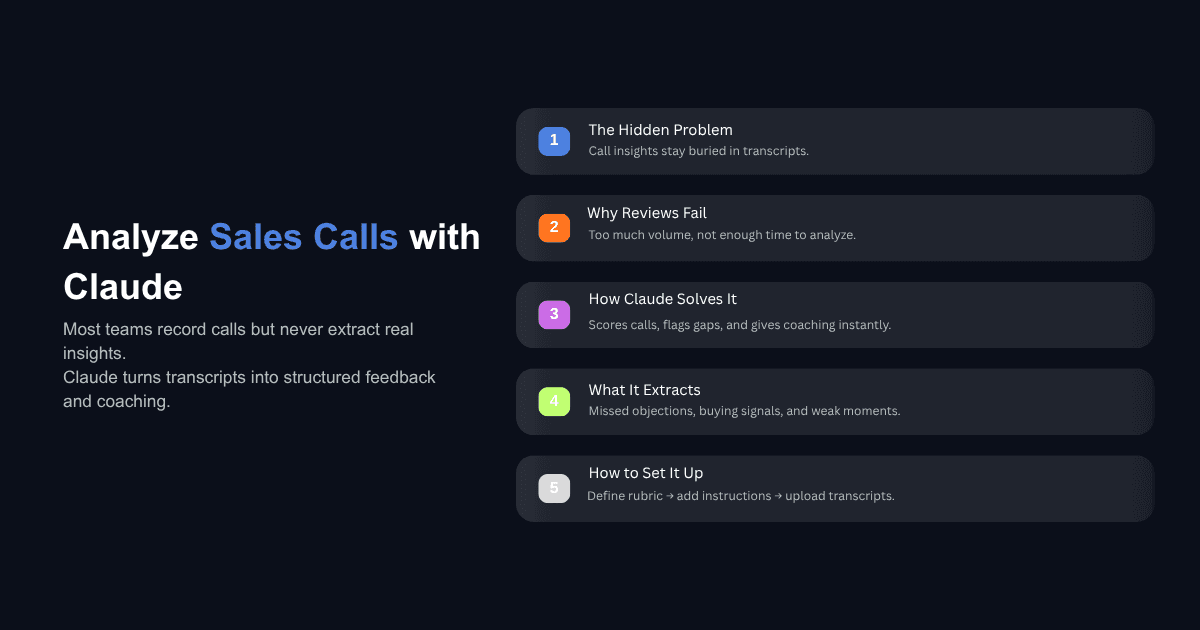
Most sales teams record their calls. Very few do anything useful with the recordings.
The typical workflow looks like this: a rep finishes a call, jots down two or three bullet points in the CRM, and moves on. The recording sits in Fireflies or Gong or Zoom's cloud storage. A manager might listen to one or two calls a week if they have the time, which they usually don't. The rest of the transcripts collect dust.
The information inside those transcripts — missed objections, buying signals, weak discovery questions, unclear next steps — stays buried. And because it stays buried, the same mistakes show up on the next call, and the one after that.
Claude's Projects feature changes this. It lets you build a dedicated sales call evaluator that scores transcripts against your own criteria, identifies what the rep missed, and generates specific coaching feedback in minutes. No coding, no complex setup, and no per-seat conversation intelligence contract.
This guide walks through how to set it up, what Claude can actually extract from a transcript, and how to turn its analysis into better calls.
Why Most Sales Call Reviews Fall Short
The Volume Problem
A 45-minute sales call generates thousands of words of transcript. A team of ten reps running three or four calls a day creates a volume of raw conversation data that no manager can realistically read through. Organizations that use AI call analytics for coaching report measurable improvements in quota attainment, but most teams never get to that point because the review process itself is the bottleneck.
The math is straightforward. If a manager spends 15 minutes reviewing a single call, and the team runs 30 calls a day, that is 7.5 hours of review work daily — more than a full workday dedicated to nothing but listening. In practice, what happens is selective sampling: the manager picks a few calls at random, listens to parts of them, and gives feedback based on incomplete information.
What Gets Lost Between the Call and the CRM Note
The gap between what actually happened on a call and what ends up in the CRM is where most coaching opportunities disappear. A rep writes "prospect interested, needs to talk to wife, follow up April 18th." What they don't capture is that the prospect mentioned a specific frustration with their current process, expressed a moral concern about AI that wasn't addressed, or gave three separate signals that they were overwhelmed by features rather than anchored by value.
These details matter because they determine whether the follow-up lands or falls flat, whether the next call opens with relevance or starts from scratch, and whether the manager can coach on the actual gap rather than a general observation. When sales teams audit their calls using AI, the first thing they notice is how much signal they were leaving on the table.
How Claude's Projects Feature Works for Sales Call Analysis
Claude Projects is a workspace where you can upload reference documents, set persistent instructions, and run multiple conversations that all share the same context. For sales call analysis, this means you configure your evaluator once and then feed it transcripts repeatedly without re-explaining what you want each time.
Setting Up a Project with Your Scoring Criteria
The first step is defining what a good call looks like for your team. This is not a generic rubric — it should reflect your actual sales methodology and the stages your reps are expected to move through.
A basic scoring structure might break down like this: opening (20 points), discovery (30 points), solution presentation (25 points), closing (15 points), and overall communication (10 points), for a total of 100. Under each category, you describe what earns full marks and what doesn't. For example, under discovery, you might specify that the rep should uncover the prospect's current workflow, their specific frustrations (not just surface-level answers), the timeline for making a decision, and who else is involved.
Write this criteria into a document — a Word doc, a text file, whatever format is cleanest — and upload it into the project's knowledge base. Claude will reference it every time you submit a transcript.
Writing Custom Instructions That Match Your Sales Methodology
Custom instructions tell Claude how to behave inside the project. This is where you define its role, its output format, and the structure of its feedback.
A practical set of custom instructions for a sales call evaluator might include the following components: Claude should act as a senior sales trainer who specializes in your type of selling (cold calling, consultative sales, enterprise deals, etc.). Its objective is to evaluate transcripts against the scoring criteria uploaded in the knowledge base. It should provide a score for each category with a brief explanation, highlight specific moments in the transcript where the rep performed well or missed an opportunity, and end with actionable suggestions for improvement.
You do not need to write these instructions from scratch. You can ask Claude itself to help you draft them. Describe your sales process, tell it what kind of feedback you want, and let it generate a first draft that you can refine. The approach to building Claude Skills for sales follows the same principle: define the task clearly once, test the output, and iterate until it matches what your team needs.
Uploading Transcripts and Running the Analysis
Once the project has your scoring criteria and custom instructions, the workflow is simple. Copy a transcript from your recording tool — Fireflies, Gong, Zoom, or even a manual transcription — paste it into the project chat, and hit enter. You don't need to add a prompt. Claude already knows what to do.
Within seconds, you get a structured evaluation: scores for each category, specific feedback on what happened during the call, and recommendations for what to do differently next time. Sales managers using Claude for this kind of analytical work report saving 5 to 8 hours per week on tasks like pipeline review, deal assessment, and coaching preparation.
What Can Claude Actually Extract from a Sales Call Transcript?
Scoring Against Your Own Criteria
Claude evaluates the transcript against whatever rubric you've defined. If your scoring system weights discovery at 30 points and the rep jumped into a product demo without asking about the prospect's current workflow, budget, or decision timeline, Claude will flag that and score accordingly. It ties the score to specific moments in the conversation rather than giving a vague assessment.
For example, an analysis might return: "Discovery: 20/30. The rep asked about the prospect's current lead generation approach and received a surface-level answer ('I get leads from referrals'). However, the rep did not explore the prospect's specific frustrations with that approach or ask about business metrics like transactions per year or average commission. When the prospect indicated things were 'okay,' the rep moved to solution presentation instead of probing deeper."
This kind of granular, evidence-based feedback is what makes the output useful for coaching. It is not a generic note about improving discovery — it points to the exact moment and the exact gap.
Identifying Missed Objections and Buying Signals
Objections on sales calls rarely arrive clearly labeled. A prospect says "I need to talk to my wife" or "the timing isn't great right now" or "we've tried tools like this before." These are objections wrapped in conversational language, and they are easy for a rep to accept at face value without digging into what's actually driving the hesitation.
Claude identifies these moments and evaluates how the rep handled them. Did they acknowledge the concern and ask a follow-up question, or did they move past it? Did they use a technique to surface the real objection underneath the stated one? Claude can also identify buying signals that the rep may not have acted on — moments where the prospect expressed excitement about a specific feature, mentioned a deadline that creates natural urgency, or asked a question that indicates they're already thinking about implementation.
Generating Follow-Up Strategies Based on What the Prospect Said
One of the most practical outputs Claude provides is a follow-up approach grounded in the actual conversation. Rather than a generic "just checking in" email, Claude can draft a follow-up message that references specific things the prospect said, addresses concerns they raised, and positions the next conversation around value rather than pressure.
If a prospect mentioned that listings were sitting on the market for months, Claude might suggest leading the follow-up with a cost-of-delay calculation: "Each month those listings sit, that's roughly $10,000 in lost commission. Getting a lead system in place before spring buying season means capturing that surge instead of watching it pass by." This kind of value-based follow-up is a different category of outreach compared to "Hey, just following up — did you have a chance to think about our conversation?"
How to Set Up a Sales Call Evaluator in Claude (Step by Step)
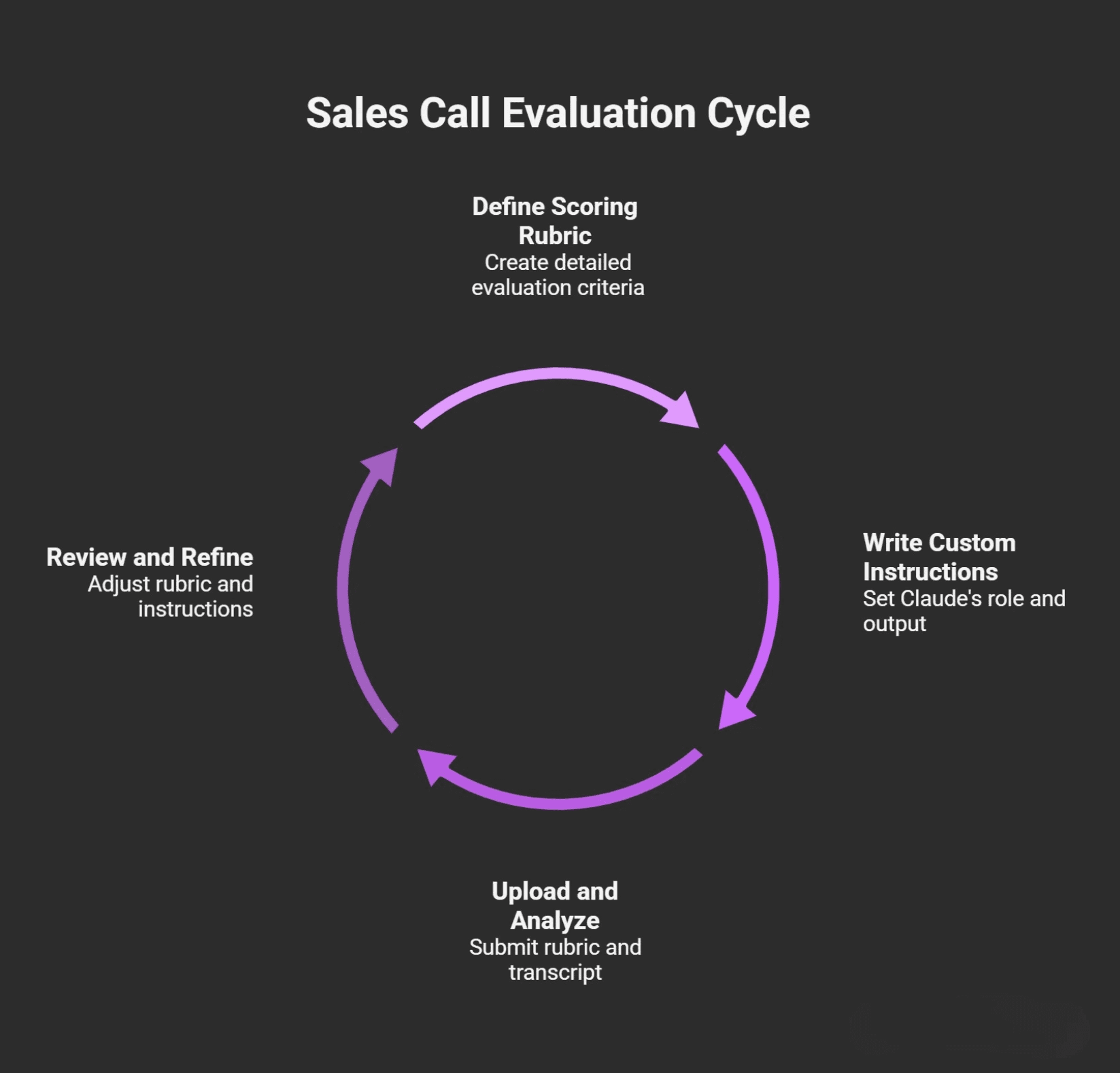
Step 1 — Define Your Scoring Rubric
Create a document that outlines your evaluation criteria. Include each stage of your sales process (opening, discovery, solution, closing, etc.), what a strong performance looks like at each stage, and a point value for each section.
Be specific. Instead of writing "good discovery," write "the rep identifies the prospect's current process, uncovers at least two specific frustrations, establishes a timeline for the decision, and confirms who else is involved in the buying process." The more specific your rubric, the more useful Claude's evaluation will be.
Include a grading scale so Claude can translate raw scores into a letter grade or performance tier. This makes it easier for managers to quickly assess where a rep stands across multiple calls.
Step 2 — Write Your Custom Instructions
Open a new project in Claude and navigate to the custom instructions section. Define Claude's role (sales trainer and evaluator), its objective (evaluate transcripts against the uploaded scoring criteria), and its output format (score per category, specific feedback referencing the transcript, and actionable improvement suggestions).
If you want Claude to ask follow-up questions after its evaluation — for example, "Would you like tips on improving discovery techniques?" — include that in the instructions. If you want it to flag specific keywords or competitor mentions, specify that as well.
You can also instruct Claude to generate a follow-up message draft based on its analysis, which saves an additional step in the coaching workflow. For teams that are already thinking about broader AI implementation in their business, the sales call evaluator is a good starting point because the results are immediate and measurable.
Step 3 — Upload and Analyze
Upload your scoring rubric document into the project knowledge base. Then paste a transcript into the chat window and submit it. Claude will evaluate the call and return structured feedback.
Run a few test transcripts first and review the output against your own judgment. If Claude is overweighting a particular section or missing something you consider important, adjust either the rubric or the custom instructions. This refinement usually takes two or three iterations before the evaluator is producing consistently useful output.
Can Claude Replace Tools Like Gong or Fireflies?
What Claude Does Differently
Claude's strength is in depth of reasoning and contextual analysis. When you give it a transcript and a rubric, it reads the entire conversation, understands the flow of the interaction, and evaluates it holistically. It can identify subtle dynamics — a shift in prospect engagement, an unaddressed concern, a missed opportunity to build urgency — that keyword-based analytics tools may not surface.
It also does not require a per-seat license, a long onboarding process, or integration with your existing tech stack. If you have a Claude Pro or Team subscription and a transcript, you can start today. For teams evaluating whether they need AI agents or AI tools for their sales process, Claude sits in a practical middle ground: more structured than a one-off prompt, less complex than a full platform deployment.
Where Dedicated Platforms Still Matter
Claude does not record calls, join meetings, or provide real-time analysis during a conversation. It processes transcripts after the fact. If your team needs automatic recording, live coaching prompts, CRM auto-population, talk-to-listen ratio tracking across hundreds of calls, or deal-level pipeline analytics, dedicated platforms like Gong, Fireflies, or Avoma are built for that.
The most practical approach for many teams is to use a recording and transcription tool to capture the raw material, and then use Claude Projects to run the deeper analysis that those tools either don't provide or charge significantly more for. They complement each other rather than competing directly.
How to Use Claude's Analysis to Improve Future Calls
Building Value-Based Rebuttals from Claude's Feedback
When Claude identifies a missed objection or a weak rebuttal, it doesn't just flag the problem — it can suggest how to handle it next time. If a prospect said they needed to think about it and the rep responded with a price discount, Claude will point out that the approach introduced pressure without addressing the underlying hesitation.
More importantly, it can generate an alternative approach. Instead of leading with price, it might suggest calculating the opportunity cost of waiting, connecting the solution to a time-sensitive market condition, or using a specific data point the prospect mentioned earlier in the call to reframe the value. One enterprise client working with Novoslo doubled their sales efficiency by applying this kind of AI-driven analysis to their call review process — identifying specific patterns in how their reps handled objections and replacing generic rebuttals with value-anchored responses.
These rebuttal frameworks become reusable assets. After analyzing ten or twenty calls, you start to see the same objections appearing repeatedly, and Claude's suggested responses become the foundation of an objection-handling playbook grounded in your team's real conversations rather than hypothetical scenarios.
Crafting Personalized Follow-Up Messages from Transcript Insights
Generic follow-ups are one of the most common wastes of pipeline energy. A rep sends "just checking in" or "wanted to see if you had any questions" and the prospect has no reason to respond because the message adds nothing.
Claude can draft follow-ups that reference specific details from the conversation: the prospect's stated frustrations, the metrics they mentioned, the timeline they're working against, or the specific concern they raised that wasn't fully resolved on the call. This level of personalization would take a rep 20 to 30 minutes to produce manually for each prospect. Claude generates it in seconds, and the rep spends a few minutes tailoring the tone and adding any context Claude didn't have.
For teams exploring how Claude fits into their broader sales workflow automation, the follow-up generation piece is often the fastest win because it directly improves response rates on outreach that was already happening.
Getting Started
The entire setup takes less than 30 minutes. Define your scoring criteria, write your custom instructions, upload the rubric, and paste in your first transcript. You will see immediately whether the output is useful or needs adjustment.
The larger opportunity is building this into a repeatable process: every call gets evaluated, patterns become visible across the team, and coaching shifts from anecdotal observation to specific, data-informed feedback. That is how call analysis stops being something that happens occasionally and starts compounding into measurable improvement.
If you want to identify where AI fits across the rest of your operations, Novoslo's AI business audit tool maps your workflows and shows where the highest-return automation opportunities are.