Article
May 18, 2026
How to Use Claude to Research Leads Before Outreach
Learn how to use Claude to research leads before outreach. ICP scoring, company briefs, and personalization flows that replace hours of manual work.
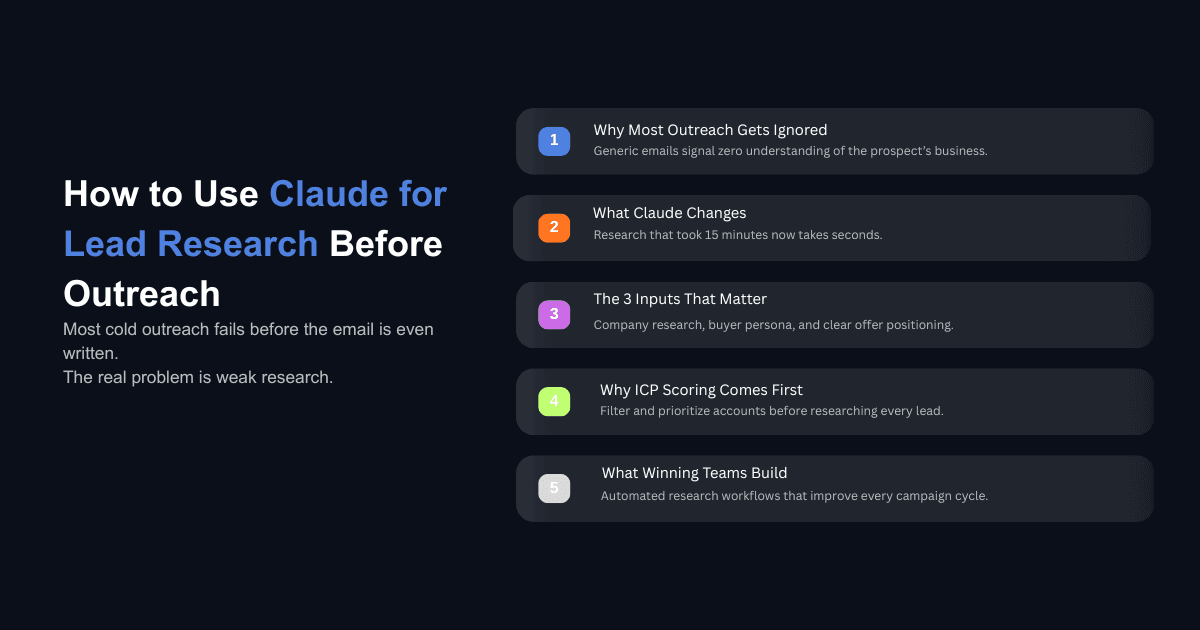
Most cold outreach fails before the first email is even written. Not because the copy is weak, but because there is nothing behind it. The sender does not know what the company does, what problems they are dealing with, or why this particular week might be the right time to reach out. The prospect can tell within three seconds.
Account research before outreach is not a new idea, but almost nobody does it consistently because it takes too long. Fifteen minutes per prospect, multiplied across a list of 200, turns research into a full time job. That is why most teams skip it and send the same template to everyone.
Claude changes that math. Not by writing better emails, but by compressing the research that makes better emails possible. When you give Claude the right structure, it can produce a complete prospect brief in seconds that would take a human rep 10 to 15 minutes to assemble manually. This post walks through exactly how to set that up, from individual lead research to ICP scoring to fully automated research loops that improve on every cycle.
Why Lead Research Matters More Than Outreach Copy
The real reason cold emails get ignored
Sales teams spend most of their energy on copy. They test subject lines, swap CTAs, rewrite opening sentences. But the reason most cold emails get ignored has nothing to do with word choice. It has to do with relevance.
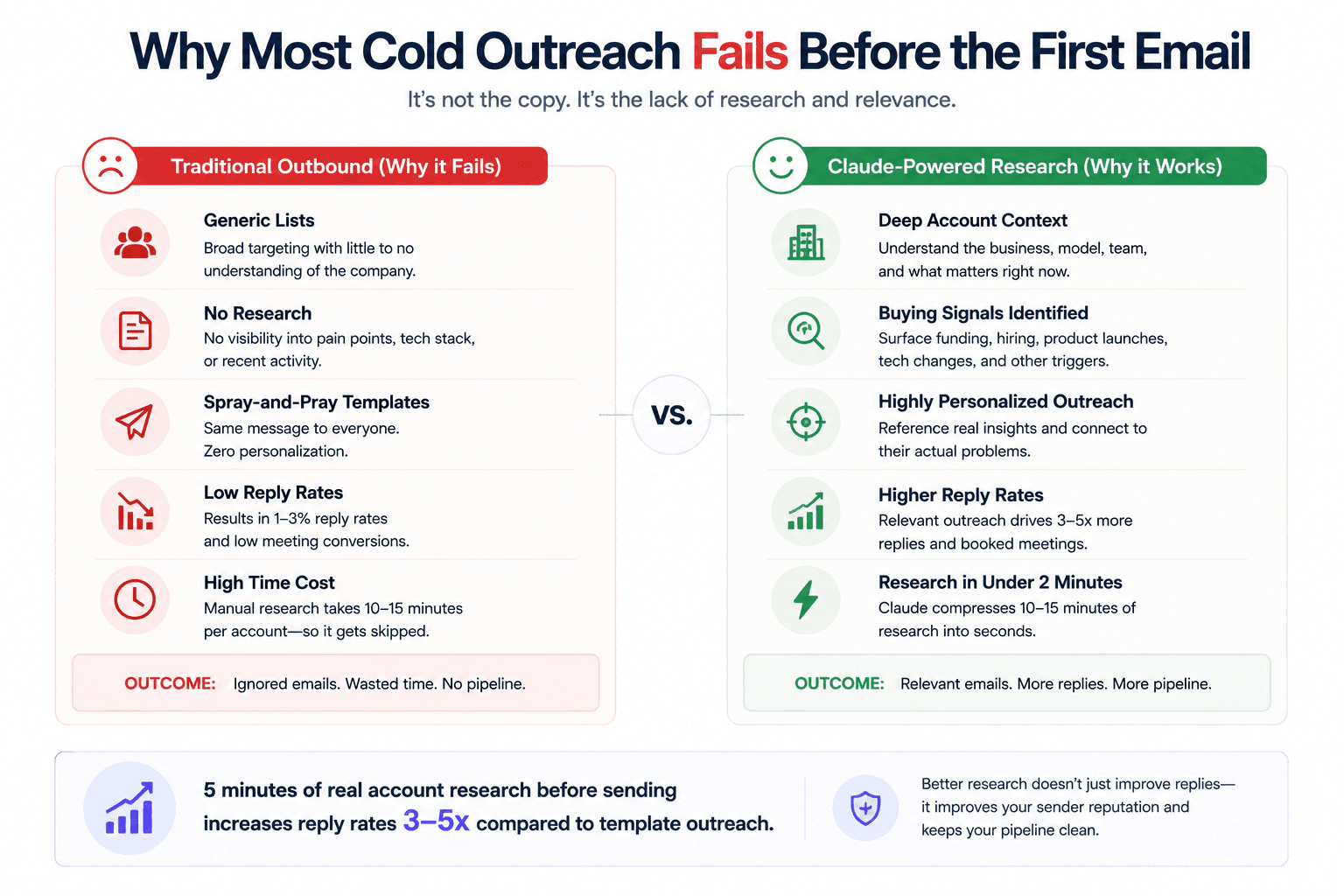
When a prospect opens an email and sees a generic pitch about "helping companies like yours," they close it. They have seen that sentence a hundred times this month. It signals that the sender did not look into the company, does not understand the business, and is running a volume play. According to 2026 cold outreach benchmarks, five minutes of real account research before sending increases reply rates three to five times compared to template outreach. The difference is not marginal. It is the difference between a campaign that books meetings and one that gets marked as spam.
The issue is that most teams treat research as optional because the time cost is too high. When you have 300 leads to work through this week, spending 15 minutes per company is not realistic. So the research gets dropped, the emails go out generic, and the reply rate sits at 1 to 3 percent.
What five minutes of account research actually changes
When you know what a company does, how it makes money, what tools it uses, and what it has been doing recently, three things shift in your outreach. First, you can reference something specific that proves you actually looked. Second, you can connect your offer to a real problem instead of a hypothetical one. Third, you can decide whether this company is worth reaching out to at all, which keeps your list clean and your sender reputation intact.
Research is not just about personalization. It is about qualification. A company that just raised a Series B, posted three engineering roles, and launched a new product line is in a fundamentally different position than one that laid off 20 percent of its team last quarter. Both might match your ICP on paper. Only one is ready to buy. That distinction comes from research, and Claude can surface it in seconds if you give it the right inputs.
How Claude Handles Lead Research Differently Than a Chatbot
The difference between asking a question and running a workflow
If you have only used Claude through the web chat interface, you have been working inside a sandbox. You type a question, Claude gives an answer. Maybe it searches the web to pull in live information. That is useful, but it is limited to the context of a single conversation window.
Claude Code breaks out of that sandbox entirely. It can read files saved on your computer, make API calls to data providers like Apollo or Prospector, store information in skill files so you do not have to repeat instructions, and batch process hundreds of records without losing context. The difference is not incremental. It is a different category of tool.
For lead research specifically, this means Claude Code can pull a company list from a CSV on your desktop, read your scoring criteria from a separate document, call an enrichment API to get contact details and company descriptions, and then use sub-agents to classify whether each company actually matches your ICP. All of that happens inside one session, and you interact with it using plain language. If you want to set up Claude Code for your GTM team, the setup process takes less than 10 minutes and does not require any coding experience.
How Claude Code connects to your files, APIs, and data sources
The practical setup works like this. You create a project folder on your machine and drop in the files Claude needs to reference: your ICP criteria, your copy frameworks, your API documentation for whatever enrichment tools you use. Then you create a CLAUDE.md file that tells Claude where to find everything and what rules to follow. This is your instruction layer.
Once that structure is in place, you can tell Claude in plain language to score a company list, find contacts at qualified companies, enrich their email addresses, and even draft the outreach copy. Claude reads your scoring criteria, references your copy frameworks, and calls the right APIs because you told it where to look. The context stays persistent across the session, which means each step builds on the last. Teams running this kind of setup report processing tables of 50,000 rows or more without hallucination in the scoring, because the scoring itself runs through Python scripts on real data rather than relying on the model to guess.
How to Build a Lead Research Brief Using Claude
The three inputs that change Claude's output entirely
The most common mistake when using Claude for outreach research is giving it a one line prompt like "write me a cold email for a VP of Sales." That gives Claude almost nothing to work with, and the output reflects it.
The approach that actually produces usable research starts with three structured inputs before you ask Claude to write anything. This is the same framework we cover in depth in our guide on personalized first lines for cold email outreach, and it applies equally to building full research briefs.
The first input is a research brief on the target company. This covers what the company does, how it generates revenue, recent funding or product launches, key executives, and any shifts in strategy. You can compile this manually, or you can have Claude Code scrape the company website and pull relevant signals automatically.
The second input is a persona document that describes who you are trying to reach. Not just the job title, but the responsibilities, the types of decisions they make, the problems they are most likely dealing with given their role and the company's current situation.
The third input is your offer positioning, which explains what you sell, what specific problem it solves, and what results look like. When Claude has all three of these, it stops producing generic copy and starts reasoning from actual data. The output shifts from "I noticed your company is growing" to a first line that references a specific hiring pattern or product launch that connects directly to what you offer.
What a complete prospect brief looks like
A useful prospect brief built by Claude includes five sections. Company overview: what they do, employee count, headquarters, industry. Recent signals: funding rounds, product launches, leadership changes, job postings. Tech stack: what tools they already use, if visible. Pain point indicators: hiring patterns that suggest gaps, public complaints, competitive pressures. Personalization hooks: two or three specific details you can reference in outreach along with a suggested angle.
This is the same type of brief that experienced SDRs produce when they spend 15 minutes researching a single account. The difference is that Claude can produce it in under two minutes and then repeat the process across your entire list. For teams that want to go further and enrich their lead list using Claude Code, the enrichment step can be chained directly to the research brief so that contact details, email verification, and personalization hooks all come back together.
How to Use Claude for ICP Scoring Before You Research a Single Lead
Why filtering comes before research
Not every lead deserves a full research brief. If you run deep research on 1,000 companies before filtering, you waste most of that effort on companies that were never a fit. The smarter sequence is to score and tier your list first, then invest research time only on the companies that pass.
This is where most teams get the order wrong. They pull a list from Apollo or Sales Navigator, do some light filtering by industry and employee count, and then start reaching out. That approach tells you who fits your ICP on paper. It says nothing about whether those companies are actually showing buying signals or are in a position to make a purchase decision right now.
AI-driven scoring models deliver roughly 40 percent higher accuracy compared to traditional firmographic filters alone. The difference comes from scoring across more dimensions, including hiring velocity, competitive displacement signals, funding recency, and buying committee structure, rather than just checking boxes on company size and industry.
Setting up tiered scoring with Claude Code
The setup is straightforward. You create a scoring criteria document that defines what a tier one, tier two, and tier three company looks like for your business. Tier one is your ideal fit across every dimension. Tier two relaxes one or two criteria. Tier three is the broader net. Then you tell Claude Code to read your company list, apply the scoring criteria, and output a tiered breakdown.
Claude Code runs this through Python scripts that reference the actual data in your CSV, not through LLM reasoning. That means the scoring is deterministic and repeatable. A company with 80 employees, Series B funding in the last six months, and three open sales roles will get the same score every time you run it. You can read the logic, adjust the weights, and debug any individual score.
One enterprise client we worked with doubled their sales efficiency by using AI-driven insights to score and prioritize leads, engaging prospects at the right time with data-backed decisions instead of gut calls. The scoring itself took minutes. The impact on pipeline quality was significant because reps stopped spending time on companies that were never going to convert.
Once scoring is done, you route the tiers to different actions. Tier one gets priority outreach from a senior AE with deep personalization. Tier two goes into a multichannel sequence covering email and LinkedIn. Tier three gets a lighter automated nurture. This kind of tiered approach is the same logic that GTM teams use Claude Code for prospecting to make sure rep time goes to the accounts most likely to close.
Can Claude Automate Lead Research at Scale?
Using Sonnet sub-agents for ICP filtering
One of the most practical features inside Claude Code is the ability to spin up Sonnet sub-agents for classification tasks. When you have a list of 500 companies and you need to confirm whether each one is actually a SaaS company (and not a consulting firm or a media company that happens to use "platform" in its description), you can tell Claude Code to use a Sonnet sub-agent to read each company description and make that determination.
The sub-agents run within your existing Claude Code usage, which means there are no additional API costs. You are not making separate OpenAI calls or paying per token for classification. You just tell Claude to "prove to me that each company is a SaaS company using a Sonnet sub-agent," and it batches the work automatically.
This is the same approach teams use when they need to personalize cold outreach at scale. Instead of having a human review every company description to decide if it is a fit, the sub-agent handles classification, and you review the reasoning after. The output includes not just a yes or no, but the logic behind the decision, so you can audit it and adjust the criteria if needed.
Auto research loops that improve with every cycle
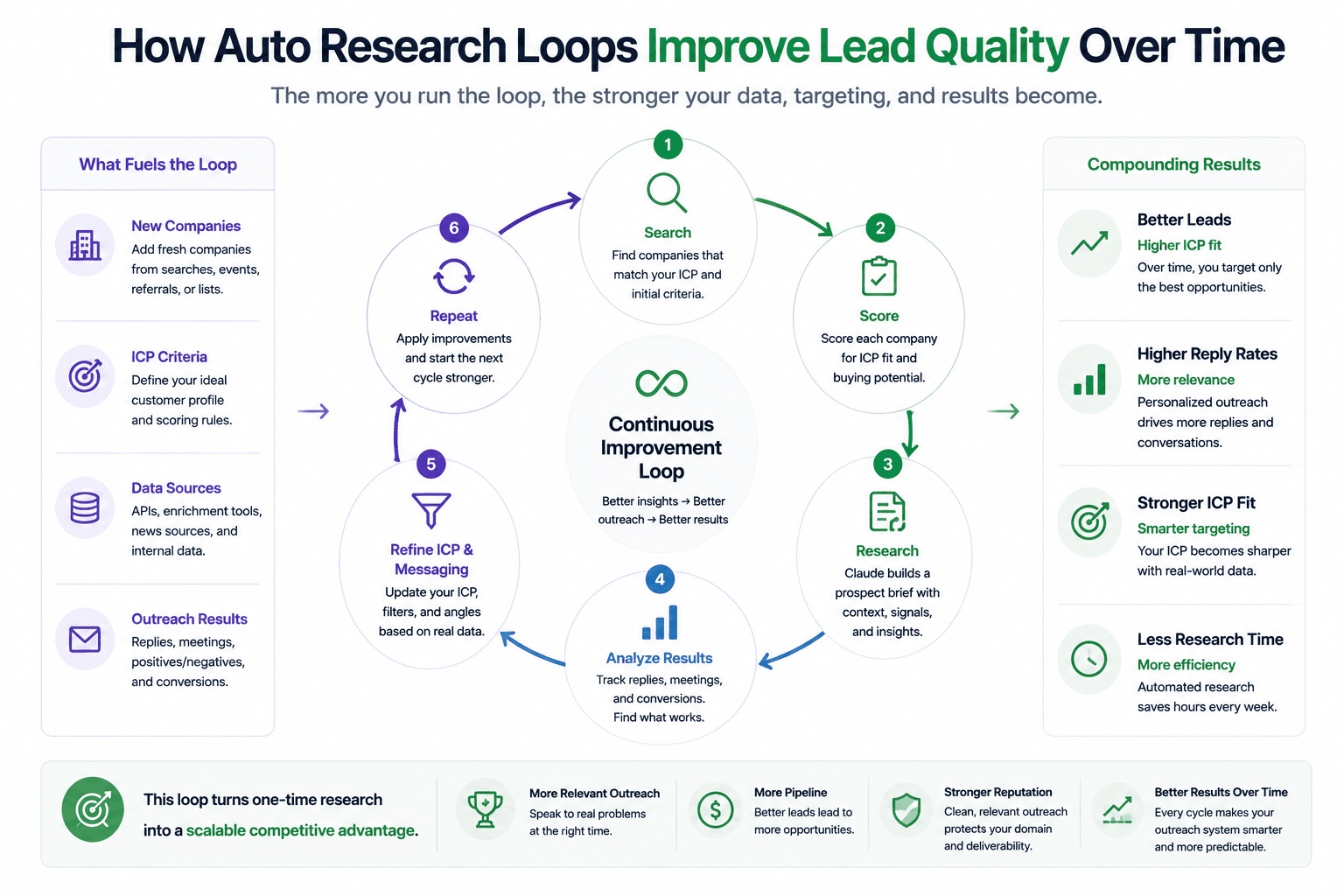
The most advanced application of Claude for lead research is a concept called auto research, based on a framework originally built by Andrej Karpathy. The idea is simple in principle: you give Claude a set of instructions, a scoring rubric, and a goal to improve against, and it runs experiments in a loop. Each cycle, it searches for leads, scores them against your rubric, records what worked and what did not, generates a hypothesis about why certain leads scored higher, adjusts the search criteria, and runs again.
After 10 to 30 cycles, the system has learned which search criteria, geographies, and keywords produce the highest quality leads for your specific ICP. The log it maintains becomes a research asset, not just a list of names. One auto research run produced 344 qualified leads across 30 cities overnight, with outreach angles already written for each one. The system discovered that cities with certain business density patterns had consistently higher quality prospects, an insight that would take weeks to surface through manual prospecting.
The practical output is that you wake up to a qualified lead list with research and personalization already done. If you want to understand how this fits into a broader outbound system, our walkthrough on building a cold email system using Claude covers the full pipeline from list building to campaign launch.
What Does This Look Like Inside a Real Outreach Workflow?
From company list to campaign launch without switching tools
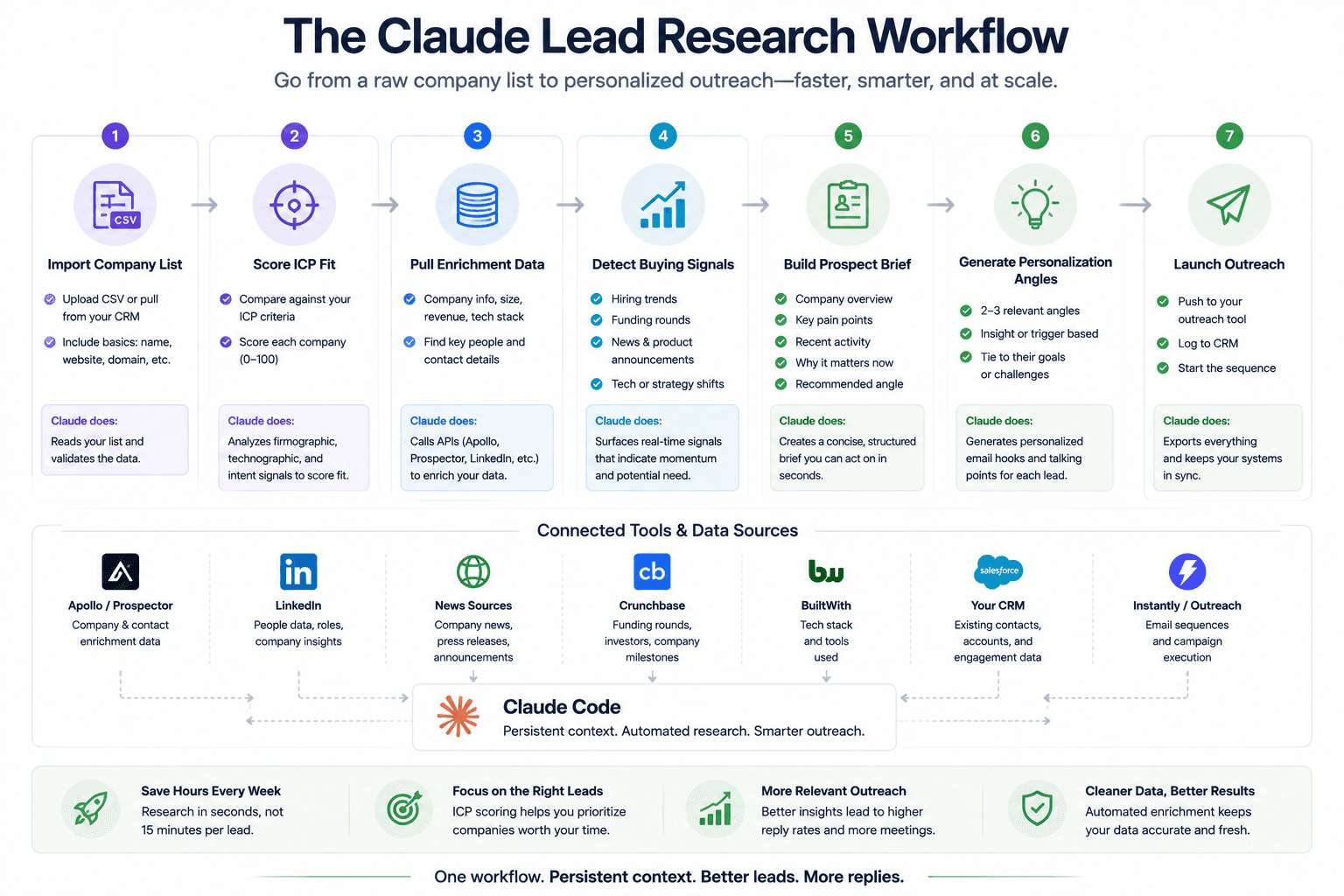
The full workflow inside Claude Code runs like this. You start with a CSV of target companies. You tell Claude to score them using your criteria document. Claude reads both files, runs the scoring, and gives you a tiered breakdown. You tell it to find sales leaders at the tier one and tier two companies. Claude calls your Apollo or Prospector API, pulls contacts, and returns a list with names, titles, and seniority levels. You tell it to enrich the contacts that are missing email addresses. Claude calls your enrichment provider and fills in the gaps. You tell it to write the outreach copy using your best performing frameworks. Claude reads your copy frameworks document, matches the right template to the campaign type, and generates the sequences. You tell it to create the campaign in your sequencer. Claude calls the Instantly or Lemlist API, creates the campaign, uploads the leads, and inserts the copy.
The entire process from company list to live campaign takes five to seven minutes of active interaction. In one demo, the campaign creation step, including lead upload and copy insertion, took 57 seconds. The barrier to entry is not technical skill. It is knowing how to structure the project folder and give Claude the right context upfront.
If you have already compared which AI writes the best cold outreach emails, you know that Claude tends to produce more natural sounding copy. But the real advantage is not the writing. It is that the writing happens at the end of a research and qualification pipeline that makes every email actually relevant to the person receiving it.
Connecting Claude to your sequencer and enrichment stack
The technical connection between Claude Code and your sales tools runs through API documentation. You feed Claude the API docs for whatever tools you use (Apollo, Instantly, Lemlist, Lima Data, Prospector, or others), give it your API keys, and it figures out the correct endpoints and payloads on its own. You do not need to write integration code. Claude reads the documentation, understands what each endpoint does, and builds the requests.
The setup lives in your CLAUDE.md file as a few lines of direction: use this tool for company data, use this tool for email enrichment, use this tool for sequencing. From there, Claude handles the execution. If you want to audit and rewrite weak cold email copy after a campaign runs, you can pull the performance data back into Claude and have it analyze what worked, what did not, and rewrite the underperforming sequences. You can also use Claude to analyze sales calls and feed those insights back into your research briefs so that the pain points you reference in outreach come from actual conversations with similar buyers.
Where to Start
The teams getting the most out of Claude for lead research are not the ones with the most complex setups. They are the ones that started with a clear ICP definition, structured their inputs properly, and built from there.
Start with one workflow. Define your scoring criteria in a document. Drop a company list into Claude Code. Score it. Research the top tier. Write the outreach. Run the campaign. Measure what comes back. Then adjust and run it again.
The research step is where most outbound campaigns break down, and it is the step Claude is best positioned to handle because it involves reading, reasoning, and pattern matching across large amounts of information. When you remove that bottleneck, every other part of your outreach gets better: the targeting, the copy, the timing, and the reply rate.
If you want to see how this fits into a broader operational system, our guide on building an AI operating system for your business covers the full picture. And if you want help building a lead research workflow tailored to your ICP and sales process, book a call with our team and we will walk through what that looks like for your business.