Article
Apr 8, 2026
How to Set Up Claude Project For Writing Sales Copy
Learn how to set up a Claude Project for writing sales copy. Custom instructions, file uploads, and prompts that work for real teams
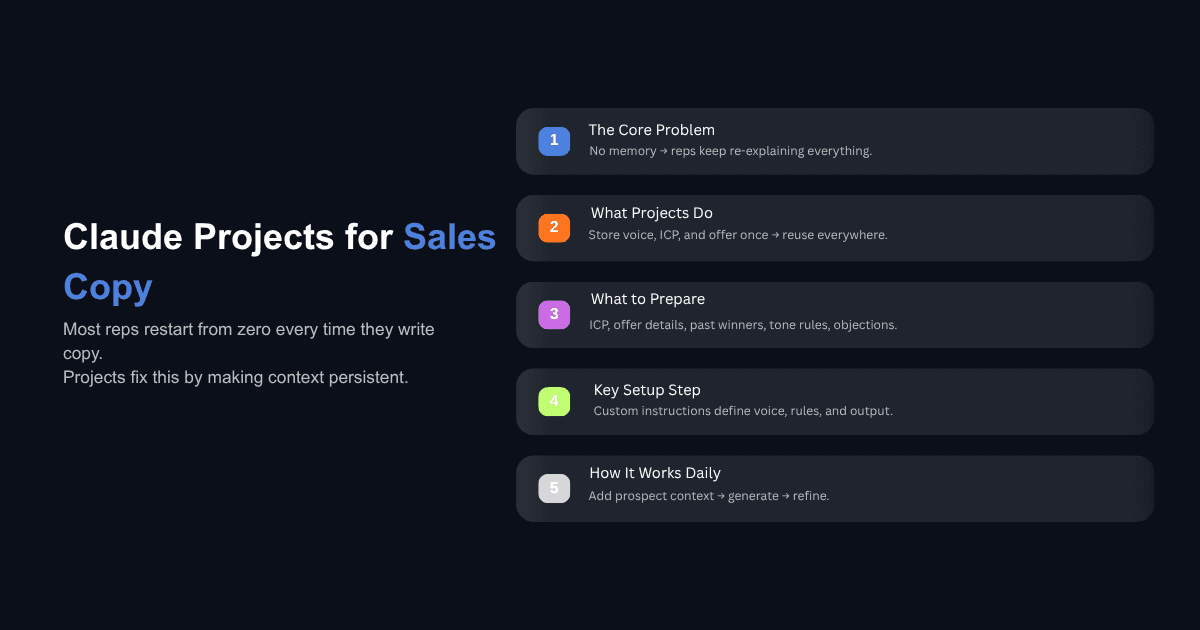
Most sales teams that try to use Claude for copy end up frustrated for the same reason. Every new chat starts from zero, so a rep pastes the ICP, the offer, the tone notes, and a few past winners into the message box, waits for output, and still gets something that sounds like a generic AI email. After the third try, the rep gives up and writes it themselves. The tool gets blamed, but the real problem is that the context never persists.
Claude Projects solve this specific problem. A Project is a workspace that holds your instructions and reference files in one place, and every new conversation inside it starts with that context already loaded. For sales copy, which depends heavily on repeated deliverables, a fixed voice, and a known buyer, this setup makes the difference between output you throw away and output you can actually send.
This guide walks through how to set up a Claude Project for writing sales copy, including what to gather first, what to put in the custom instructions, which files to upload, and how to use the Project once it is running. You should be able to complete the setup in about thirty minutes.
What a Claude Project Actually Does for Sales Copy
A Claude Project is a persistent workspace with its own custom instructions and uploaded files. Conversations inside the Project inherit that context automatically, which means you stop re-explaining your audience, offer, and voice every time you open a new chat. The Claude Projects documentation describes them as self-contained workspaces with their own knowledge bases, and that description is accurate in practice.
Sales copy is a strong fit for this format because the inputs are stable and the deliverables repeat. Your ICP does not change week to week. Your offer does not change every morning. Your voice and the objections you hear on calls stay consistent for months at a time. Everything a rep would normally repaste into a chat can live in the Project instead, which means the writing starts from a real baseline rather than a blank prompt.
The difference from running prompts in a normal chat is mostly about reliability. A normal chat can produce good copy if you prompt it carefully, but the quality depends on how much context you remember to include that day. A Project removes that variable. If you want more context on how Claude compares against other models for this use case, we covered how Claude compares to ChatGPT and Gemini for cold outreach in a separate test.
What to Gather Before You Open Claude
The quality of a sales copy Project depends almost entirely on what you feed it during setup. A useful way to think about this is to ask what you would hand a new sales hire on day one, because that is roughly what Claude needs.
Start with your ICP and buyer persona notes. Who are you writing to, what do they care about, what triggers their buying cycle, and what do they already know about the problem you solve. One page is enough if it is specific.
Next, gather your offer details. Include pricing or pricing ranges, the differentiators you lean on in real conversations, the proof points you use most often, and the outcomes your best customers usually reference. Avoid polished marketing language here. The goal is accuracy, not a brochure.
Pull five to ten past sales assets that actually worked. Cold emails that booked meetings, LinkedIn messages that got replies, landing page sections with solid conversion, follow-up sequences that closed stalled deals. These become the voice calibration material, and they matter more than any tone description you could write.
Add your voice and tone rules in plain language, along with a list of words and phrases to avoid. If your team has banned "circle back," "touch base," or "just checking in," write that down. A list of things to never do is often more useful than a list of things to do.
Finally, pull an objection library from real calls if you have one. The phrases prospects actually use when they push back are the most valuable input you can give a sales copy Project, because they let Claude write responses that sound like your market rather than a generic buyer. If you do not have this documented yet, analyzing sales calls in Claude is a straightforward way to build it.
Step by Step Setup Inside Claude
Once you have your materials, the setup itself is quick.
Create the Project and Name It Clearly
Open Claude, find Projects in the left sidebar, and create a new one. Name it something specific like "B2B Cold Email Copy" or "Outbound Sales Copy, Enterprise ICP." Generic names like "Sales" become a problem once you have more than one Project, and clarity here pays off later when you are switching between workspaces.
Write the Custom Instructions
This is the most important step. Custom instructions are the system prompt that runs on every conversation inside the Project, and they determine how Claude behaves before you ask it anything. Good instructions front-load the context and include a clear list of things to avoid. A detailed walkthrough of effective project instructions is worth reading if you want more examples, but the structure below covers most sales copy use cases.
The instructions should cover who Claude is writing as, who the audience is, what deliverables it will produce, the voice rules, and the guardrails. A full template is in the next section.
Upload Your Knowledge Base Files
Add the files you gathered earlier to the Project. Claude supports PDF, DOCX, CSV, TXT, HTML, and MD formats. A reasonable starting set is your ICP document, your offer brief, a voice guide, five to ten past winners, and an objection library. Avoid uploading everything you have. More files do not produce better copy, and irrelevant material pulls the output in the wrong direction. The test is simple: would you give this document to a new sales hire in their first week. If yes, upload it. If not, leave it out.
Run a First Calibration Chat
Before you start using the Project for real work, run one calibration conversation. Ask Claude to read every file in the knowledge base and summarize what it understands about the audience, the offer, the voice, and the rules. Read the summary carefully. If anything is wrong or missing, update the instructions or the files and run the check again. Two or three iterations usually gets the Project to a point where the output matches how your team actually writes.
A Custom Instructions Template You Can Adapt
Below is a copy ready template. Replace the bracketed parts with your own details and paste the result into the custom instructions field.
Two notes on adapting this. For a Project focused only on cold email, tighten the deliverables section and add more specific format rules, like subject line length and CTA style. For a landing page Project, drop the email rules entirely and add guidance on section structure, headline patterns, and the proof points you want surfaced. Splitting these into separate Projects usually works better than cramming them into one, because the rules for each format are different enough that they start to conflict.
The broader principle here is writing custom instructions that actually produce usable output: be specific, include constraints, and tell Claude what to avoid. Vague instructions produce vague copy.
How to Actually Use the Project Day to Day
Once the Project is set up, the day to day usage is simple. For a cold email, tell Claude who the prospect is, what you know about them, and what outcome you want from the email. The Project already knows the voice and the offer, so you only need to provide the specific context. For follow-ups, reference the previous email and the signal you are responding to. For objection handling, paste the exact objection and ask for a reply that uses language from the objection library.
Uploaded call transcripts are useful here in a way that most teams underuse. When you need a specific phrase that sounds like your market, ask Claude to pull three real quotes from the transcripts that relate to the pain point you are writing about, and then use those quotes to inform the draft. The copy that comes out of this usually sounds more like a human than anything written from a persona document alone. For personalization specifically, the same Project can also handle writing personalized first lines at scale once you feed it the prospect research.
On when to start a new chat versus continue an existing one, the rule is practical. Start a new chat for each new prospect or each new campaign, because the context stays cleaner. Continue an existing chat when you are iterating on a single draft. Conversations inside a Project do not automatically share memory with each other, so starting fresh does not cost you anything except the few seconds it takes to paste the prospect details.
One enterprise sales team we worked with doubled their sales efficiency by engaging leads at the right time with data backed decisions, and a meaningful part of that was standardizing how the team produced copy. The setup itself is less interesting than the discipline of keeping the reference material current.
If you want to automate what happens around the copy, such as lead research, call prep, and follow ups, that work tends to belong in a different part of Claude. We covered the full setup for that in our guide on how to automate the rest of your sales workflow with Claude Skills.
Common Questions About Claude Projects for Sales Copy
Do I need a paid Claude plan to use Projects?
Projects are available on all Claude plans, including Free, though the Free tier limits you to a small number of Projects. Pro and Team plans give you unlimited Projects along with higher message limits, which matters once multiple reps are using the same workspace daily. For a single rep running one or two Projects, Free can work as a starting point. For a team that wants every member writing in the same Project with shared instructions and files, a paid plan is the practical choice. You can read more on Claude Projects plan availability if you need to compare tiers.
How many files should I upload to a sales copy Project?
Fewer than you think. A focused Project with five to ten carefully chosen files usually outperforms a Project with thirty files dumped in. The reason is that Claude references everything in the knowledge base when generating copy, and irrelevant material pulls the output away from what you actually need. A tight set of documents, including one ICP brief, one offer brief, one voice guide, a handful of past winners, and an objection library, covers most use cases. If you find yourself wanting to add more, consider whether a second Project for a different channel or audience would be a better fit.
Why does my Claude Project still produce generic copy?
Three causes account for most of it. The first is vague custom instructions that describe a tone without showing examples of it, which leaves Claude guessing. The second is a knowledge base full of polished marketing material instead of real sales writing that worked, since polished material teaches Claude to write polished copy that sounds like everything else. The third is prompts that do not include enough specific context about the prospect or the situation. Fixing any one of these usually improves the output noticeably. Fixing all three changes the quality entirely.
Should one Project handle all sales copy or should I split by channel?
Split by channel once you have more than one format to support. A cold email Project and a landing page Project have different voice rules, different length constraints, and different structural expectations, and trying to encode all of that into one instruction set produces compromises in both. Start with the channel you write for most often, get that Project to a point where the output is reliable, and then clone it and adjust for the next channel. Two focused Projects are almost always better than one general one.
Closing Thoughts
Setting up a Claude Project for sales copy is less about the tool and more about the material you feed it. The instructions give Claude its rules, but the uploaded files and the past winners give Claude its voice. Teams that treat the Project as a living workspace, updating the objection library as new calls come in and refining the instructions when something is off, get output they can actually use. Teams that set it up once and forget about it drift back to generic copy within a few weeks.
Start with one Project for your most important sales copy format, spend thirty minutes on the setup, and run a real cold email through it this week. If the output is close but not right, adjust the instructions rather than starting over. The Project gets sharper the more real examples and corrections you give it. Once it is working, the same approach extends easily to landing pages, follow ups, and any other repeated copy your team produces.