Article
Aug 11, 2026
How to Use Instantly AI for Cold Email
A practical guide to using Instantly AI for cold email: inbox setup, warmup, lead finder, campaigns, and where it fits best.

Running cold email at any real volume usually means holding four tools together at once. One finds leads, another warms your domains, a third sends the campaigns, and a fourth tracks who replied. Every handoff between them adds cost, adds setup time, and adds another place where a message quietly lands in spam. Instantly AI exists to collapse that stack into a single workspace, which is why so many outbound teams start there.
This guide walks through how to use Instantly AI for cold email from the first login to a live campaign, covering inbox setup, warmup, list building, sequences, and reply management. It also gives an honest read on where the platform is strong and where it starts to strain, so you can decide whether it fits your operation before you commit a budget to it. If you are still deciding on the tools underneath your outbound, our breakdown of the best cold email stack for B2B companies is a useful companion to read alongside this.
What Instantly AI actually does
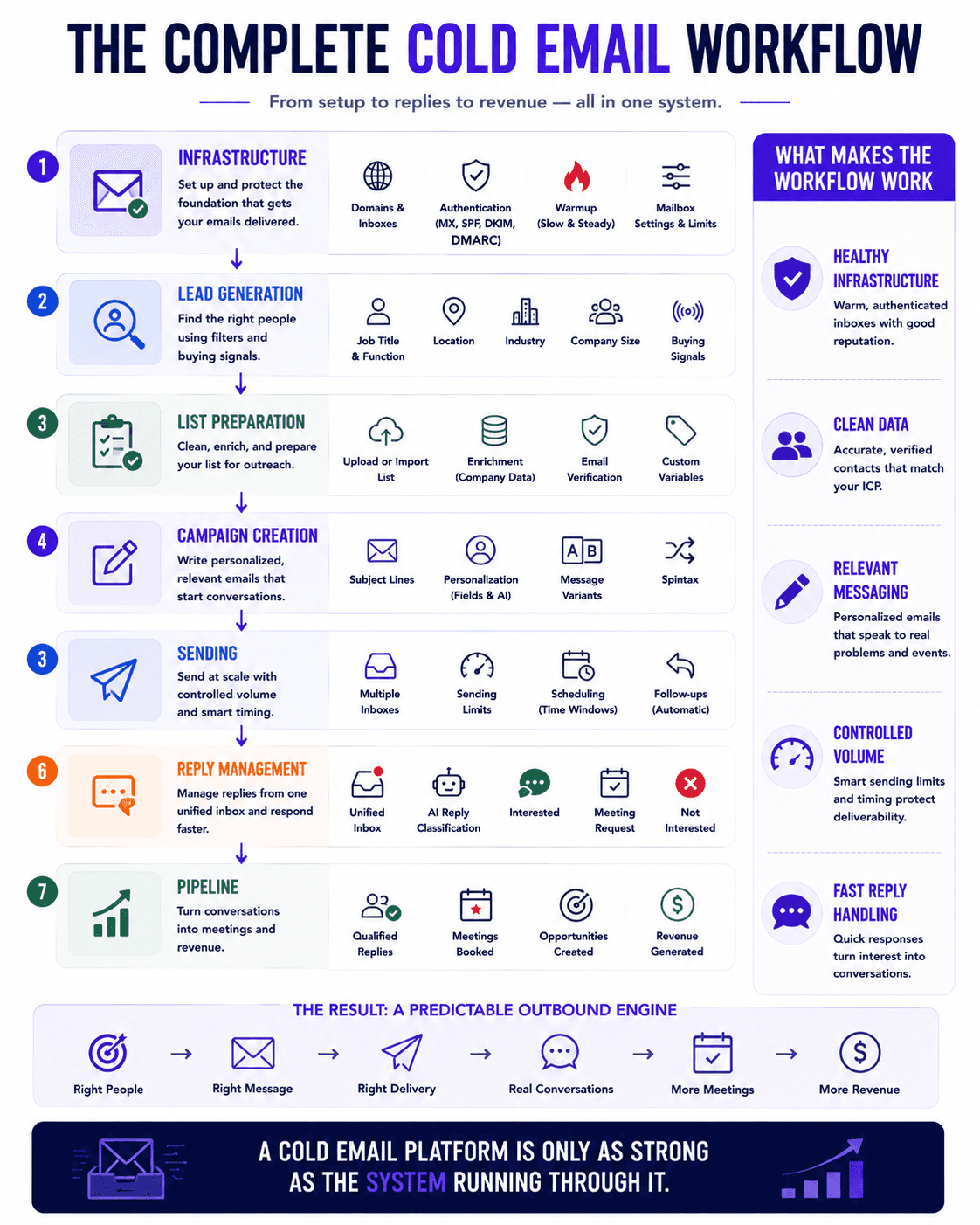
Instantly is a cold email platform that has grown into a broader outbound workspace. In one interface you can find or upload leads, connect and warm your sending accounts, build multi step sequences, and handle replies through a unified inbox. Recent versions add AI that classifies replies and drafts responses, which reduces the manual sorting that eats into an SDR's day.
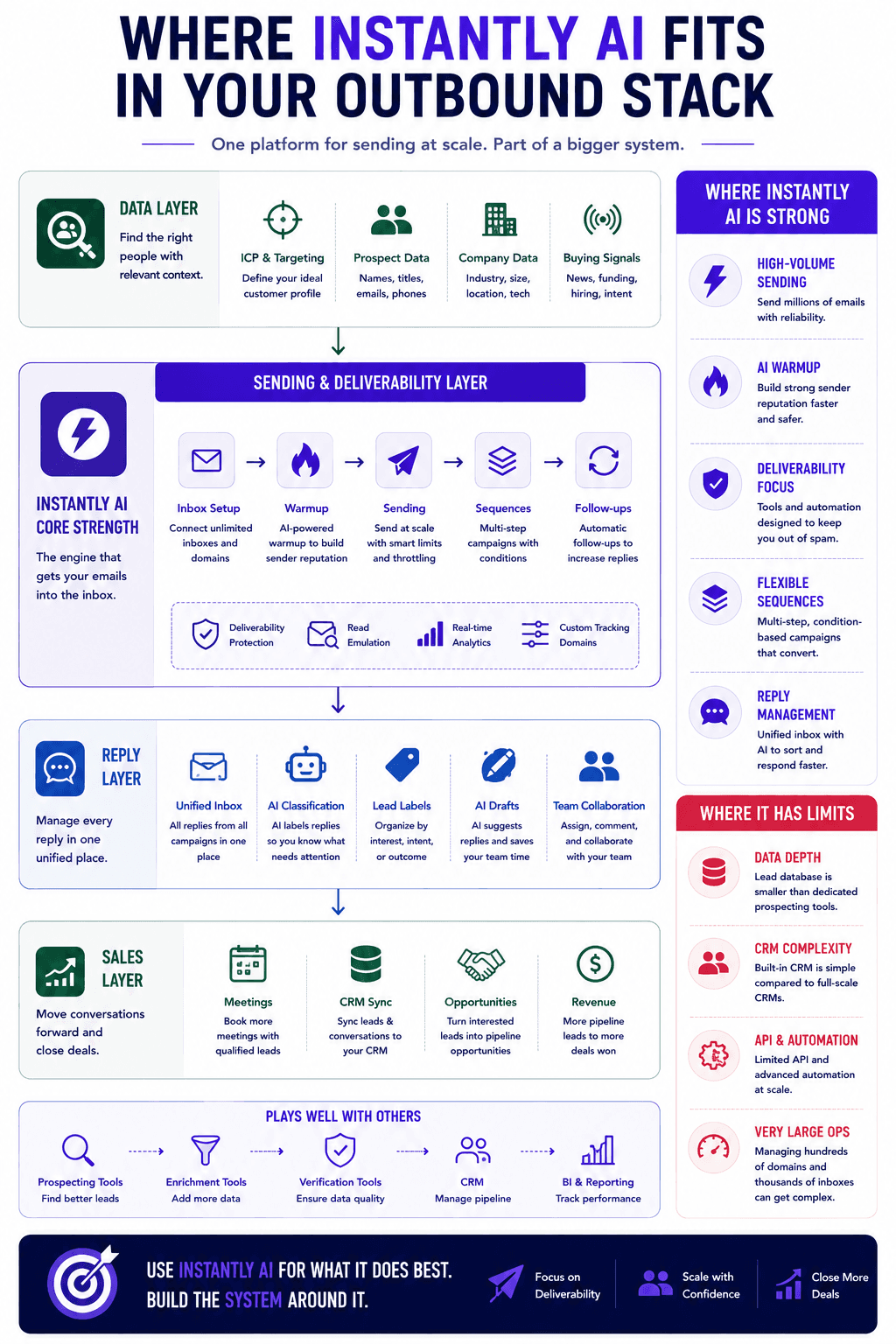
It helps to be clear about what the platform is and is not. According to the team's own feature overview, the core value is consolidation: sending, warmup, and personalization live in one place instead of across separate subscriptions. Independent reviews add a fair caveat. As one hands on review notes, the sending engine and warmup pool are genuinely strong, but the lead database and the built in CRM are lighter than dedicated tools. Treat Instantly as an excellent sending and deliverability layer, and keep expectations realistic about the parts bolted on around it.
Setting up your sending accounts
Your first task after signing up is connecting the inboxes you will send from. For a handful of accounts you can add each Gmail or Microsoft mailbox one at a time, and the platform walks you through the IMAP, SMTP, and forwarding steps as you go. If you are running dozens of accounts, the bulk import from CSV is the faster path. You download the sample sheet, drop in your account details, and upload them together rather than syncing each one by hand.
Once your accounts are connected, spend time on the settings before you send anything. Each inbox needs a signature, a sensible daily limit, and a gap between sends so the pattern looks human. Keep the slow warmup running rather than rushing it, and consider read emulation, which mimics a person opening and scrolling through messages so the account looks active. These small choices protect your sender reputation, which is the single thing most likely to sink a campaign before your copy ever gets read. Our guide to why most cold email campaigns are dying in 2026 goes deeper on how reputation quietly decides deliverability.
When you manage many accounts, two features save real time. Bulk edit lets you apply the same name, signature, and limits across every inbox in one pass. Filtering lets you surface only the accounts with problems, such as a missing custom tracking domain or a failed authentication check, so you can pause and fix them before they drag down a campaign. Instantly will also test your MX, SPF, DKIM, and DMARC records and tell you what is misconfigured. If you want the full picture of the records and warmup logic underneath this, read our cold email infrastructure setup for B2B companies, and if you are still choosing where your mailboxes live, compare the best cold email inbox providers first.
Building your lead list
If you do not already have a contact list, the built in lead finder gives you a place to start. You filter by job title, location, industry, and company size, and you can layer in technologies a company uses or keywords tied to their business. The size filter tends to be a more reliable targeting signal than revenue, which is often stale in most databases.
A useful addition is the recent news field, which surfaces events like a funding round or a leadership change on a prospect's company. You can feed that into an AI prompt to write an opening line tied to something real rather than a generic hello. This is the same idea behind our work on buying signals: reaching out when something has just changed usually beats reaching out at random.
You are not limited to the platform's own data. If you already have a list sitting in a spreadsheet, you can upload it and let Instantly enrich and verify it, which fills in missing detail and checks that addresses are deliverable. Verification matters more than most people assume, because sending to invalid addresses raises your bounce rate and damages the accounts you spent weeks warming. Our roundup of the best email verification tools for cold email covers this in more depth. The lead finder is solid for small and mid sized outbound, though for deeper firmographic targeting many teams still pair it with a dedicated source. Our list of the best prospecting tools for B2B sales teams is worth a look if data depth is a priority for you.
Creating and scheduling a campaign
With inboxes warmed and a list ready, you move to the campaign itself. You can pull leads straight from the lead finder or upload a CSV, and when you upload you choose which columns to import so that fields like location or company size become custom variables you can drop into the copy.
Writing the sequence is where most of the outcome is decided. Start with a subject line, then write the body. If copywriting is not your strength, the template library gives you a workable starting point, but treat templates as a first draft rather than a finished email. The stronger move is to build several variants of each message and let the platform rotate through them, so it can track which version earns the most opens and replies. You can push this further with spintax, which generates many small wording variations so that no two sends look identical, which helps you stay out of spam filters when volume climbs. The custom variables you imported are what make each email feel specific to the person reading it, and getting those opening lines right is worth real effort. Our walkthrough on writing personalized first lines for cold outreach shows how to do this at scale.
Add later steps to the sequence by setting how many days should pass before the next email goes out. Leaving the subject line empty keeps that message on the same thread as a reply, while adding a new subject starts a fresh thread. Before you launch, set your schedule and sending window, choose which warmed accounts to include, and pace your volume. Spreading a modest number of emails per day across several inboxes is far safer than pushing everything through one account. The most common errors happen here rather than in the copy, so it is worth reviewing our list of cold email mistakes that kill reply rates before you hit publish. For a structured way to think about the whole system, the cold email frameworks high performing teams use lays out the pieces in order.
Managing replies and pipeline
Once campaigns are live, the volume of replies is its own workload. The unified inbox, which Instantly calls the Unibox, pulls every reply across every connected account into one view, so you are not logging into a dozen mailboxes to find who responded. You can filter it by campaign, by account, or by read status to keep things manageable.
The platform classifies replies into buckets such as interested, meeting request, not interested, and out of office, and the AI inbox manager can respond to positive replies quickly, suggest drafts, tag interest automatically, and add anyone who unsubscribes to a block list so they are never contacted again across your campaigns. Custom lead labels let you sort responses your own way, which is helpful when you run several offers or several clients at once.
Instantly includes a lite pipeline that moves interested leads through stages, and it is enough for basic tracking. It is fair to say it is closer to a tagged kanban view than a full CRM, a point most independent reviews make plainly. If your sales cycle has real complexity, plan to connect a dedicated CRM through the available integrations rather than running your whole pipeline inside the platform.
Common questions about using Instantly AI for cold email
Is Instantly AI good for beginners?
Yes. The setup flow is guided, the interface is clean, and the templates give newer users a starting point for both inboxes and copy. A beginner can get a campaign live in an afternoon. The one area that still requires care is deliverability, since warmup, authentication records, and sensible daily limits decide whether your emails reach the inbox regardless of how easy the tool is to use.
How many emails can you safely send?
There is no single number, because safe volume depends on how many warmed inboxes you have and how established their reputation is. The reliable approach is to keep per account sending modest and spread your total across many inboxes rather than pushing high volume through a few. Instantly rotates sends across your connected accounts and paces new leads separately from follow up replies, which helps you scale without spiking spam complaints. Grow volume gradually and watch your account health scores as you go.
Does Instantly AI replace a CRM or a lead database?
Not fully, and it is better to know that upfront. The lead finder is capable for small and mid sized outbound but does not match the depth of dedicated database tools, and the built in pipeline handles simple tracking rather than a complex sales process. Instantly is strongest as your sending, warmup, and reply layer, and it works best when paired with a proper database and CRM for teams that need them. Our comparison of Apollo vs Clay is a good next read if data enrichment is where you feel the gap.
Which cold email tool should you actually choose?
Instantly is a strong choice for solo founders, small SDR teams, and small agencies who want fast setup, reliable warmup, and high volume sending in one place. The value is real, though the modular pricing means the cost rises as you switch on the lead database and the AI features, so price the full setup you actually need rather than the entry tier. Teams running very large mailbox counts, heavy API automation, or multiple client accounts tend to hit ceilings and often move to a platform built for that scale. Our side by side of Smartlead vs Instantly vs PlusVibe walks through exactly where each one fits.
Final takeaways
Instantly AI for cold email earns its reputation as one of the cleaner ways to run outbound from a single workspace. It is fast to set up, its warmup and sending are dependable, and its reply management removes a lot of manual sorting. The honest limits are its lighter lead database and its basic pipeline, both of which matter more as your operation grows. For most small and mid sized teams the tradeoff is worth it, and the platform will carry you a long way before you outgrow it.
The tool itself is only ever part of the outcome. Deliverability, list quality, and copy decide whether any of this books meetings, and a clean platform will not fix weak inputs underneath it.

If you would rather have that system built and run for you instead of managing it in house, book a call with our team and we will walk you through how we set up cold email infrastructure that holds up at scale.