Article
Jun 10, 2026
Best Cold Email Inbox Providers in 2026
Compare the best cold email inbox providers in 2026. Premium Inboxes, Zapmail, and InboxKit reviewed on pricing, DNS setup, and deliverability.
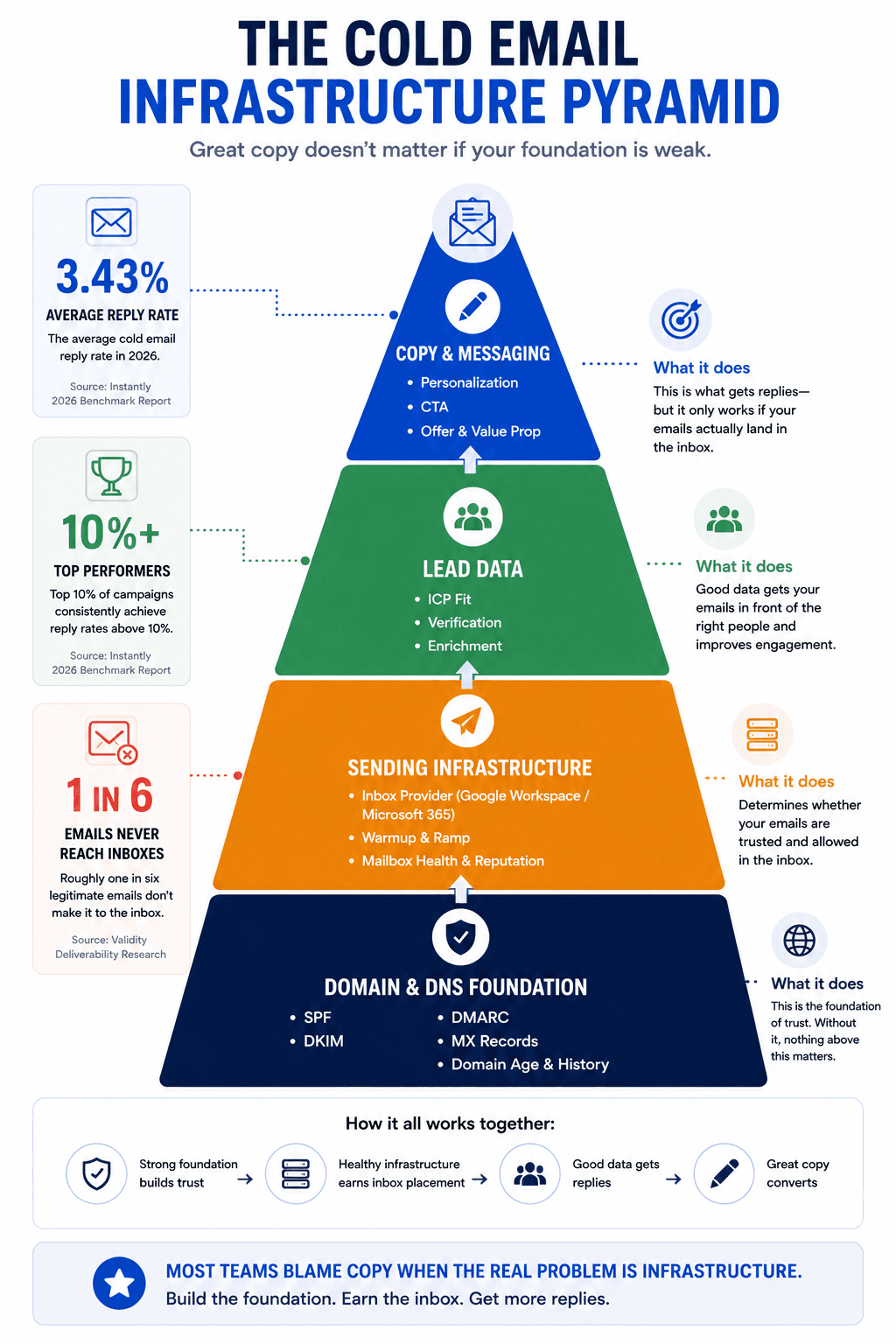
Most cold email campaigns fail before the first reply. Not because the copy is weak or the list is bad, but because the infrastructure underneath was never set up properly. According to Instantly's 2026 Benchmark Report, the average cold email reply rate sits at 3.43%, while top performers consistently exceed 10%. The difference between those two numbers almost always traces back to one thing: whether emails actually landed in the primary inbox.
Your inbox provider is the foundation of your entire cold email stack. It determines your DNS configuration, your sender reputation, your IP quality, and ultimately whether your prospect ever sees what you wrote. If you get this layer wrong, everything built on top of it is wasted spend. Most cold outreach fails before the first email is even sent, and infrastructure is usually the reason.
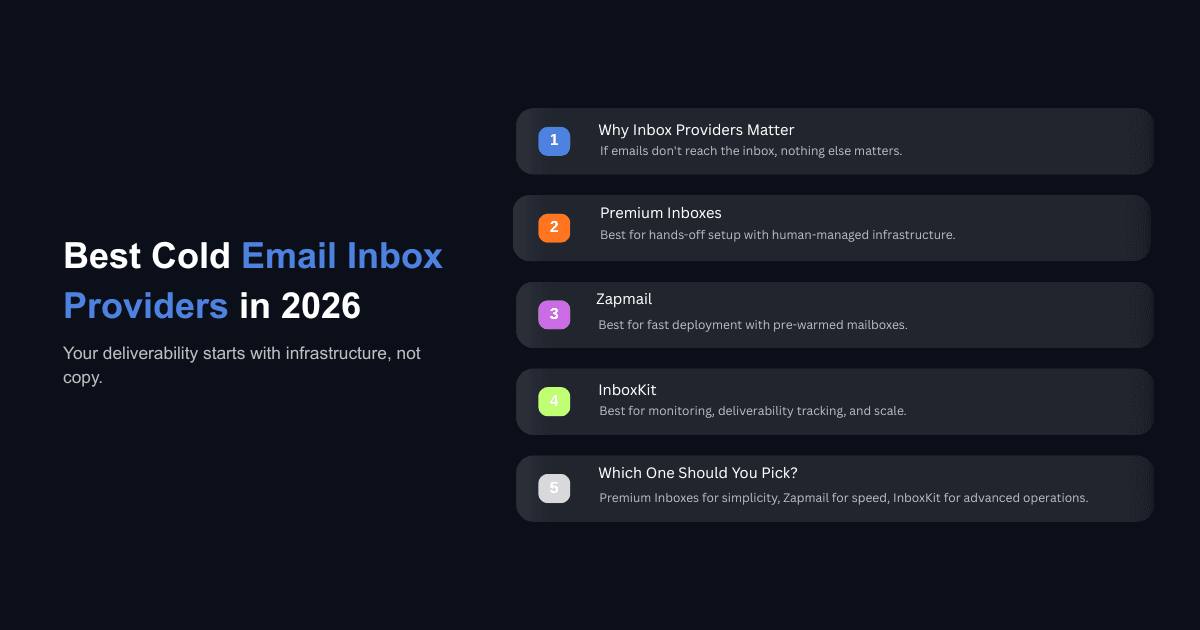
This guide breaks down the three inbox providers that B2B teams are actually using in 2026: Premium Inboxes, Zapmail, and InboxKit. We'll cover what each one does, how much it costs, where it fits, and which one makes sense depending on your operation.
Why Your Inbox Provider Matters More Than Your Copy
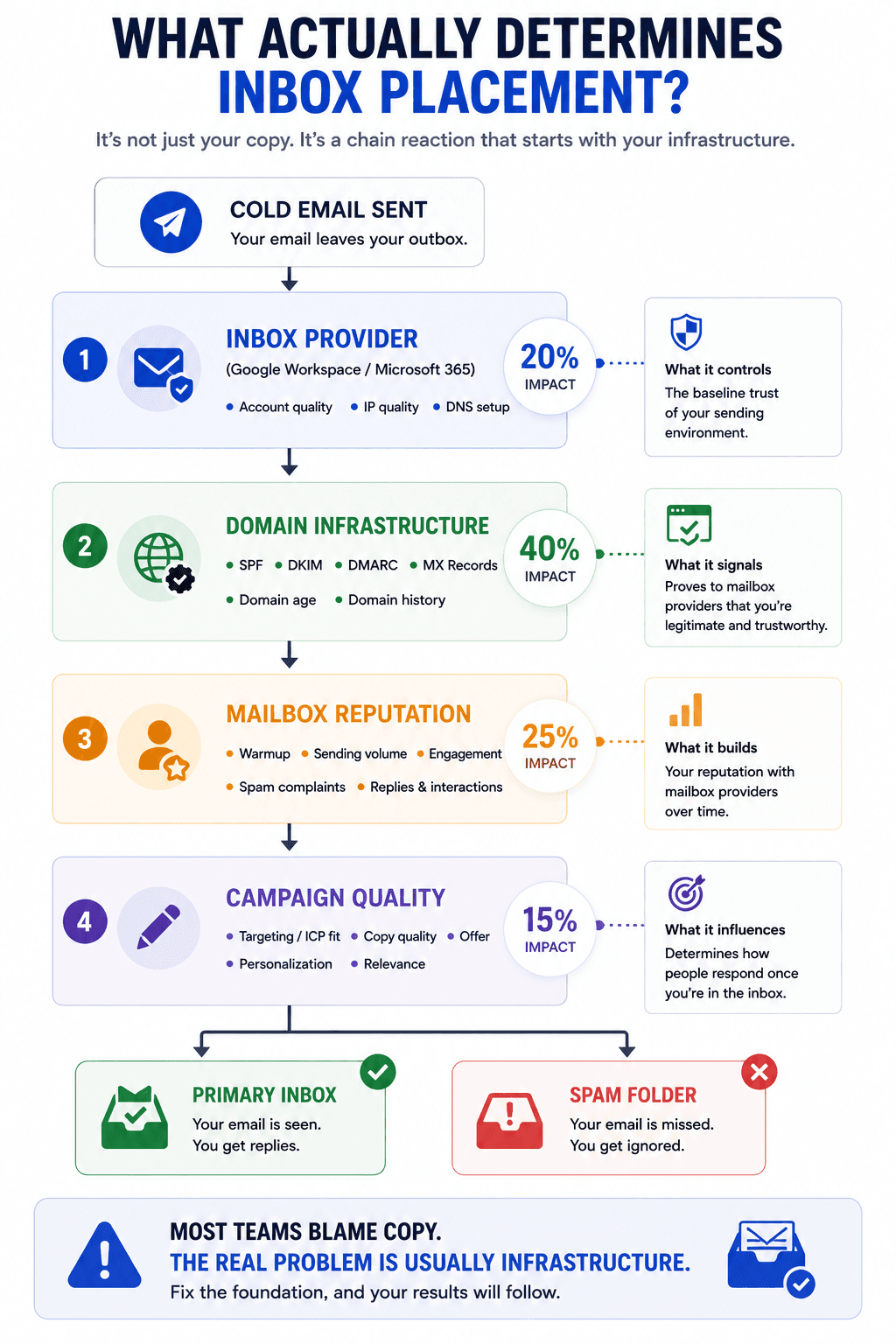
You can write the most relevant, personalized cold email in the world, but if Gmail or Outlook flags your domain, nobody reads it. That is not an exaggeration. According to Validity's deliverability research, roughly one in six legitimate emails never reaches the inbox. For cold email specifically, the numbers are worse because you're sending to people who have never interacted with you before.
The failure is invisible. Spam doesn't send you a notification. Your reply rates just quietly decline over time, and most teams blame copy or targeting before they ever look at their infrastructure. This is one of the core reasons most cold email campaigns are dying in 2026. The infrastructure layer is treated as a checkbox instead of the operational priority it actually is.
What Proper Cold Email Infrastructure Includes
A reliable inbox provider should handle several things. Official Google Workspace or Microsoft 365 accounts, not cracked or farmed licenses that carry reputation risk. Full DNS authentication including SPF, DKIM, DMARC, and MX records, all verified before you send a single email. US-based IPs, because offshore IPs are disproportionately associated with spam even when the sender is legitimate. And direct integrations with your sequencing platform so you can export mailboxes and start campaigns without manual configuration.
These are not nice-to-haves. If any one of them is misconfigured, you're signaling to mailbox providers that your domain may not be trustworthy. Google's sender guidelines now enforce a spam complaint threshold of 0.3%, and Microsoft implemented similar enforcement in 2025. One bad setup decision can cost you months of recovery time.
What to Look for in a Cold Email Inbox Provider
Before comparing specific platforms, it helps to know what actually separates a good provider from one that creates more problems than it solves.
Official Accounts on Real Licenses
The most important distinction is whether you're getting official Google Workspace or Microsoft 365 accounts versus cracked, farmed, or resold licenses obtained through unofficial channels. Cracked accounts get flagged and shut down without warning. Farmed accounts carry the sending history of whoever used them before you. Official accounts come authenticated and with a clean reputation. Google and Microsoft can detect the difference, and they treat unofficial accounts as high risk.
Automated DNS Configuration
SPF, DKIM, DMARC, and MX records need to be correctly configured before you send anything. Some providers handle this automatically when you connect your domain. Others leave it to you. If you are managing dozens or hundreds of domains, manual DNS setup becomes an operational bottleneck that introduces errors. The best providers verify DNS configuration and alert you if something is misconfigured.
Provider Diversification and IP Quality
Running all your outreach through a single email provider is a concentrated risk. If Google tightens filters tomorrow, your entire operation stops. This happened in both 2024 and 2025 when Google adjusted security filters and teams with Google-only infrastructure saw campaigns shut down overnight. A solid inbox provider should offer both Google Workspace and Microsoft 365 accounts so you can diversify your sending. US-based IPs are also important because they carry cleaner sending histories than offshore alternatives.
Sequencer Integrations
Your inbox provider sits at the infrastructure layer. Your sequencer, whether that's Instantly, Smartlead, PlusVibe, or another platform, handles the actual campaign. The handoff between these two tools needs to be clean. Look for direct integrations or one-click exports that upload your mailboxes with credentials, display names, and sending limits already configured.
Premium Inboxes: The Hands-Off Standard
Premium Inboxes is a managed inbox provider that handles the entire infrastructure setup for you. You fill out a form with your domain preferences, and their team configures official Google Workspace and Microsoft 365 accounts with full DNS authentication, US-based IPs, and direct sequencer uploads. The entire process typically takes under 12 hours.
What Sets It Apart
The core value of Premium Inboxes is that the setup is entirely hands-off and human-verified. DNS records are manually checked by their team rather than auto-scripted, which reduces configuration errors. They also offer unlimited replacement inboxes, so if an account gets flagged or you need to rotate infrastructure, you can swap it out without downtime or additional cost.
The platform has built a strong reputation in the cold email space, with over 300 verified Trustpilot reviews averaging 5 stars. Users consistently highlight three things: delivery speed under 12 hours, DNS quality, and responsive personal support. For teams that want reliable infrastructure without learning the technical details, this is the simplest option available.
Pricing
Premium Inboxes uses volume-based pricing. The Startup tier covers 1 to 249 inboxes at $3.50 per inbox per month. Growth and Enterprise tiers are available for larger operations with reduced per-inbox costs. Every plan includes complete DNS setup, a real-time dashboard, direct sequencer upload, and unlimited replacements. There's also an Insured Infrastructure plan at $4.50 per inbox that adds additional protection.
Best For
Non-technical founders, small agencies, and teams running under 250 inboxes who want white-glove setup with zero configuration work. If you value simplicity and support quality over having the absolute lowest per-inbox price, Premium Inboxes is the strongest option.
Zapmail: Fast Provisioning at Scale
Zapmail is an inbox provisioning platform built for speed and scale. It offers both Google Workspace and Microsoft 365 accounts with pre-warmed mailboxes, automated DNS setup, and workspace-level domain isolation. The platform serves over 50,000 businesses and has configured more than 500,000 mailboxes.
What Sets It Apart
Zapmail's strongest feature is its pre-warmed accounts. Mailboxes arrive with 2 to 3 weeks of warmup activity already completed, which means you can start campaigns within days instead of waiting the standard 14-day ramp-up period. The platform uses workspace-level isolation where each workspace gets its own dedicated domain, reducing the risk that one flagged account poisons others on the same domain.
The setup process is fast and straightforward. You can buy Google or Microsoft mailboxes from the same dashboard, connect your existing domains by updating nameservers, and Zapmail handles all DNS records automatically. It supports both individual and bulk domain imports, and mailboxes are typically ready in under 30 minutes.
Zapmail integrates with major sequencers including Smartlead, Instantly, and several others. You can export mailboxes directly to your sequencer with credentials included, eliminating the manual upload step.
Pricing
Zapmail's pricing follows a tiered structure. The Starter plan is $39 per month for 10 mailboxes. Growth is $99 per month for 30 mailboxes. Enterprise is $299 per month for 100 mailboxes. Additional mailboxes beyond the plan limits cost $3.00 to $3.50 each depending on volume. Domains can be purchased through Zapmail at around $13 per domain, though buying domains from a registrar like Porkbun or Namecheap and importing them is more cost-effective.
Best For
Agencies and freelancers who need to spin up infrastructure quickly and want pre-warmed accounts ready to send from day one. Zapmail works well for teams scaling from 10 to 100+ mailboxes who value provisioning speed and don't want to manage their own warmup process.
InboxKit: The Infrastructure Dashboard
InboxKit positions itself as an all-in-one infrastructure management platform. Beyond standard Google Workspace and Microsoft 365 provisioning, it adds Azure mailbox support, real-time deliverability monitoring through a feature called InfraGuard, and over 24 sequencer integrations. InboxKit also claims to be the only official Google Cloud partner in the cold email infrastructure space.
What Sets It Apart
InboxKit's differentiator is its monitoring and management layer. Where most inbox providers hand off accounts and move on, InboxKit provides ongoing deliverability tracking, blacklist alerts, DNS drift detection, and bounce rate monitoring. This is valuable for teams running large-scale outreach where a single deliverability issue can cascade across dozens of domains. For teams that want to track cold email deliverability across multiple domains, having this built into the provider eliminates the need for separate monitoring tools.
InboxKit also supports Azure mailboxes at $30 per tenant with up to 100 mailboxes per domain, which adds a third provider option beyond Google and Microsoft for maximum diversification. The platform uses isolated warmup pools rather than shared ones, which they claim produces higher inbox placement rates.
The integration list is extensive, covering 24+ platforms including Instantly, Smartlead, Apollo, Reply, Lemlist, HubSpot, and Salesforce. It also offers a REST API for programmatic provisioning, which makes it viable for technical teams automating infrastructure at scale.
Pricing
InboxKit's pricing mirrors the same tier structure. Professional is $39 per month for 10 mailboxes. Agency is $99 per month for 30 mailboxes. Enterprise is $299 per month for 100 mailboxes, with per-mailbox add-ons from $2.99 on the Enterprise plan. Warmup is a separate add-on at $3 per mailbox per month. InfraGuard monitoring comes with a free first month, then becomes a paid feature. Every plan includes automated DNS setup, US-based IPs, API access, unlimited users, and 24/7 support.
Best For
Teams that want more than just mailbox provisioning. If you're managing infrastructure across multiple clients or running enough volume that deliverability monitoring and domain health tracking are operational necessities, InboxKit offers the most complete dashboard. It's particularly well-suited for agencies with technical capacity and SDR teams that need real-time visibility into inbox placement.
How Do Premium Inboxes, Zapmail, and InboxKit Compare?
Here's how the three providers stack up across the factors that actually matter for cold email infrastructure.
Feature | Premium Inboxes | Zapmail | InboxKit |
Google Workspace | Yes | Yes | Yes |
Microsoft 365 | Yes | Yes | Yes |
Azure Mailboxes | No | No | Yes |
DNS Setup | Human-verified, done for you | Automated | Automated |
Pre-warmed Accounts | No (standard warmup needed) | Yes (2-3 weeks pre-warmed) | Add-on ($3/mailbox/month) |
Deliverability Monitoring | No | No | Yes (InfraGuard) |
Sequencer Integrations | Direct upload to major platforms | 5+ platforms | 24+ platforms |
US-based IPs | Yes | Yes | Yes |
Unlimited Replacements | Yes | No | No |
Pricing (10 inboxes) | $35/month | $39/month | $39/month |
Per-inbox at scale | From $3.50 | From $2.50 | From $2.99 |
Setup Time | Under 12 hours | Under 30 minutes | Under 5 minutes |
Best For | Hands-off setup, support quality | Speed, pre-warmed accounts | Monitoring, API, scale |
Each provider handles the basics well. Official accounts, DNS configuration, and US-based IPs are standard across all three. The differences come down to what you need beyond provisioning. Premium Inboxes wins on support quality and replacement flexibility. Zapmail wins on pre-warmed accounts and speed. InboxKit wins on monitoring, integrations, and Azure support.
How to Set Up Your Cold Email Infrastructure the Right Way
Regardless of which provider you choose, the setup decisions you make around domains, warmup, and diversification determine your long-term deliverability. Getting the cold email infrastructure setup right from the beginning prevents the slow, invisible decline that kills most campaigns.
Domain Setup
Use reputable registrars like Porkbun, Namecheap, or GoDaddy for your sending domains. Avoid cheap TLDs like .xyz or .info because they burn out roughly three times faster than standard TLDs based on tested data across hundreds of thousands of inboxes. Limit yourself to two or three inboxes per domain maximum. If one inbox gets flagged, it can poison the entire domain. Spreading across more domains with fewer inboxes per domain is basic risk diversification.
Warmup Protocol
New domains need a minimum of 14 days of warmup before you start sending campaign emails. Based on data from large-scale infrastructure operations, the most reliable warmup protocol is 8 emails per day, with a 2-email daily ramp, 1 to 8 randomization, and a 60% reply rate target. Don't rush this process. Teams that try to compress warmup into a week consistently see accounts burn within the first month.
The warmup pools included with platforms like Instantly or Smartlead work fine. You don't need to pay a premium for isolated warmup pools unless you're operating at significant scale. Make sure reply simulation is turned on so that Google and Outlook see your inbox having real conversations, not just blasting outbound messages.
Provider Diversification
Diversify across Google Workspace and Microsoft 365 at roughly a 70/30 split. This protects you if either provider tightens their filters. We've seen teams lose their entire pipeline because they had 100% of their outreach running through Google when a filter update rolled out.
Which Cold Email Inbox Provider Should You Choose?
Which provider is best for agencies?
It depends on the size and technical capacity of the agency. Agencies managing fewer than 10 clients with under 250 total inboxes will get the most value from Premium Inboxes because the white-glove setup eliminates operational overhead. Larger agencies running infrastructure across dozens of clients should look at InboxKit for the monitoring, API access, and integration breadth that become necessary at scale.
Which provider is cheapest at scale?
At the Enterprise tier (100+ mailboxes), InboxKit offers the lowest base per-inbox rate at $2.99, followed by Premium Inboxes at $3.50. Zapmail falls in between depending on volume. Keep in mind that InboxKit's warmup is a paid add-on at $3 per mailbox per month, which changes the total cost calculation. Premium Inboxes includes unlimited replacements in its base price, which adds value if you're rotating infrastructure frequently.
Do you need both Google and Microsoft inboxes?
Yes. Running all your outreach through one provider concentrates risk. Google and Microsoft handle spam filtering differently, and their enforcement updates don't happen simultaneously. Having both means a filter change from one provider doesn't shut down your entire operation. If you want maximum diversification, InboxKit is the only provider among these three that also offers Azure mailboxes as a third option.
Can you switch providers without losing reputation?
Your sender reputation is tied to your domains and IPs, not to your inbox provider. If you migrate from one provider to another using the same domains and maintain your DNS configuration, your reputation carries over. The risk is in the transition period. Make sure your DNS records don't lapse during migration and that warmup history isn't interrupted. Most teams can switch providers within a day if they plan the cutover properly.
Making the Right Choice for Your Operation
All three providers handle the fundamentals. Official Google and Microsoft accounts, DNS authentication, US-based IPs. The decision comes down to what your operation needs beyond basic provisioning.
Choose Premium Inboxes if you want the most hands-off experience with human-verified setup and strong personal support. Choose Zapmail if you need to launch fast with pre-warmed accounts and workspace-level isolation. Choose InboxKit if you need monitoring, Azure support, API access, and the broadest integration set.
What matters more than which provider you pick is that you take infrastructure seriously as an operational discipline. The teams booking meetings consistently in 2026 are treating deliverability like a product, not an afterthought. They're managing their cold email systems with the same rigor they apply to their sales process, and they're using AI to scale outreach without sacrificing the mistakes that kill reply rates.

If you want help setting up your cold email infrastructure the right way, or you'd rather have a team manage the entire outreach operation for you, book a call with us. We'll walk through your current setup, identify where deliverability is leaking, and build an infrastructure that actually lands in the primary inbox.