Article
May 11, 2026
How to Set Up Claude Code for Your GTM Team (Step-by-Step Guide for 2026)
Learn how to set up Claude Code for your GTM team with folder structure, CLAUDE.md setup, MCP connections, and real workflow examples for 2026.
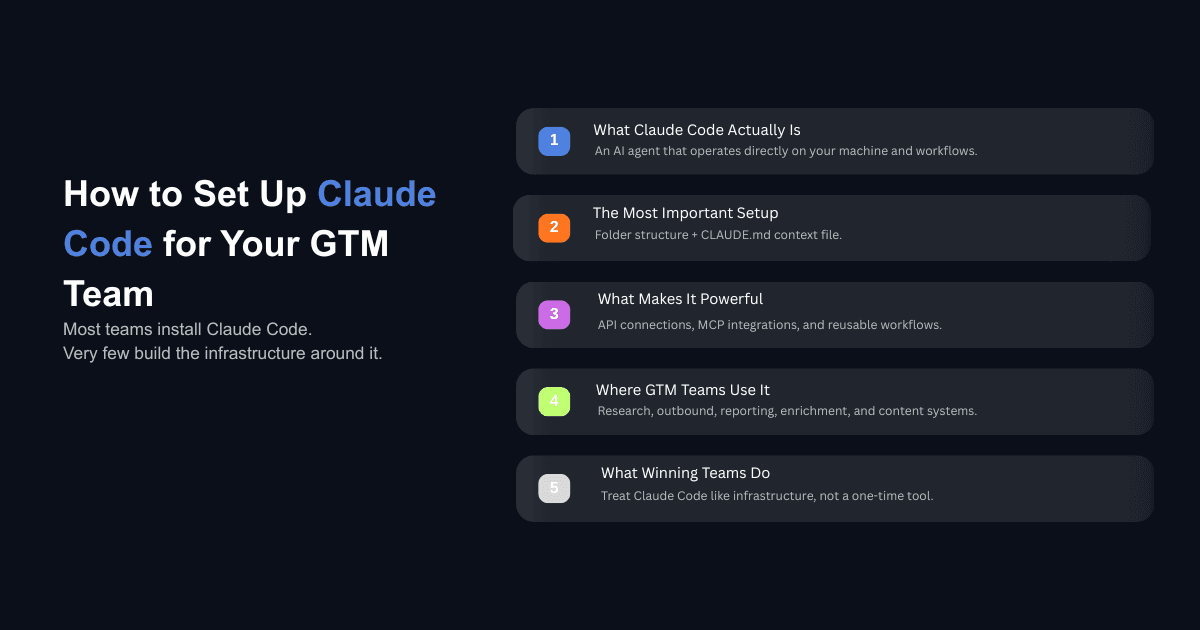
That's not because the setup is hard. It's because the conversation around Claude Code has been dominated by LinkedIn posts showing flashy demos and terminal screenshots without explaining what actually matters: the boring infrastructure work that makes it useful for a GTM team on a daily basis.
A survey of 200 GTM operators conducted in early 2026 found that operators are now roughly split between Claude Chat, Claude Code, and Claude Cowork as their primary tool. The ones getting real results from Claude Code aren't the ones who installed it last week. They're the ones who set up the foundation properly: folder structure, context files, API connections, and workflows that compound over time.
This guide walks through that foundation. Every step, from installation to your first working GTM workflow, explained for operators who don't come from a software engineering background. If you've been meaning to implement AI into your business and Claude Code keeps coming up in conversations, this is where you start.
What Is Claude Code and Why GTM Teams Should Care
Claude Code is Anthropic's terminal-based AI agent. Unlike the Claude chat interface (where you type a message and get a response), Claude Code operates directly on your computer. It reads your files, writes code, runs scripts, connects to APIs, and executes multi-step workflows without you needing to copy and paste anything between tabs.
The difference matters for GTM teams because most go-to-market work involves moving data between systems, personalizing outreach at scale, researching accounts, building reports, and connecting tools that don't natively talk to each other. Claude Code can do all of that inside a single session where each step builds on the last.
Think of it this way: Claude Chat is an advisor you talk to. Claude Code is an operator that does the work on your machine. If you've been exploring Claude Cowork for business workflows, Code takes that same capability further by giving you access to APIs, databases, and custom tool connections that Cowork can't reach.
The distinction between AI agents and AI tools is relevant here. Most GTM software is a tool that does one thing when you click a button. Claude Code is an agent that plans, acts, checks its own work, and iterates. That's a meaningfully different capability when you're trying to run outbound, manage reporting, enrich data, and build content systems without growing your team.
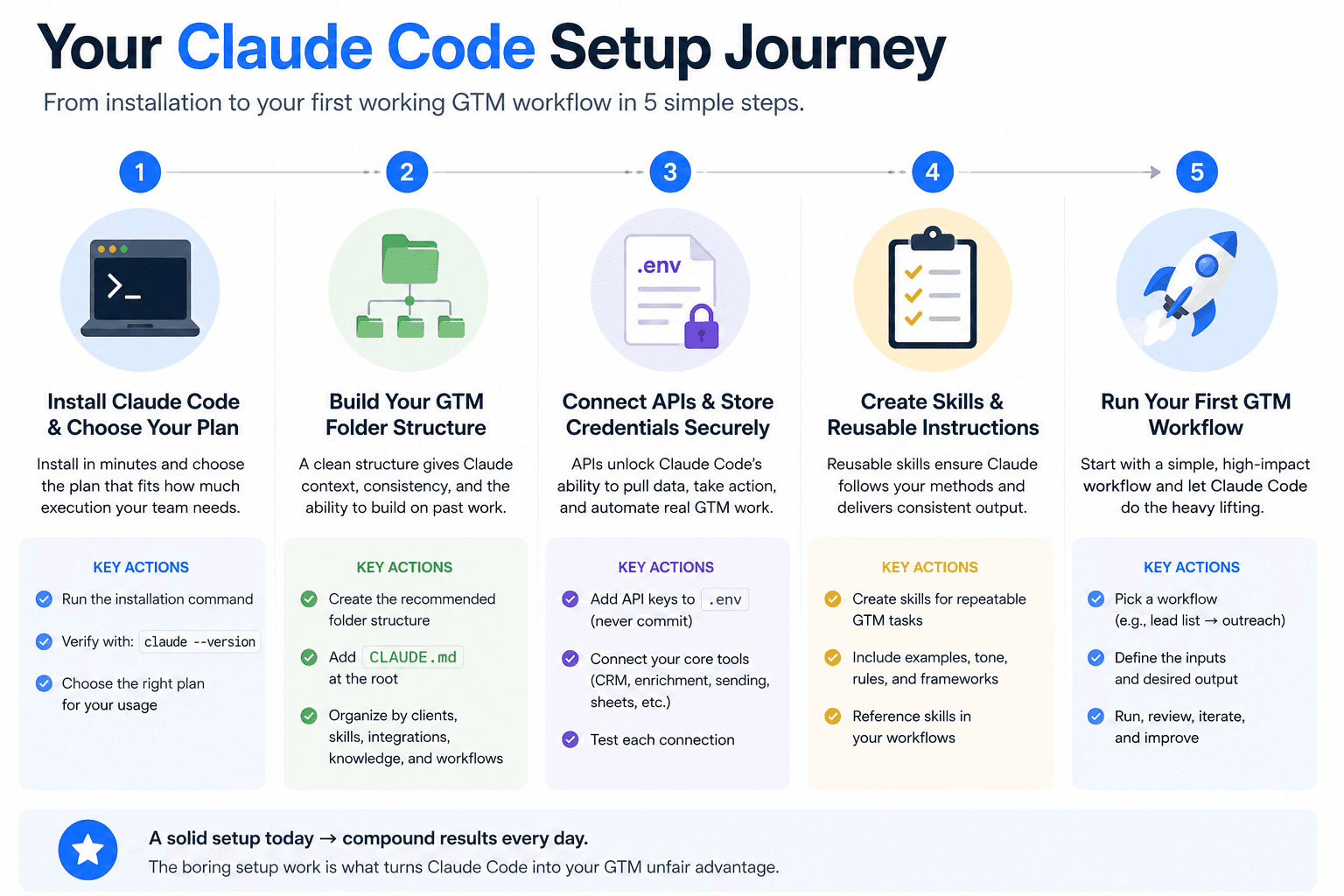
Step 1: Install Claude Code and Pick the Right Plan
Installation takes less than five minutes. Anthropic now offers a native installer that doesn't require Node.js or any dependencies. You run one command and it handles the rest.
On macOS or Linux, open your terminal and run:
On Windows, you have two options. The recommended path is to use WSL (Windows Subsystem for Linux), which gives you a proper Linux terminal inside Windows. Open PowerShell as administrator, run wsl --install, restart, then run the same curl command above inside your Ubuntu terminal.
After installation, verify it worked by typing:
If you see a version number, you're set.
Choosing a plan: Claude Code requires a paid account. The free tier does not include access. Here's the practical breakdown for GTM teams:
Claude Pro at $20 per month is enough for learning and light usage. If you're running multiple workflows daily, pulling data from several APIs, and processing large volumes of leads or content, Claude Max at $100 or $200 per month gives you significantly higher rate limits. For teams and agencies, the Teams Premium plan at $150 per user per month includes Claude Code access for everyone.
If you're an agency or consultancy working with enterprise clients, the enterprise plan removes most usage concerns entirely. Pick the plan based on how much execution you need, not how much you think you'll experiment.
Step 2: Build Your GTM Folder Structure
This is where most people skip ahead and start prompting Claude Code with random tasks. That works for a quick demo, but it creates a mess within a week.
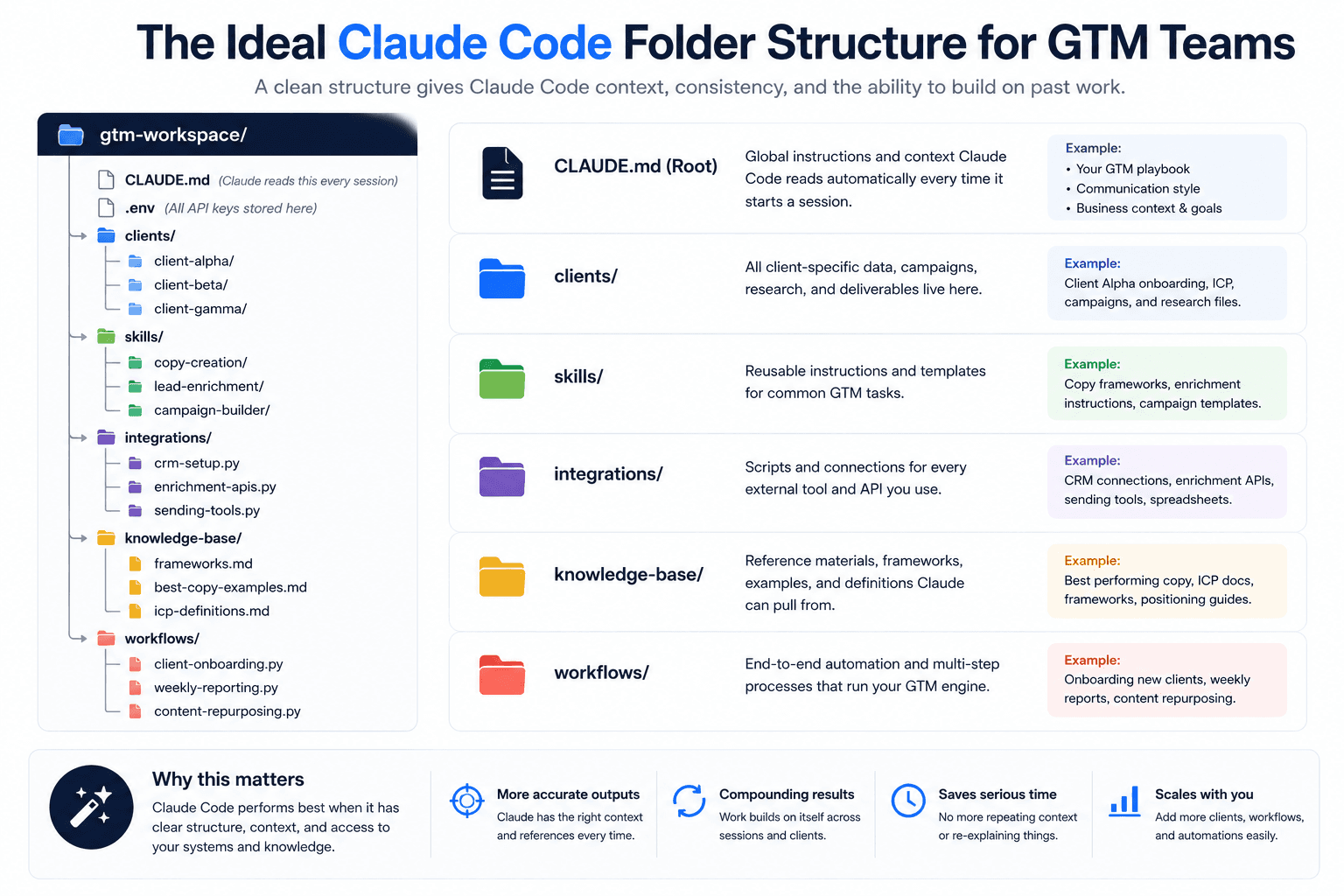
The GTM teams getting consistent output from Claude Code organize their work into a structured folder system that Claude reads from every time it starts a session. One agency running 14 clients with a three-person team structures their Claude Code workspace like this:
Each folder serves a specific purpose. The clients/ folder holds everything related to individual accounts, including onboarding materials, campaign files, and research. The skills/ folder contains reusable instructions for common tasks like writing outreach copy or building prospect lists. The integrations/ folder stores the connection scripts for every tool in your stack. The knowledge-base/ holds reference materials that Claude can pull from when generating output.
This structure is what turns Claude Code from a chat tool into something closer to an AI operating system for your business. The folder hierarchy is the operating system. Claude Code is the execution layer that runs on top of it.
If you're familiar with Claude Skills, the skills/ folder follows the same principle. Each skill is a folder containing a SKILL.md file with instructions and optional templates or reference data. Claude loads the right skill automatically when it detects a matching task.
Step 3: Write Your CLAUDE.md File
The CLAUDE.md file is the single most important piece of your setup. Claude Code reads it automatically at the start of every session. It is the persistent context layer that tells Claude who you are, what you do, who you sell to, and how you work, before you type a single word.
Without it, every session starts from zero. With it, Claude already knows your business when the conversation begins.
Here's a practical CLAUDE.md template for a GTM team:
Keep it under 300 lines. Research on how frontier language models handle instructions suggests they can reliably follow around 150 to 200 instructions with consistency. Anything beyond that and you're diluting the context rather than strengthening it.
The most effective approach is to keep the CLAUDE.md scannable and point it toward deeper context files stored in your knowledge-base/ folder. Think of it like an index for a filing cabinet rather than the filing cabinet itself.
Step 4: Set Up Your Environment File and API Keys
The .env file is where every API key for your stack lives. Claude Code references this file whenever it needs to connect to an external service, which means you set it up once and every future workflow can pull from it automatically.
Create a file called .env in your workspace root:
Add a line in your CLAUDE.md that tells Claude to store any new API key you provide during a session into this .env file. That way, your key library grows automatically as you add tools.
One important note: never commit your .env file to a public GitHub repository. Add it to your .gitignore immediately. If you're working with a team, use a secrets manager or share keys through a secure channel.
Step 5: Connect Your Tools with MCP
MCP stands for Model Context Protocol. It's Anthropic's standard for connecting Claude Code to external tools and data sources. Instead of writing custom scripts for every integration, MCP gives Claude Code a standardized way to talk to your CRM, email, calendar, Slack, Google Drive, and dozens of other services.
To add an MCP server, you run a single command:
You can list all your configured servers with claude mcp list and test a specific connection with claude mcp get [server-name].
For GTM teams, the most useful MCP connections are typically your CRM (HubSpot, Salesforce), communication tools (Slack, Gmail), file storage (Google Drive), and any enrichment or sending platforms that support MCP natively. The ecosystem is expanding quickly, and more GTM tools are adding native MCP support every month.
MCP is what makes Claude Code feel like it's part of your stack rather than a separate tool you switch to. When Claude can read your Slack threads, pull from your CRM, and reference your Google Drive docs without you copying and pasting anything, the amount of manual work that disappears is substantial.
How Does Claude Code Fit with Clay and the Rest of Your Stack?
This is the question that generates the most confusion in GTM communities right now, and the answer is straightforward: Claude Code does not replace Clay. Trying to use it as a substitute is a waste of time for most teams.
Clay gives you a visual interface where you can see data flowing through enrichment steps, check outputs at each stage, and access dozens of pre-built API integrations with a single click. That visibility is what makes it useful for data orchestration work. Building the same thing from scratch in a terminal means spending your day debugging instead of running campaigns.
One GTM engineer put it simply: he saw someone in a community group who spent 20 hours building a Calendly replacement using Claude Code. Calendly costs $10 a month. Unless your time is worth $2 an hour, that math doesn't work. This pattern repeats constantly with Claude Code. People rebuild existing software to save a subscription fee and then spend more time maintaining the custom version than the subscription would have cost in a year.
Where Claude Code adds value alongside Clay is in two directions.
Claude Code feeds into Clay. You build a custom scraper or research agent in Claude Code, like a Google Ads scraper or a LinkedIn post engager extractor, deploy it on a hosting service like Railway, and connect it to Clay through an HTTP API integration. Clay calls your custom tool as part of its normal workflow, and you get capabilities that Clay doesn't offer natively without leaving the Clay interface.
Clay feeds into Claude Code. You build your prospect list and run enrichments in Clay, then send that data to Claude Code through a webhook for tasks that need more processing power or customization than Clay can handle, like writing deeply personalized outreach sequences based on the enriched data.
The best business process automation tools in 2026 work together, not in isolation. The winning stack for most GTM teams right now is Claude Code for intelligence and custom automation, Clay for data orchestration and enrichment, and your CRM and sending tools for execution.
What Can a GTM Team Actually Build with This Setup?
Once the foundation is in place, here's what GTM teams are building in production right now. These aren't theoretical use cases. They're workflows running daily at agencies and in-house teams.
Deep research agents for client onboarding. When a new client signs, Claude Code runs deep research on their industry, competitors, and market position, then generates a completed onboarding brief within 15 minutes. This used to take a junior team member half a day.
Campaign builders from onboarding data. You feed Claude Code the onboarding brief, your best-performing frameworks, and your copy library. It generates campaign strategies, email sequences, and offer variations tailored to the new client. One agency uses this to go from signed contract to first campaign draft in under an hour.
Automated reporting dashboards. Claude Code reads your sending tool's API, pulls campaign performance data, and generates a formatted report for each client on a set schedule. One team sends automated weekly reports every Friday at 2 PM without anyone touching a spreadsheet.
Content repurposing workflows. You write one piece of content, and Claude Code turns it into LinkedIn posts, email sequences, Twitter threads, and YouTube descriptions. Teams using this workflow report it as one of the highest-value applications they've built because it directly multiplies content output without multiplying effort.
Lead list enrichment that goes beyond what standard enrichment tools offer. Claude Code can validate emails, score leads against your ICP, and generate personalized opening lines for each contact in a single workflow.
Sales call analysis where Claude Code processes recorded calls, extracts objections and buying signals, and generates coaching notes. This is particularly useful for building sales skills into your Claude Code setup so the analysis runs consistently against the same criteria every time.
SEO content workflows where Claude Code researches keywords through an API, scrapes what currently ranks on page one for a target phrase, writes an article based on that source material plus your brand guidelines, and publishes it directly to your CMS through its API. The entire cycle runs in one session.
What Should You Avoid When Setting Up Claude Code for GTM?
The biggest mistakes teams make with Claude Code aren't technical. They're strategic.
Don't adopt it because it's trending. If your current GTM process is working and doesn't have a specific bottleneck that Claude Code solves, adding it to your stack creates maintenance overhead without a clear return. The question should always be: what problem does this solve for my clients or my team? If the answer is "nothing specific, but it looks cool in demos," wait until you have a real use case.
Don't rebuild tools that already exist. Custom code requires maintenance. It breaks when APIs change. It needs debugging when edge cases appear. A $10 to $50 per month subscription for a purpose-built tool is almost always cheaper than the hours you'll spend maintaining a Claude Code replacement. Build custom only when you need something that genuinely doesn't exist or when the existing tool can't handle your specific requirements.
Don't ignore compliance and security. If you work with enterprise clients, everything needs to be compliant. Custom code running on your laptop doesn't meet the security requirements that most large companies demand. Clay and other established platforms handle this through enterprise plans and security certifications. Before deploying Claude Code workflows that touch client data, make sure you understand the compliance implications.
Don't confuse your clients with your tools. Most companies don't know what Claude Code is. They don't know what Clay is. They don't care how elegant your technical setup looks. They have problems and they want solutions. The value you deliver is the outcome, not the infrastructure. Focus your energy on getting better clients, solving their problems effectively, and building referral relationships. That's what keeps a GTM business running. Understanding why AI transformations fail helps you avoid the trap of over-investing in tooling while under-investing in actual results.
Don't skip the context engineering. Installing Claude Code and immediately prompting it with random tasks produces mediocre output. The teams seeing real results invested time upfront to build their CLAUDE.md, populate their knowledge base, and structure their folders. That context layer is what makes every future interaction better. Without it, you're starting from scratch every session and wondering why the output feels generic.
Start Building Your GTM Infrastructure
Setting up Claude Code for a GTM team comes down to five things: install it, build your folder structure, write your CLAUDE.md, connect your API keys, and wire up your tools through MCP. None of those steps require a software engineering background. They require patience and a clear understanding of what your team actually needs automated.
The teams that get the most from this tool treat it as infrastructure, not as a novelty. They build it once, improve it incrementally, and let the context compound over time. That compounding effect is where the real advantage lives, because six months from now, your Claude Code setup will know your ICP, your messaging, your best frameworks, and your tool stack better than a new hire would after a full quarter of onboarding.
If you want help building a Claude Code GTM infrastructure that's tailored to your business, book a call with our team. We'll walk through your current setup and show you where Claude Code fits and where it doesn't.