Article
Mar 23, 2026
Claude Skills for Email Marketing
Learn how to build Claude Skills for email marketing — automate sequences, personalize copy, and standardize campaigns step by step.
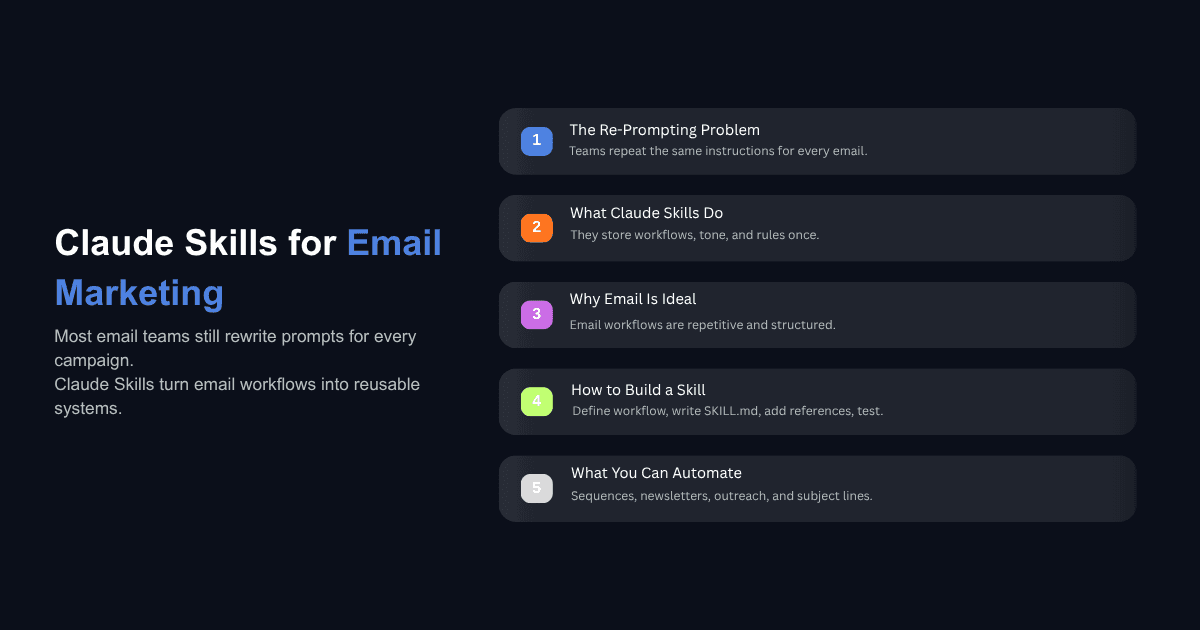
Most email marketing teams are already using AI to write copy. The problem is they are re-prompting from scratch every time. Each welcome email, each follow-up sequence, each newsletter draft starts with the same long prompt, the same brand guidelines pasted in, the same back-and-forth to get the tone right.
Claude Skills fix this by letting you encode your email marketing workflows, brand voice, audience context, and formatting rules into a reusable instruction set. You build it once. Claude applies it every time someone on your team asks for email content.
This guide walks through how to build Claude Skills for email marketing, step by step, with specific workflows you can start automating today.
What Are Claude Skills and Why Do They Matter for Email Marketing?
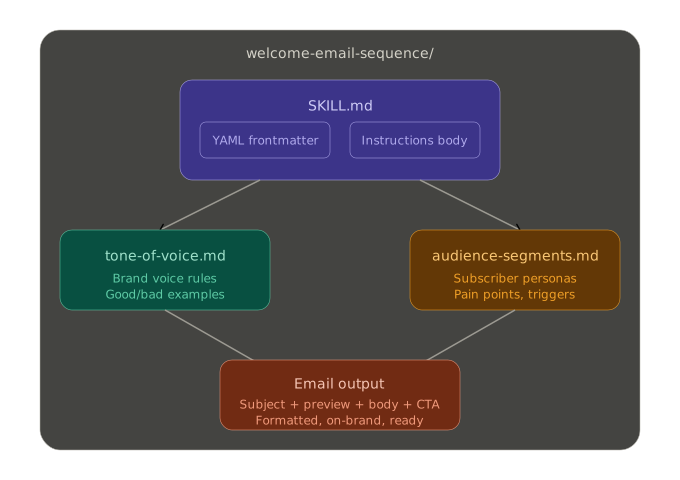
A Claude Skill is a structured set of instructions — stored as a SKILL.md file — that tells Claude how to handle a specific type of task. Instead of writing a detailed prompt every time you need a cart abandonment email, you build a Skill that already knows your brand voice, your audience segments, your preferred copywriting frameworks, and your formatting standards.
If you are new to this concept, start with our guide on what Claude Skills are and how they work.
Email marketing is one of the best use cases for Skills because the work is highly repetitive and format-driven. Welcome sequences follow a predictable structure. Subject lines need consistent tone. Follow-ups have specific timing logic. Cold outreach requires personalization at scale without losing your voice. These are exactly the kinds of tasks where encoding instructions once and reusing them delivers the most value.
According to Litmus's State of Email research, 70% of email marketers expect up to half of their email operations to be AI-driven by the end of 2026. The teams getting there fastest are the ones who have moved past ad-hoc prompting and started building repeatable AI workflows — which is exactly what Skills enable.
How to Build a Claude Skill for Email Marketing (5 Steps)
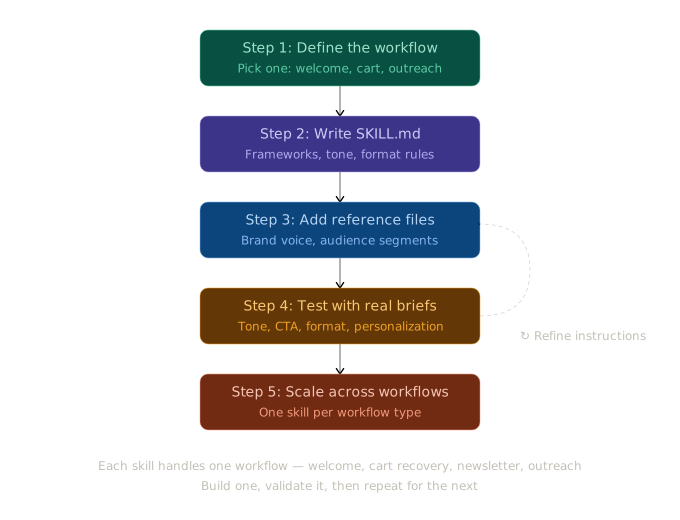
Step 1: Define the Email Workflow You Want to Automate
Do not try to build one Skill that handles all of your email marketing. Pick a single workflow and build for that first. The most common starting points are:
Welcome sequences — 3-5 emails that onboard new subscribers or trial users
Cart abandonment recovery — time-sensitive emails tied to purchase behavior
Cold outreach — personalized first-touch emails for sales prospecting
Weekly newsletters — recurring content roundups with consistent formatting
Re-engagement campaigns — win-back emails for inactive subscribers
For each workflow, document three things before you write any instructions: what inputs Claude will receive (a product name, a subscriber segment, a content brief), what outputs you expect (email copy with subject line, preview text, body, and CTA), and what decision logic applies (tone shifts based on audience, sequence timing, personalization variables).
This documentation becomes the foundation of your Skill. If you skip it, your Skill will produce generic output because Claude will not have enough context to make the decisions you would make manually.
Step 2: Write Your SKILL.md File with Email-Specific Instructions
Every Claude Skill starts with a SKILL.md file. The file has two parts: YAML frontmatter at the top (metadata that tells Claude when to use the Skill) and markdown instructions below (the actual playbook Claude follows).
Here is what the frontmatter looks like for an email welcome sequence Skill:
The description is the most important field. Claude reads this to decide whether to load the Skill, so it needs to be specific about when the Skill should activate. Vague descriptions like "helps with emails" will not trigger reliably.
Below the frontmatter, write the instructions Claude should follow. For email marketing Skills, include:
Copywriting framework: Specify which structure to use. PAS (Problem-Agitation-Solution) works well for re-engagement emails. AIDA (Attention-Interest-Desire-Action) fits product launch sequences. BAB (Before-After-Bridge) is effective for cold outreach. Tell Claude which framework to apply and how each section of the email maps to it.
Tone and voice rules: Define your brand's email voice with concrete constraints. Instead of "friendly and professional," write something like: "Use second person. Sentences under 20 words. No exclamation marks in subject lines. Open with a question or a specific data point, never a generic greeting."
Format specifications: Include character limits for subject lines (under 50 characters for mobile), preview text length (40-90 characters), CTA button copy constraints, and paragraph length rules for the email body.
Personalization logic: Describe which variables Claude should expect and how to use them. For example: "When the subscriber segment is 'trial user,' reference the product feature they activated most recently. When the segment is 'free tier,' focus the CTA on the most relevant paid feature."
Step 3: Add Reference Files for Brand Voice and Audience Data
Complex Skills benefit from reference files that sit alongside your SKILL.md in the same directory. These give Claude deeper context without cluttering the main instruction file.
The two most useful reference files for email marketing are:
tone-of-voice.md — A dedicated document that captures your brand's writing style with examples of good and bad copy. Include real email excerpts that represent your voice, along with phrases to avoid and preferred alternatives. This is the same approach we use when building a Claude Skill for LinkedIn posts — the tone file is what keeps output consistent across different team members and different sessions.
audience-segments.md — A file that describes your key subscriber segments with enough detail for Claude to adjust messaging. For a SaaS company, this might include segment names, typical pain points, product usage patterns, and which features resonate with each group. For ecommerce, it might map customer lifecycle stages to messaging priorities.
Reference these files in your SKILL.md so Claude knows they exist and when to consult them:
This structure means Claude only loads the additional context when it is relevant, keeping the Skill efficient and focused.
Step 4: Test the Skill Against Real Campaign Scenarios
A Skill that looks good on paper might still produce inconsistent output. The only way to know is to test it against real scenarios — not hypothetical ones.
Run 3 to 5 actual email briefs through the Skill. Use briefs from campaigns you have already sent so you can compare Claude's output against what your team actually wrote and what performed well. Check for:
Tone consistency — Does every email sound like your brand, or does the voice drift between emails in a sequence?
CTA strength — Are calls to action specific and tied to the right next step for each subscriber segment?
Format compliance — Are subject lines within character limits? Is preview text present? Does paragraph length match your rules?
Personalization accuracy — When you change the subscriber segment or input variables, does the output adapt in the ways you specified?
Where the output misses, tighten the instructions. If subject lines are too long, add an explicit character count with an instruction to check before finalizing. If tone drifts in the third email of a sequence, add a reminder that voice rules apply to every email in the series. Most Skills reach a reliable state within two or three rounds of testing and refinement.
Step 5: Scale Across Your Email Workflows
Once your first Skill is producing consistent, usable output, build additional Skills for your other email workflows. The key principle here is one Skill per workflow type. A welcome sequence Skill, a cart recovery Skill, a newsletter Skill, and a cold outreach Skill should each be separate files with their own instructions and trigger conditions.
This matters because each workflow has different inputs, different tone requirements, and different success criteria. Bundling them into a single Skill forces Claude to parse too much context for every request, which leads to slower responses and more frequent errors.
As you build out your Skill library, you will notice a pattern: teams that have standardized their Claude Skills for sales workflows tend to adopt email marketing Skills faster because the structure and thinking is the same. The specifics change, but the approach — define the workflow, encode the instructions, add reference files, test, refine — stays consistent.
One enterprise client we worked with doubled their sales efficiency after implementing AI-driven workflows with this kind of structured approach. The email marketing side followed naturally once the framework was in place.
What Email Marketing Tasks Can Claude Skills Handle?
Here are the specific email tasks where Skills deliver the most consistent results:
Subject line generation with A/B variants. Build a Skill that takes a campaign brief and produces 3-5 subject line options with different angles — curiosity, urgency, benefit-led, question-based. Include your character limits and any words to avoid (spam trigger words, off-brand language).
Welcome and onboarding sequences. A 3-to-5-email series that follows a defined arc: introduction, core value, social proof, feature highlight, activation CTA. The Skill handles the structure while you provide the product-specific inputs.
Re-engagement and win-back emails. These follow predictable patterns — acknowledge the absence, restate value, offer an incentive, set a deadline. A Skill can produce a complete 3-email re-engagement sequence from a segment description and a single offer detail.
Cold outreach personalization. For teams doing outbound, a Skill can take prospect data (company, role, recent activity) and produce personalized first-touch emails using frameworks like BAB or PAS. We have tested AI cold email performance across multiple models, and the results improve significantly when the AI has structured instructions rather than open-ended prompts.
Newsletter content drafts. A recurring newsletter Skill takes a list of topics or links and produces a formatted draft with consistent section headers, intro copy, blurbs for each item, and a closing CTA.
Post-purchase follow-ups. Timing-based emails that request reviews, suggest complementary products, or check in on satisfaction — all following a standardized format that the Skill can produce from a product name and purchase date.
Can Claude Skills Replace Your Email Marketing Platform?
No. Skills handle the content and strategy layer of email marketing. They do not send emails, manage subscriber lists, track deliverability, or run A/B tests at the infrastructure level. Your email service provider — whether that is ActiveCampaign, Klaviyo, HubSpot, or something else — still handles the delivery and data side.
Where Skills add value is in everything that happens before you hit send. They reduce the time it takes to produce email copy from hours to minutes. They keep brand voice consistent across campaigns, team members, and sequences. They eliminate the re-prompting cycle where every new email starts from zero context.
The practical workflow looks like this: you use your Claude Skill to generate the email content, then move that content into your ESP for design, scheduling, segmentation, and sending. The Skill handles the thinking and writing. The platform handles the operations and delivery.
How Much Time Can Claude Skills Save on Email Marketing?
Research from organizations that have fully integrated AI into their content workflows shows a documented reduction in campaign production time of up to 75%, measured from brief to launch. On the team level, marketing automation with AI has been shown to reclaim over 13 hours per week from repetitive tasks — time that can go toward strategy, analysis, and creative work that AI cannot do alone.
For a team of two or three email marketers, that translates to meaningful capacity. Instead of spending Monday morning writing the weekly newsletter from scratch, the Skill produces a draft in minutes from a list of topics. Instead of each team member prompting Claude differently for follow-up sequences and getting inconsistent results, everyone uses the same Skill and gets output that matches your brand standards.
The compounding effect is what matters most. Each Skill you build removes one more manual step from your process. Over weeks and months, the cumulative time savings changes what your team can realistically accomplish without adding headcount.
Start Building Your First Email Marketing Skill
The five steps above are the complete process: define one workflow, write your SKILL.md with specific email instructions, add reference files for brand voice and audience context, test against real campaign briefs, and scale to additional workflows once the first one is reliable.
If you are evaluating how much automating your email workflows (and other operational processes) would actually save your business, try our AI Implementation Cost Estimator It gives you a realistic picture of the cost and return before you commit resources — which is the same approach we recommend for any AI implementation.