Article
May 13, 2026
How GTM Teams Use Claude Code for Prospecting
Learn how GTM teams use Claude Code for prospecting, from ICP scoring to lead enrichment to campaign deployment, in one connected workspace.
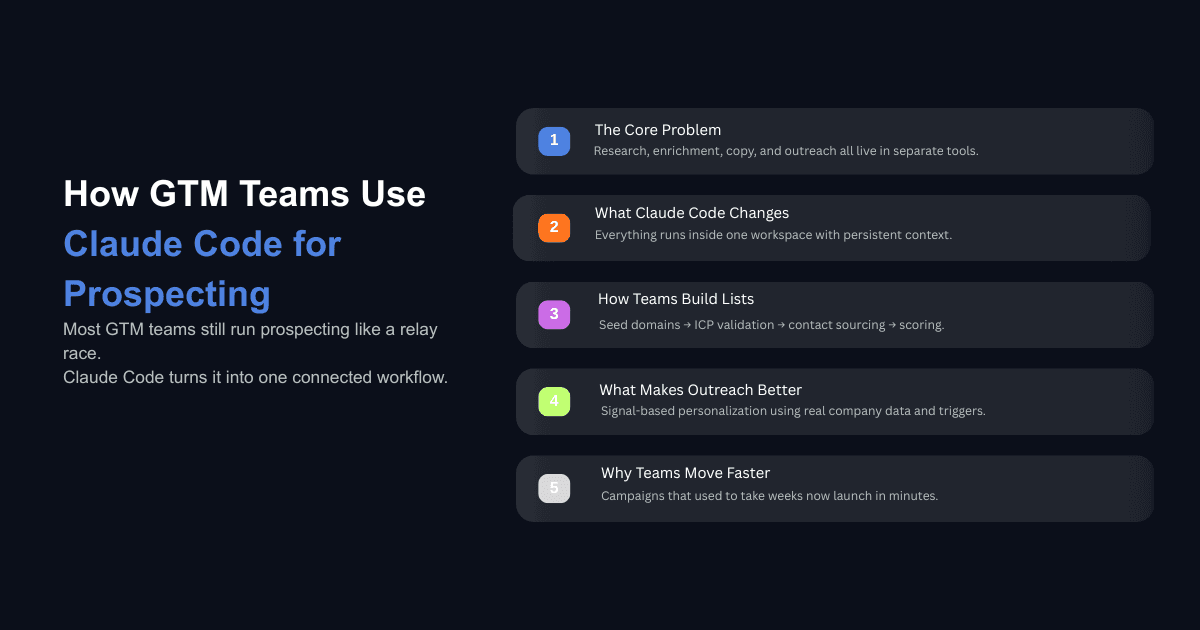
When sales leadership decides to enter a new market, most companies kick off a process that takes about six weeks to complete. Marketing researches the target segment. Product marketing builds buyer personas and positioning angles. RevOps defines the ICP criteria and assembles the target list. The BDR manager writes calling scripts. The team gets trained. Marketing or the SDRs themselves draft email sequences. Then, finally, outreach begins.
That is a relay race where each team waits for the one before it to finish. And the reason it takes so long is not that anyone is slow. It is that every team works inside a different tool, and none of those tools share context with each other. The research lives in one place, the list in another, the copy in a third. Nothing compounds.
GTM teams running Claude Code are compressing that entire sequence into a single workspace. Not by skipping steps, but by running them in parallel, inside an environment where every output becomes context for the next. This post walks through the specific workflows, from ICP research through campaign deployment, that teams are actually using in production. If you are still figuring out the basics, start with our guide on how to set up Claude Code for your GTM team before diving into the prospecting workflows below.
Why Manual Prospecting Still Costs GTM Teams So Much Time
The Research Tax on SDRs
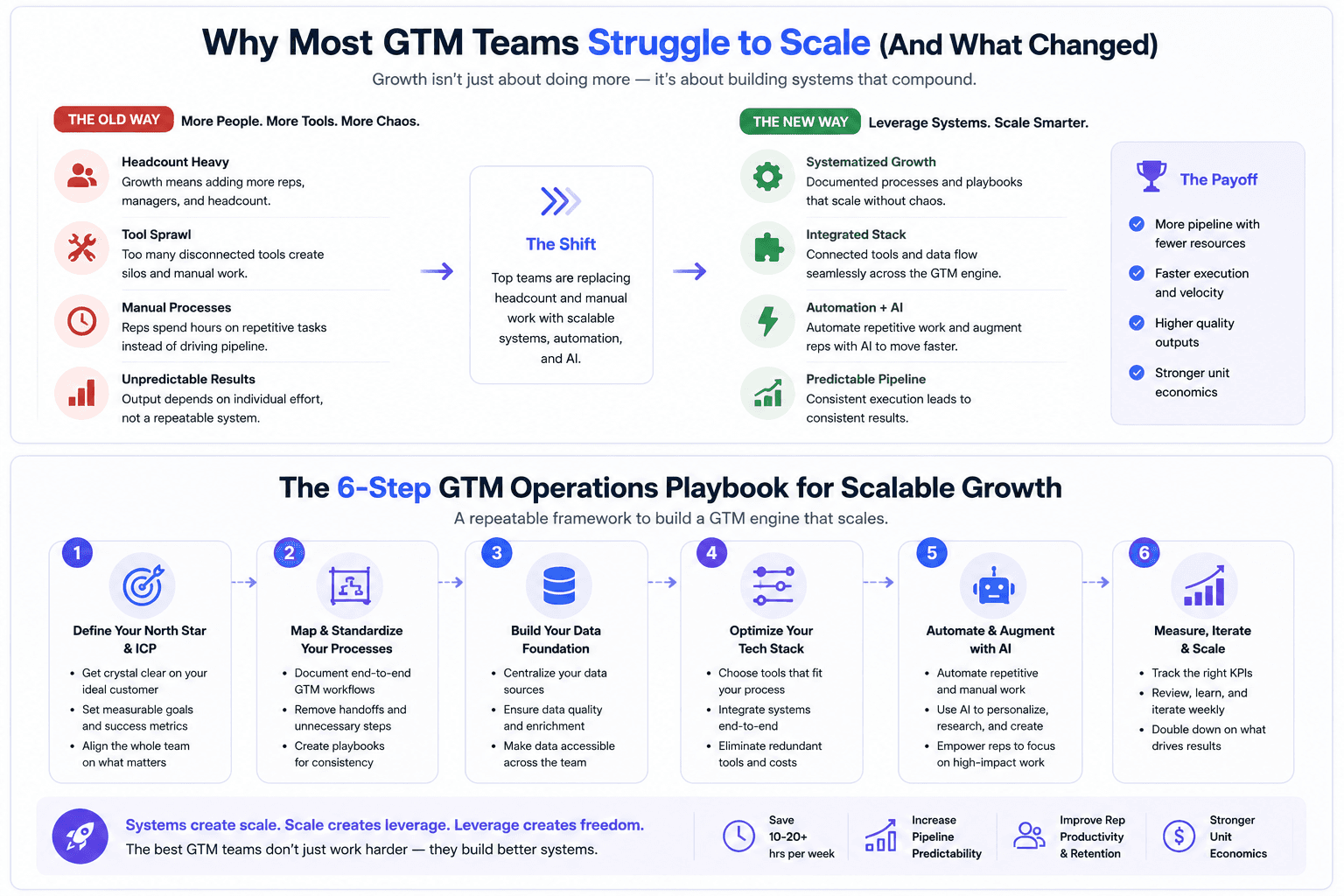
The numbers on SDR productivity have not improved much in the last few years despite billions spent on sales tools. According to Salesforce's 2026 State of Sales report, reps spend roughly 60% of their time on non-selling tasks. HubSpot's data puts it slightly differently: only 33% of a rep's time goes toward active selling. Either way, the majority of an SDR's day is consumed by admin work, CRM entry, tool switching, and prospect research.
MarketsandMarkets research found that for an SDR earning $60,000 per year, approximately $22,200 of that salary goes toward research time alone. That is 37% of their compensation directed at activities that do not require human judgment but eat up the hours that should be spent on conversations. Each prospect might take 5 to 15 minutes of research: finding a decision maker's email, confirming their title is current, checking whether the company fits the ICP. Across 40 prospects in a week, that adds up to somewhere between 4 and 10 hours of pure research.
This is the kind of work that AI SDRs are already replacing at forward-thinking companies.
The Relay Race Between Departments
Beyond the individual SDR, the bigger time cost is organizational. When a new market segment needs to be targeted, the process is sequential by default. Marketing cannot build personas until research is done. RevOps cannot build lists until personas are defined. SDRs cannot write sequences until lists and messaging are ready.
Each of those handoffs introduces delay, context loss, and rework. The output from one team rarely arrives in the format the next team needs, so someone has to translate, reformat, or redo the work. By the time outreach actually starts, the window of opportunity may have already narrowed.
What Makes Claude Code Different from Chat-Based AI
Persistent Context and File Access
When you use a chat-based AI like ChatGPT or Gemini in a browser, you paste context in, get text back, and then go do the actual work yourself. Every new session starts from zero. You re-explain your company, your ICP, your messaging framework, and your data sources each time.
Claude Code runs locally. It reads your CRM exports, call transcripts, campaign templates, and SOPs from your file system without you needing to paste anything. It writes code, runs it, handles errors, and produces files. The distinction is structural: Claude Code does not just advise. It takes actions. And because it operates within a persistent project folder, every step builds on the one before it. Your scoring criteria, your copy frameworks, your ICP definitions, and your API configurations all live in the same space and carry forward across sessions.
According to the 2026 Claude for GTM Pulse Report, which surveyed 200 GTM operators, 54% of Claude Code users have adopted it for GTM engines and prospecting, and 28% rated it as their single highest-impact use case. The report also noted that Claude Code users overwhelmingly favored it over Cowork for prospecting because of this ability to chain steps together and maintain context across complex workflows.
MCP Connections to Data Providers, CRMs, and Sequencers
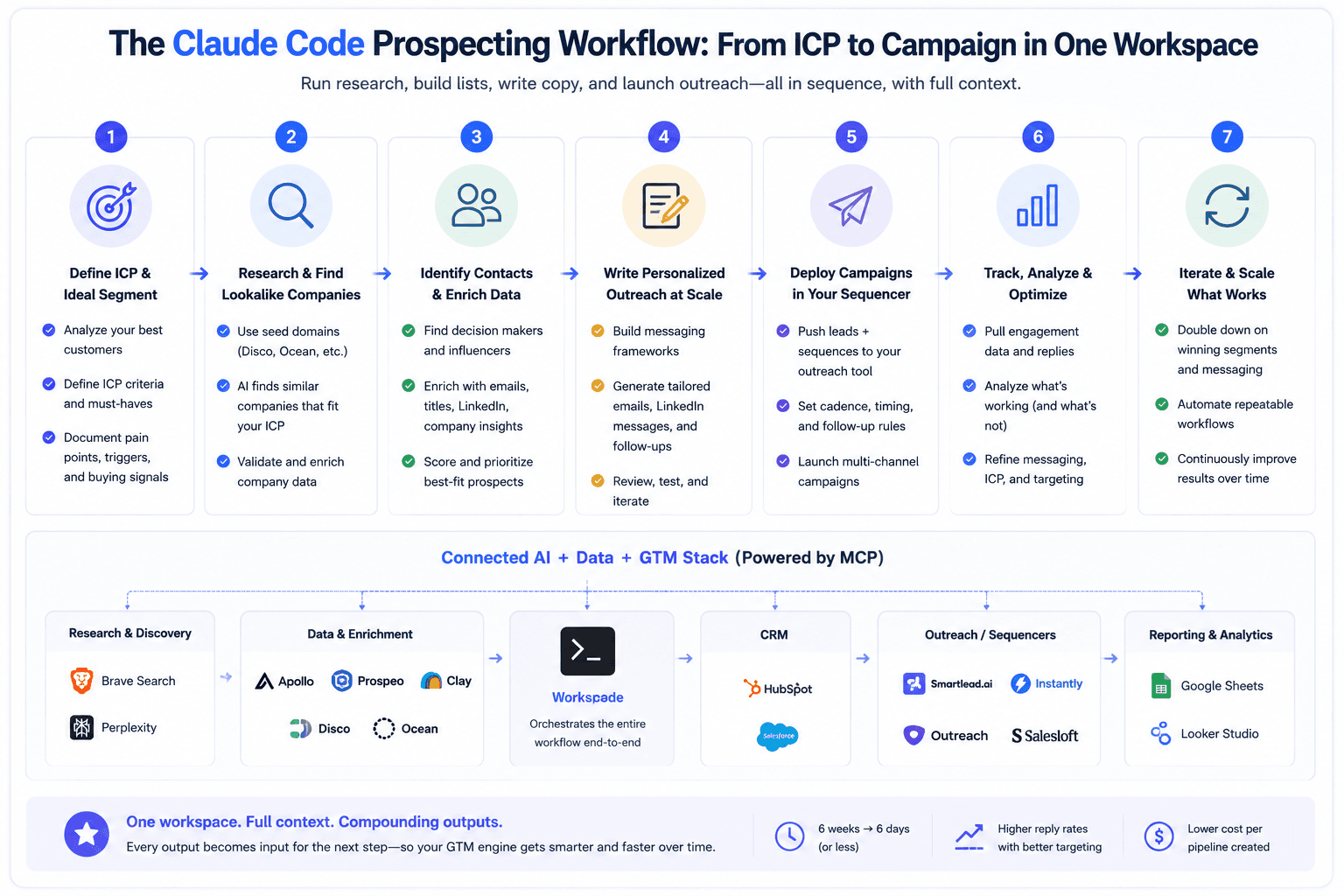
The practical power comes from MCP (Model Context Protocol) connections. These allow Claude Code to talk directly to your data enrichment providers, CRM, and email sequencing platforms through their APIs.
The typical setup involves connecting a few categories: a web search tool like Brave Search for real-time prospecting and competitive research, data enrichment providers like Apollo, Prospeo, or a unified platform that gives access to multiple providers through a single connection, and CRM access through HubSpot or Salesforce MCP servers. Most teams keep CRM connections read-only initially, which is a smart default because the risk of unintended modifications is real before your workflows are battle-tested.
You give Claude Code the API documentation for each tool, along with your API keys, and it figures out the correct payloads to use. You do not need to write the integration code yourself. You describe what you want in plain language and Claude Code handles the API calls.
How GTM Teams Actually Build Prospect Lists in Claude Code
The Seed Domain Approach
One of the most effective list-building workflows starts with a seed domain rather than a set of filters. Tools like Disco and Ocean accept a single company domain that matches your ICP and use AI to find lookalike companies. The advantage over traditional filter-based approaches in Apollo or ZoomInfo is that you get companies that are structurally similar to your best customers, not just companies that happen to match a set of industry codes and employee count ranges.
The key detail that most people miss: your seed domain needs to clearly represent the specific segment you are targeting. If you sell to roofing contractors and you use a seed domain from a company that does roofing plus HVAC plus plumbing, your list will come back full of general contractors. Pick a domain where the website is saturated with keywords specific to your exact segment.
ICP Validation and QA Before Scaling
Teams that get consistent results from Claude Code do not pull their full list immediately. They pull a small sample of 5 to 100 accounts first and run an ICP validation check before scaling to thousands. The validation step uses a function that pulls the homepage text from each company and checks it against a detailed ICP description. If the sample passes at least 80% accuracy, they proceed to pull the full list.
This matters because every AI list-building tool loses accuracy in the tail. The first 500 results tend to be close matches. The last 25% of a large pull tends to include companies that only loosely fit. Without validation, those marginal matches pollute your outreach and waste SDR time on accounts that were never going to convert.
After the initial pull, Claude Code can surface patterns in the mismatches. It might flag that software platforms keep getting mixed in with agencies, or that SEO-focused companies are contaminating a list that should only include outbound-focused firms. You tell it to add those as negative keywords, and it refines the filter for the next pull.
Sourcing Contacts and Title Validation
Once you have a clean account list, the next step is finding the right people at those companies. The approach that produces the highest-quality contact lists is to pull every employee across all your target domains, collect every title, and then run those titles through a skill that evaluates which ones are actual decision makers for your offer.
This is where most teams go wrong if they just tell Claude Code "find me decision makers." The AI will skip contacts that do not have obvious decision-maker titles, even when context suggests they are the right person to reach out to. For example, at a company with only two employees listed, both are likely worth contacting regardless of title. A head of fulfillment at a 5-person company is probably involved in buying decisions, but Claude Code will skip that person if you only asked for VPs and directors.
Building a title validation skill that accounts for company size and contact coverage is one of the highest-value investments a GTM team can make inside Claude Code. If you want to go deeper on the enrichment side, we have covered the full process in our guide on how to enrich lead lists using Claude Code.
The Three-List Output Structure
Experienced teams structure their output into three separate lists. The first contains domains where contacts were found and enriched with verified emails. The second contains domains where no employee data was available and needs to be run through a manual crawl or secondary enrichment source. The third contains smaller companies where only a public email (info@, sales@) was found on the website.
Claude Code can build a skill that filters public emails intelligently, removing addresses like hr@domain.com that are not relevant to sales outreach while keeping general inquiry and sales addresses. This segmentation means each list gets the appropriate outreach treatment rather than mixing high-confidence contacts with low-confidence ones in the same campaign.
How Claude Code Scores and Segments Accounts
Data-Based Scoring With No Hallucination
One of the underappreciated advantages of using Claude Code for account scoring is that it uses Python scripts to evaluate raw data from your CSV, not AI-generated guesses. When you define scoring criteria based on revenue ranges, employee counts, funding status, and industry fit, Claude Code reads the actual numbers from your company list and scores accordingly. There is no room for the model to hallucinate a score.
The scoring criteria live in a markdown file inside your project folder. You define what makes a tier-one, tier-two, and tier-three account, along with disqualification rules. Claude Code reads this file every time you ask it to score a list and applies the criteria consistently.
Tiering Into Priority Outreach vs. Automated Nurture
The output of scoring is a tiered list with recommended actions for each tier. Tier-one accounts might go to senior AEs for manual, high-touch outreach. Tier-two accounts get multi-channel sequencing through email and LinkedIn. Tier-three accounts go into automated email nurture sequences. Disqualified accounts get removed entirely.
This tiering system feeds directly into how Claude Code builds and deploys campaigns. Different tiers get different copy frameworks, different levels of personalization, and different sequencing cadences. One enterprise sales team that implemented this kind of tiered, signal-based approach saw their sales efficiency double because reps stopped spending time on accounts that were never going to close. That result came from doing the scoring and prioritization work upfront rather than treating every lead equally.
How Teams Use Claude Code to Write and Deploy Outreach
Pulling Best-Performing Copy Frameworks
Instead of starting from scratch every time, teams store their best-performing email templates and frameworks in a markdown file inside the Claude Code project. When it is time to create copy for a new campaign, Claude Code reads the framework file, identifies the template that best matches the campaign goal (cold outreach, webinar invite, case study share), and generates new copy using that framework as a base.
The more advanced version of this workflow involves connecting Claude Code to your sequencer's API to pull actual performance data. It queries your campaigns, identifies which ones had the highest reply rates, pulls the copy from those campaigns, and uses that as the foundation for new sequences. This means your copy frameworks improve continuously based on real data, not assumptions about what should work. If you want to improve existing sequences, you can also audit and rewrite weak cold email copy using Claude Code.
Signal-Based Personalization
The prospecting workflows covered earlier produce more than just a list of names and emails. They generate signals: a company's subscription page is labeled "in development," a VP of operations just started in the last 90 days, a prospect posted about their Black Friday campaign performance on LinkedIn, a company just raised $45 million, or they are expanding into retail distribution channels.
Claude Code stores all of these signals alongside the contact data. When it writes outreach, it references the specific signals that make each prospect worth contacting right now. The email for a company with an incomplete subscription page looks completely different from the one for a company that just hired a new e-commerce director. Neither of them reads like a template because the personalization is based on verified, specific information.
This is the fundamental shift that separates Claude Code outreach from what most teams send. The personalization is not "I noticed you work at Company X." It is "Your subscription page is still in development and you just raised $45 million, which suggests you are building this capability now." No data provider surfaces this kind of insight. It comes from combining web research, LinkedIn scraping, and hiring signal detection into a single context layer.
For more on how this plays out at scale, see our breakdown of why sales teams are using Claude Code to personalize cold outreach.
Creating and Launching Campaigns Inside Your Sequencer
The final step is deployment. Claude Code uses the API documentation from your email sequencer (Instantly, Lemlist, Outreach, or similar) to create campaigns, inject the copy, upload the lead list, and configure sending settings. In one documented workflow, Claude Code created a campaign, added copy, uploaded 154 leads, and configured all sending settings in 57 seconds.
The entire process, from receiving a company list to having a live campaign ready to launch, takes five to seven minutes when all the skills and connections are in place. That includes scoring, contact sourcing, email enrichment, copy generation, and campaign creation. If you want a step-by-step walkthrough of building the full system, our guide on how to build a cold email system using Claude covers the complete setup.
What Skills Should Your GTM Team Build First?
Claude Skills are reusable instruction sets that encode your team's specific workflows, decision frameworks, and quality standards into Claude Code. Instead of re-explaining how your team qualifies leads every time, you build a skill once and it applies your logic consistently. Here are the four skills that deliver the most value for prospecting.
ICP Validation Skill
This skill takes a list of company domains and validates each one against a detailed description of your ideal customer. It pulls homepage text, checks for relevant keywords, flags mismatches, and suggests negative keywords to improve future pulls. Without this skill, you are relying on Claude Code's general judgment about whether a company fits, which is less reliable than structured validation against your specific criteria.
Title and Decision-Maker Validation Skill
This skill examines every contact title pulled from your enrichment source and determines whether the person is worth contacting based on their title, the company size, your offer, and the number of other contacts available at that company. It should include logic for edge cases: companies with fewer than 10 employees, titles that combine multiple roles, and contacts where the title alone does not indicate seniority but the company structure suggests they are influential.
Signal Scanning and Creative Variable Skills
Signal scanning skills search for data points that generic prospecting tools do not capture: subscription models, case study mentions on company websites, specific technology implementations, recent LinkedIn posts about relevant topics, and job postings that indicate the company is building a capability you can help with. Creative variable skills take those signals and format them as personalization variables ready to insert into email copy. These are the skills that turn a basic outreach campaign into something that feels individually researched.
Email Copy and Template Skill
This skill stores your proven email frameworks and generates new copy by combining the right framework with the specific signals and context gathered during prospecting. It should include logic for handling missing variables using conditional syntax, so leads without a case study signal still get a complete email rather than being dropped from the campaign. Learn how to set up this kind of structured approach with Claude Skills for sales workflows.
If you want to take the sequencing piece further, we have covered how to automate cold email sequences with Claude Code in a separate guide.
Common Mistakes When Using Claude Code for Prospecting
Skipping QA on Outputs
The most common failure mode is treating Claude Code's output as final without reviewing it. The AI will produce lists that look clean, copy that reads well, and campaigns that appear ready to launch. But look closer and you will find contacts that do not fit, companies that were miscategorized, or personalization variables that reference information from the wrong company.
Teams that succeed with Claude Code build a review step into their workflow. They check the Google Sheet or CSV output before launching. They verify that the case study names pulled by the signal scanning skill actually appear on the company's website. They confirm that the contact's LinkedIn profile matches the title in the database. This QA step takes 15 to 20 minutes and prevents the kind of embarrassing errors that damage reply rates and sender reputation.
Using Vague ICP Descriptions
Claude Code's output quality depends directly on the quality of your inputs. If your ICP description says "we work with marketing agencies," you will get a list full of SEO agencies, social media agencies, PR firms, and creative shops alongside the outbound agencies you actually sell to. Your ICP description needs to be specific enough that Claude Code can distinguish between what fits and what does not. Something like "B2B outbound lead generation agencies that offer email and cold calling as a service, not SaaS platforms, not SEO agencies, not inbound-only firms" produces dramatically better results.
Not Building Skills for Your Specific Workflows
Teams that use Claude Code without building custom skills are doing the equivalent of having a senior employee but never documenting their processes. Every time you start a new prospecting session, you end up re-explaining the same decision frameworks, the same qualification criteria, the same output formats. Skills eliminate that repetition and ensure consistency across team members and sessions.
The investment in building skills pays off within the first week. After that, every prospecting run executes faster and more consistently than the last because your team's institutional knowledge is encoded in the system rather than locked in individual people's heads. For more frameworks on how to structure your cold outreach infrastructure, see our breakdown of cold email frameworks high-performing teams use.
The Teams That Win Are the Most Connected, Not the Most Tooled
The gap between GTM teams that are getting real value from AI and those that are still prompting one-off emails in a chat window is widening. The difference is not intelligence or effort. It is infrastructure. The teams pulling ahead have built a workspace where their ICP criteria, enrichment data, copy frameworks, campaign performance data, and CRM records all live together and compound on each other.
Claude Code is not a magic tool. It is a connected workspace that runs the same work your team already does, but eliminates the context loss, manual handoffs, and repetitive research that consume the majority of their time. The hardest part is starting. Once the folder structure, CLAUDE.md file, API connections, and first few skills are in place, the system improves every time you use it.
If your GTM team is spending more time on research and admin than on actual selling, that is the process that needs to change. We help teams design, build, and deploy these workflows so they can launch campaigns in days instead of weeks.
Book a 45-minute call with our team to walk through how this would work for your specific GTM motion.