Article
Aug 7, 2026
How We Built an Automated Cold Email Workflow with Claude Code
How we automated cold email with Claude Code, wiring Smartlead, Prospeo, and MillionVerifier into one workflow that books calls.

Most cold email operations are held together by tab-switching. You pull a list in one tool, clean it in another, write copy in a third, personalize in a fourth, then load everything into a sender and hope the pieces line up. Every handoff is a place where quality drops and time leaks. The work isn't hard on its own, but the coordination between steps is where teams quietly lose hours each week.
We started running the whole thing inside Claude Code, and the coordination problem mostly went away. Claude Code became the layer that holds the tools together, follows the same process every time, and does the repetitive writing without us babysitting it. This post walks through how we automated cold email with Claude Code, which tools we plugged in, and a straight recommendation on what to actually use if you want to build this yourself.
The three things cold email actually needs
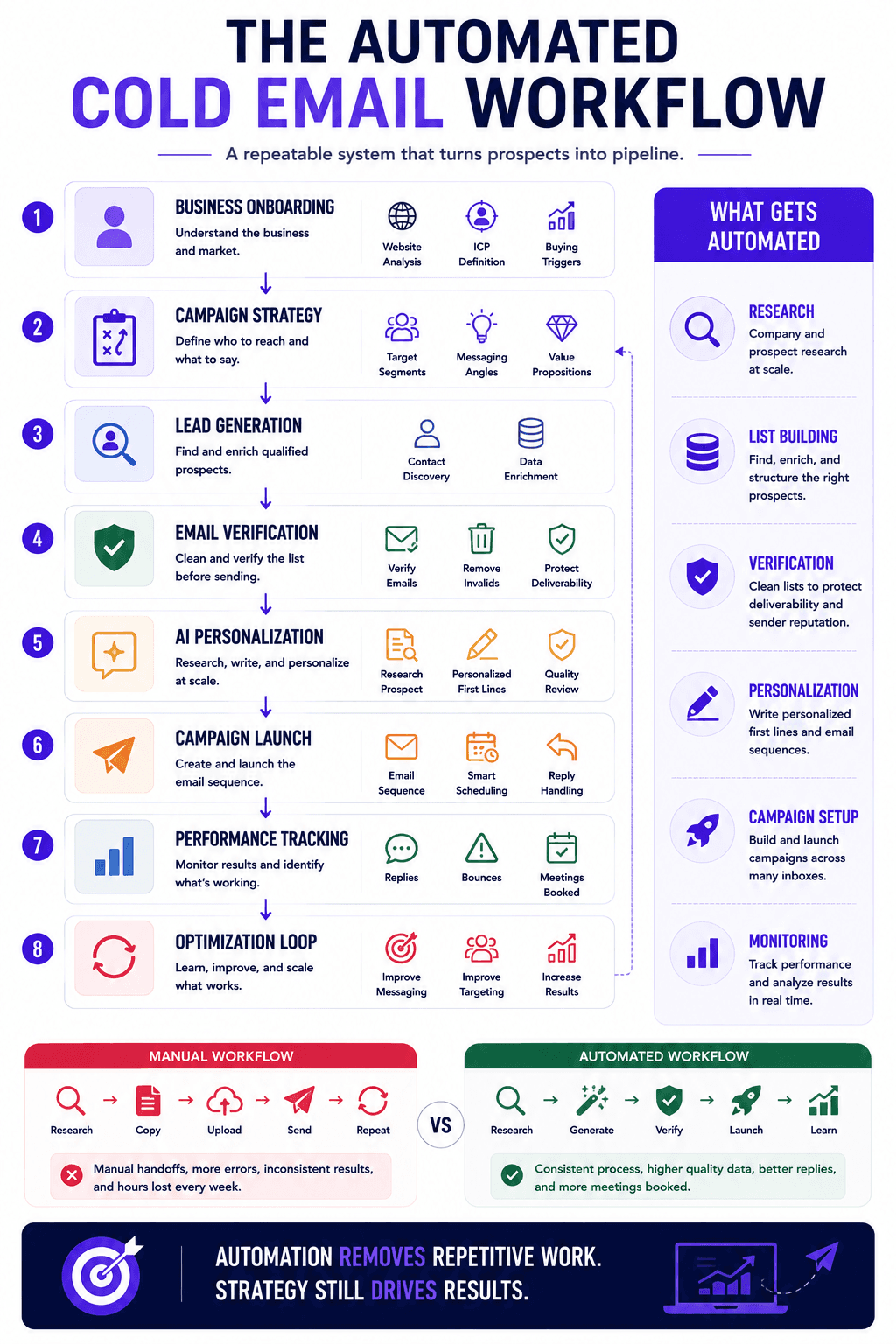
Before any automation, it helps to be clear on what a campaign requires. There are three parts, and each one has to work for the whole thing to run.
The first is infrastructure: domains and inboxes you can send from safely, warmed up and authenticated. The second is a list of the right people, meaning contacts who match your ideal customer and have verified email addresses. The third is something worth saying, meaning copy and personalization that reads like a person wrote it.
Infrastructure is the most mechanical of the three, so we treat it as a prerequisite and set it up once. If you are still standing that part up, our guide to the best cold email infrastructure setup for B2B companies covers domains, DNS, and warmup in order. Everything in this post assumes that layer already exists. The interesting automation lives in the other two parts, list building and copy, because that is where teams spend the most manual effort.
Why we run the workflow inside Claude Code
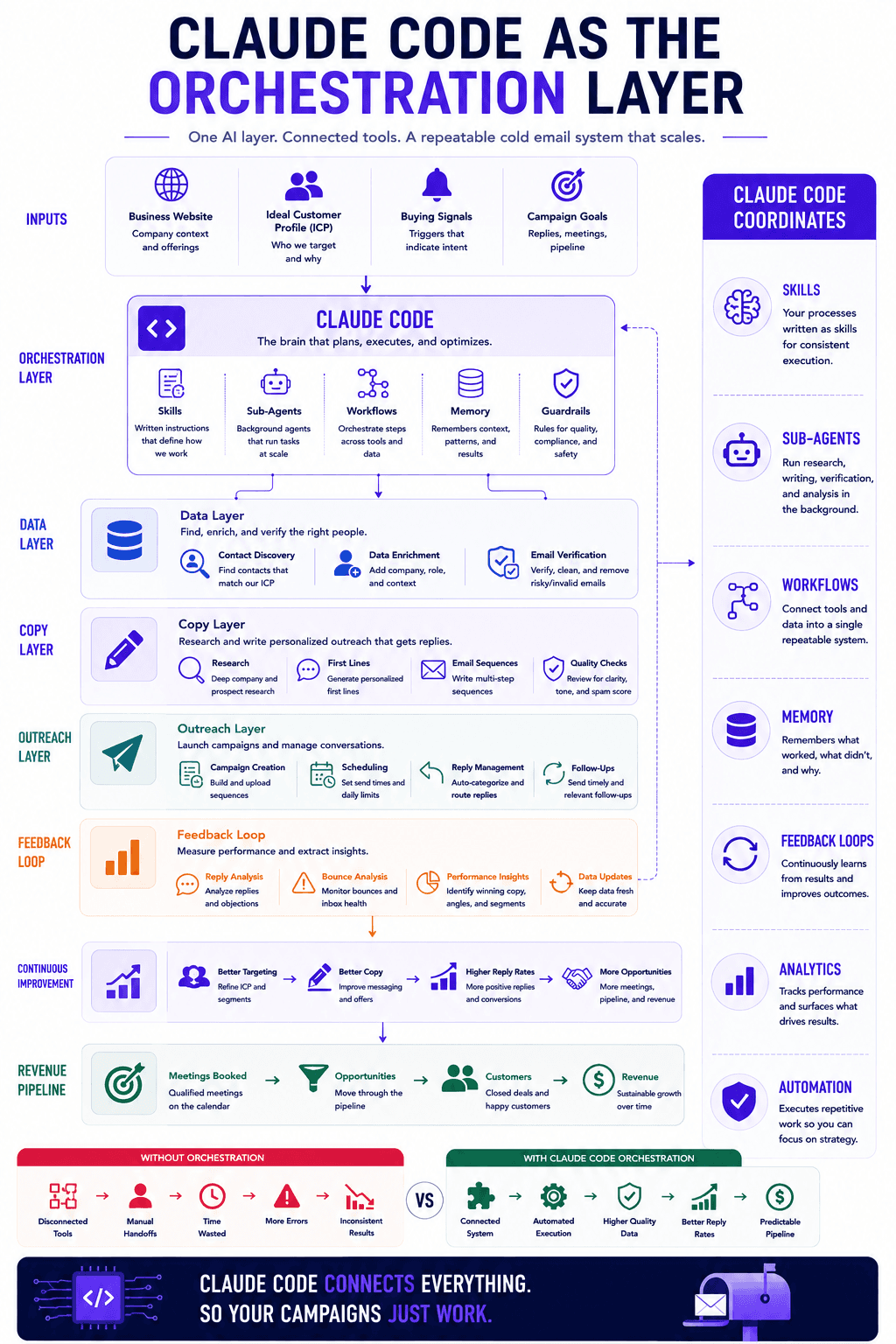
Claude Code is a command-line environment where the AI can read files, run steps, and call other tools. The reason it works well for outbound is a feature called skills. A skill is a written instruction set that tells the agent exactly how to do a task, in your words, following your process. Instead of the model guessing what a good cold email looks like from whatever it learned online, it follows the method you gave it. If you want the background on how skills fit into an outbound stack, we covered it in the GTM engineer's guide to Claude Code.
Two things make this practical rather than a novelty. Claude Code is tool-agnostic, so it connects to whatever list source, verifier, and sender you already pay for. And it can hand repetitive writing to a background sub-agent that works through your list without you sitting there approving each line, which keeps the cost and the time in check. Getting the folder structure and connections right takes an afternoon, and our walkthrough on how to set up Claude Code for your GTM team covers that setup end to end.
The stack we wired in, and what each part does
We kept the tool choices boring on purpose. Three integrations do the heavy lifting, and Claude Code coordinates them.
Prospeo for contact data
Prospeo is the data engine that finds and verifies business contacts. It pulls emails and mobile numbers from LinkedIn profiles, company sites, and its own database, then checks each address before it hands it back. Reviewers describe it as a focused contact-data platform that feeds your other tools rather than a full CRM or sender, which is exactly the role we want it to play. Claude Code calls Prospeo through its API to build the raw list, so the people who land in a campaign already match the profile we defined. If you want to see how this compares to the broader field, our rundown of the best prospecting tools for B2B sales teams organizes them by the job each one does.
MillionVerifier for a clean list before send
Even good data decays, so we verify the full list again before anything goes out. MillionVerifier handles the bulk cleaning. It sorts each address into valid, invalid, risky, or unknown, and it charges only for results it can confirm. Independent write-ups position it as the budget bulk verifier that does one job simply, which is what a verification step should be. The reason this matters is deliverability. Guidance from the major providers puts the danger line for bounces around two to three percent, and a single dirty campaign can hurt your sender reputation for weeks. Verifying here is cheap insurance. If you want to weigh verifiers against each other, we compared them in our guide to the best email verification tools for cold email.
Smartlead for sequencing and sending
Smartlead is where the finished campaign runs. It connects your mailboxes, rotates sending across them to protect any single domain, warms them automatically, and pulls every reply into one master inbox. Reviewers consistently describe it as a sequencer built for volume and agencies, and its reply categorization routes interested prospects into the right follow-up on its own. Claude Code loads the campaign into Smartlead as a draft, so the last human step is a review rather than data entry. If you are choosing a sender, our comparison of Smartlead vs Instantly vs PlusVibe breaks down where each one fits.
How the workflow runs, step by step
Once the tools are connected, a single skill kicks off the whole sequence, and the process is the same every time.
It starts by onboarding the business. The agent reads the company site, drafts a proposed ideal customer profile, and asks a short set of questions to confirm titles, headcount, geographies, industries to include or exclude, and the buying triggers that matter. Those triggers are worth thinking about carefully, since they decide who gets contacted and when. Our primer on what buying signals are explains which ones actually predict a reply.
From there it produces a campaign strategy document with a set of distinct angles, each with its targeting, filters, and value proposition already spelled out. It pulls a sample list so you can sanity-check the data before committing credits. When you pick an angle, it moves into copy. This is the part we spent the most time getting right, because generic AI output was the old failure point. Instead of dumping three finished emails, the agent proposes a direction, gets your approval, then builds the subject line, the first line, the proof point, and the ask one layer at a time, checking in as it goes. The full list-to-launch version of this lives in our guide to enriching your lead list using Claude Code, and there is a broader build in how we built an AI lead generation engine with Claude Code.
What actually makes AI personalization work
The reason most AI personalization gets ignored is that the first draft reads like AI, and people send it anyway. The fix is not a better one-shot prompt. It is a feedback loop.
We let the sub-agent write a personalized line for each contact based on real research, then we correct the parts that sound off. When a line uses phrasing no real person would say, we tell it plainly, and it rewrites in plainer language. The agent even flags its own misses, like a contact that does not fit the campaign, and suggests removing it. Once the pattern holds up cleanly across a couple of rounds, it locks the prompt and runs it across the whole list. The output at that point is close to what a person would write by hand, produced at a speed a person cannot match. For the copy fundamentals underneath this, our piece on writing personalized first lines for cold email using Claude goes deeper. This kind of timing and relevance is also what one enterprise team credited for a real lift in sales efficiency after they started acting on data-backed signals instead of sending blind.
Does automating cold email with Claude Code hurt deliverability?
No, and it usually helps, because the automation makes the boring hygiene steps consistent. The workflow verifies every list before send, keeps sending inside Smartlead's rotation and warmup, and avoids the manual mistakes that quietly wreck reputation. Deliverability problems in outbound almost always trace back to skipped steps rather than the tools themselves, which we cover in cold email mistakes that kill your reply rates. Automating the process is what keeps those steps from being skipped.
Do I need to know how to code?
You need to be comfortable in a terminal and willing to follow setup instructions, but you are not writing software. Skills are written in plain language, and the initial connection of your tools is a one-time task. After that, you are having a conversation with an agent that already knows your process. Most operators who can configure a sending tool can run this.
Which tool should you actually go for?
The honest answer is that Claude Code is the piece worth committing to. It is the orchestration layer, and because it is tool-agnostic, it protects you from being locked into any single vendor underneath it. If your data source or sender changes next year, the workflow stays the same and you swap one connection.
For the plug-ins, a clean starting stack is Prospeo for contact data, MillionVerifier for verification, and Smartlead for sending. Each does one job well and connects cleanly. If you already run a comparable prospecting tool, verifier, or sequencer, keep it, since the orchestration layer is what matters more than the specific brand. Start with the stack above, get one campaign live, then adjust the parts that do not fit your volume.
The takeaway

Automating cold email with Claude Code is less about the AI writing your emails and more about one system running your process the same way every time. Verify before you send, keep a human check on the copy direction, and let the sub-agent handle the repetitive personalization at scale. The tools matter less than the workflow that connects them, which is why the orchestration layer is the real investment. If you would rather have this built and run for you instead of standing it up yourself, book a call and we will walk through what it would look like for your pipeline.