Article
Aug 10, 2026
How to Generate B2B Leads with DeepSeek for Free
Learn how to generate B2B leads with DeepSeek for free using search operators and directories, plus which AI tool actually fits the job.

Most teams building a lead list still do it the slow way. Someone opens a directory, copies a name, pastes an email, checks a phone number, and repeats that a few hundred times before the campaign can even start. It works, but it eats a full day of someone's week and the output is usually messy by the time it reaches a spreadsheet. So when a free, open-source model like DeepSeek shows up and can format raw text into a clean table in seconds, the interest makes sense.
This guide walks through how to generate B2B leads with DeepSeek for free, using methods you can run today with nothing but a browser and the model. We will cover three practical ways to pull contact data, how to turn that raw list into something you can actually send to, and the part most people skip: whether DeepSeek is the right tool to build a business process on, or just a quick shortcut with real trade-offs. If you want the wider view first, our guide on how to generate B2B leads with AI covers the full landscape.
Why people are using DeepSeek for lead generation
DeepSeek is an open-source language model that performs the same text-based work as other advanced models at a lower cost. It is strong at structured reasoning, which is exactly what list building needs. You are not asking it to be creative. You are asking it to take a block of messy text and organize it into rows and columns without losing anything.
The appeal is straightforward. Data usually costs money, and a model you can use for free removes that line item for anyone testing an outbound motion or working a new niche. The later versions also support structured output and function calling, which makes them reliable at returning clean tables and formats you can drop straight into a sheet. Before you build anything on it, it helps to be clear on what you are actually doing here, so our breakdown of what lead generation is is worth a look if the fundamentals feel shaky.
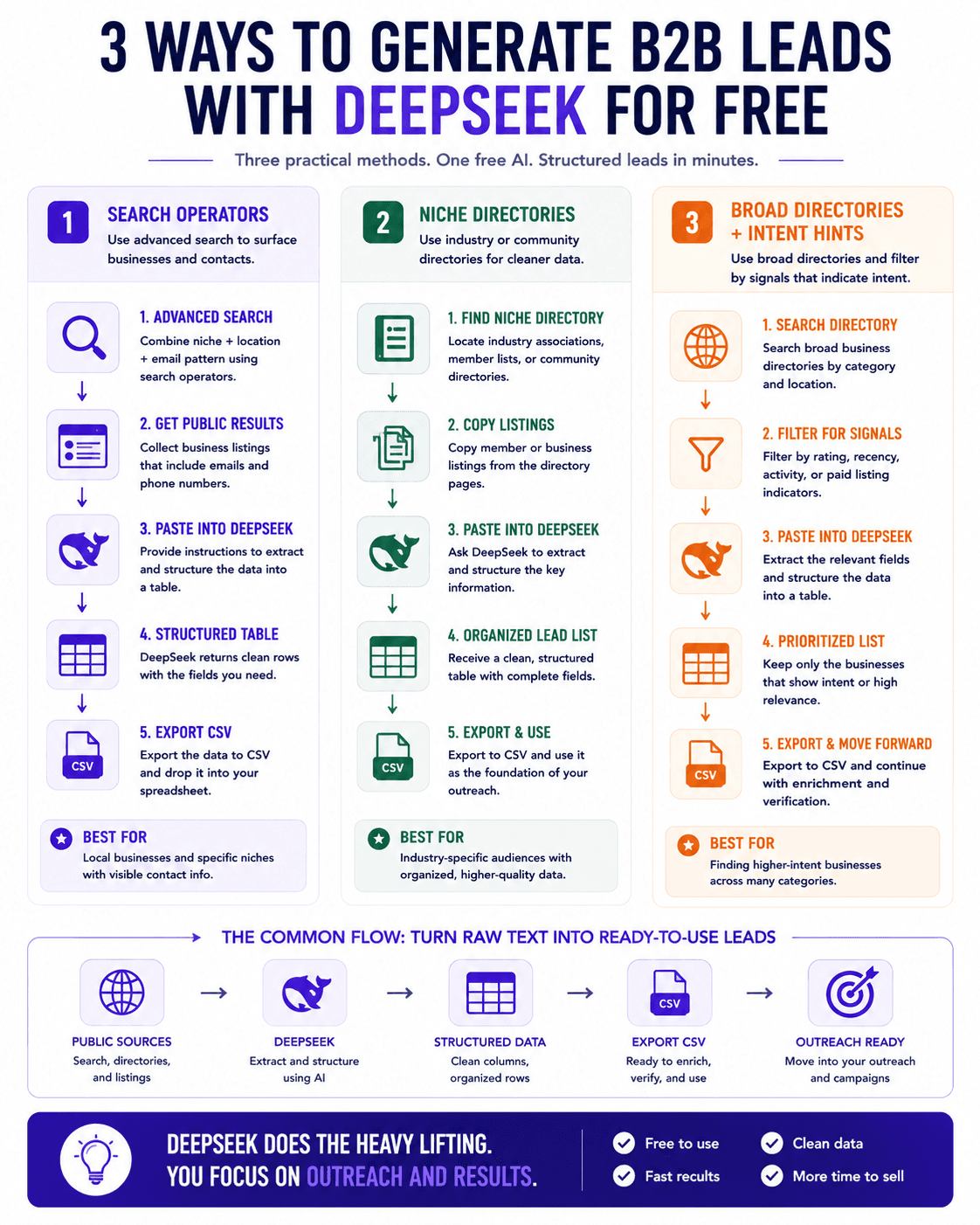
Method 1: Advanced search operators to surface contacts
The first method uses search operators to narrow a public search down to a specific niche paired with a contact pattern. If you are targeting a particular type of local business, you can combine the business category with a common email domain in an advanced search. The results come back as pages of listings that already contain the business name and, often, a visible contact email.
From there the model does the tedious part. Copy the relevant results, paste them into DeepSeek, and ask it to format the information into a table with the columns you care about, such as business name, contact name, email, and phone number. The model reads the block, pulls out the fields, and returns organized rows. You can then ask it to output the same data as a CSV so it is ready to move.
This is faster than manual copying, but the quality of what you get depends entirely on the quality of the source. Public listings are inconsistent, emails are frequently generic inboxes, and phone numbers go stale. The model organizes whatever you feed it, and it cannot fix bad inputs. This is where a dedicated sourcing approach earns its cost, which is part of why we compared Apollo and Clay for B2B lead generation rather than relying on scraped public data alone.
Method 2: Niche directories and member lists
The second method looks at directories built around a specific industry or community. A lot of B2B buyers belong to trade associations, attend recurring events, or appear in member rosters for professional groups. These directories are organized, which makes them a better source than open search because the listings are already grouped by the exact audience you want.
The workflow is the same as the first method. Find the directory that matches your target, copy the listings, and hand the block to DeepSeek with instructions to structure it into a table. Because directory data tends to be cleaner and more complete than scattered search results, the output is usually more usable straight away. You still get a formatted list you can export and work from.
The caveat holds here too. Directory data still ages, and membership lists rarely include verified direct contacts for the person you actually want to reach. Treat the output as a starting point rather than a finished list.
Method 3: Broad directories with intent hints
The third method uses broad business directories that cover many categories at once. These are useful because some of them signal spending behavior. A business that maintains a strong presence or a high rating on a directory it pays to be listed on is a business already investing in getting found, which can be a soft signal that it spends on growth.
Search the directory for your category and location, filter by rating or recency to focus on the businesses worth your time, and extract the listings into DeepSeek the same way. The model returns your structured table, and you can narrow further by asking it to keep only the entries that meet your criteria. Understanding these signals properly is its own skill, and our guide on what buying signals are goes deeper on reading them well.
Across all three methods the pattern is identical. You are using the model as a formatting and organization layer on top of publicly available data. That is genuinely useful, and it removes hours of manual work. It is not the same as building a verified, enriched pipeline, and it is important to be honest with yourself about which one you have.
Turning the list into outreach
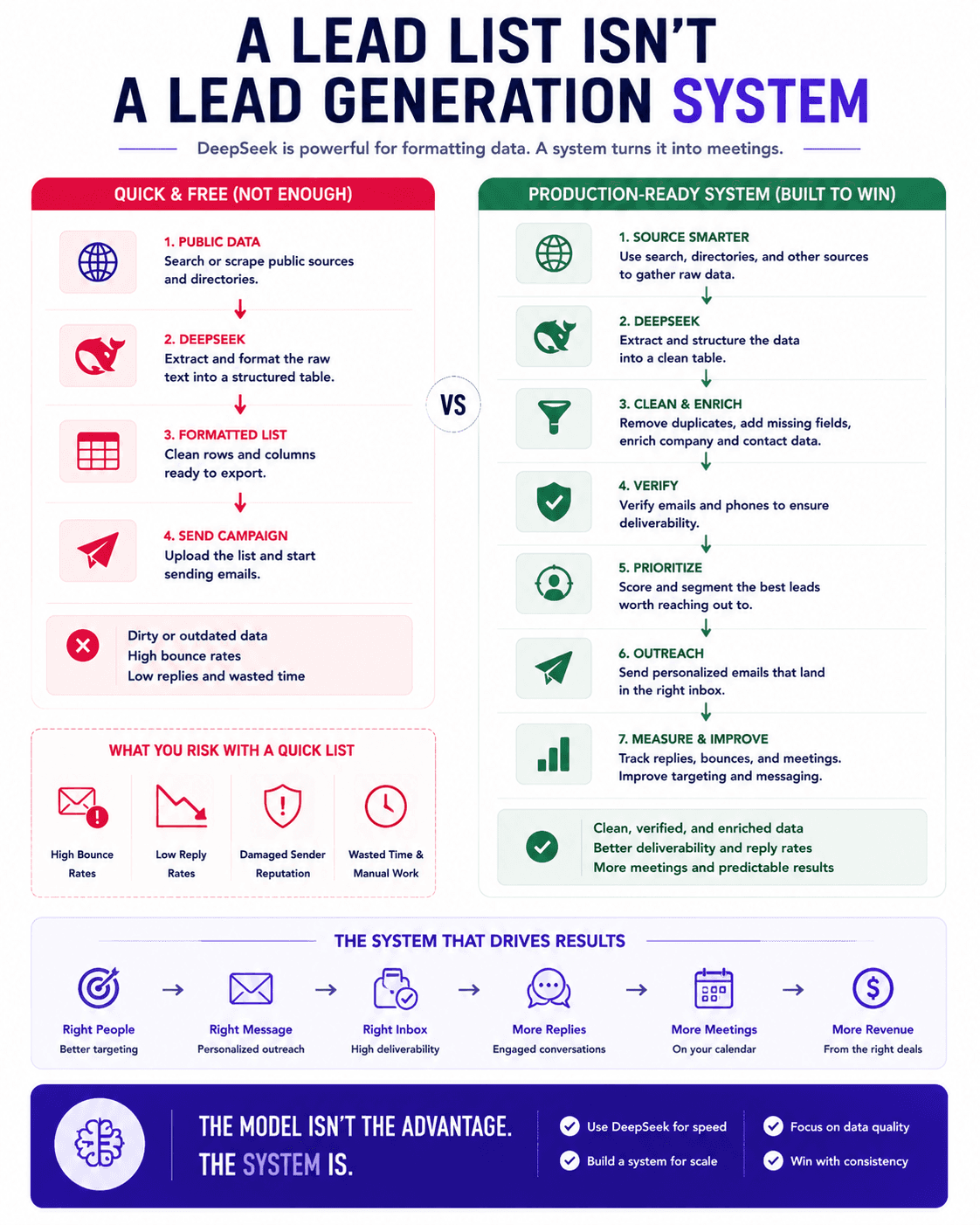
A formatted list is not a campaign. The gap between the two is the part that decides whether your outreach lands or gets buried, and it is the step most people underinvest in.
Start by cleaning and verifying. Public and directory data carries dead addresses, and sending to them damages your sender reputation before your message ever reaches a real person. Running the list through verification first protects your deliverability, and our roundup of the best email verification tools for cold email covers the options. Sending into weak infrastructure will sink even a good list, so it is worth setting up your cold email infrastructure properly before the first send.
Once the list is clean, move it into a cold email platform and build a sequence. You map the fields you exported, such as company, first name, and email, into the tool and write copy that fits the audience you sourced. If you are choosing a platform, our comparison of Smartlead, Instantly, and PlusVibe breaks down the trade-offs by team size and volume.
Is DeepSeek safe to use for business lead data?
This is the question that matters most once you move past testing, and it deserves a direct answer.
The hosted version of DeepSeek processes your inputs on its own servers, and that data is stored in China under different regulatory conditions than the ones most Western businesses operate under. Analysts reviewing whether DeepSeek is safe for business data point out that inputs may be retained and that access requirements under local law create real exposure for companies handling sensitive information. Broader reviews of DeepSeek's data privacy practices reach a similar conclusion, flagging the platform as a poor fit for most commercial applications that involve customer or prospect data.
For lead generation specifically, the data you are pasting in is other people's contact information. Feeding a list of prospects into a hosted model with unclear retention and sharing terms is a decision worth pausing on, especially in regulated industries. The open-source route changes this, because the model weights can be run in an environment you control, which keeps the data under your own jurisdiction. That path requires technical setup and hardware, so it is a real project rather than a quick win. If your work touches regulated or confidential data, the guidance from privacy reviewers on DeepSeek's risks is to keep sensitive material off the hosted service entirely.
Which AI tool should you actually use for lead generation?
Here is the honest recommendation, and it is the reason this guide exists.
The three methods above are not really about DeepSeek. They are about using a language model as a formatting layer over public data, and almost any capable model can do that. The model is the least important part of the process. What determines whether your lead generation works is the quality of your source data, whether you verify it, and whether the whole thing runs as a repeatable system instead of a one-off scramble every time you need a list.
If you are only experimenting and pasting in fully public information, DeepSeek's free hosted version is a fine place to see the workflow in action. Once real prospect data and client work enter the picture, the privacy trade-off and the manual nature of the copy-and-paste approach stop being worth it. At that point you want a model you can trust with data and a proper enrichment and verification stack behind it. For a system you can actually control end to end, we built our approach around Claude, and our guide on enriching a lead list using Claude Code shows how the sourcing, enrichment, and formatting steps connect into one workflow rather than three disconnected manual tasks.
The larger point is that a free model can start you off, but the durable advantage comes from the system around it. We documented exactly how that comes together in our write-up on the AI lead generation engine we built with Claude Code, which handles sourcing, contact finding, and research as one connected pipeline instead of a manual chain.
Final takeaways
DeepSeek can genuinely speed up the boring part of list building, turning raw text into a clean, exportable table in seconds and saving you hours of manual work. That is real, and it is worth trying if you are testing a new niche or an outbound motion for the first time.
The catch is that the model is the easy part. Your results come from the quality of your data, the discipline of verifying it before you send, and whether you run the whole thing as a repeatable process. For a quick test on public data, a free model is fine. For real B2B lead work with client or prospect data, choose a tool you can trust with that data and build a proper system around it. If you want more approaches beyond this one, our list of B2B lead generation strategies that actually work is a good next read.

If you would rather have a lead generation system built and run for you instead of piecing it together tool by tool, book a call with our team and we will map out what a done-for-you setup looks like for your business.