Article
Feb 2, 2026
Mastering AI Transformation in Financial Operations: A Comprehensive Guide for 2026
Most AI projects in finance fail. Not because the technology doesn't work. Because teams skip the boring stuff and jump straight to buying software.
We've seen this pattern dozens of times. A CFO gets excited about AI. The team picks a vendor. They launch a pilot. Three months later, nobody's using it. The software sits there. The invoices still get processed manually. The month-end close still takes 12 days.
This guide gives you the actual steps to get AI working in financial operations. Not theory. Not vendor promises. The specific actions that separate successful implementations from expensive failures.
Understanding AI in Financial Operations
What AI Actually Does in Finance (And What It Doesn't)
Before spending money on AI, you need to understand what it can and can't do.
What AI does well in finance:
Reading and extracting data from documents. AI scans an invoice, pulls out the vendor name, invoice number, date, line items, and total. It handles different formats without needing templates for each vendor.
Matching transactions. AI compares invoice details against purchase orders and receiving documents. It finds matches even when the data isn't identical (e.g., "ABC Corp" vs "ABC Corporation").
Spotting patterns and anomalies. AI learns what normal looks like in your data. Then it flags transactions that don't fit, duplicate invoices, unusual amounts, vendors billing outside normal patterns.
Predicting future numbers. AI analyzes your historical data and identifies trends you might miss. It projects cash flow, revenue, and expenses based on patterns in your past performance.
Classifying and coding transactions. AI learns from your past coding decisions and suggests GL codes, cost centers, and departments for new transactions.
What AI doesn't do well:
Making judgment calls. AI can flag an invoice as unusual. It can't decide whether to pay it anyway because you have context it doesn't.
Understanding your business strategy. AI can forecast based on history. It doesn't know you're launching a new product next quarter.
Fixing bad processes. If your approval chain has seven steps and takes two weeks, AI will make those seven steps faster. It won't tell you to cut it to three steps.
Working with messy, inconsistent data. AI learns from your data. If your data is garbage, AI learns garbage.
This distinction matters because most failed AI projects expect magic. They expect AI to fix problems that require human decisions first.
Why Financial Operations Is the Right Starting Point
Finance has three characteristics that make AI implementation easier than other departments.
Characteristic 1: Repetitive, high-volume work.
Your AP team processes invoices every day. Your accounting team reconciles accounts every month. These tasks follow patterns. AI thrives on patterns.
Compare this to sales, where every deal is different, or marketing, where creative judgment drives most decisions. Finance has clear inputs, clear rules, and clear outputs.
Characteristic 2: Structured data.
Invoices have predictable fields. Journal entries follow a standard format. Bank statements arrive in consistent layouts. This structure gives AI something to work with.
Unstructured data (like email threads or meeting notes) is harder for AI. Finance data is easier.
Characteristic 3: Measurable outcomes.
You know exactly how long it takes to process an invoice. You know your days-to-close. You know your error rate. These numbers let you prove whether AI helped.
According to NVIDIA's 2026 financial services survey, 73% of executives say AI is crucial to their future success. The companies already using it report operational efficiency as the biggest improvement (52%) and employee productivity gains (48%).
If you're new to AI, our AI transformation definition and roadmap covers the fundamentals.
Strategic Planning for AI Implementation
The 5-Step Process to Build Your AI Roadmap
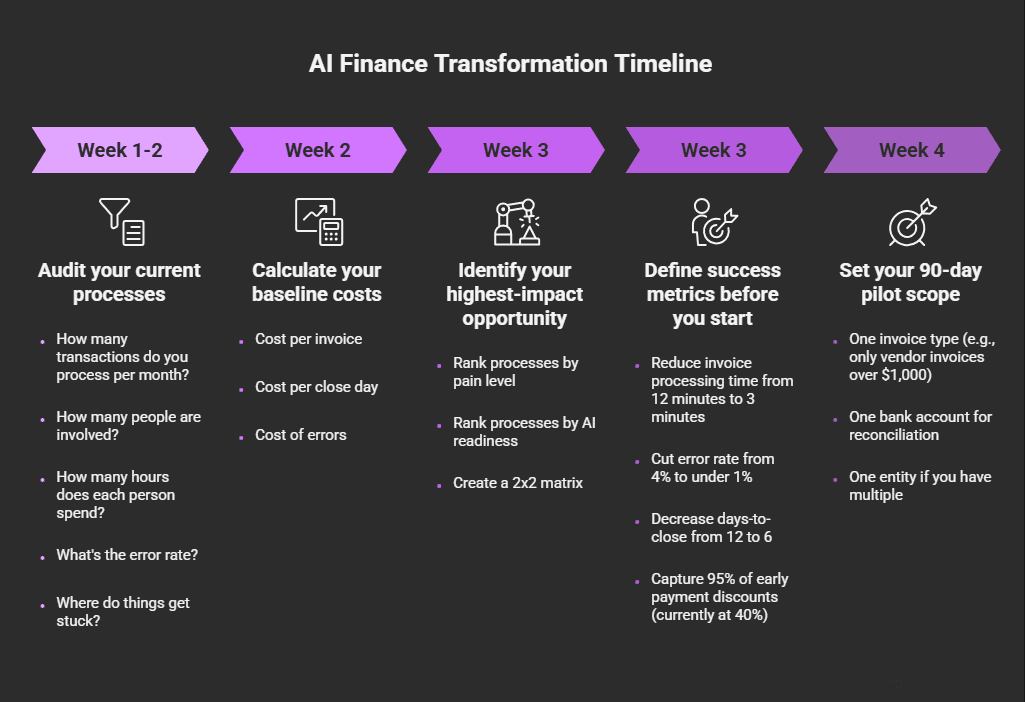
Skip this section and your AI project will fail. We've seen it happen too many times.
Step 1: Audit your current processes (Week 1-2)
Before you touch AI, document exactly how your finance operations work today.
For each major process (AP, AR, close, forecasting), answer these questions:
How many transactions do you process per month?
How many people are involved?
How many hours does each person spend?
What's the error rate?
Where do things get stuck?
Be specific. "AP takes too long" isn't useful. "We process 2,400 invoices per month with a 3-person team, averaging 12 minutes per invoice, with a 4% error rate and a 6-day average time from receipt to payment" is useful.
Use our AI business audit tool to structure this assessment.
Step 2: Calculate your baseline costs (Week 2)
You need hard numbers to measure ROI later. Calculate:
Cost per invoice: (Total AP staff salary + benefits) ÷ (Invoices processed per year)
Cost per close day: (Total accounting staff salary + benefits) × (Days spent on close activities ÷ Working days per month)
Cost of errors: (Number of errors per month) × (Average time to fix each error) × (Hourly cost of staff)
Example calculation for a mid-size company:
Metric | Current State |
Invoices per month | 2,400 |
AP staff cost (fully loaded) | $180,000/year |
Cost per invoice | $6.25 |
Processing time per invoice | 12 minutes |
Error rate | 4% |
Errors per month | 96 |
Time to fix each error | 25 minutes |
Monthly error cost | $4,800 |
These numbers become your baseline. If AI doesn't improve them, the project will fail.
Our AI ROI calculator helps you build these projections.
Step 3: Identify your highest-impact opportunity (Week 3)
Rank your processes by two factors:
Pain level: How much does this process hurt? (Time, cost, errors, frustration)
AI readiness: How structured is the data? How repetitive is the work?
Create a simple 2x2 matrix:
High AI Readiness | Low AI Readiness | |
|---|---|---|
High Pain | START HERE | Fix process first |
Low Pain | Quick win | Skip for now |
Most finance teams find accounts payable in the "Start Here" quadrant. It's painful (high volume, lots of manual data entry) and AI-ready (structured invoices, repetitive matching).
Step 4: Define success metrics before you start (Week 3)
Write down exactly what success looks like. Be specific:
"Reduce invoice processing time from 12 minutes to 3 minutes"
"Cut error rate from 4% to under 1%"
"Decrease days-to-close from 12 to 6"
"Capture 95% of early payment discounts (currently at 40%)"
If you can't measure it, you can't prove it worked.
For more on tracking outcomes, see our guide on the best ways to measure success of AI transformation.
Step 5: Set your 90-day pilot scope (Week 4)
Don't try to automate everything. Pick one slice:
One invoice type (e.g., only vendor invoices over $1,000)
One bank account for reconciliation
One entity if you have multiple
Run the pilot for 90 days. Measure results against your baseline. Then decide whether to expand.
How Do You Align AI with Business Goals?
AI projects that work solve problems the CFO talks about in leadership meetings.
Here's how to connect AI use cases to CFO priorities:
CFO Priority | AI Use Case | What It Actually Does |
Faster close | Automated reconciliation | Matches transactions automatically, surfaces exceptions only |
Better cash visibility | AI forecasting | Analyzes patterns in receivables and payables, predicts cash position |
Lower operating costs | AP automation | Eliminates manual data entry, reduces headcount needs |
Fewer errors | Anomaly detection | Flags duplicate invoices, unusual amounts, coding mistakes |
Audit readiness | Automated documentation | Creates audit trails for every transaction automatically |
Pick the priority that matters most right now. Start there.
The Data Readiness Checklist
AI can't work with bad data. Before you implement anything, verify:
Data quality checklist:
[ ] Vendor master file is clean (no duplicates, consistent naming)
[ ] Chart of accounts is standardized across entities
[ ] Historical transactions are coded consistently
[ ] Bank feeds are connected and reconciled
[ ] Invoice images are stored digitally (not just paper)
Process standardization checklist:
[ ] Invoice approval workflow is documented
[ ] Coding rules are written down (not just in people's heads)
[ ] Exception handling process is defined
[ ] Month-end close checklist exists
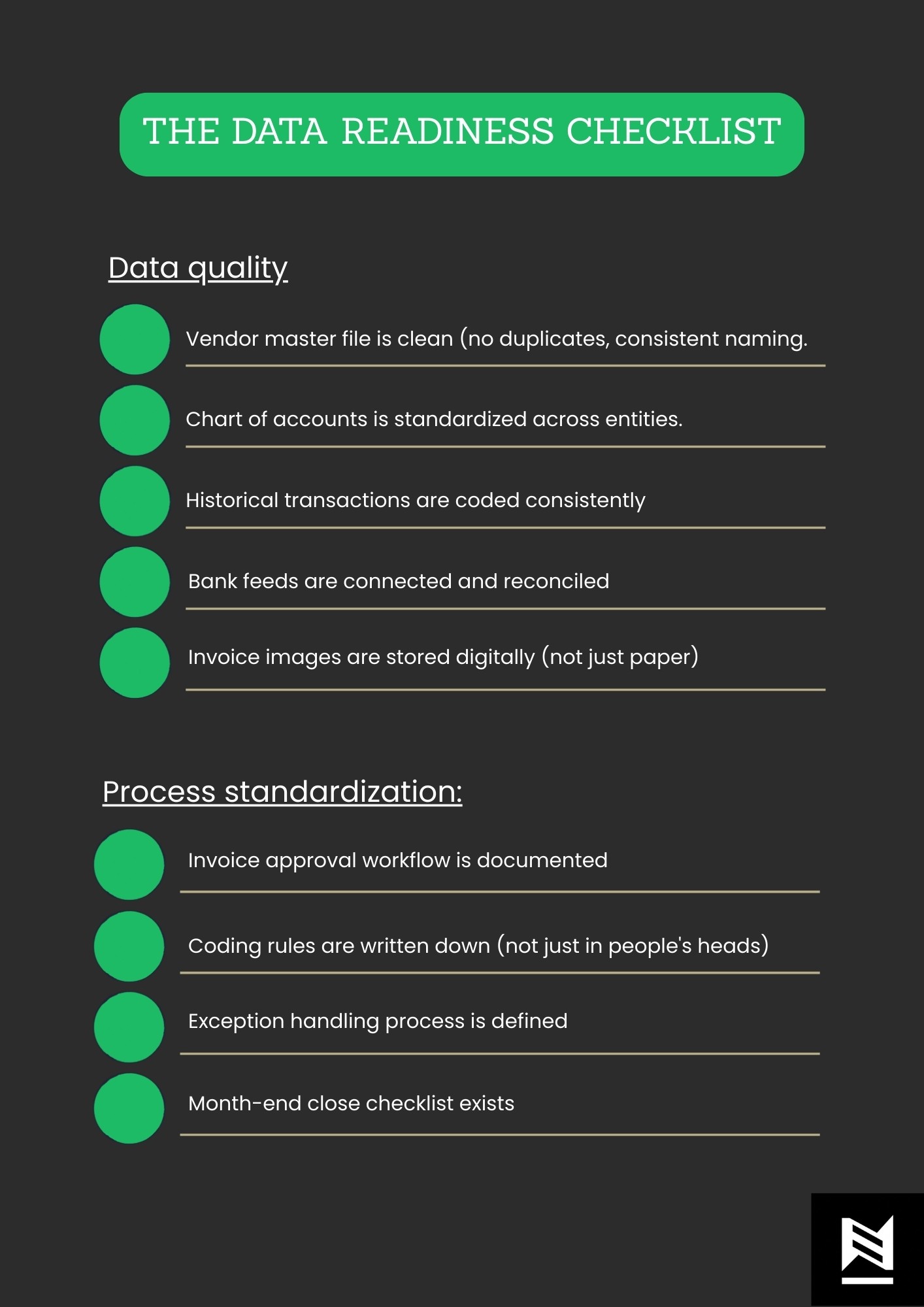
If you can't check these boxes, fix them first. AI will amplify whatever exists — including problems.
Our guide to AI data transformation tools covers the software that helps clean and prepare your data.
Key AI Use Cases in Financial Operations
Accounts Payable Automation: The Complete Implementation Guide
AP is where most finance teams start. Here's exactly how to do it right.
What AI handles in AP:
Invoice capture: AI reads invoices from email, scans, or uploads. It extracts vendor name, invoice number, date, PO number, line items, amounts, and tax.
Data validation: AI checks extracted data against your vendor master and PO system. It flags mismatches before anyone reviews.
Three-way matching: AI compares invoice to purchase order to receiving document. Matches get auto-approved. Exceptions get routed for review.
GL coding: AI suggests account codes based on vendor, description, and your historical coding patterns.
Approval routing: AI sends invoices to the right approver based on amount, department, and type.
Duplicate detection: AI identifies invoices that might be duplicates of ones you've already processed or paid.
Implementation steps:
Week 1-2: Prepare your data
Export your vendor master file. Clean up duplicates and standardize names.
Export 12 months of historical invoices with their GL coding.
Document your current approval thresholds and routing rules.
Week 3-4: Configure the system
Upload vendor master to AI system.
Set up approval workflows matching your current rules.
Configure GL coding suggestions based on historical data.
Connect to your ERP via API.
Week 5-6: Pilot with limited scope
Process only invoices from your top 20 vendors by volume.
Have staff review every AI decision during this phase.
Track accuracy: What percentage of extractions were correct? What percentage of coding suggestions were right?
Week 7-8: Expand and refine
Correct errors and retrain the model.
Add more vendors to the scope.
Begin allowing auto-approval for high-confidence matches.
Week 9-12: Measure and scale
Compare metrics to your baseline.
Document the process for remaining invoice types.
Plan rollout to remaining vendors.
What good results look like:
Companies report 70-80% reduction in invoice processing time with AI. Here's what that means in practice:
Metric | Before AI | After AI (90 days) |
Processing time per invoice | 12 minutes | 2-3 minutes |
Touches per invoice | 4-5 people | 1-2 people |
Error rate | 4% | Under 1% |
Early payment discounts captured | 40% | 90%+ |
Cost per invoice | $6.25 | $1.50-2.00 |

Financial Close and Reconciliation: Step-by-Step
The month-end close is where AI creates the most visible impact. Here's the detailed approach.
What AI handles in the close:
Account reconciliation: AI matches transactions between your GL and source systems (bank, subledgers, intercompany). It auto reconciles matching items and surfaces exceptions.
Journal entry automation: AI generates recurring journal entries, accruals, and adjustments based on rules you define.
Variance detection: AI compares current period to prior periods and budget. It flags unusual variances for review.
Intercompany matching: AI reconciles transactions between entities and identifies timing differences.
Close task management: AI tracks checklist completion, identifies bottlenecks, and alerts when tasks are overdue.
The 5-step close automation process
Step 1: Map your current close (Before implementation)
Create a detailed close calendar showing:
Every task required to close
Who owns each task
Dependencies (what can't start until something else finishes)
Time required for each task
Most close processes have 50-100 discrete tasks. Document all of them.
Step 2: Identify reconciliation volume
For each account you reconcile, count:
Number of transactions per month
Current time to reconcile
Typical number of exceptions
Focus AI on high-volume accounts first. A bank account with 500 transactions per month benefits more than a prepaid account with 10.
Step 3: Standardize reconciliation rules
Write down how you match transactions today:
What fields do you compare? (Amount, date, reference number)
What tolerance do you allow? (Exact match, within $0.01, within 1 day)
How do you handle partial matches?
AI needs these rules programmed. If they're only in someone's head, extract them now.
Step 4: Implement in phases
Phase 1 (Month 1): Automate one high-volume bank reconciliation
Phase 2 (Month 2): Add remaining bank accounts
Phase 3 (Month 3): Add credit card reconciliations
Phase 4 (Month 4): Add intercompany reconciliations
Phase 5 (Month 5): Implement automated journal entries
Step 5: Measure close reduction
Track days-to-close each month. Successful implementations show:
Finance teams using AI cut close time by 50% or more. A 10-day close becomes 5 days. A 5-day close becomes 2-3 days.
Example close transformation:
Close Task | Before AI | After AI |
Bank reconciliations (5 accounts) | 8 hours | 1 hour (review exceptions) |
Credit card reconciliation | 4 hours | 30 minutes |
Intercompany reconciliation | 6 hours | 1 hour |
Recurring journal entries | 3 hours | 10 minutes (review only) |
Accrual calculations | 4 hours | 30 minutes |
Variance analysis prep | 5 hours | 1 hour |
Total | 30 hours | 4 hours |
That's 26 hours returned to your team every month.
What Are the Best AI Use Cases for Forecasting?
Forecasting is where AI moves from efficiency to strategic insight.
What AI does in forecasting:
Pattern detection: AI analyzes years of historical data and finds trends humans miss — seasonality, growth patterns, correlations between variables.
Automatic updates: As new actuals come in, AI revises forecasts automatically. No more manual spreadsheet updates.
Scenario modeling: AI runs multiple scenarios simultaneously and shows the range of possible outcomes.
Anomaly flagging: AI identifies when actuals deviate significantly from forecast and alerts you immediately.
How to implement AI forecasting:
Week 1-2: Prepare historical data
You need clean historical data. Minimum 24 months, ideally 36+ months.
Required data:
Monthly revenue by product/service line
Monthly expenses by category
Cash receipts and disbursements by week
Headcount by month
Key drivers (units sold, customers, etc.)
Clean the data:
Remove one-time items or flag them
Ensure consistent categorization across periods
Fill gaps in the data series
Week 3-4: Connect to AI forecasting tool
Most AI forecasting tools integrate directly with accounting software. Connect your:
General ledger
Billing system
Bank accounts
CRM (for pipeline data)
Week 5-8: Train and validate
Let the AI analyze your historical data. Then test its predictions:
Use data through Month X to predict Month X+1
Compare AI prediction to what actually happened
Calculate forecast accuracy
IBM research shows companies using AI in budgeting reduced errors by at least 20%. A quarter of those companies cut errors by 50% or more.
Week 9-12: Integrate into planning process
Replace manual forecasts with AI-generated forecasts for:
Weekly cash flow projections
Monthly revenue and expense forecasts
Quarterly budget-to-actual analysis
Forecasting accuracy benchmarks:
Forecast Type | Traditional Method | AI-Enhanced |
30-day cash flow | ±15-20% variance | ±5-8% variance |
Monthly revenue | ±10-15% variance | ±3-7% variance |
Quarterly expenses | ±8-12% variance | ±3-5% variance |
Fraud Detection and Compliance: Practical Implementation
Fraud detection is a defensive use case. The ROI comes from losses prevented, not time saved.
What AI detects:
Duplicate invoices: Same invoice submitted twice, sometimes with slight modifications
Vendor fraud: Fake vendors, inflated invoices, kickback schemes
Expense fraud: Personal expenses coded as business, inflated receipts
Payment anomalies: Unusual payment amounts, timing, or destinations
Access pattern anomalies: Users accessing data outside normal patterns
Implementation approach:
Phase 1: Layer AI on existing controls
Don't replace your current controls. Add AI as an additional layer.
Configure AI to monitor:
All payments over a threshold (e.g., $10,000)
All new vendors for first 90 days
All expense reports
All manual journal entries
Phase 2: Establish baseline
Let AI learn normal patterns for 60-90 days before acting on alerts. During this period:
Review all AI flags manually
Mark false positives so AI learns
Document true positives for investigation
Phase 3: Tune and automate
After training:
Set thresholds for automatic blocking vs. alert-only
Create escalation paths for different risk levels
Integrate with your investigation workflow
Mastercard doubled its detection rate of compromised cards using AI and reduced false positives by up to 200%. That's the benchmark to aim for — more real fraud caught, fewer false alarms.
For more examples, see our real-world AI transformation examples.
Overcoming Challenges in AI Adoption
Dealing with Technical Barriers: A Realistic Assessment
Let's be honest about what technical challenges you'll face.
Challenge 1: Legacy ERP systems
If you're on an older ERP (legacy SAP, older Oracle, AS/400 systems), integration is harder but not impossible.
Solutions:
Use middleware that sits between AI tools and your ERP
Export data files on a schedule if APIs aren't available
Consider cloud ERP migration as a parallel project (but don't let it block AI)
Timeline impact: Add 4-8 weeks for legacy system integration.
Challenge 2: Data in multiple systems
Finance data often lives in 5-10 different systems. AI needs it consolidated.
Solutions:
Build a data warehouse or data lake as your AI foundation
Use integration platforms (like Workato, Celigo, or Boomi) to connect systems
Start with the systems that have 80% of your transaction volume
Timeline impact: Add 4-12 weeks depending on number of systems.
Challenge 3: Security and compliance requirements
Regulated industries have additional hurdles.
Solutions:
Choose vendors with SOC 2 Type II certification minimum
Require data residency in approved regions
Build audit logging into every AI workflow
Document AI decision logic for regulatory examination
For investment firms, our piece on AI in private equity due diligence covers specific compliance considerations.
To understand full implementation costs, read our guide on calculating total AI implementation costs.
How Do You Get Your Team on Board?
Resistance comes from three sources. Address each directly.
Source 1: Fear of job loss
What to say: "AI handles the data entry. You handle the analysis. We need your judgment more than ever."
What to do:
Show them examples of roles that evolved (accountants who became analysts)
Commit to no layoffs from the AI project
Identify career growth paths that include AI skills
Source 2: Fear of learning new tools
What to say: "The system is designed to work like tools you already use. We'll train you step by step."
What to do:
Choose tools with intuitive interfaces
Provide hands-on training (not just videos)
Assign super-users who can help colleagues
Allow 3-4 weeks of learning curve with reduced productivity expectations
Source 3: Fear of being blamed
What to say: "You're not responsible for AI errors. You're responsible for catching them. That's a smaller job than doing everything manually."
What to do:
Define clear ownership of AI outputs vs. human review
Create an "AI mistakes" log without blame
Celebrate people who catch AI errors (that's the system working)
Managing Regulatory Concerns: The Compliance Framework
Build these elements into every AI workflow:
1. Audit trail requirements
For every AI-processed transaction, log:
Original input data
AI decision made
Confidence score
Human reviewer (if any)
Final action taken
Timestamp for each step
2. Explainability requirements
You must be able to explain why AI made each decision. For regulators, document:
What data the AI used
What rules or patterns it applied
Why it reached its conclusion
Avoid "black box" AI where you can't explain the logic.
3. Human oversight requirements
Define which decisions require human approval:
All transactions over $X
All new vendors
All exceptions flagged by AI
All changes to master data
4. Testing and validation requirements
Before go-live and quarterly thereafter:
Test AI with known scenarios
Verify accuracy rates meet thresholds
Document test results
Consider working with an AI transformation partner who understands regulatory requirements in your industry.
Measuring ROI and Success Metrics
The Complete KPI Framework
Track these metrics at three levels:
Level 1: Process metrics (measure weekly)
Metric | What It Measures | Target |
Processing time per transaction | Speed improvement | 70-80% reduction |
Straight-through processing rate | % handled without human touch | 60-80% |
Exception rate | % requiring human review | Under 20% |
Error rate | % of AI decisions that were wrong | Under 2% |
Level 2: Financial metrics (measure monthly)
Metric | What It Measures | Target |
Cost per invoice | Direct cost savings | 50-70% reduction |
Days to close | Close efficiency | 40-50% reduction |
Early payment discounts captured | Cash management | 90%+ capture rate |
Fraud losses prevented | Risk reduction | Varies by baseline |
Level 3: Strategic metrics (measure quarterly)
Metric | What It Measures | Target |
Finance team capacity freed | Time for analysis vs. processing | 30-50% shift |
Forecast accuracy | Decision quality | 20-50% improvement |
Audit findings related to process | Compliance improvement | Reduction year-over-year |
How Long Does It Take to See Results?
Here's the realistic timeline:
Weeks 1-4: Implementation
System setup and configuration
Data preparation and loading
Initial training
Weeks 5-8: Pilot
Processing limited transaction volume
High human oversight
Learning and adjustment
Weeks 9-12: Scaled pilot
Expanded transaction volume
Reduced human oversight
Measuring initial results
Months 4-6: Full production
All in-scope transactions processed
Steady-state operations
Measurable efficiency gains
Months 6-12: ROI realization
Full financial benefits achieved
Capacity redeployment complete
Decision to expand scope
Most AI finance tools show positive ROI within 6-12 months. Focused pilots show measurable results in 8-12 weeks.
One enterprise client doubled their operational efficiency by implementing AI-driven insights, starting with a single AP automation pilot and expanding from there.
Future-Proofing Finance with AI
The Scaling Roadmap
After your first success, expand methodically:
Year 1 roadmap:
Q1: AP automation pilot → full AP automation Q2: Bank reconciliation automation Q3: Full close automation Q4: Basic forecasting integration
Year 2 roadmap:
Q1: Advanced forecasting and scenario planning Q2: Fraud detection and continuous monitoring Q3: Treasury and cash management Q4: Strategic planning integration
Each expansion should follow the same pattern:
Document current process
Calculate baseline metrics
Define success criteria
Run 90-day pilot
Measure and decide to scale or adjust
Staying Ahead with Continuous Improvement
AI isn't a project. It's a capability you maintain.
Monthly:
Review accuracy metrics
Retrain models with new data
Address recurring exceptions
Quarterly:
Assess new use cases
Evaluate new tools and features
Update success benchmarks
Annually:
Full AI strategy review
ROI analysis across all implementations
Roadmap planning for next year
CFOs predict that AI will move finance from retrospective reporting to real-time decision-making. The teams that build AI as an ongoing capability will lead. The ones that treat it as a one-time project will fall behind.
Start With One Process, Not One Tool
AI transformation in financial operations succeeds when you focus on the work, not the technology.
Pick one process that hurts. Map it completely. Calculate what it costs today. Define what better looks like. Then find the AI that gets you there.
The companies winning with AI didn't start with the biggest budgets or the fanciest tools. They started with one clear problem and solved it.
Ready to identify the right starting point for your finance team? Book a call and we'll map out your 90-day pilot together.