Article
Feb 20, 2026
How Does AI Automation Work in Customer Support?
Most companies that adopt AI for customer support start with plugging in a chatbot, deflect tickets, cut costs.
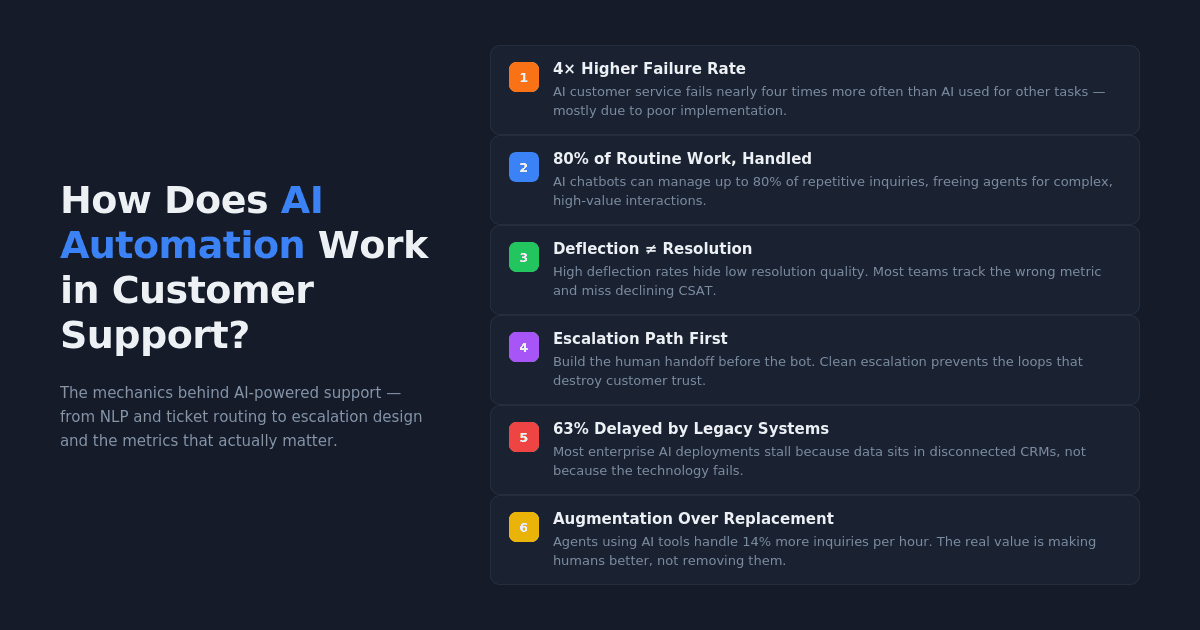
In practice, it usually plays out differently. The Qualtrics 2026 Consumer Experience Trends Report found that nearly one in five consumers who used AI for customer service saw no benefit from the experience — a failure rate roughly four times higher than for AI use in general. That gap between expectation and reality is where most of the damage happens, and it almost always traces back to how the automation was built rather than whether AI itself can do the job.
This post walks through how AI automation in customer support actually works — the technologies involved, where it performs well, where it breaks, and what to prioritize if you want it to hold up under real conditions.
What AI Automation in Customer Support Actually Looks Like
The Core Technologies Behind It
AI customer support runs on a few foundational technologies working together, and understanding them in plain terms matters more than knowing the acronyms.
Natural Language Processing (NLP) allows an AI system to read a customer message and understand what the person is actually asking for. When someone types "where's my order," the system recognizes that as a tracking request. As IBM's overview of AI in customer service explains, NLP reads intent and context, not just keywords.
Machine Learning (ML) is the part that gets better over time. Every interaction gives the system more data about what works and which responses lead to resolution. This is how AI moves from clumsy to competent — through accumulated exposure to real conversations, not manual reprogramming.
Retrieval-Augmented Generation (RAG) sits behind most modern AI chatbots. When a customer asks a question, the system searches your knowledge base, pulls relevant information, and generates a response grounded in that specific content. This is what keeps AI from making things up — when it works correctly.
Robotic Process Automation (RPA) handles the structured, rules-based tasks that surround a support interaction: sending follow-up emails, updating account records, issuing refunds, triggering satisfaction surveys. RPA executes predefined steps the same way every time, which is exactly what you want for operational pieces that don't require judgment.
How a Customer Query Moves Through an AI System
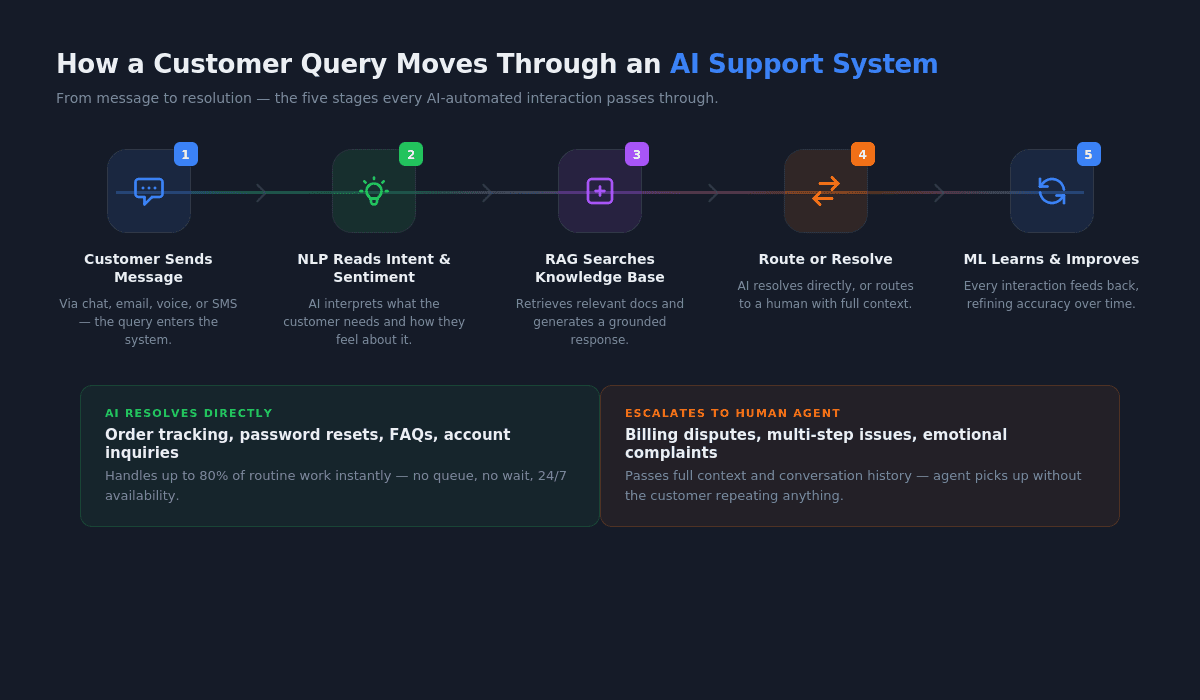
Here's a simplified version of what happens when a customer reaches out to a company running AI automation in its support workflow:
The customer sends a message through chat, email, or voice. The AI system reads the message using NLP to determine what the customer needs and how urgent it feels. Sentiment analysis checks whether the customer sounds frustrated, confused, or neutral and flags anything that might need faster attention.
Based on that analysis, the system either handles the request directly — pulling from the knowledge base to generate a response — or routes it to a human agent with full context attached. If the system resolves the issue, RPA handles any follow-up tasks automatically.
The whole cycle feeds data back into the machine learning layer, which refines future responses and routing decisions. In a well-built system, this loop means the AI gets more accurate over time without someone manually updating it.
Where AI Handles Support Well — and Where It Doesn't
The Tier 1 Work That AI Was Built For
AI automation performs best on the work that eats up the most agent time without requiring much judgment. Order status checks, password resets, FAQ responses, account balance inquiries, return policy questions — high-volume, low-complexity interactions that follow predictable patterns.
According to Desk365's compilation of AI customer service statistics, AI chatbots can handle up to 80% of routine tasks and customer inquiries, and conversational AI is projected to reduce contact center labor costs by $80 billion by 2026. Those numbers are real, but they describe a specific slice of the work — the structured, repeatable portion where the right answer is already documented somewhere.
This is where AI delivers clear value, and it delivers it quickly. Customers get answers in seconds instead of waiting in a queue, agents stop spending their days on repetitive questions, and the operation runs around the clock without adding headcount. If you're implementing AI in your business, this tier of work is where you should start.
The Complexity Threshold Most Teams Underestimate
The trouble shows up when the work requires context that doesn't live in a knowledge base, or when the customer's situation doesn't map to a predefined flow. A billing dispute involving three departments. A technical issue that depends on the customer's specific configuration. A complaint where the customer's frustration is the actual problem, not the product.
We see this constantly. Teams deploy AI expecting it to handle "most" inquiries, but they define "most" by volume without accounting for difficulty. The 20% of inquiries that AI can't handle well are often the ones that matter most to retention and revenue.
Zendesk's AI customer service research shows that 68% of consumers expect chatbots to have the same level of expertise as highly skilled human agents. That expectation gap is where customer trust erodes — not because the AI failed on easy questions, but because it couldn't handle the hard ones gracefully.
How Does AI Automation Improve Customer Support Operations?
Response Speed and Availability
The most straightforward improvement is speed. AI responds instantly, and customer tolerance for wait times has collapsed. There's no queue, no hold music, no business hours constraint. For the categories of questions AI handles well, the experience is meaningfully better than what most human-only teams can deliver at scale.
This also compounds across the rest of the operation. When AI absorbs simple inquiries, the humans who handle complex cases aren't burned out from spending their day on password resets.
Ticket Routing and Prioritization
AI doesn't just answer questions — it decides where questions should go when they need human attention. By analyzing the content, urgency, and sentiment of an incoming message, AI routes it to the right team with the right context already attached. This replaces manual triage, which is slow, inconsistent, and one of the biggest sources of internal friction in support operations.
The practical effect is that customers stop getting bounced between departments, and agents stop receiving tickets they aren't equipped to handle.
Agent Augmentation, Not Replacement
The part people miss about AI automation in customer support is that most of the value isn't in replacing agents — it's in making them better at work that still requires a person.
AI can surface relevant knowledge base articles while an agent is mid-conversation, draft responses for review, and summarize a customer's history so the agent doesn't spend the first two minutes figuring out what already happened. Zendesk reports that 80% of employees say AI has improved the quality of their work, and support agents using AI tools handle nearly 14% more inquiries per hour.
One enterprise client we worked with doubled their sales efficiency after implementing AI-driven insights that helped their team engage leads at the right time with better data. The same principle applies to support: AI makes the human interactions faster, better informed, and more consistent. Understanding the difference between AI agents and AI tools helps clarify which approach fits your operation.
Why Do Most AI Customer Support Implementations Underperform?
The Deflection Metric Trap
This is where a lot of AI support projects go sideways. Teams measure success by deflection rate — the percentage of inquiries handled without a human agent. The number goes up, leadership celebrates, and nobody looks closely at what's actually happening inside those deflected conversations.
As Decagon's analysis of AI chatbot challenges makes clear, chatbots often fail because they're designed to keep customers away from agents rather than to resolve problems. High deflection with low resolution is worse than no automation at all, because it trains customers to distrust your support channel.
We see this pattern regularly. The metric looks good on a dashboard, but CSAT drops, repeat contacts increase, and customers start going to social media instead. If you're tracking deflection without also tracking resolution quality, escalation success rate, and containment accuracy, you're flying blind.
Disconnected Systems and Bad Data
AI customer support systems only work as well as the data they can access. When customer data is scattered across legacy CRMs, disconnected ticketing systems, and ungoverned spreadsheets, the AI can't pull together the context it needs to be helpful.
Research on AI implementation challenges in customer support found that 63% of enterprises report delayed AI deployments due to legacy integration issues, with 41% seeing cost increases of 30 to 50%. The technology isn't usually the bottleneck — the data infrastructure underneath it is. Understanding the true cost of AI implementation before you start helps avoid the most expensive surprises.
Skipping the Escalation Design
Most teams spend their implementation budget on the bot and treat the handoff to humans as an afterthought. The escalation path — how and when the AI transfers a conversation to a person, and what context it passes along — is what determines whether the system feels helpful or infuriating.
When escalation is poorly designed, customers get trapped in loops typing "AGENT" or "HUMAN" with no escape. The AI keeps trying to resolve something it can't, frustration compounds, and by the time a human picks up, the interaction is already damaged. Decagon recommends a principle of controlled failure: it's always better for an AI to admit it doesn't know and escalate cleanly than to provide a wrong answer.
What Should You Actually Build First?
Start With the Escalation Path, Not the Bot
If you're exploring what AI transformation actually means for your support operation, the instinct is to start with the chatbot, the automated responses, the knowledge base integration. The better move is to start with the escalation path.
Design the handoff first. Decide what triggers it, what context transfers with it, and how quickly a human picks up. Test that flow until it's smooth. Then layer automation on top, knowing that every interaction the AI can't handle will land somewhere reliable.
Connect AI to What Your Team Already Uses
AI automation that operates in a silo creates more problems than it solves. The system needs access to your CRM, your ticketing platform, your knowledge base, and your order management tools — not as a future integration, but from day one.
When the AI can pull up a customer's full history, check their order status in real time, and pass that context to an agent during escalation, the whole operation works. When it can't, you've built an expensive FAQ page. There are real-world AI transformation examples that show how other companies have handled this integration work.
Measure What Matters (Beyond Deflection Rate)
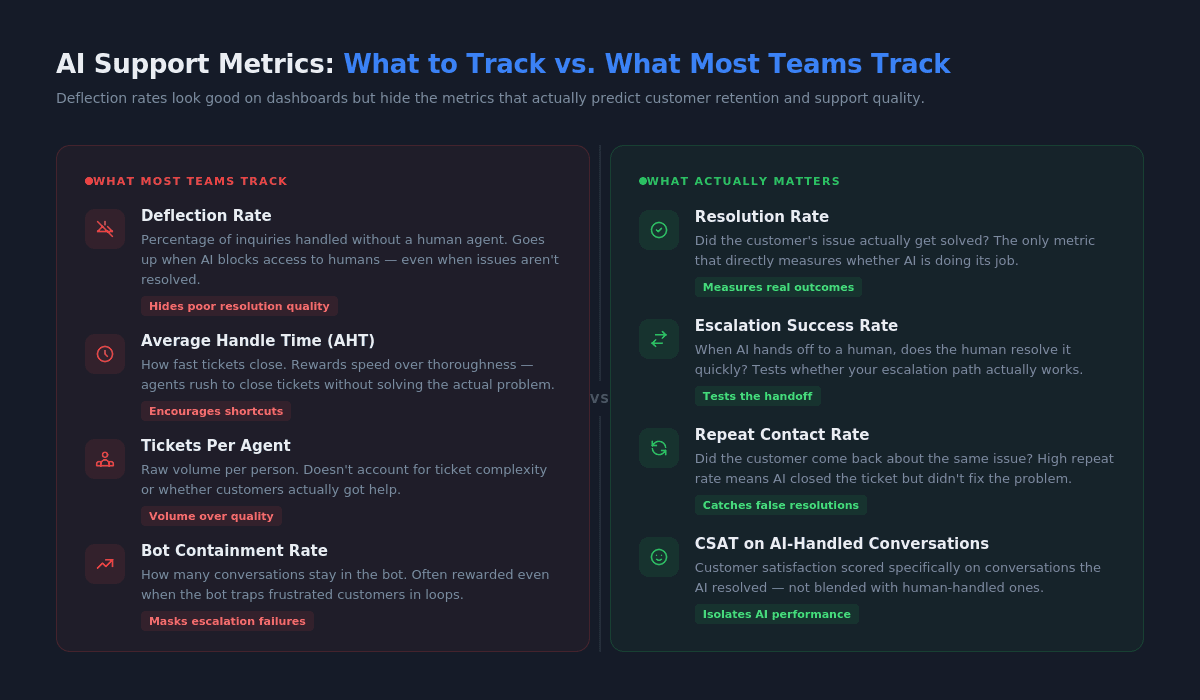
The metrics that actually tell you whether AI automation is working are resolution rate (did the issue get solved?), escalation success rate (when the AI handed off, did the human resolve it quickly?), CSAT on AI-handled conversations, and repeat contact rate (did the customer come back about the same issue?).
Deflection rate belongs on the dashboard, but it should never be the headline metric. It tells you how much work the AI is absorbing, not whether it's doing that work well.
Conclusion
AI automation in customer support works when it's built as operations infrastructure — connected to real data, designed around escalation paths, and measured by whether customers actually got help. It doesn't work when it's treated as a cost-cutting shortcut or measured by how many people it keeps away from your team.
The companies getting this right start with the hardest part (the handoff between AI and humans), connect their systems before they automate, and track resolution quality alongside efficiency. If you're evaluating how AI fits into your support operation, working with an AI transformation partner who understands the operational side, not just the technology makes the difference between a system that holds up and one that looks good on a slide deck.