Article
Mar 20, 2026
10 Claude Skills for Paid Ads Marketers (2026)
10 Claude skills that replace hours of paid ads work. From competitor research to weekly reporting, here's what marketers are actually using in 2026.
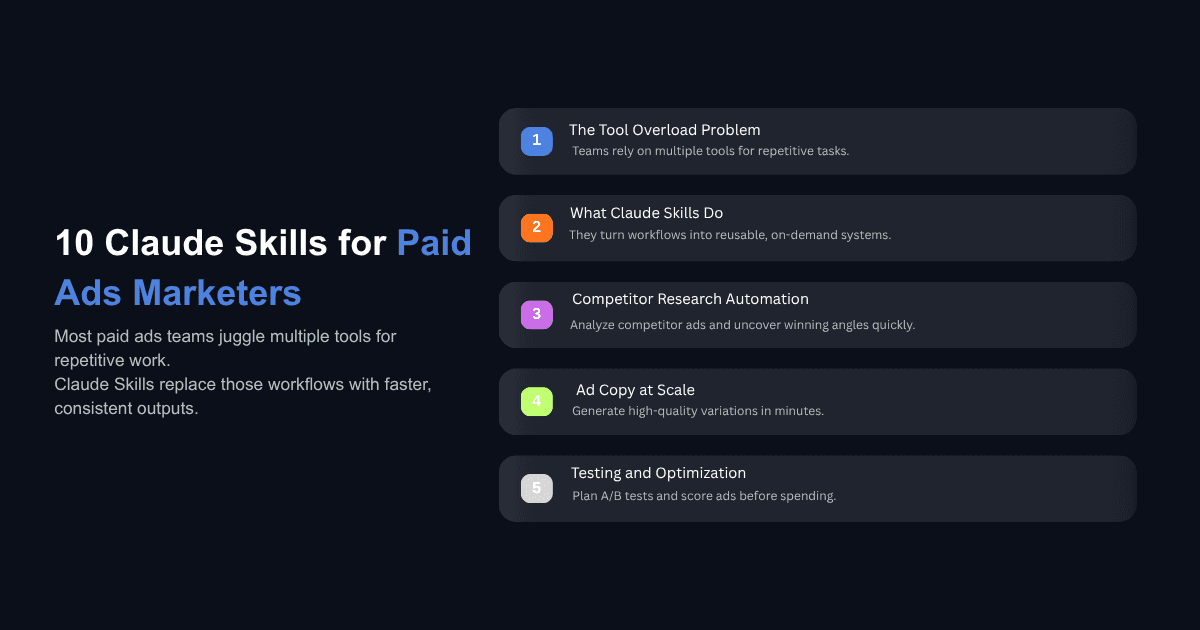
Most paid ads teams are running five to eight SaaS tools just to get through a week. One for copy. One for reporting. One for audience research. A developer on call for tracking issues. And all of it held together by spreadsheets and Slack threads.
Claude skills change that math. Instead of switching between tools or reprompting from scratch every time you need a competitor breakdown or a set of ad variations, you build the workflow once as a skill and run it on demand. Your brand voice, audience data, and campaign context carry forward automatically through your CLAUDE.md file, so every output already knows who you are selling to and how you talk.
If you are not familiar with skills yet, here is a quick overview of what Claude skills are and how to use them. The short version: a skill is a markdown file containing structured instructions that Claude follows for a specific task. You install it once, invoke it with a slash command, and get a consistent, repeatable output every time.
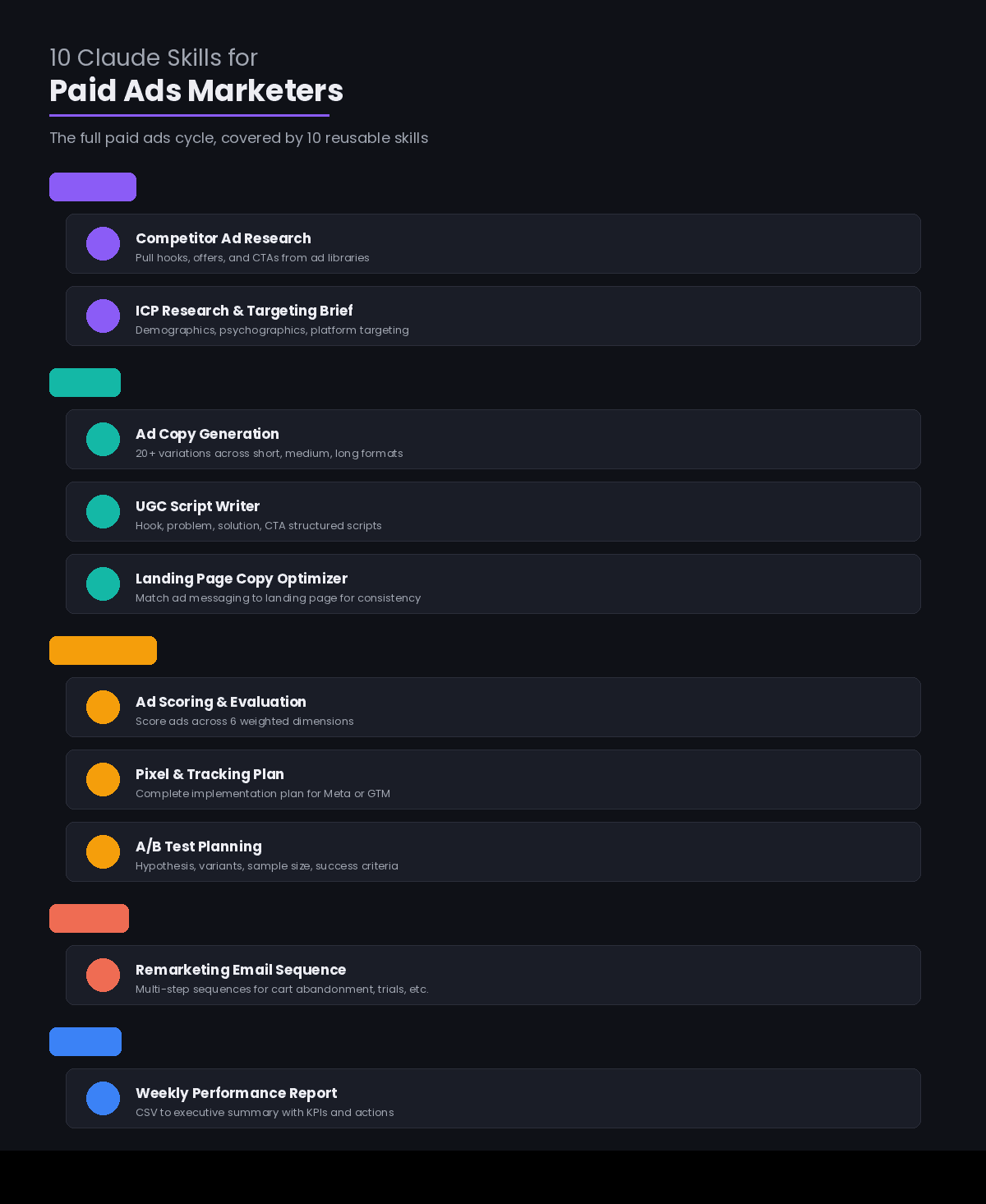
The 10 skills below map to the full paid ads cycle, from competitive intelligence through weekly performance reporting. Each one replaces a workflow that currently takes hours or costs hundreds of dollars per session.
What Are Claude Skills (And Why Do Paid Ads Marketers Care)?
A Claude skill is a set of instructions saved as a SKILL.md file that teaches Claude how to handle a specific, repeatable task. According to Anthropic's official skills documentation, skills work through progressive disclosure, meaning Claude loads only the instructions it needs for the task at hand, keeping your context window clean even if you have dozens of skills installed.
For paid ads, this matters because the work is inherently repetitive. You run competitor research every time you launch a new campaign. You generate ad copy variations every week. You pull performance reports every Monday. These are structured workflows with consistent inputs and outputs, which is exactly what skills are built for.
The persistent memory in CLAUDE.md is what makes this different from just saving prompts. Your audience segments, brand voice rules, campaign goals, and past performance benchmarks all live in that file. When you invoke a skill, Claude reads that context first, so the output reflects your specific business rather than producing generic marketing copy.
If you want to understand the difference between AI agents and AI tools, skills sit closer to the agent side. They are not one-off prompts. They are encoded workflows that carry institutional knowledge and produce structured outputs you can act on immediately.
10 Claude Skills for Paid Ads Marketers
1. Competitor Ad Research
Get this skill: Competitive Ads Extractor on GitHub
This skill instructs Claude to pull ads from the Meta Ad Library, Google Ads Transparency Center, and competitor URLs you specify, then extract the emotional hooks, offer structures, and call-to-action patterns that appear most frequently across active campaigns.
You provide three to five competitor brand names or URLs. The skill returns a structured breakdown of competitor hooks ranked by how often they appear, along with a gap analysis showing emotional angles your competitors are not using.
The practical impact here is significant. Jonathan Martinez, who managed paid ads at Uber, Postmates, and Coinbase, used this type of skill to analyze 110 competitor ads and produce an 11-page PDF with scoring and recommendations on how to capitalize on weak points. That analysis would take a paid specialist the better part of a day. The skill completed it in minutes.
Emily Kramer's MKT1 newsletter also documented how marketer Kamil Rextin built a competitive intelligence agent specifically for LinkedIn ads that generates branded PDF reports in about five minutes per competitor.
2. Ad Copy Generation
Get this skill: Ad Creative skill from Corey Haines' marketingskills install with:
This skill takes a single product description along with the audience data stored in your CLAUDE.md file and generates 20 or more distinct ad copy variations across three formats: short form (primary text plus headline), medium form (primary text, headline, and description), and long form in the style of a full Facebook post.
The key difference between this and typing a prompt into any AI chat window is consistency. Because the skill reads your brand voice rules and audience segments from CLAUDE.md before generating anything, you get copy that already sounds like your brand and speaks to the right pain points. You are not correcting tone after the fact. The guardrails are built into the workflow.
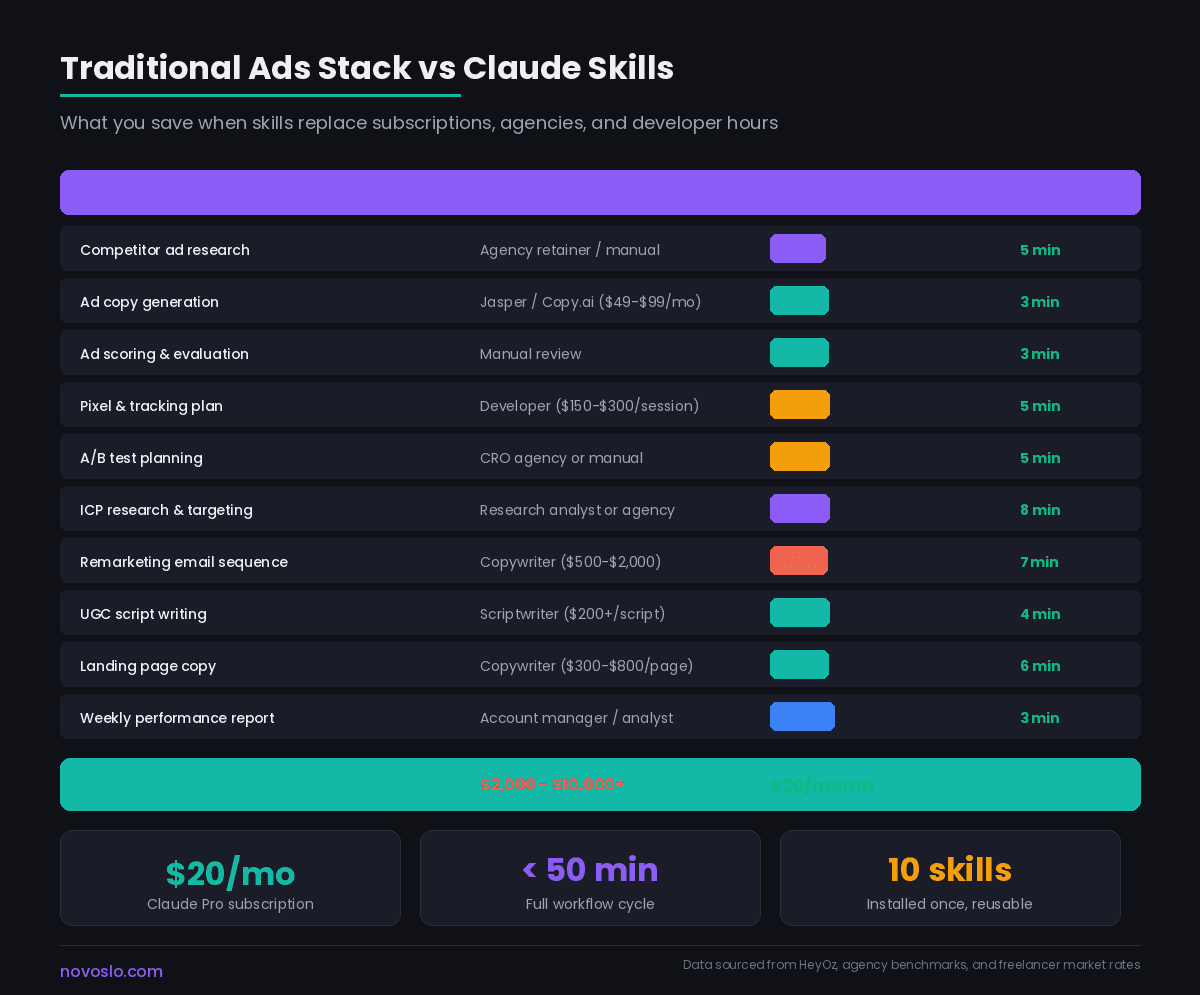
Most teams we see are spending 30 to 60 minutes generating a batch of ad variations manually. This skill produces a larger set in about three minutes, and because the quality guardrails are baked in, the editing pass is faster too.
3. Ad Scoring and Evaluation
Get this skill: Claude Ads on GitHub (186 checks across 6 ad platforms)
This skill scores any ad, whether yours or a competitor's, across six dimensions on a one to ten scale, with each dimension weighted differently in the composite score.
The six dimensions typically include hook strength (weighted heavily, based on Schwartz's awareness levels and scroll-stopping principles), body copy effectiveness, call-to-action clarity, emotional resonance, offer structure, and visual-copy alignment. The skill evaluates whether the hook matches the audience's awareness level, whether the copy leads with the problem or the product, and whether the CTA is specific enough to drive action.
The claude-ads skill on GitHub takes this even further with 186 checks across Google, Meta, YouTube, LinkedIn, TikTok, and Microsoft Ads, using weighted scoring and industry-specific templates based on benchmarks from over 16,000 campaigns.
This is the skill you run before spending money. Score your ads before they go live, compare them against what competitors are running, and you catch weak hooks and unclear CTAs before they burn budget.
4. Pixel and Tracking Plan Generator
Get this skill: Analytics Tracking skill from Corey Haines' marketingskills install with:
Every paid ads campaign needs a tracking plan. Most marketers either rely on a developer to set it up or cobble together a plan from documentation and Stack Overflow threads.
This skill takes your campaign objectives, conversion events, and platform (Meta Pixel, Google Tag Manager, or both) and outputs a complete tracking implementation plan. That plan includes which events to track, the parameters to include, where to place each code snippet, and a testing checklist to verify everything fires correctly.
The output is structured enough that a developer can implement it directly or, in simpler cases, that a marketer comfortable with Tag Manager can do it themselves. The skill saves the $150 to $300 that a typical developer session costs and eliminates the back-and-forth that usually adds days to a campaign launch.
5. A/B Test Planning
Get this skill: A/B Test skill from Corey Haines' marketingskills install with:
Effective A/B testing requires more upfront structure than most teams give it. You need a clear hypothesis, defined variants, a sample size calculation, success criteria, and a decision framework for what happens after the test ends.
This skill generates all of that from a simple input: what you want to test, your current performance baseline, and your minimum detectable effect. The output is a complete experiment brief that you can share with your team or drop directly into your testing documentation.
We see teams consistently skip the hypothesis and sample size steps because the manual work feels tedious. The skill removes that friction, which means more tests actually get designed properly and fewer get called early with inconclusive data.
6. ICP Research and Targeting Brief
Get this skill: AI Marketing Skills by Superamped (includes competitor research and audience discovery skills)
This skill uses web search to research your ideal customer profile in depth, then produces a targeting brief with demographics, psychographics, platform behavior patterns, and recommended targeting parameters for each ad platform.
You provide a description of your product and your current customer base. The skill returns a structured brief covering who your buyers are, what they care about, where they spend time online, what objections they carry, and how to reach them on Meta, Google, and LinkedIn specifically.
The brief doubles as a strategy document you can share with anyone working on the campaign. Instead of having targeting knowledge scattered across people's heads, it lives in one place that the entire team can reference.
7. Remarketing Email Sequence Builder
Get this skill: Email Sequence skill from Corey Haines' marketingskills install with:
Remarketing does not stop at retargeting ads. The highest-performing campaigns pair retargeting with email sequences that address specific drop-off points in the funnel.
This skill generates multi-step email sequences for common remarketing scenarios: cart abandonment, trial expiration, webinar attendance follow-up, or any custom trigger you define. Each email includes subject lines, preview text, body copy, and a clear CTA, all written in your brand voice because the skill reads your CLAUDE.md before producing anything.
The output typically covers a three to five email sequence with timing recommendations, and the copy is specific enough that you can drop it into your email platform with minimal editing. Compare that to the $500 to $2,000 a freelance copywriter charges for a similar deliverable.
For a broader look at how this kind of skill-based automation works in sales contexts, see how Claude skills apply to sales workflows, which covers a similar approach for outreach and follow-up sequences.
8. UGC Script Writer
Get this skill: Market Ads skill from AI Marketing Suite (covers ad creative and script generation)
User-generated content style ads are among the highest-performing formats on Meta and TikTok, but writing the scripts is a specific discipline. The hook needs to stop the scroll. The problem statement needs to feel personal. The solution reveal needs to be natural. And the CTA needs to land without feeling like an ad.
This skill produces UGC scripts structured by hook, problem, solution, and CTA. You provide the product details and target audience, and the skill generates multiple script variations in different tones and angles. Each script includes direction for the on-screen talent, suggested b-roll moments, and text overlay recommendations.
This is especially useful for teams testing multiple creative angles per campaign. Instead of briefing a creator and waiting days for scripts, you generate a batch of options in minutes and hand the best ones to your talent.
9. Landing Page Copy Optimizer
Get this skill: Page CRO skill from Corey Haines' marketingskills install with:
Your ad gets the click. The landing page closes the deal. When those two pieces of copy don't align, conversion rates suffer.
This skill analyzes existing landing page copy and rewrites it using conversion rate principles, matching the messaging to your ad copy for consistency. You provide the landing page URL or text along with the ad copy it will pair with, and the skill identifies where the messaging gaps are, where the CTA is weak, and where the copy talks about features when it should talk about outcomes.
The output is a rewritten landing page with section-by-section rationale for each change. If you want to go deeper on this kind of work across your full business, Claude Cowork for business workflows covers how to run these types of analysis tasks at scale using Claude's desktop app.
Corey Haines' open source marketing skills repository includes a dedicated page-cro skill that applies specific CRO frameworks, and it works well as a complement to this landing page copy skill.
10. Weekly Performance Report Generator
Get this skill: Marketing Skills for Google and Meta Ads (includes reporting, anomaly detection, and creative fatigue monitoring)
This is the skill that saves the most time on a recurring basis. It reads a CSV export from your ad platform, calculates week-over-week performance changes, surfaces top and bottom performers, flags anomalies like unexpected spend spikes or CTR drops, and writes an executive summary in plain English.
The output is a structured weekly report with a KPI summary table, top performers, areas of concern, and three recommended actions for the following week. The report is formatted for direct paste into a Google Doc, Notion page, or client email.
Ryze AI's collection of 30 ad-specific skills includes several reporting variations, including one that monitors CTR trajectory and frequency accumulation to flag creative fatigue before it tanks performance. If you connect your ad accounts via MCP (Model Context Protocol), Claude can pull data directly instead of requiring manual CSV exports.
How to Install and Use These Skills
Setting up Claude skills takes about 10 to 15 minutes. Each skill is a markdown file that you place in your Claude skills directory.
If you are using Claude Code, skills live in .claude/skills/ within your project folder. Each skill gets its own subfolder with a SKILL.md file as the entry point. You invoke skills with a slash command (for example, /competitor-research) or Claude can auto-detect when a skill is relevant based on your request.
If you are using Claude Cowork, the desktop app, you can install skills through the settings menu or by placing files in your workspace folder. The workflow is the same: invoke with a slash command or let Claude detect the right skill automatically.
The CLAUDE.md file is where you store your persistent context: brand voice guidelines, audience segments, campaign goals, competitor lists, and performance benchmarks. Every skill reads this file before producing output, which is why the results feel tailored instead of generic.
One practical tip: start by creating your CLAUDE.md with your core brand information, then install two or three skills and test the outputs against your quality standards before expanding. Building Claude skills for LinkedIn content walks through this process for a different use case and the setup principles are the same.
Can Claude Skills Replace Your Paid Ads Team?
No. And that is the wrong framing for what skills actually do well.
Claude handles the text and analysis layers of paid advertising with real precision: research, copy, strategy, scoring, and reporting. The gap is visual creative production. Building a scroll-stopping 15-second UGC video or a product image with brand-consistent design requires dedicated creative tools and human judgment about what will resonate visually.
The more useful way to think about this is augmentation. Jonathan Martinez put it clearly: skills are not meant to replace a paid ads team, but to augment their work and make them significantly more productive. The tasks that used to take hours of manual work, like pulling competitor hooks, generating copy variations, or writing weekly reports, now take minutes. That frees up time for the strategic work that actually requires human judgment, such as choosing which audiences to go after, deciding on creative direction, or interpreting what the data actually means for your business.
As Metaflow's growth marketing playbook notes, skills amplify strategy, whether that strategy is good or bad. If you feed them weak positioning or unclear audience definitions, you will produce weak outputs faster. The quality of what goes in determines the quality of what comes out.
What Should You Build First?
Start with the skills that address your biggest time sinks this week. For most paid ads marketers, that is either the weekly performance report (skill 10) or ad copy generation (skill 2), since those are the tasks that recur most frequently and consume the most hours.
Once you have confirmed those outputs meet your quality bar, expand to the skills that support campaign launches: competitor research, A/B test planning, and tracking plan generation. These have a less frequent cadence but a higher per-instance time cost.
A few practical guidelines as you build out your skill library:
Version control your CLAUDE.md and skill files in a Git repository. As your campaigns evolve, you can track which versions of your skills produced which results and roll back if a change degrades output quality.
Test each skill against a real scenario before relying on it. Run the competitor research skill on a competitor you already know well, and compare the output to your manual analysis. That comparison tells you where to tighten the instructions.
Keep your CLAUDE.md updated. Stale audience data or outdated brand voice rules will produce stale outputs. Treat it like a living document that gets reviewed monthly.
The teams getting the most from Claude skills are the ones who treat them as infrastructure rather than novelty. Build two skills. Run them for a week. Refine the instructions based on what the outputs get wrong. Then build two more. That incremental approach produces better results than installing 10 skills on day one and hoping they all work perfectly.
If you are still evaluating how AI fits into your operations more broadly, our AI ROI Calculator can help you estimate the actual time and cost savings before you commit to building out a full skill library.