Article
Mar 27, 2026
AI Tools for Automating Email Responses
AI tools for automating email responses can cut reply time and reduce manual work — if you pick the right type and build around your workflow first.
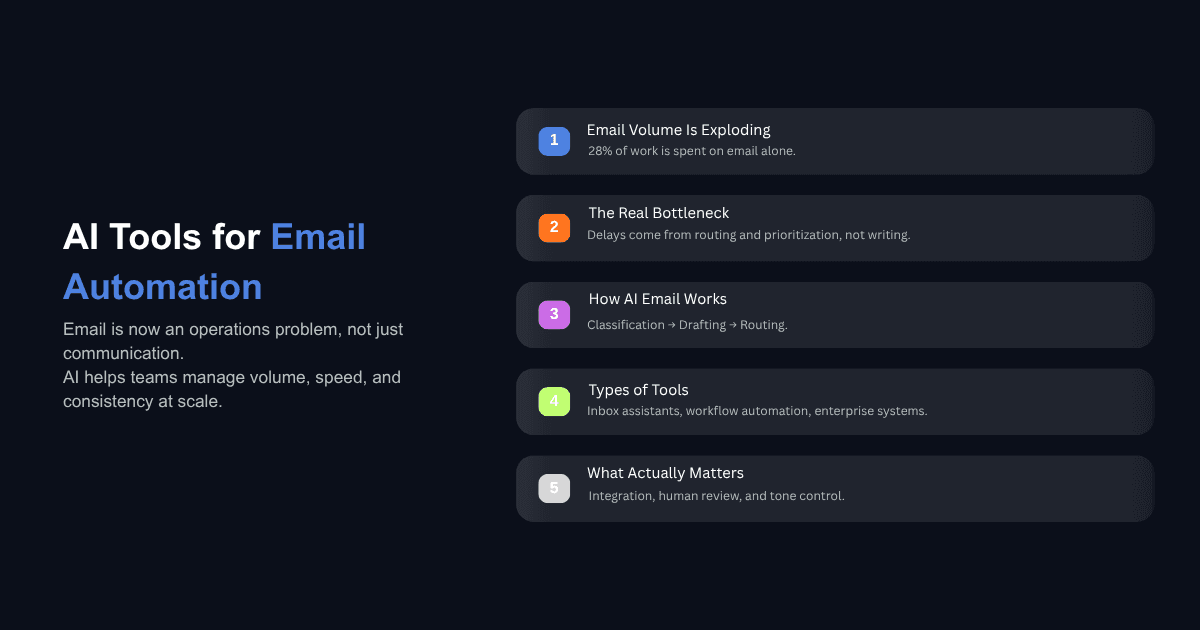
The average knowledge worker spends roughly 28% of their workweek reading, sorting, and responding to email. For a 200-person company, that's the equivalent of 56 full-time employees doing nothing but managing inboxes.
Meanwhile, the people sending those emails expect faster replies than ever. Customers, partners, internal teams — nobody is sitting around waiting 48 hours for a response anymore. And the volume keeps climbing. Global email traffic is projected to hit 392 billion messages per day in 2026, up from 376 billion in 2025.
So most operations teams are caught between two pressures: more email coming in, and higher expectations on how fast it goes back out. AI tools for automating email responses are supposed to close that gap. Some of them actually do. But which ones work, how they work, and where they break down depends entirely on how your email operations are structured today.
Why Email Response Automation Has Become an Operations Problem
Email feels like a communication tool, but in most mid-market and enterprise companies, it functions more like an operations layer. Purchase orders, support tickets, vendor negotiations, internal approvals, client follow-ups — a significant portion of the work that keeps a business running moves through email threads.
The problem is that email was never designed for this. There's no built-in prioritization, no structured routing, and no way to track whether someone responded to the right message with the right information at the right time. Teams compensate with shared inboxes, manual labels, and people checking in on other people's inboxes. It works at low volume. It falls apart as the company grows.
This is where the math gets hard to ignore. According to recent industry data, more than 25% of inboxes now actively use AI to summarize, categorize, or prioritize email, and AI-assisted inbox management has reduced average response time by 18%. But here's the thing most teams miss: that 18% improvement comes from the classification and routing layer, not from the reply itself. The teams seeing real gains are the ones who automated the decision-making around email before they automated the writing.
And yet, 87% of businesses using AI say they apply it to email workflows, while only 6% qualify as high performers in AI adoption. That gap tells you something. Buying the tool isn't the hard part. Knowing where it fits in your operations is.
How AI Tools for Automating Email Responses Actually Work
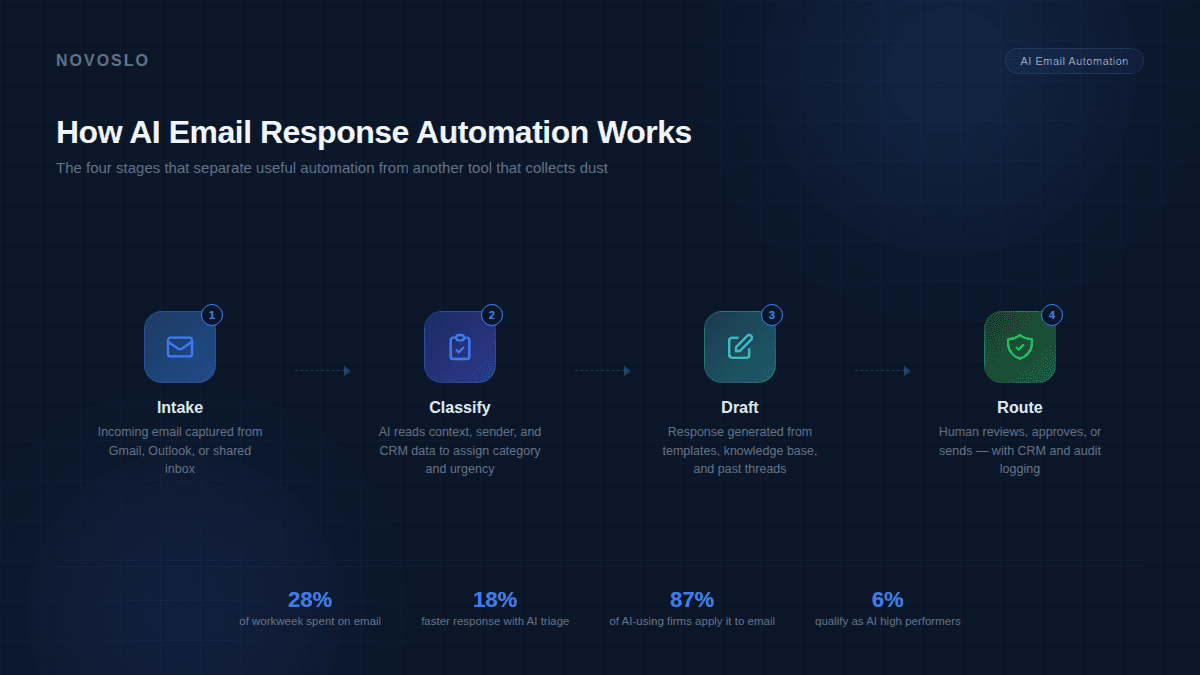
Most AI email tools work in three stages: classification, drafting, and routing. Understanding these stages matters because most failed implementations skip or collapse at least one of them.
Classification is where the AI reads an incoming email and determines what it is — a support question, an invoice dispute, a meeting request, a sales inquiry, a vendor follow-up. Good classification pulls from the subject line, body text, sender history, and sometimes CRM data to assign a category and urgency level. This is the part that separates a useful system from one that just generates generic replies.
Drafting is the part most people think of when they hear "AI email automation." The AI generates a reply based on the email content, company knowledge bases, past threads, and whatever instructions it's been given about tone and context. Tools vary widely here. Some use a single large language model to generate freeform responses. Others pull from pre-approved templates and fill in dynamic fields. The best implementations combine both approaches — templates for routine inquiries, generative responses for anything that requires more nuance.
Routing determines what happens next. Does the draft go straight to the recipient? Does it land in a queue for human review? Does it trigger a follow-up sequence or update a CRM record? Routing is where human-in-the-loop controls live, and it's where compliance-heavy industries need the most attention.
You can set up Claude to draft email responses using tools like Zapier, the API, or Cowork, with step-by-step instructions tailored for operations teams. That's one example of how the drafting layer works in practice — the AI handles the writing, but the routing and approval logic still lives with the team.
What Types of AI Email Response Tools Exist?
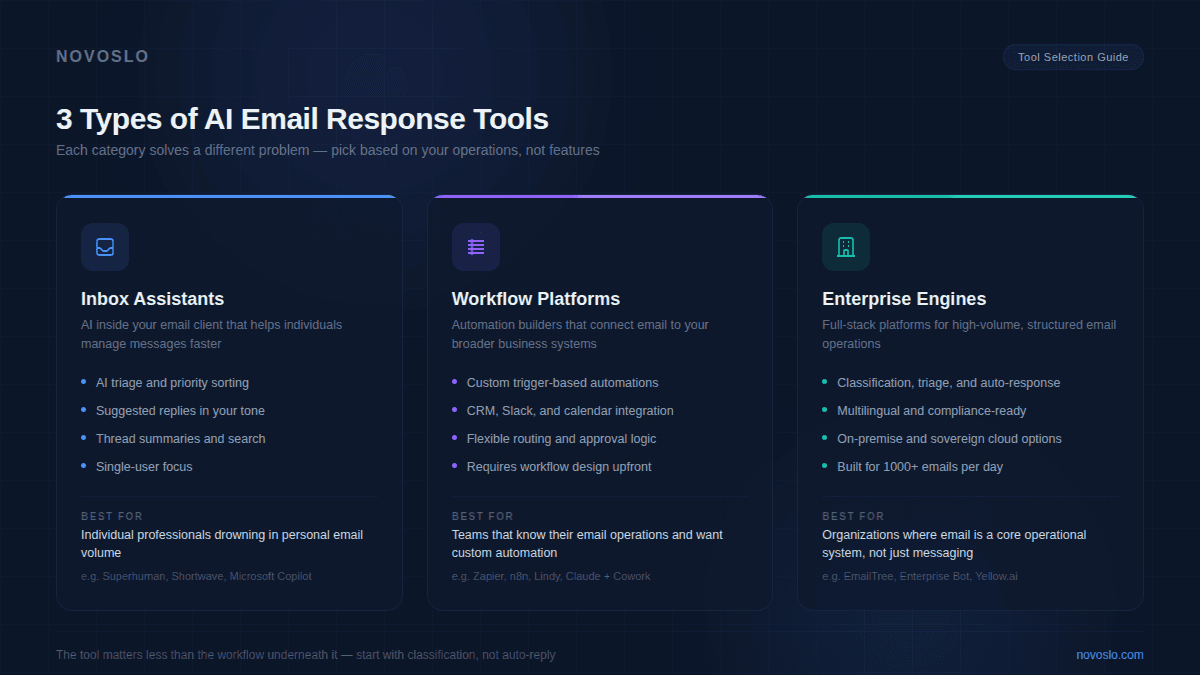
The market has split into three broad categories, and they serve very different needs.
Inbox Assistants
These are tools like Superhuman, Shortwave, and Microsoft Copilot that sit inside your existing email client. They help individual users manage email faster — AI triage, suggested replies, thread summaries, priority sorting. Superhuman's AI compose assistant, for example, drafts responses based on your writing style and maintains your voice while handling routine replies. Shortwave offers the widest range of AI features among standalone email clients, according to Zapier's comparison.
These tools are good for professionals who are personally drowning in email. They're less useful for teams that need shared workflows, centralized routing, or compliance controls. If your problem is "I personally have too much email," an inbox assistant will help. If your problem is "our support team takes two days to respond to vendor inquiries," you need something else.
Workflow Automation Platforms
Tools like Zapier, n8n, and Lindy connect your email to broader business systems. They let you build automations that trigger when specific types of emails arrive — for example, automatically routing support requests to the right team, logging client inquiries in a CRM, or drafting a response based on knowledge base articles and sending it to a review queue.
The strength here is flexibility. You can design the exact workflow your business needs, connecting email to your CRM, project management tools, calendars, and Slack channels. The tradeoff is that someone needs to build and maintain those workflows. These platforms assume you have a clear picture of how your email operations should work and are willing to invest the time to map it.
This is also where AI automation in customer support becomes relevant, because the same workflow logic that handles customer-facing email can apply to internal communications, vendor management, and cross-departmental requests.
Enterprise Email Response Engines
Platforms like EmailTree and Enterprise Bot are built specifically for large organizations that handle high volumes of structured email — insurance claims, financial inquiries, IT support tickets, HR requests. These tools offer classification, auto-response, triage, and routing in a single platform, often with multilingual support, CRM integration, and on-premise deployment options for data sovereignty.
Enterprise engines are designed for teams where email is a core operational system, not just a communication channel. They make sense when you have hundreds or thousands of inbound emails per day that follow predictable patterns and require consistent handling across a large team.
What Should You Look for in an AI Email Response Tool?
There are three things that separate tools that actually work from tools that look good in a demo and collect dust six months later.
Integration Depth
A tool that doesn't connect to your CRM, knowledge base, or ticketing system is limited to generating replies based only on what's in the email itself. That's fine for simple confirmations, but it falls apart for anything that requires account context, order history, or prior interaction data. The tools that perform well in practice are the ones that can pull from multiple sources when drafting a response — and push updates back to those systems after the reply is sent.
Human-in-the-Loop Controls
For most enterprise use cases, fully autonomous email replies are a risk that teams aren't ready to take. The 2026 Deloitte AI survey found that while worker access to AI rose 50% in 2025, only 34% of leaders are truly reimagining how their businesses operate with AI. Most teams are still in the "AI drafts, human approves" phase, and for good reason. Look for tools that make the review step easy — drafts that surface with context, one-click approval, and audit trails for compliance.
The reality in 2026 is that enterprise AI adoption is increasingly measured by workflow adoption rather than just access. An AI email tool that your team doesn't trust enough to actually use every day is an expense, not an improvement.
Tone and Context Learning
Generic AI-generated replies are easy to spot and often worse than no reply at all. The best tools learn from your existing email patterns, match your brand voice, and adjust based on the type of message they're responding to. A reply to a frustrated customer should read differently from a reply to a routine vendor invoice. If the tool can't make that distinction, your team will spend more time editing drafts than they saved by generating them.
Where Do Most Teams Get Email Automation Wrong?
We see the same two mistakes constantly.
The first is starting with the tool instead of the workflow. A team hears about a new AI email assistant, signs up, connects it to Gmail, and waits for things to improve. But the tool has no idea which emails matter, which ones need a human, and which ones can go out automatically. Without that structure, the AI either generates a lot of replies nobody trusts or misses the emails that actually needed fast attention.
The second mistake is skipping classification and going straight to auto-reply. Classification is the unsexy part of email automation, but it's the part that makes everything else work. If the AI can accurately identify what type of email it's looking at and how urgent it is, the drafting and routing layers become much simpler. If it can't, you end up with a system that sends vague responses to important messages and detailed replies to things that didn't need a response at all.
This is the same pattern we see across AI implementation more broadly. The technology works. The failures happen when teams skip the boring operational work that makes the technology useful.
How to Start Automating Email Responses Without Breaking What Works
If you're considering AI tools for automating email responses, here's a practical starting point.
Audit Your Email Categories First
Before you look at any tool, spend a week tracking what types of emails your team handles. Group them by category — support requests, scheduling, vendor communications, internal approvals, client questions, billing inquiries. Then note which categories are high-volume and repetitive versus which ones require judgment and context. That map is your automation blueprint. The high-volume repetitive categories are where AI delivers immediate value. The judgment-heavy ones are where you want human-in-the-loop controls.
Build a Pilot With One Workflow, Then Expand
Pick the single highest-volume email category from your audit and build an automation workflow around it. Set up classification, connect a drafting layer, and route everything through a human review step for the first 30 days. Measure how much time it saves, how often the drafts need editing, and how the response quality compares to what your team was doing manually.
Once that workflow is stable, add the next category. Then the next. This is how email automation compounds — each new workflow reduces more manual work while the team builds confidence in the system. One enterprise client we worked with doubled their sales team's efficiency by layering AI-driven insights into their email and outreach workflows, starting with a single use case before expanding across the team.
The organizations that get this right treat email automation as an ongoing operations project, not a one-time tool purchase. They build it into how their teams work rather than bolting it on top and hoping for results.
Conclusion
AI tools for automating email responses are mature enough to deliver real operational gains in 2026. The market has solid options across inbox assistants, workflow automation platforms, and enterprise-grade engines. The part that determines whether any of them work is the operational thinking underneath — mapping your email categories, building classification logic, keeping humans in the loop where it matters, and expanding one workflow at a time.
If you're trying to figure out where email automation fits into your broader AI strategy, our AI business audit tool can help you identify the specific opportunities across your operations and estimate the ROI before you commit to a platform.